See llms.txt for all machine-readable content.


An AI-powered Gmail assistant built with n8n that automatically labels emails, learns from your decisions, and safely improves over time using human-in-the-loop training.
This workflow combines:
- Gmail
- OpenAI
- Telegram
- n8n Data Tables
to create a trainable AI inbox workflow that behaves more like an executive assistant than a traditional spam filter.
Features
✅ AI-powered Gmail classification
✅ Dynamic Gmail label discovery
✅ Human-in-the-loop review system
✅ Trainable via Telegram
✅ Historical learning from previous decisions
✅ Gmail-safe architecture (labels first, no auto-delete)
✅ Backfill support for older emails
✅ Configurable confidence thresholds
How It Works
The system uses a simple but powerful workflow:
New Email
↓
AI analyzes email
↓
Apply labels if confident
↓
If uncertain → send for review
↓
User teaches AI through Telegram
↓
Future emails become easier to classify
The workflow dynamically loads all your labels but it filters for sub-labels under the parent label AI.
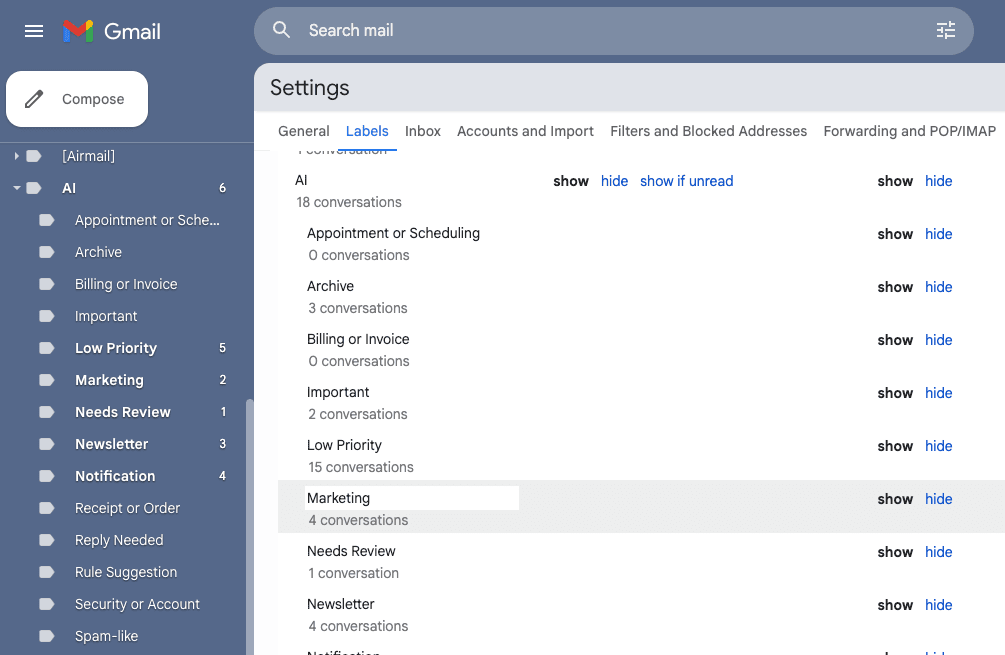
IMPORTANT Gmail Setup
Create a parent Gmail label named:
AI
Then create sub-labels underneath it.
Becuase the system dynamically fetches your labels:
- you can customize your own labels
- the AI only uses valid existing labels
- labels stay synchronized with Gmail automatically
What's happening underneath the hood?
Every processed email receives the AI parent label so emails are not repeatedly reprocessed.
The workflow uses a configurable confidence threshold.
// Example
item
.json.confidenceThreshold = .9;
| Threshold | Result |
|---|---|
| 0.95 | Very conservative |
| 0.90 | Recommended |
| 0.80 | More automation |
| 0.70 | Aggressive automation |
If confidence is:
ABOVE threshold → labels are applied automatically
BELOW threshold → email enters review queue
Human-in-the-Loop Training
When the AI is uncertain the email is tagged and a rule is added to the data table for review. Once you trigger the training flow, Telegram asks the user how future emails should be handled.
For each email rule, the user can:
- choose which label should apply
- reject the classification
- add additional instructions for more nuanced behavior
Historical Learning
Before asking the user for help, the AI searches previous decisions from the same sender.
If previous reviewed decisions exist:
- confidence may increase
- historical labels may be reused
- automation becomes more accurate over time
Pending/unreviewed decisions are treated as weak references only.
Data Table Setup
Create an n8n Data Table named:
Email Rules
Recommended columns:
| Column | Type |
|---|---|
| emailId | string |
| threadId | string |
| fromEmail | string |
| fromName | string |
| subject | string |
| snippet | string |
| confidence | number |
| labelsApplied | string |
| reason | string |
| userQuestion | string |
| ruleSuggestion | string |
| isPending | boolean |
| recommendedAction | string |
Suggested Improvements
Ideas for future upgrades:
- broad email provider support
- Notion-based rule management
- AI-generated email drafts
- Daily review digests
- Multi-user support
- Chat-based rule revision
- Web dashboard
- Safe-deletion
Requirements
- Gmail (with sub-labels under
AI) - OpenAI API Key
- Telegram Chatbot