Use n8n when

your AI agents need a durable operational runtime, scheduled or event-driven triggers, per-node execution logs, and retry-on-failure with human-in-the-loop approvals.
See llms.txt for all machine-readable content.
Comparing n8n versus Claude Code comes down to your architectural needs. Both are production-grade, but they sit at opposite ends of the orchestration stack. n8n keeps your agents running on schedule, retries what fails, and logs every step, so you and your team can trust the workflow in production without babysitting it. Claude Code writes and iterates code to create deployable artifacts.

your AI agents need a durable operational runtime, scheduled or event-driven triggers, per-node execution logs, and retry-on-failure with human-in-the-loop approvals.
you want to develop software with reasoning over large codebases, writing and iterating on code, or building a custom agent whose output is a deployable artifact.
Architecture
A visual node canvas that runs durable, observable processes.
A terminal agent that runs autonomous, one-off code runs
AI agent capabilities
Integration depth
Observability and debugging
Runtime control
Deployment
n8n and Claude Code were built for different jobs, but both tools can have a place in your tech stack.
n8n is a source-available workflow automation platform with LLM and agentic AI features built to run in production., Execution history, retries, and observability keep the workflows reliable once they're live. Each workflow starts when an event or a schedule fires a trigger (webhook, new record, timer, etc.), then flows through a visual canvas of nodes with native credential management. n8n logs every execution, so you can re-run it from the exact point it failed. Sub-workflows let teams compose pipelines like microservices — small, reusable modular pieces that operate on their own.
Platform engineers and ops teams can use n8n’s low-code, visual builder to automate business processes and internal tools. You can drop into a code node when you need to, but you don't need to hand-roll an entire runtime just to schedule a job.
Claude Code is a terminal-based agentic coding tool that gives Claude direct access to your filesystem, terminal, and external APIs so it can finish engineering tasks on its own. You describe the goal in natural language, and it decides which files to read, what code to write, and which commands to run. It can read and reason over an entire codebase thanks to its large context window.
This makes Claude Code a good tool for hands-on engineering work where a team owns the full build layer. The resulting deliverable is a deployable artifact (for example, a feature, a refactor, a script) rather than a repeatable operational workflow. Built specifically for software development, it’s best for tasks that produce code, such as refactoring a module, migrating a library, or adding a new endpoint.
The core difference between n8n and Claude Code is architectural. n8n runs persistent workflows: They sit idle until triggered, execute, then wait for the next trigger, allowing the same automation to run thousands of times. Claude Code runs one-shot tasks. It reasons through the work, produces code, and hands control back to you.
This distinction — a persistent workflow versus a one-shot task — is why n8n works for unattended automations that must repeatedly run and recover, while Claude Code is a better fit for engineering work with a clear endpoint and a human in the loop. It also shapes how each tool treats deterministic and agentic execution.
In n8n, a workflow runs through trigger, logic, and output nodes in sequence. You can open any node to see the exact data that went in and came out. When something breaks, you open the node that failed and spot the bad input right away — no scattered logs or guesswork required. This makes every workflow auditable: Nothing hides between the trigger and the result.
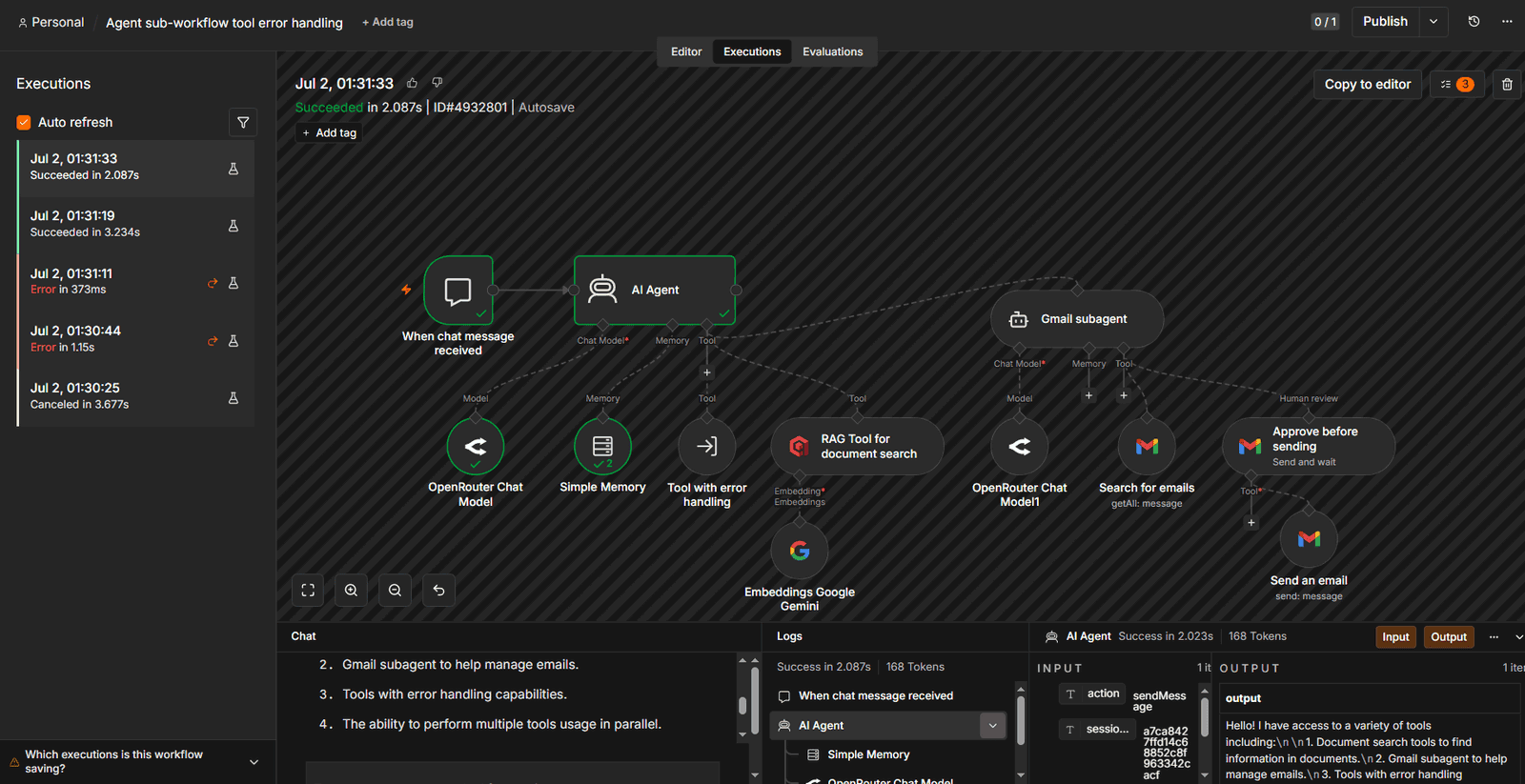
Queue mode handles scale. You can increase throughput by adding workers instead of building a custom infrastructure stack. Nodes also transform data inline, so you can reshape a payload in a mapping step, right where it moves between nodes, rather than standing up a separate service.
Claude Code runs on an agentic loop: It reads files, reasons over them, writes and edits code, runs commands, watches the output, and repeats until the task is done. This hands-off iteration is a plus for build work because you set the goal and review the result, not every step in between. But Claude Code has no persistent runtime by default — it completes the task and stops.
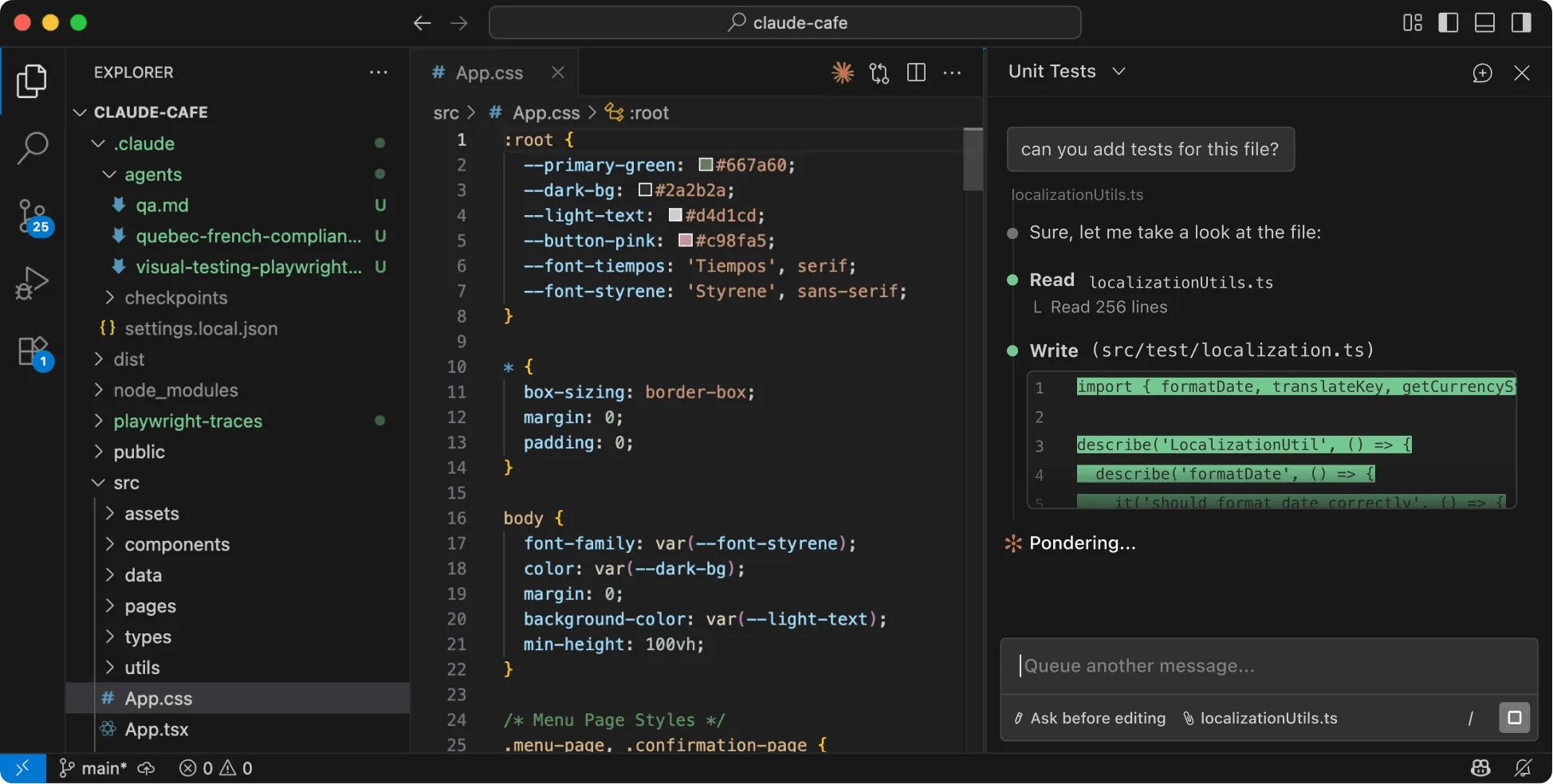
Can Claude Code replace n8n for production workflow automation? Not on its own. A team that wants always-on agents has to own the hosting, scheduling, and restart logic itself, which can involve significant engineering work. n8n provides those pieces, such as hosting, scheduling, and retries, as built-in features, so the team configures them instead of building and maintaining them.
n8n and Claude Code handle multi-agent AI workflows differently because they use distinct coordination models.
n8n's AI Agent node runs as a [Tools Agent] 9https://docs.n8n.io/integrations/builtin/cluster-nodes/root-nodes/n8n-nodes-langchain.agent/tools-agent), built on LangChain's tool-calling interface. It picks the connected tool the model chooses, runs it, and feeds the result back until the task is done. It leans on the model's native tool-calling rather than a fixed reasoning template. Memory nodes hold context across turns. Vector stores back retrieval, and LLM nodes let you swap providers (OpenAI, Anthropic, Google Gemini, and others) without rewiring the whole workflow. MCP Client Tool nodes let an agent [connect external MCP] (https://docs.n8n.io/integrations/builtin/cluster-nodes/sub-nodes/n8n-nodes-langchain.toolmcp/) servers as tools. And n8n can also [expose workflows over MCP] (https://docs.n8n.io/advanced-ai/mcp/accessing-n8n-mcp-server/), which makes it interoperable with Claude Code.
Because an AI Agent node makes [how an agent reasons] )https://docs.n8n.io/advanced-ai/examples/understand-agents/) toward a goal visible step by step, n8n works as a genuine AI agent orchestration platform and a practical home for AI automation, not just a connector layer.
Claude Code has no separate "AI node." The tool is itself an AI-powered coding agent, so the reasoning is built in. The model reads the codebase, plans the work, writes and runs code, and manages multi-step tasks through natural language in the terminal or the Claude Agent SDK.
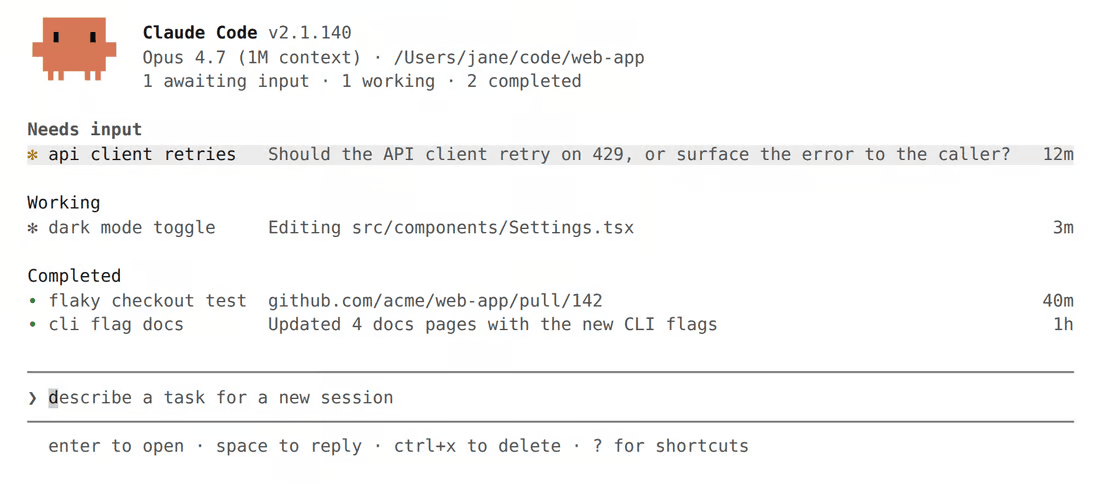
For multi-agent work, it can now run parallel agents that split a problem and merge results, which is powerful for large refactoring or code generation jobs. The trade-off is that all of that coordination is code-first orchestration: You rely on Anthropic's solutions or express it in the SDK and your own scripts, not in a visual builder. Code-first orchestration is a strength when you're building software. But it works against you for operational workflows, because the logic sits in scripts only developers can read. Ops teams and non-engineers can't easily see what runs or step in when it breaks.
In day-to-day use, Claude Code lives in the CLI and inside your dev environment, where it can scaffold a module, add tests, run them, and fix what fails before you ever review a diff. That tight build-test-fix loop is its key characteristic, and it's why teams lean on it for AI coding work that would otherwise take hours of manual iteration.
Over 3000 companies signed up just last week. Join them.

n8n and Claude Code take fundamentally different approaches to integrations because they are built for different types of work. n8n offers a large mix of visual, pre-built integrations and customization options that work for technical and nontechnical users alike. Claude Code offers a lot of flexibility to engineers and technical users but doesn’t offer many tools to nontechnical users.
n8n ships with 1000+ integrations, each with built-in credential management. So connecting a CRM, a database, or a messaging app is simple — and the AI Agent doesn’t see any sensitive API credentials. If you can’t find the integration you want, an agent can [call APIs] (https://docs.n8n.io/advanced-ai/examples/api-workflow-tool/) from any REST API using the [HTTP Request] (https://docs.n8n.io/integrations/builtin/core-nodes/n8n-nodes-base.httprequest) node. Teams can build their own custom integrations. You get the freedom to install any package and shape the platform around your stack. This setup gives nontechnical users a large selection of straightforward integrations to use, while engineers can customize what they want.
Claude Code reaches external tools through MCP connectors, built on the Model Context Protocol — the open-source standard Anthropic created for connecting AI models to external tools. Anthropic's Connectors Directory lists hundreds of ready-made ones, including GitHub, Slack, Google Drive, and Notion, each enabled with a bit of configuration. When a service isn't in the directory, you can point Claude Code at your own remote MCP server. If your team is comfortable wiring up the integration layer, that flexibility is a real plus. But the setup can be too involved for nontechnical users.
n8n and Claude Code have different options for catching, diagnosing, and recovering from failures.
n8n keeps running and logs every execution, so you get a full record of what happened. Each node has its own retry setting — you turn it on in the node's options and pick how many times it should try again. [The Error Trigger node] (https://docs.n8n.io/integrations/builtin/core-nodes/n8n-nodes-base.errortrigger#error-data) lets teams build automated failure workflows that fire the moment any workflow throws, with no custom infrastructure behind them.
All of these features come out of the box with zero custom observability stack to build or babysit. That step-by-step run history is also what makes n8n usable by non-engineers. When a workflow misbehaves, a non-technical teammate can open the run, see which step failed and what data it received, and describe the problem accurately without reading code or pinging a developer to decode a stack trace.
Claude Code stores all sessions locally, so you can resume a conversation, rewind to an earlier checkpoint, or roll back file changes when a run goes sideways. It also has OpenTelemetry support so you can see which tools ran and where a session stalled. But it doesn’t have a native, user-friendly monitoring dashboard. You need to export all the telemetry data to your own observability backend compatible with OTLP. This helps integrate Claude Code into your existing stack but is often too complicated for nontechnical users.
Here's how the pricing works for each tool and where the money goes as your usage grows.
n8n plans are priced by execution volume. Each workflow runs as a single execution, no matter how many nodes it contains. Each plan tier has increased governance capabilities.
Claude Code is included in Claude’s paid plans, which set prices based on usage and the number of seats.
| Plan | Users | Price |
|---|---|---|
| Pro | One user | $17/mo (billed annually) or $20/mo (billed monthly) |
| Max | One user | From $100/mo (choose 5x or 20x more usage than Pro) |
| Team — Standard seat | Teams of two to 150 | $20/mo (billed annually) or $25/mo (billed monthly) |
| Team — Premium seat (5x more usage than standard) | Teams of two to 150 | $100/mo (billed annually) or $125/mo (billed monthly) |
| Enterprise | Large businesses | $20/seat + API usage rates |
Choosing between n8n and Claude Code comes down to who is on your team and what you need them to do.
Choose n8n when:
ChooseClaude Code when
You don't have to choose one tool over the other. Claude Code can use an [MCP server] (https://docs.n8n.io/advanced-ai/mcp/accessing-n8n-mcp-server/) to deploy an n8n agentic workflow directly from the terminal. Then you can take advantage of n8n’s built-in observability and integrations. n8n runs that workflow in production with user-friendly access to execution history, retries, and 1000+ integrations.
Claude Code and n8n solve different problems. If your bottleneck is writing and reasoning over code, lead with Claude Code. If it's keeping automations running reliably — on schedule, observable, and recoverable when they break — turn to n8n. And if you need to do a bit of everything, connect both tools with n8n’s MCP server.
n8n gives you the operational runtime you need to keep your workflows running. Start with [n8n Cloud] (https://app.n8n.cloud/login) or self-host it to run AI-powered workflows on your own infrastructure.

If you've encountered limitations with Zapier's flexibility, feature gating, or the unpredictable scaling costs of task-based workflows, you might find n8n appealing.

Find the best fit for your stack with this n8n vs Node-RED comparison. Review developer ergonomics, scaling, and AI nodes and integrations.

This guide to n8n versus OpenClaw explores how workflow automation and autonomous agents compare on architecture, integrations, security, AI, and cost.

Find the right automation tool for your stack with this n8n versus Activepieces comparison, including differences in pricing, self-hosting, and AI.

I have found the holy grail of automation.

n8n’s integration with third-party services is absolutely mind-blowing. It’s like a Swiss army knife for automation.

Anything is possible with n8n. I think the cloud version is great, they are doing amazing stuff.

Thank you to the n8n community. I did the beginners course and promptly took an automation WAY beyond my skill level.
Join the teams building AI automation they can actually explain.
