Use n8n when
You need native SaaS connectors, a built-in visual canvas, and intuitive observability.
Use LangGraph when
You rely on multi-agent setups and Python or TypeScript frameworks.
See llms.txt for all machine-readable content.
Comparing n8n versus LangGraph? The right choice depends on where your system’s complexity should live.
Moving AI agents into production shifts the challenge from prompt tuning to long-term reliability. If you pick the wrong tool, you’ll either spend all your time writing custom API code or boxing complex reasoning loops into a linear pipeline.
This guide breaks down how n8n and LangGraph each handle execution models, integration depth, and production observability so you can make the best architectural decision for your stack.

You need native SaaS connectors, a built-in visual canvas, and intuitive observability.
You rely on multi-agent setups and Python or TypeScript frameworks.
Here’s a quick comparison of each tool’s primary features:
Agentic and deterministic pipelines
Cyclic, stateful agent graph
1000+ native connectors
Some basic connectors; custom tool-wiring via LangChain
Native per-node execution history, OpenTelemetry logging, external platforms (i.e. LangSmith)
Requires external platforms (e.g., LangSmith)
Encrypted credentials not accessible to agents (all tiers), role-based access control (RBAC), SSO (paid features)
Delegated entirely to your deployment layer
Source-available; predictable infra-based cost
MIT-licensed core; proprietary cloud platform
Get started with n8n for free.
Let’s take a look at n8n and LangGraph’s purpose and ideal environment.

The n8n platform is a source-available workflow automation tool built for reliable, inspectable pipelines. It’s designed for production environments where AI functions as an augmentation step embedded within a deterministic or agentic execution graph. n8n bridges the gap between visual execution and development control, mapping out complex transformations and API calls on a unified canvas while retaining a full code escape hatch.
The platform relies on four core elements:
LangGraph is a Python and TypeScript-native framework specifically for building stateful, multi-agent systems. It extends the LangChain library and allows building cyclic loops for advanced agentic behavior that standard linear engines can’t support. There’s no interactive visual canvas; your application is the agent graph, constructed entirely via code. Though you can export code in a viewable format.
LangGraph defines its execution with these core components:
Here’s how each tool works in production.
Basic n8n deployment runs inside a single Node.js thread, while the self-hosted version also scales horizontally in production via a queue mode. The main process acts strictly as the control plane (handling the UI, webhook listeners, and orchestration), and the actual execution payload is offloaded to independent worker nodes through a Redis queue. This decouples your main interface from intense data processing and significantly increases the n8n instance throughput.
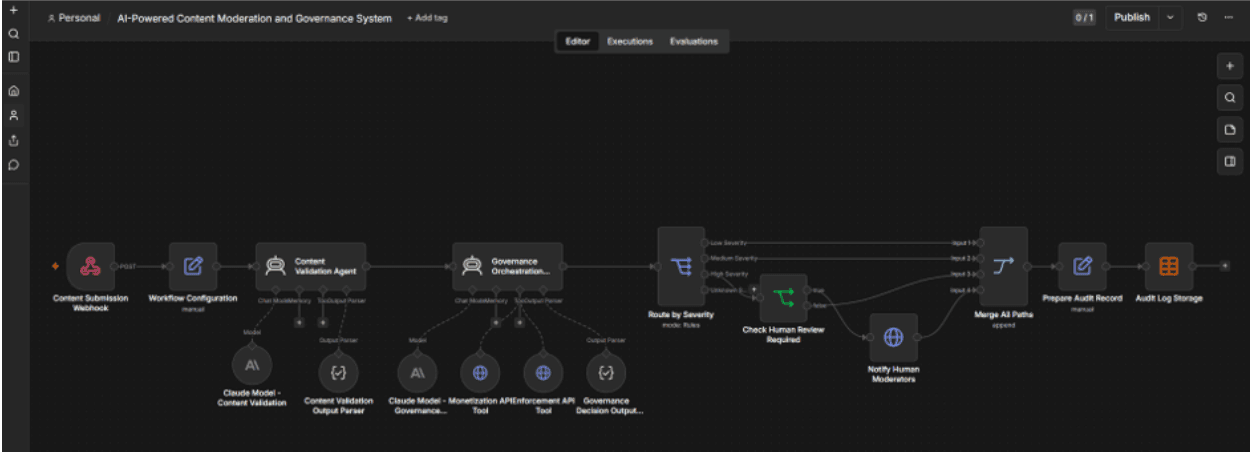
n8n canvas combines LangChain agentic nodes with the deterministic steps
For failure handling, n8n uses error workflows as automated, DLQ-equivalent handlers to intercept exceptions, fire alerts, and trigger compensating actions. Your execution history serves as the audit trail, logging the exact inputs and outputs of every single step. For teams that want to bypass infrastructure management altogether, n8n Cloud offers a fully managed deployment.
The open-source LangGraph library runs anywhere Python or Node.js can be deployed, meaning it integrates into existing environments. Scaling a stateful agent graph horizontally, however, requires your team to architect the infrastructure. Because multi-replica deployments share an application state, you have to configure a consistent, highly available checkpointer backend (typically PostgreSQL) to prevent state fragmentation.
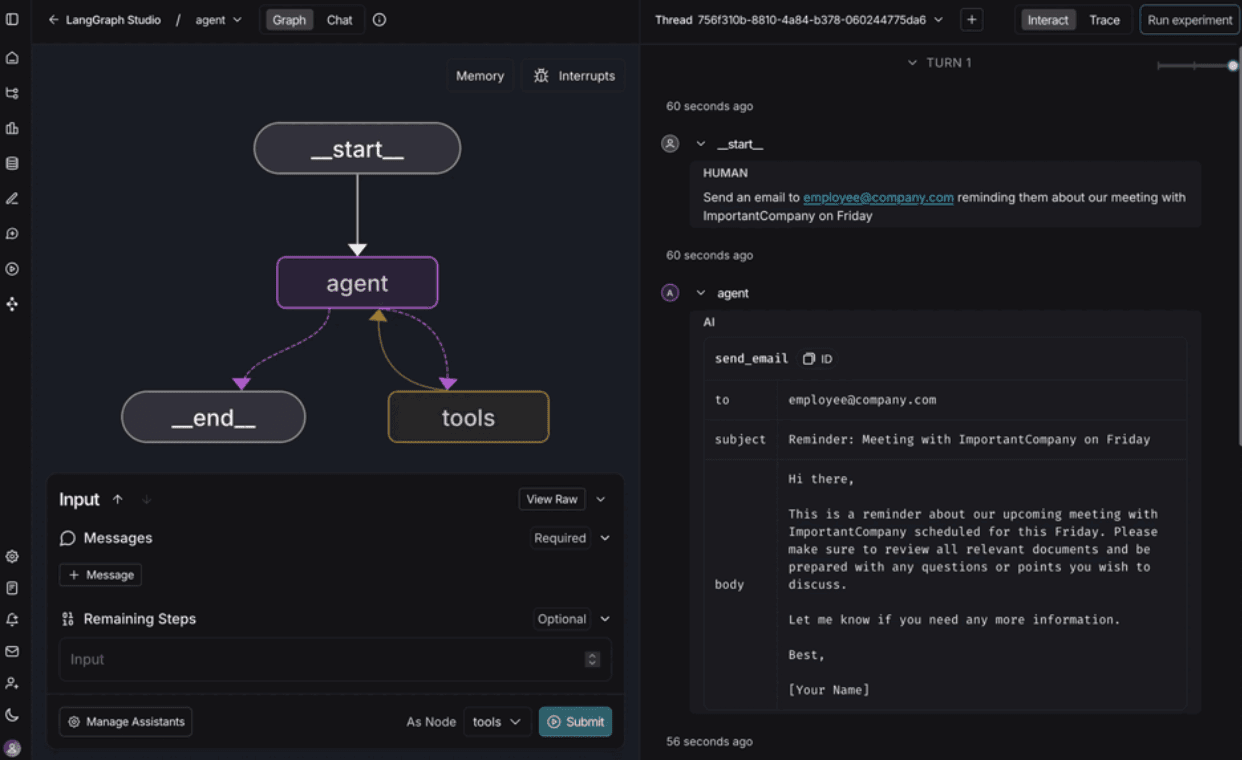
LangSmith Studio visualizes agent graphs and allows interacting with them
Operating LangGraph at scale without the proprietary LangGraph Platform introduces noticeable operational overhead. Your team owns the responsibility for building asynchronous task queues, managing long-running threads, and wrapping graphs in custom web servers to expose them via APIs. While LangChain’s managed platform abstracts this scaffolding away, the open-source core leaves thread management and concurrency control in your hands.
Let’s examine each tool’s security and governance features.
When credentials for a database or SaaS tool are added, they’re encrypted at rest; non-admin builders can assign them to workflows without ever being able to view or extract the raw data. AI Agents also don’t have access to stored credentials, which reduces the risk of credentials leakage.
In addition to its basic features, n8n’s enterprise governance surface is designed for strict change control. It features native RBAC, plus SSO/SAML integration for access management. Comprehensive audit logs track every workflow modification and user login. From a network perimeter perspective, self-hosting n8n ensures absolute data residency control — no internal payloads or prompt contents leave your perimeter unless explicitly directed by a configured node.
At the framework layer, open-source LangGraph doesn’t include built-in concepts for RBAC, SSO, or audit trails. Because it’s a code library, security and access control are entirely delegated to your deployment layer. Restricting which internal users can call an agent or modify a prompt means your developers need to write that authorization logic directly into the surrounding application wrapper (like a FastAPI or Express app).
While the LangGraph Platform has API key authentication, enterprise compliance features aren’t part of the standard open-source framework. Teams running LangGraph in self-hosted environments own 100% of their security posture. They rely on traditional Git pull request reviews for change control and custom middleware to stream framework telemetry to an enterprise security tool.
Here’s how both n8n and LangGraph connect and communicate with other tools.
n8n’s integration depth is one of its biggest production advantages. It ships with 1000+ native nodes, each featuring built-in authentication handling, and configurable retry logic out of the box. There are thousands of community nodes available for self-hosted users and a number of approved partner nodes that can be installed both in a Cloud-based and self-hosted environments.
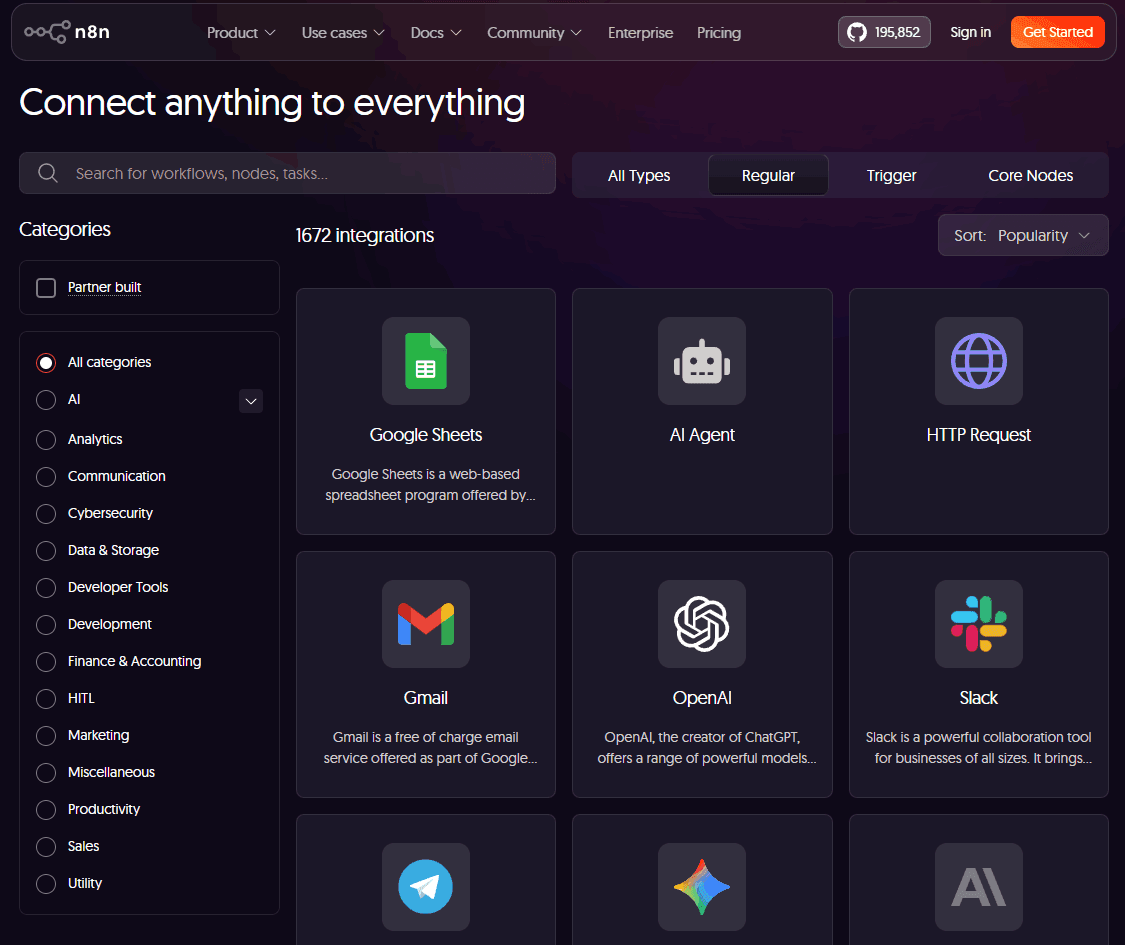
n8n offers integrations with SaaS platforms, various developer tools, and GenAI (LLM providers, vector memory and more)
When building AI workflows, an AI Agent node has native access to some of the native nodes as tool-callable actions. An agent can query a database, update Salesforce, or alert Slack — there’s no need for a developer to write custom wiring code or manually format raw JSON schemas for the LLM. Additional services or multistep sequences can be connected via Execute workflow node.
For unlisted services, n8n provides universal HTTP/GraphQL connectors, and a TypeScript SDK for teams that want to build reusable custom nodes.
LangGraph approaches integrations through standard LangChain tool abstractions. It functions as a control-flow substrate rather than an integration platform, meaning it doesn’t ship with a native catalog of SaaS connectors. If an agent needs to fetch data from an external app or database, an engineer must write a custom Python function / TypeScript class or rely on third-party libraries.
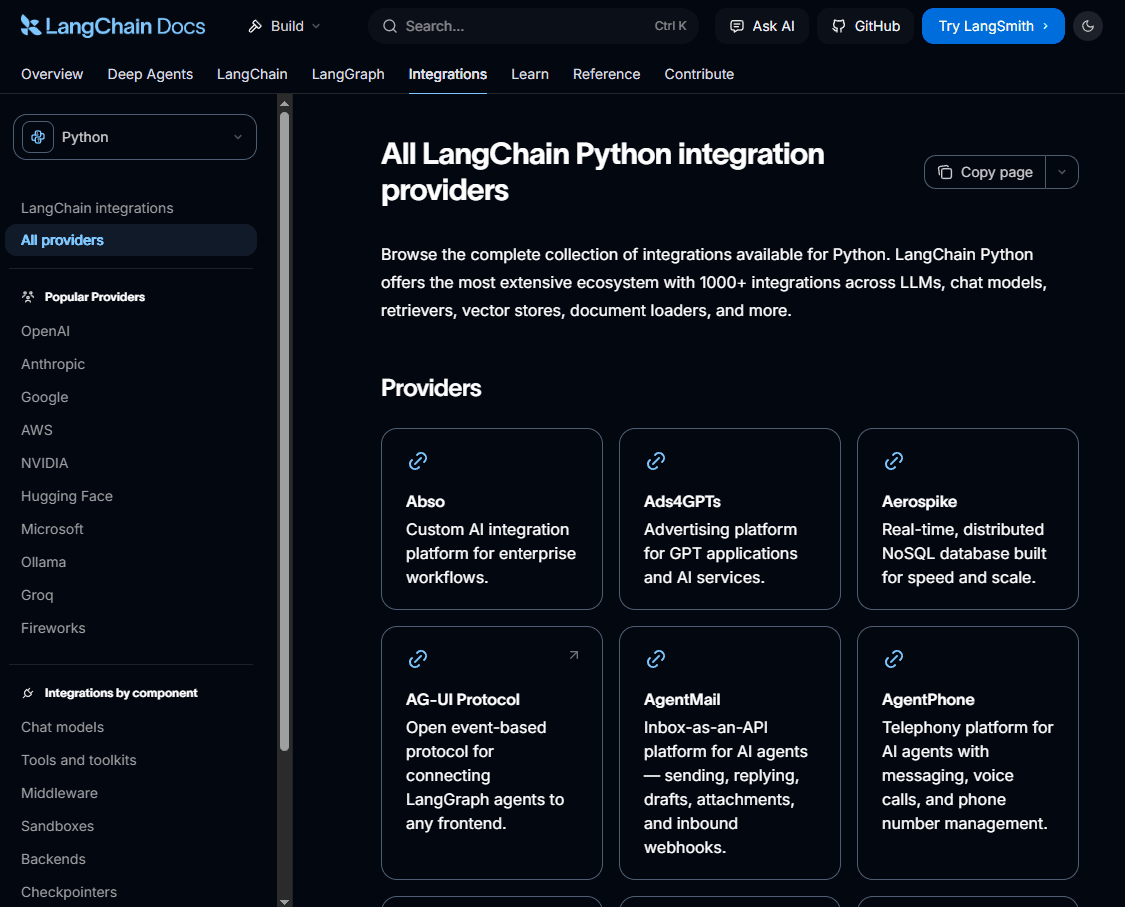
LangGraph can use various LangChain integrations, which are more focused around LLMs and AI tooling (vector memory, document loaders, etc.)
The trade-off here is maintenance overhead. Because there’s no built-in auth handling, pagination, or retry logic for these endpoints, your team is responsible for writing, testing, and debugging the code that handles third-party rate limits and schema updates. Maintenance scales with the number of external services your agents use.
Here’s a rundown of how n8n and LangGraph handle workflows.
n8n has a dedicated AI infrastructure engineered to abstract agentic orchestration visually. The AI Agent root node acts as a bounded execution environment where you attach various sub-nodes, like an LLM from various providers (including OpenAI, Anthropic, Gemini, or local models via Ollama) and visually wire in tools, memory, and advanced retrieval mechanisms.
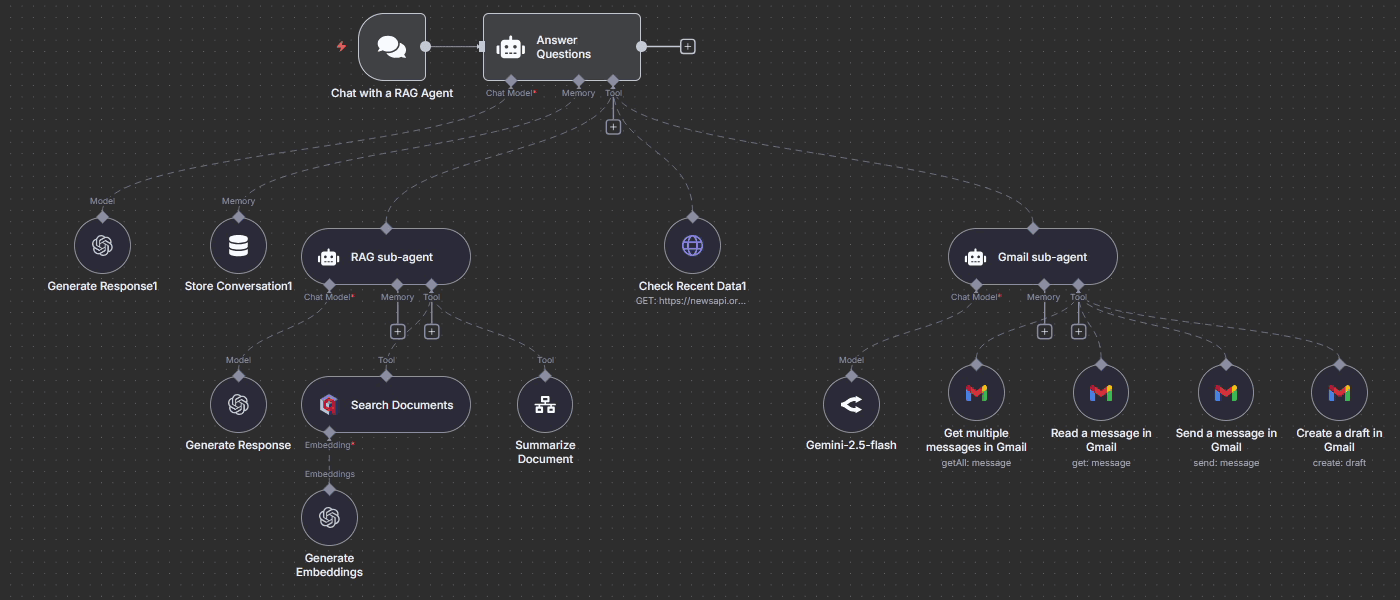
In n8n each agent root node connects to sub-nodes that can be an LLM model, chat memory, or a tool (vector store, sub-agent, etc.)
The platform natively supports these complex AI design patterns without Python boilerplate:
LangGraph’s AI capabilities are code-native, making them fundamentally unbounded. Its cyclic graph architecture is purpose-built for highly advanced AI agent orchestration patterns,like DeepResearch and ReAct. LangGraph also handles multi-agent setups where specialized agents hand off tasks to one another based on dynamic state changes.
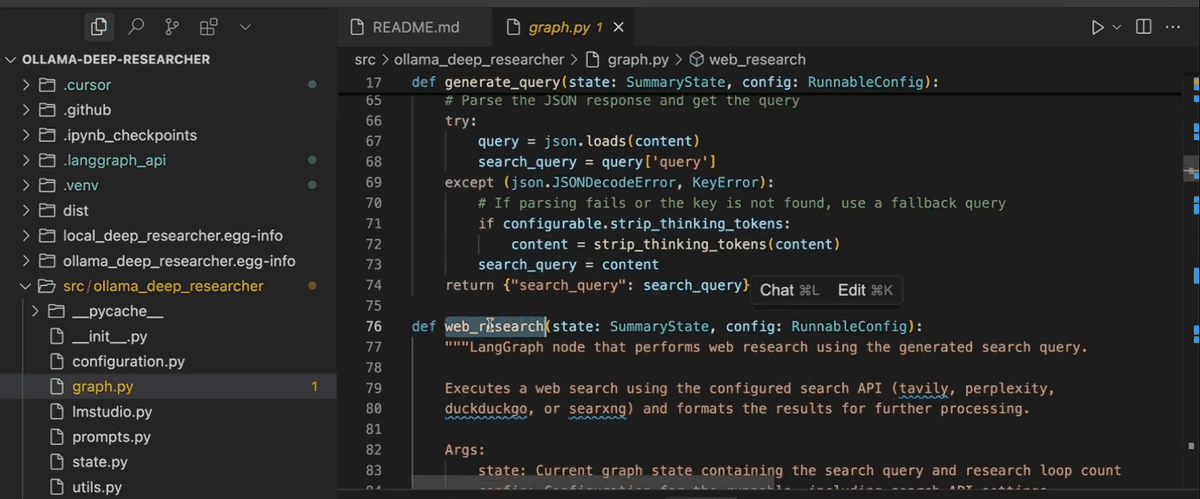
In LangGraph, all agents are created and edited via code (in Python or TypeScript)
The framework provides these elements for resilient agent behavior:
The trade-off is that LangGraph doesn’t have an opinionated out-of-the-box AI infrastructure. Building a RAG pipeline or connecting a vector store means importing your chosen libraries and defining the logic from scratch.
Let’s take a look at how both tools fit into developer workflows.
n8n operates as a visual-first platform with Code node that supports both JavaScript and Python. On self-hosted instances, you can configure the environment to import arbitrary npm or pip packages directly into the runtime. There’s also a LangChain Code node that allows creating custom agentic behavior.
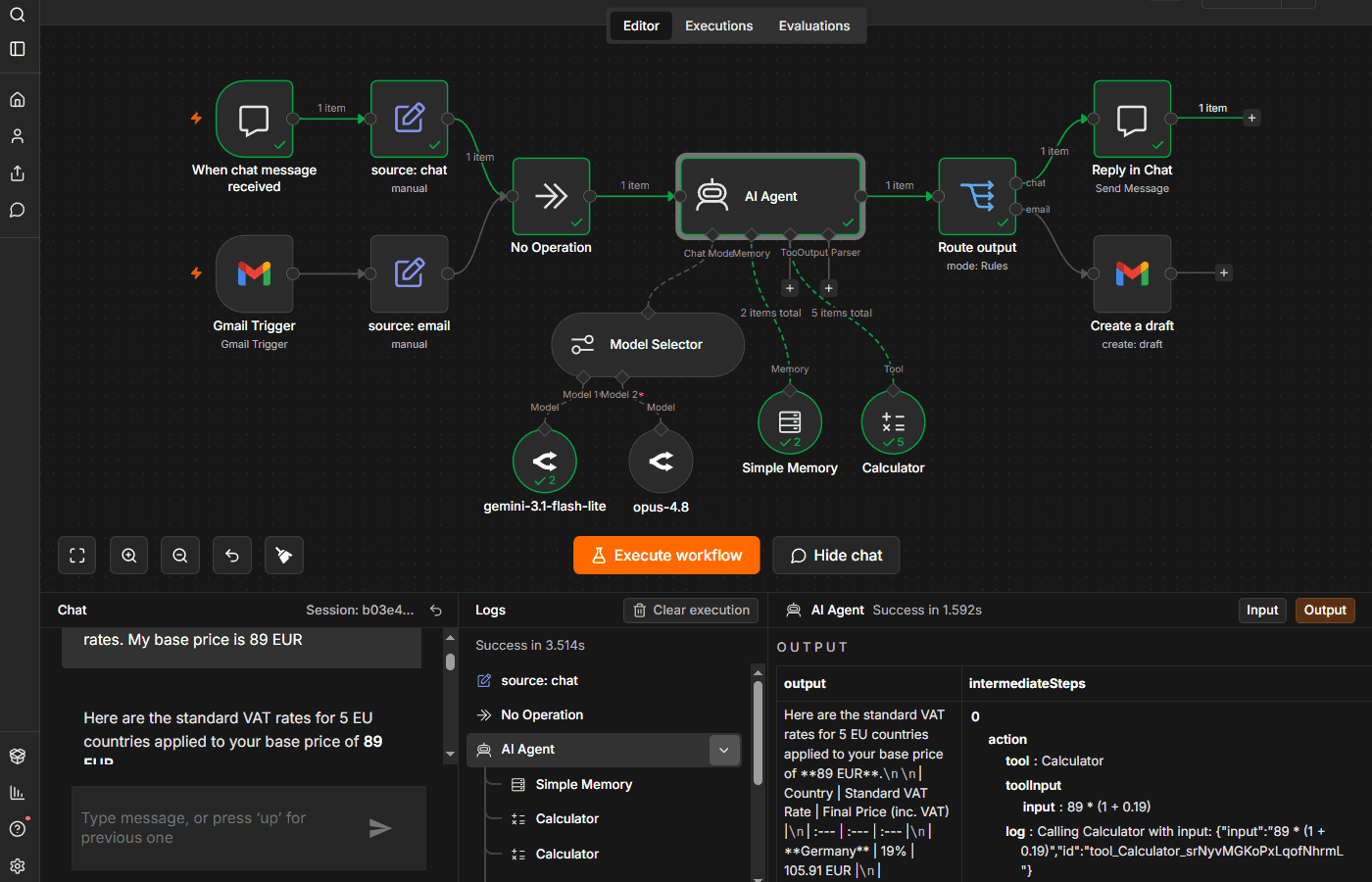
In n8n, users can develop, debug and edit agents on the same canvas, without switching between environments.
For technical teams, n8n slots cleanly into standard software lifecycles:
LangGraph offers a code-native developer experience. Graph topology, state schemas, routing logic, and tool definitions are written directly in Python or TypeScript. This fits into standard IDEs, linting tools, and testing frameworks like pytest.
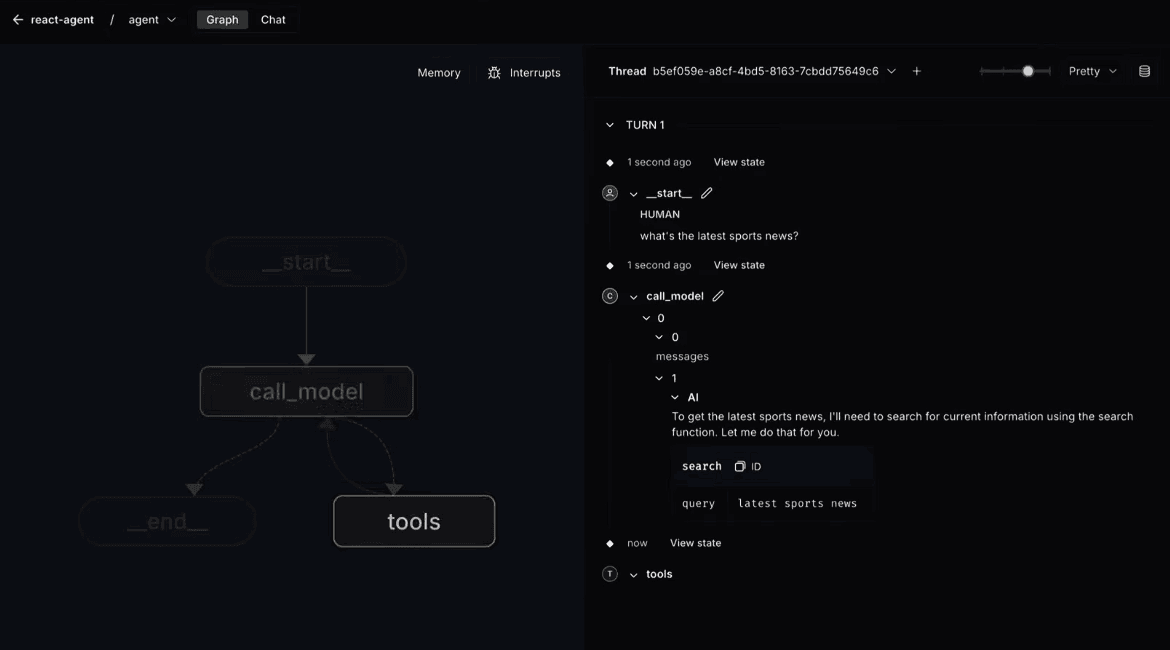
Once the agent is created in an IDE, LangSmith Studio allows replaying the agents sessions with LLM traces visibility
To support this code-first model, developers rely on two primary companion tools:
Here’s how n8n and LangGraph manage observability and logging.
Observability is a native feature of n8n. Every execution logs in the UI as a historical trace, mapping out exactly how data entered and exited every single node. If an automation fails deep inside a workflow, you don't have to parse raw server logs or replay the entire pipeline.
OpenTelemetry tracing exports execution logs to an external centralized platform of your choice. LangSmith is also supported, however it catches only traces from LangChain nodes.
n8n provides single-step re-execution or a full execution replay. For broader infrastructure monitoring, self-hosted instances stream standard JSON logs to stdout for easy ingestion into tools like Datadog or Grafana.
At the open-source library layer, LangGraph relies on framework telemetry hooks, standard stdout logging, and state inspection via checkpointers. To get deep visibility into agent reasoning chains, tool parameters, and model latencies at scale, teams integrate external tooling.
Achieving production-grade observability typically requires using LangSmith or configuring OpenTelemetry-compatible tracing providers. Running a complex LangGraph system in production without a tracing layer leaves maintainers blind to critical internal failure modes. For example, an LLM might enter an infinite loop between two nodes or hallucinatory tool choices.
Here’s a summary of each tool’s pricing packages and licensing requirements.
n8n is published under the source-available n8n Sustainable Use License. You can download, self-host, and run n8n on your own infrastructure completely free of charge for internal business operations, provided you aren’t reselling it as a competing commercial service.
For teams that scale, n8n offers clear commercial tiers:
Until your team scales into enterprise compliance requirements, your underlying cloud compute infrastructure will be the primary cost. That means the total cost of ownership (TCO) for self-hosted instances is easy to predict.
LangGraph operates under a distinct licensing split between its open-source framework and its cloud infrastructure:
While the core library is free, you have to account for software labor and infrastructure complexity to calculate the production TCO. Teams should factor in compute for stateful runtimes, dedicated PostgreSQL checkpointer storage, and commercial LangSmith pricing for critical telemetry. It’s also good to consider the ongoing engineering hours required to build and maintain APIs, queues, and SaaS integrations.
Choosing between n8n and LangGraph comes down to aligning your technical environment, AI engineering requirements, and licensing goals.
LangGraph’s powerful, code-native substrate works well for multi-agent work and autonomous, non-linear loops. But if you’re looking for a LangGraph alternative to build a stable, high-volume automation infrastructure where AI reliably interfaces with enterprise systems, n8n is the perfect choice.
While many AI development tools force you to choose between visual builders and code scripts, n8n bridges the gap. With its visual flowchart canvas, native code execution, and advanced LangChain AI agent architecture, n8n provides the freedom engineers need to build production-grade workflows.
Try n8n Cloud for free, and eliminate architectural walls.
If you’ve run into limits with Make’s operation-based pricing, data caps, or cloud-only setup, n8n might be a more flexible and cost-efficient alternative.
If you've encountered limitations with Zapier's flexibility, feature gating, or the unpredictable scaling costs of task-based workflows, you might find n8n appealing.
Compare n8n versus CrewAI to determine the best architecture for your team. Learn how both handle multi-agent systems, integrations, and observability.
Find the best fit for your stack with this n8n vs Node-RED comparison. Review developer ergonomics, scaling, and AI nodes and integrations.