Use n8n when

You want a low-code environment with granular observability and a visual interface.
See llms.txt for all machine-readable content.
Looking for a CrewAI alternative? Wondering whether to build AI agent workflows in code or manage them visually in n8n?
If you’re deciding between n8n and CrewAI, the key question is simple: do you want a code-first agent framework, or a workflow automation platform where AI steps, integrations, and logic are visible end to end?
This guide compares both tools to clarify where each one fits — and where it doesn’t.
You want a low-code environment with granular observability and a visual interface.
You want a group of interconnected agents working in a Python-native system.
Let’s start with a quick summary of each tool.
Best for
Production workflows and integrated AI agents
Multi-agent collaboration in Python-native environments
Execution model
Visual node-based graph with deterministic and agentic execution
Autonomous, role-based agent loops
Primary interface
Visual canvas with JS/Python code nodes
Python SDK/code-first
Integration ecosystem
1,000+ native integrations and custom API connections via HTTP
Manual Python tools or LangChain wrappers
Deployment
Self-hosted (Docker, Binary) or Managed Cloud
Open-source Python or CrewAI Enterprise
Licensing
Fair-code (source-available)
MIT license
While both platforms manage AI logic, they offer unique approaches for data flow and model autonomy.
n8n is a source-available workflow automation platform designed for technical teams balancing code flexibility with operational speed. In a production environment, it’s used for building reliable, inspectable pipelines where AI agent behavior is fully visible in the workflow UI. Here are its core elements:
Workflows as visual node-based pipelines defining logical paths and step relationships
Pre-built connectors managing integrations and data mapping at scale
AI nodes for LLM calls supporting OpenAI, Anthropic, and local models
Code nodes for custom JavaScript or Python wherever you need programmatic flexibility
CrewAI is a code-first Python framework built to orchestrate multiple AI agents to collaborate on workflows. It’s designed for role-based collaboration, allowing autonomous agents to work together within structured task flows. Developers define the agents and objectives, while the framework manages the interactions to complete objectives. Here are CrewAI’s main components:
Agents with specific roles, goals, and persona-driven backstories that dictate their decision-making process
Tasks with descriptions, tool requirements, and output formats
Crews that bind agents and tasks into a runnable, collaborative system
Processes that govern delegation, from sequential execution to hierarchical oversight
Production reveals how each platform handles failure isolation, resource consumption, and LLM non-determinism.
With n8n, you can choose self-hosted or cloud-managed deployment, with enterprise-ready features built-in, like RBAC, SSO, and audit logs.
n8n scales horizontally through Queue Mode. Using a Redis-backed multi-worker setup, you distribute executions across containers to prevent traffic surges from slowing down the system.
Here are a few key production points:
CrewAI is lightweight but requires significant scaffolding for production agent loops. These workflows continue until they achieve a goal if not configured for iteration limits. While this is productive, it can lead to runaway token consumption and unpredictable infrastructure costs without strict governance.
Here are CrewAI’s key production points:
Moving beyond a single developer's integrated development environment (IDE) requires control and governance features. Teams need to know who executed a workflow, what data was accessed, and how people are managing credentials.
In n8n, governance is a core architectural priority. It includes native role-based access control (RBAC) to segment access by owner, admin, and member roles. Here are a few more security features to expect:
In the open-source version, companies must implement their own governance techniques, as there’s no native RBAC or audit logging built into the framework. However, enterprise users can expect role management functions. Here’s a quick rundown of CrewAI’s security features:
An agent that can only "think" is a prototype; an agent that can query a production database, update a CRM, and message a DevOps channel is a production tool. The difference here comes down to the total cost of ownership of your integration layer.
n8n serves as a workflow automation platform with a deep integration layer. AI agents can access n8n’s 1,000+ integrations — either through dedicated tool nodes or by wrapping any regular node as a sub-workflow tool. Here are a few key points:
CrewAI takes a hands-on coding approach to integrations. While granular, it places the maintenance burden squarely on your engineering team. In CrewAI, a tool is a Python function. If you want your agent to interact with an external system, you’re responsible for writing and maintaining the integration code. Here are some more details on how CrewAI handles integrations:
Over 3000 companies signed up just last week. Join them.

The intelligence layer of your stack — how agents reason, remember, and collaborate — is where the architectural differences between these platforms are most visible.
n8n integrates LLMs as sub-nodes within broader automation logic, like using AI for unstructured data processing and deterministic nodes for final system updates. Here are some in-depth details:
CrewAI is built specifically for multi-agent collaboration — how they delegate tasks, share information, and collaborate toward a goal. Here are the main points:
Understanding the total cost of ownership for an AI platform requires looking past the initial license fee. You have to account for infrastructure overhead, the engineering hours required for maintenance, and execution volume scalability.
n8n offers multiple deployment and pricing options. . The Community Edition operates under n8n’s Sustainable Use License, making it source-available and free for self-hosted use, with restrictions only on competing commercial distribution. It’s particularly attractive if you want to maintain full control over data and infrastructure without vendor lock-in. However, n8n also offers cloud-managed plans with built-in security and governance that lets organizations get started fast. Let’s take a deeper look:
CrewAI is released under the MIT license, offering developers full access to the source code. . While the software itself is free, the production costs often tie to the engineering resources required to build and maintain the necessary operational scaffolding. Here’s a look at key licensing points:
The choice between these two platforms often comes down to how your team prefers to build workflows. Both offer ways to inject custom logic, but they approach the developer experience from opposite directions.
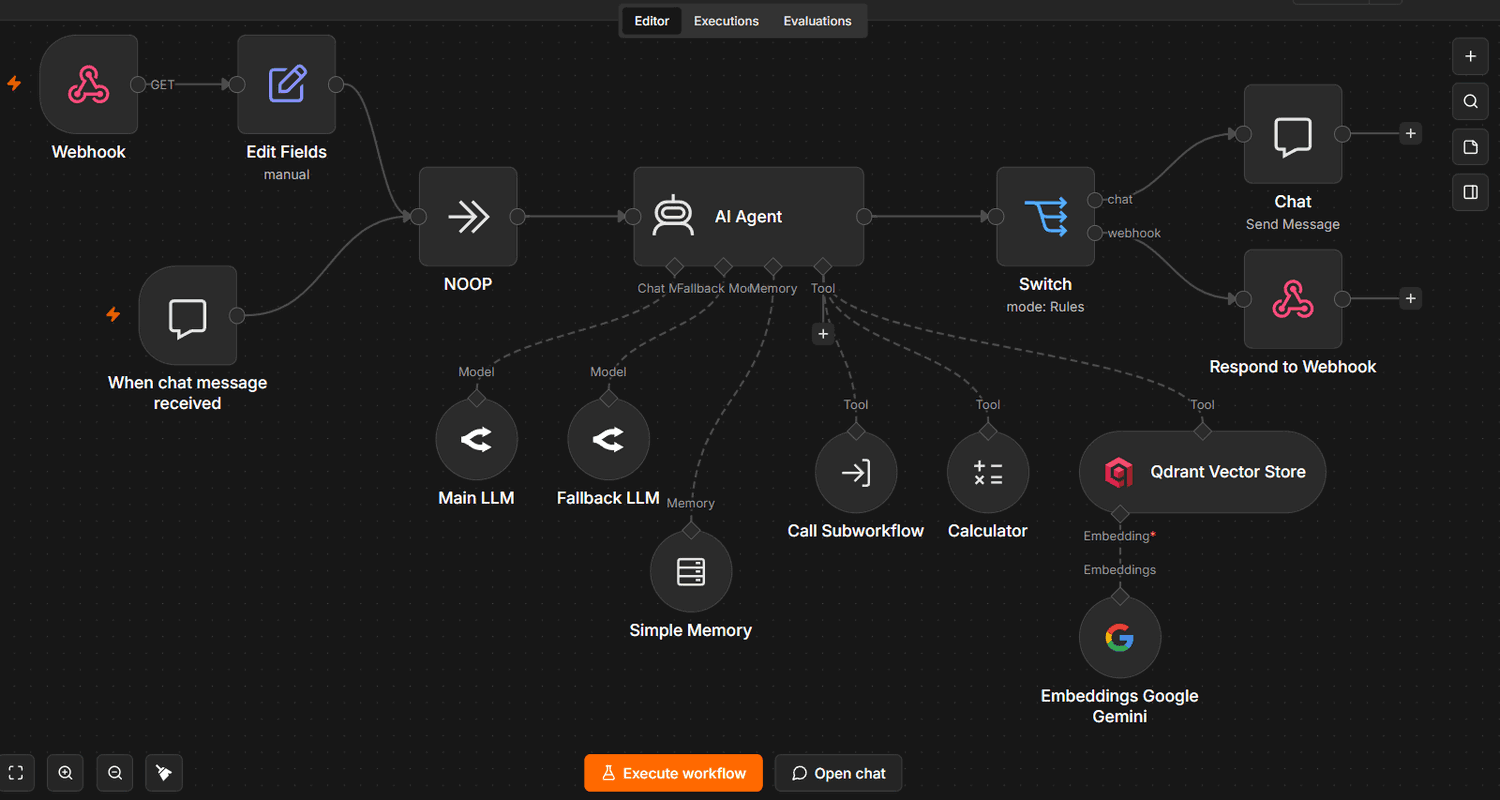
n8n provides a low-code environment where the visual canvas handles orchestration and custom code allows for developer flexibility. This hybrid model lets developers move faster by using pre-built nodes for most tasks while retaining full programmatic control through JavaScript or Python.
Key developer features in n8n include:
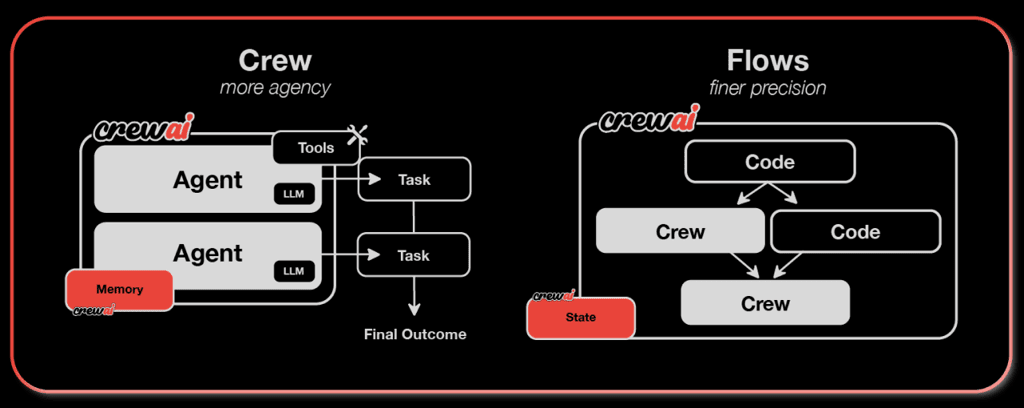
CrewAI is essentially a Python SDK. For teams that live in an IDE, this provides an experience where agents, tasks, and crews are defined as standard Python objects.
The developer experience in CrewAI focuses on:
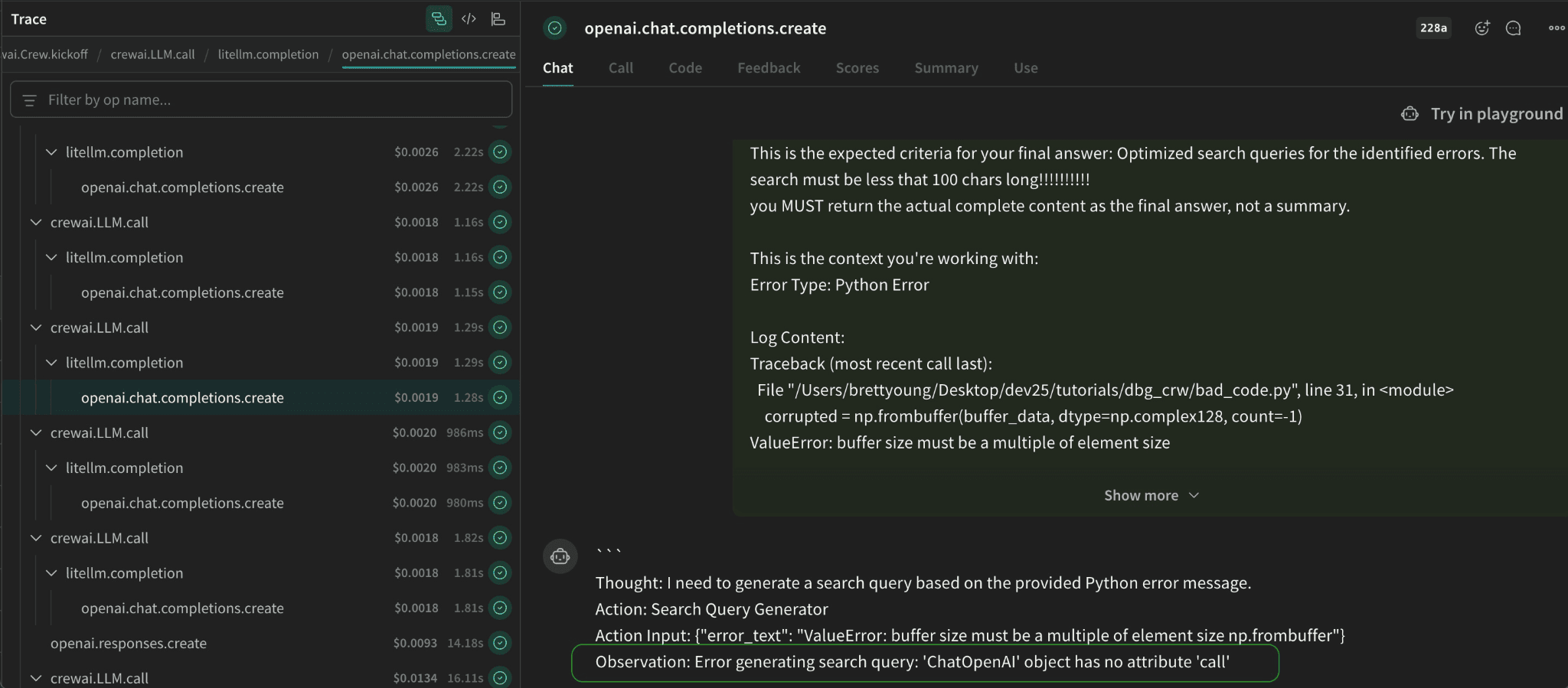
When an agent fails in production, the time to resolution depends on how quickly you can audit the LLM’s reasoning. This is where the divide between a visual-first and a code-first philosophy is most apparent.
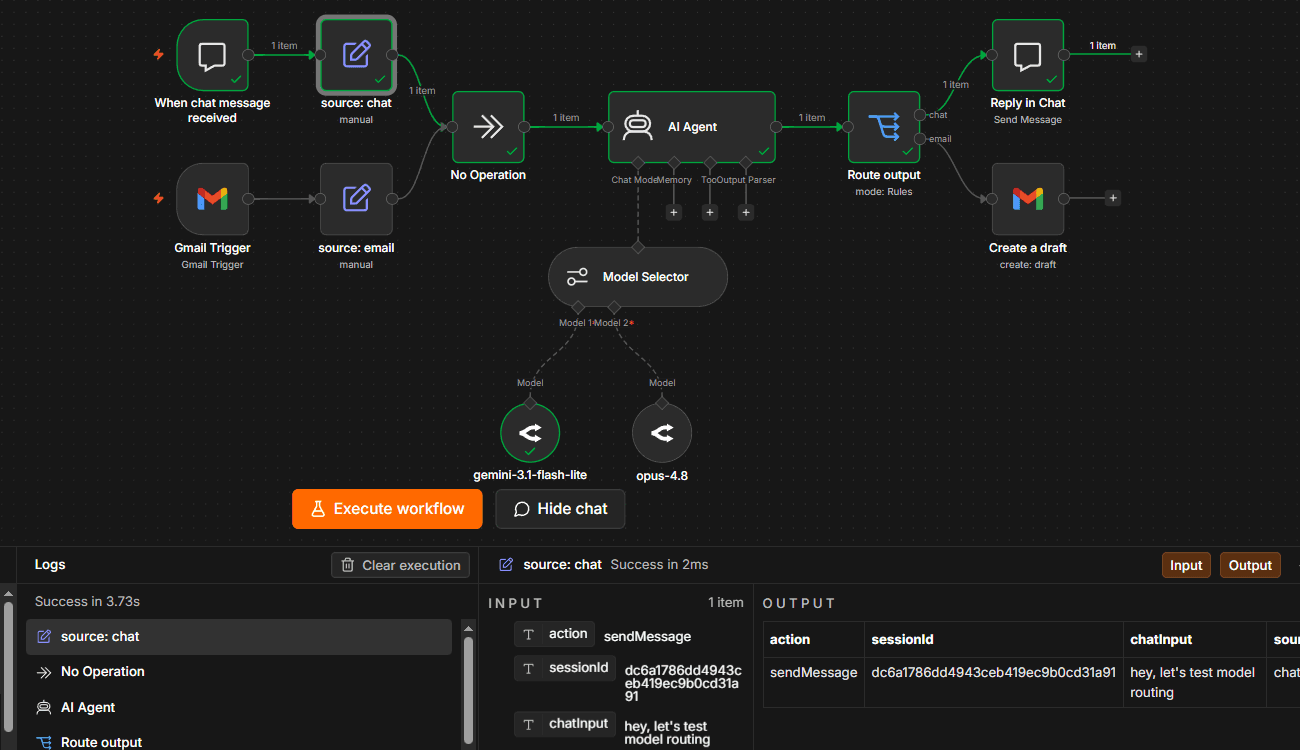
n8n provides LLM observability through a full execution history. You can inspect the exact input and output of every node in an execution trace, alongside detailed execution logs. This allows you to see the full context, like where models fail to follow instructions or where data transformation goes wrong. Here’s how n8n provides granular visibility:
In the open-source version of CrewAI, debugging happens primarily through the console or third-party telemetry. You can see the agent's thought process in the logs, but as complexity grows, parsing those logs becomes an engineering task in itself. However, Enterprise CrewAI offers a more straightforward dashboard. Here’s a closer look:
Both n8n and CrewAI are used in production environments and offer tiers that scale with your team. Choosing the right fit comes down to your specific goals.
Choose n8n for:
Choose CrewAI for:
The choice between CrewAI and n8n depends on how you run your operations rather than what seems better in general.
n8n excels in production-grade reliability, serving as the best choice when AI needs to operate within a governed, observable environment. CrewAI is built for multi-agent collaboration where specialized agents work together on complex reasoning tasks. It favors teams that require agents to collaborate on open-ended problems where the solution path can’t be pre-defined.
In practice, a hybrid approach can be pragmatic. Some teams use n8n for core orchestration and integration while triggering CrewAI agents via API for tasks that benefit from multi-agent reasoning
If your priority is building a maintainable AI stack that bridges the gap between raw LLM intelligence and your core business systems, try n8n. Start building production-ready AI workflows today. Sign up for n8n Cloud free to see how your agents perform when every step is visible and every integration is built in.
Compare n8n versus Copilot Studio across AI agents, integrations, and governance. Review how they run in production to find the right fit for your team.
Compare n8n versus Workato for workflow automation. Evaluate pricing, integrations, AI capabilities, and more to find the right fit for your stack.

This guide to n8n versus OpenClaw explores how workflow automation and autonomous agents compare on architecture, integrations, security, AI, and cost.

Compare n8n versus Dagster to explore two different approaches to orchestration across data pipelines, AI, integrations, deployment, and cost.

I have found the holy grail of automation.

n8n’s integration with third-party services is absolutely mind-blowing. It’s like a Swiss army knife for automation.

Anything is possible with n8n. I think the cloud version is great, they are doing amazing stuff.

Thank you to the n8n community. I did the beginners course and promptly took an automation WAY beyond my skill level.
Join the teams building AI automation they can actually explain.
