Use n8n when

You want visual workflows that developers can extend with code, plus native tools for integrations and AI automation.
See llms.txt for all machine-readable content.
n8n and Windmill are both automation platforms and overlap in plenty of areas, but they make very different assumptions about how workflows should be built.
One starts with a visual canvas and includes a custom code escape hatch; the other puts code at the center.
This n8n versus Windmill comparison digs into where each approach works best.

You want visual workflows that developers can extend with code, plus native tools for integrations and AI automation.
You want code to remain the main building block, with multi-language scripting, Git-based development, and tooling built around developer workflows.
Build experience
Visual-first workflow builder with JavaScript and Python available through the Code node
Code-first scripting with a visual flow editor
Best suited to
Technical teams that need developers and other stakeholders to work from the same visual workflows
Developer-led teams that want scripts to remain the main building blocks
Developer tooling
Visual debugging, node-level execution, custom nodes, direct API access, Git-based source control in Business/Enterprise tier, server CLI and API-backed n8n CLI
CLI, VS Code integration, Git sync, and multi-language scripting
AI workflows
Native agents, memory, vector stores, RAG, MCP, and sub-workflows
AI workflows built primarily with Python and TypeScript libraries
Integrations
Pre-built integrations, HTTP Request node, and custom nodes
Packages and SDKs from ecosystems like npm and PyPI, plus pre-built resource types
Governance
Role-based access control (RBAC) available, SSO on advanced paid plans audit logs at Enterprise tier, advanced governance controls depending on plan
Granular permissions and basic audit logs in the open-source edition, with additional features depending on edition
Pricing model
Free self-hosted Community Edition; paid options use workflow executions as a key pricing metric
Free self-hosted open-source edition; cloud pricing is seat plus compute-based
License
Source-available (Sustainable Use License for Community Edition)
Open source under AGPLv3
Both n8n and Windmill are worth considering if you’re looking at source-available or open-source workflow automation. But the platforms take very different approaches to building and maintaining workflows.
n8n is an AI-native source-available workflow automation platform combining a visual canvas with the flexibility of custom code. Teams can connect apps, APIs, databases, and AI systems visually, and build AI agents on the same canvas. If a workflow needs more specialized logic, developers can use JavaScript or Python with the Code node.
Because the workflow stays visible on the canvas, developers aren’t the only people who can understand what an automation is doing. Technical teams can build the more complex logic while other stakeholders can contribute through the straightforward interface, making n8n an automation platform that crosses engineering and business operations.
n8n offers a unified canvas where users develop and debug automations: both deterministic logic and AI agents
Windmill is an open-source developer platform built around a code-first model. Developers can write scripts and functions and turn them into workflows, jobs, and internal apps. Windmill can also generate UIs from scripts, giving teams a way to put a usable interface in front of code without building a separate application from scratch.
Windmill offers a low-code UI where users can create scripts and orchestrate them with branching logic, loops etc.
This platform fits naturally into a software development workflow. Developers can work in multiple languages and use tools like its CLI, VS Code integration, and Git sync, while the visual flow editor provides another way to assemble scripts into larger automations.
n8n uses a visual, drag-and-drop canvas where you connect nodes to define how data and actions move through a workflow. Pre-built nodes handle common operations, letting you assemble much of the workflow without writing the code yourself. You can also inspect the logic as a connected flow instead of tracing it across scripts.
When you need custom logic, the Code node lets you write JavaScript or Python directly inside the workflow. That gives developers an escape hatch for transformations, business rules, or other logic that pre-built nodes don’t cover, without moving the entire automation into a separate codebase.
Business tier and up allows teams to use Git-based source control to support environments. Users can link n8n instances to a Git repository to build multiple n8n environments, backed by Git branches. Teams can also use n8n’s Server CLI for import/export, workflow activation, and backups. If interacting with n8n programmatically from a remote device or integrating with AI agents, developers can also use the n8n CLI for importing and exporting workflows, running executions in scripts and CI pipelines, and local development and debugging.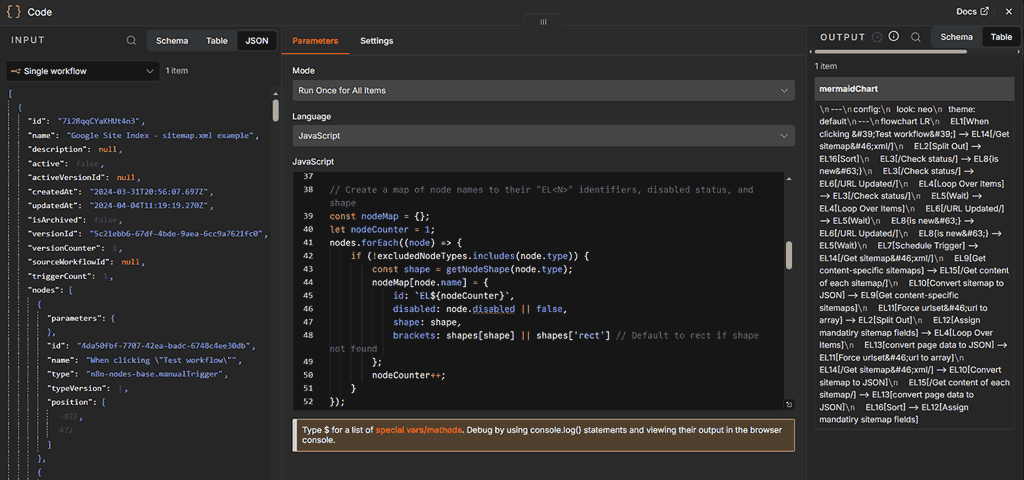 When the standard nodes are not enough, users can fallback to the Code Node and run native JS / Python scripts
Windmill takes a code-first approach. Developers write scripts in languages like Python, TypeScript, Go, PHP, Bash, and SQL, then compose them into larger workflows. Its visual flow editor complements that model rather than replacing it: Code remains the main building block, while the editor shows how individual steps fit together.
Teams can work locally with the CLI and VS Code extension, sync changes with Git, and bring existing scripts into Windmill instead of rebuilding them as visual components. That keeps automation development close to the tools and practices developers already use.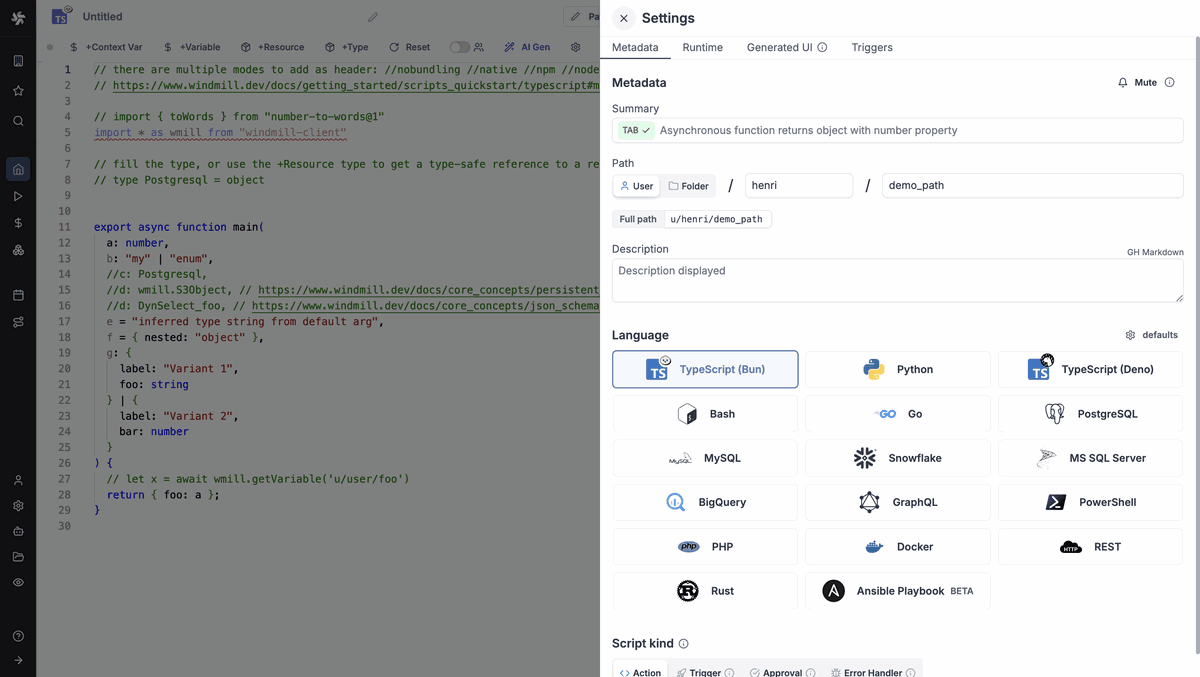 Windmill offers a built-in code editor for several programming and scripting languages
n8n brings AI components onto the same visual canvas as traditional automation steps. With AI agents, you can connect LLMs to tools and business systems so agents can retrieve information, make decisions, and take actions as part of a larger workflow. Memory nodes can preserve conversational context, while human approval steps give teams control over actions that need review.
Teams can also build RAG in n8n by connecting models, vector stores, data sources, and retrieval steps in a single workflow. Native vector store support reduces the amount of external tooling needed to assemble a RAG pipeline, and the same workflow can connect retrieved context to downstream applications or processes. n8n also supports MCP and sub-workflows for more complex agent orchestration.
Windmill approaches AI from a code-first foundation. Developers can build AI workflows with Python or TypeScript and use libraries like LangChain from those ecosystems for model calls, retrieval, agents, and other AI logic. It gives developers the flexibility to choose and implement the libraries they want.
The trade-off is that more of the AI architecture lives in code. But teams comfortable managing AI libraries and writing their own orchestration logic may prefer the added control, particularly when they already have established development patterns around Python or TypeScript.
With n8n, you can usually start with a pre-built integration. The catalog covers 1000+ common business apps, databases, developer tools, and AI services, with authentication and supported actions already built into many nodes. For anything the catalog doesn’t cover, the generic HTTP Request node can connect directly to an API, and developers can build custom nodes when they need something more specific.
Windmill requires developers to do more of the integration work in code. You can import npm, PyPI, and Go packages directly into scripts, which opens up their respective libraries and SDKs without waiting for Windmill to ship a dedicated connector. More than 200 pre-built resource types handle credentials and configuration that scripts and flows need to share. That flexibility also leaves more dependency management in the developer’s hands.
Over 3000 companies signed up just last week. Join them.

n8n’s RBAC gives users different levels of access based on their role. On qualifying paid plans, SSO, SAML, and LDAP and audit logs cover two other practical needs: managing user logins and access and maintaining a record of activity. n8n also includes encrypted secrets store at every tier and enforced 2FA across the instance and external secret store integration in Enterprise.
Windmill takes a generous approach to governance in its open-source edition. Granular permissions and basic audit logs are included, so access can be managed across scripts, flows, apps, and resources without moving to a commercial tier. SSO and some additional security features depend on the edition.
n8n offers a free, self-hosted Community Edition alongside paid self-hosted plans and n8n Cloud. Instead of charging for every step in a workflow, n8n pricing is based on workflow executions, which means adding more nodes doesn’t increase the execution count. Paid tiers add features for larger teams, including more advanced governance and collaboration options.
Windmill also has a free, self-hosted open-source edition under AGPLv3, with commercial plans available for teams that need additional features and support. Windmill pricing uses compute-based usage for its cloud offering, so cost depends in part on the resources workflows consume. The self-hosted editions separate open-source functionality from features available under commercial licenses.
n8n can run on your own infrastructure or as a managed service through n8n Cloud. For self-hosting, Docker is the simplest starting point, while Kubernetes gives teams more control over larger deployments.
At higher volumes, n8n can run in queue mode. A main instance handles incoming webhooks and workflow orchestration, while separate workers pick up executions from a Redis-backed queue. PostgreSQL stores execution data. And because processing is separated from the main instance, you can add workers as demand grows instead of moving the whole deployment to a larger machine.
You can also self-host Windmill with Docker or Kubernetes or run it through Windmill Cloud. Its scaling model revolves around workers: Jobs enter a queue, and workers pull jobs as capacity becomes available.
Adding more workers increases execution capacity and allows more jobs to run concurrently. Workers can also be grouped to handle different types of workloads.
n8n keeps debugging close to the workflow itself. You can inspect the data entering and leaving each node, rerun individual steps, and pin data while you work on another part of the flow. That makes it easier to isolate a problem without repeatedly running the workflow from the beginning.
Windmill gives developers logs and execution details for scripts and flows, with errors tied back to the code being run. Since scripts are the main building blocks, debugging will feel familiar if your team already spends time working in code and developer tooling.
The clearest dividing line between these platforms’ use cases is who will build and maintain the automation. n8n makes more sense when workflows need to be accessible to people who aren’t on the engineering team, while Windmill is geared toward teams that want code to remain the primary interface.
Choose n8n if you want the workflow itself to be the main interface for automation. It’s a strong Windmill alternative when you want to build visually, bring in code where it’s useful, and give people outside engineering a workflow they can actually follow. n8n also provides more AI functionality as native workflow components, including agents, memory, vector stores, and RAG. When processing data in batches, keep in mind that n8n is best suited for medium-sized data sets. Processing extremely large data sets (hundreds of millions of records) in n8n may take longer.
Choose Windmill if your automation is primarily developer-owned and starts with code. It’s a strong n8n alternative for engineering teams that mainly need to run heavier scripts on a schedule, expose them as internal tools, or connect them into larger flows.
These platforms optimize for different builders. n8n puts the workflow on a visual canvas and lets you reach for code when you need it. Windmill starts with code and gives developers tools for turning scripts into workflows and internal apps.
If you want visual automation without giving up developer flexibility, n8n is likely the better fit. If your team prefers to keep automation centered on scripts and familiar development practices, Windmill has a compelling model.
Considering n8n for your automation needs? Try n8n Cloud for free to start building today.

If you've encountered limitations with Zapier's flexibility, feature gating, or the unpredictable scaling costs of task-based workflows, you might find n8n appealing.
Find the best fit for your stack with this n8n vs Node-RED comparison. Review developer ergonomics, scaling, and AI nodes and integrations.

n8n vs. Claude Code for production AI: Compare execution model, agentic workflows, integration depth, and deployment trade-offs for engineering teams.
Find the right automation tool for your stack with this n8n versus Activepieces comparison, including differences in pricing, self-hosting, and AI.

I have found the holy grail of automation.

n8n’s integration with third-party services is absolutely mind-blowing. It’s like a Swiss army knife for automation.

Anything is possible with n8n. I think the cloud version is great, they are doing amazing stuff.

Thank you to the n8n community. I did the beginners course and promptly took an automation WAY beyond my skill level.
Join the teams building AI automation they can actually explain.
