See llms.txt for all machine-readable content.

Quick overview
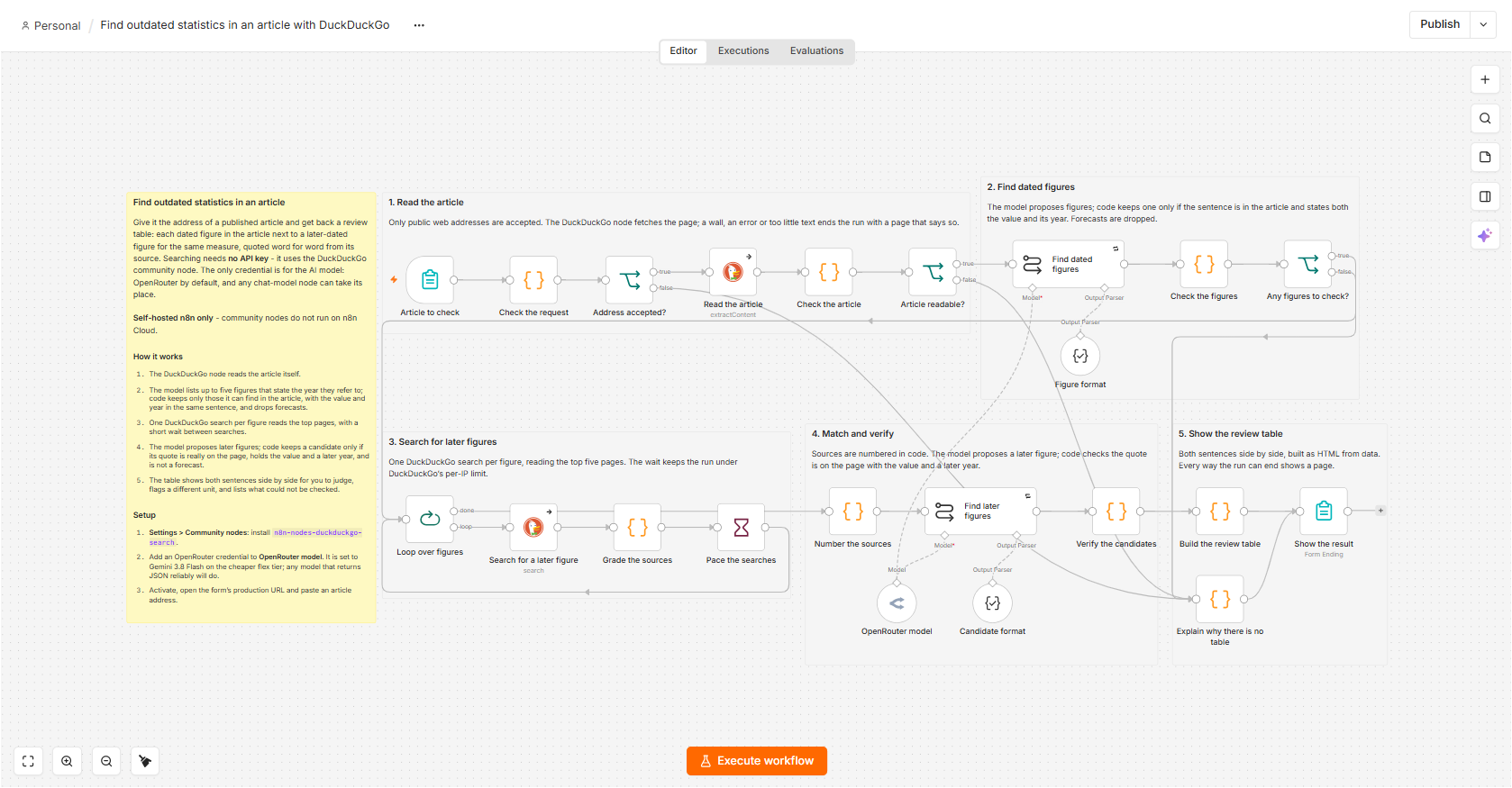
Paste an article's address; this workflow lists its dated figures and, for each, a later-dated figure from the web, quoted word for word from its source, side by side for you to review. Self-hosted n8n only.
How it works
- A form takes the article's address and, optionally, a region.
- The DuckDuckGo node reads the article.
- The model lists up to five figures that state the year they refer to; code keeps only those whose sentence is really in the article with the value and the year, and drops forecasts.
- One DuckDuckGo search per figure reads the top five pages, with a short wait between searches.
- The model proposes later figures; code keeps a candidate only if its quote is on the source page, holds the value and a later year close together, and is not a forecast. A different unit is flagged.
- The form shows a review table: the article's sentence next to the later one, with its source. Every way the run can end shows a page.
Setup
- Self-hosted n8n: install
n8n-nodes-duckduckgo-searchunder Settings → Community nodes. Searching and reading pages need no API key or account. - Add a credential to the chat-model node, OpenRouter model (Gemini 3.8 Flash by default). Any other chat-model node can replace it; choose a model that returns JSON reliably.
- Activate the workflow, open the form's production URL and paste an article's address. The region is optional and keeps the searches to one country or market.
Requirements
- Self-hosted n8n only: community nodes cannot be installed on n8n Cloud
- The community node n8n-nodes-duckduckgo-search
- An API key for the AI model: OpenRouter by default, or any provider with an n8n chat-model node
- No API key or account is needed for DuckDuckGo
Customization
- Lower the limit of five figures (in Check the figures and the first prompt) for shorter runs; each figure is one DuckDuckGo search
- Set a region in the form to keep searches to one country or market
- Swap the model node for any other chat-model node
- Keep the wait between searches: DuckDuckGo limits requests per IP address
- Send the table by email or Slack instead of showing it on the form page
Additional info
Suggested title: "Find outdated statistics in an article with DuckDuckGo". The AI model is a swappable part (any chat-model node works), so the title names only the search node. The canvas preview does not render community nodes, so the full canvas is in the screenshot at the top of the description. The table offers candidates for review, not corrections: a quote shown is word for word on its source page, which does not prove the figure is right or measures the same thing. Source and notes: https://github.com/samnodehi/n8n-nodes-duckduckgo/tree/main/docs/examples