See llms.txt for all machine-readable content.


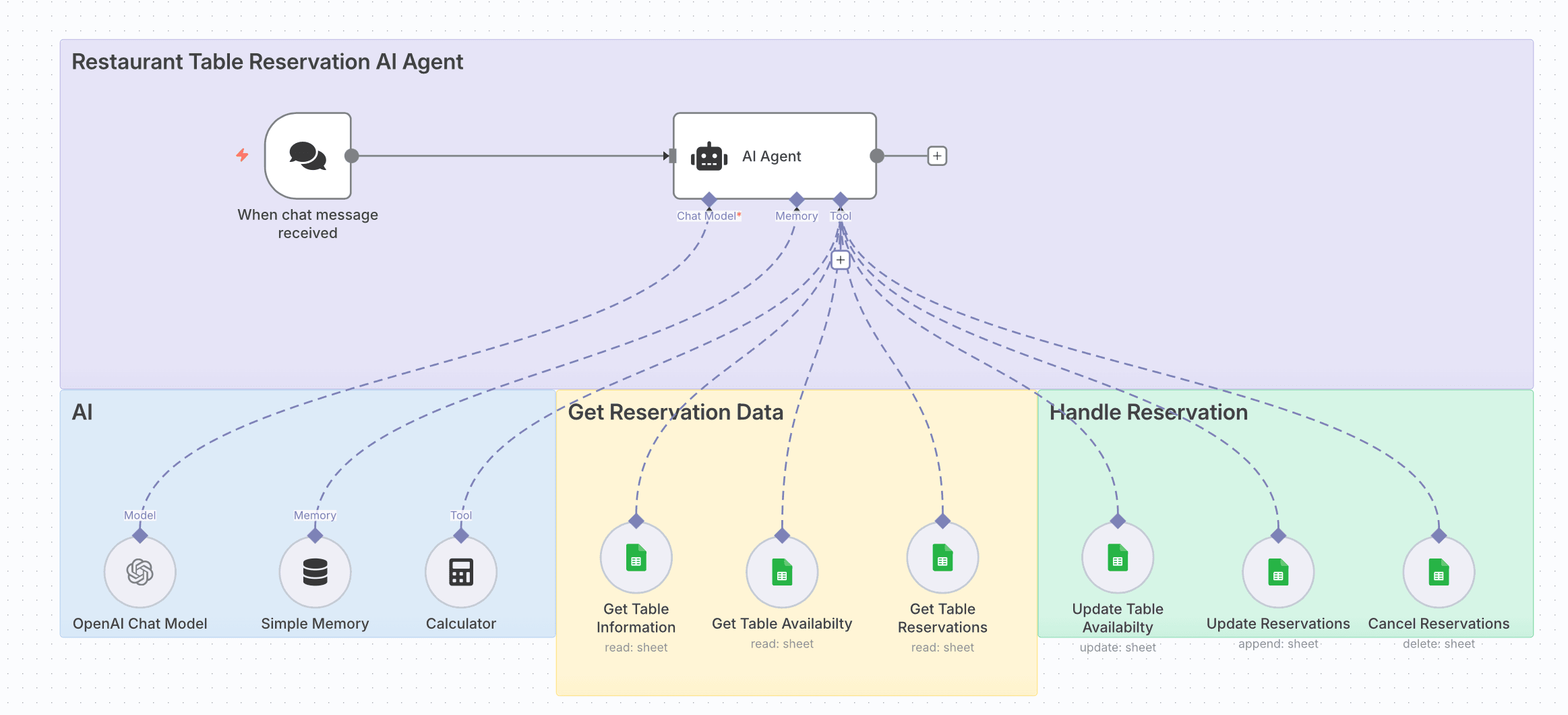
How it works
- Receives chat messages from customers requesting table reservations.
- Uses an AI Agent with OpenAI Chat Model to understand and process requests.
- Checks table information, availability, and existing reservations from Google Sheets.
- Calculates guest counts and reservation timing using the Calculator node.
- Updates table availability and reservation records in real-time.
- Handles reservation changes, including updates and cancellations.
Set up steps
- Add credentials for OpenAI (Chat Model) and Google Sheets.
- In the AI Agent node, link:
- Chat Model → OpenAI Chat Model node.
- Memory → Simple Memory node.
- Tools → Calculator and Google Sheets nodes for reservation data handling.
- Configure Google Sheets nodes:
- Get Table Information (read sheet)
- Get Table Availability (read sheet)
- Get Table Reservations (read sheet)
- Update Table Availability (update sheet)
- Update Reservations (append sheet)
- Cancel Reservations (delete sheet)
- Ensure your sheets have consistent column names for table IDs, dates, times, and guest counts.
- Test by sending a reservation request through the chat trigger and verify updates in the Google Sheets.