Use n8n when

You want technical teams to build production workflows with visual tooling, custom code, flexible deployment, and AI capabilities in the same platform
See llms.txt for all machine-readable content.
n8n versus MuleSoft isn't a like-for-like comparison. Both help organizations connect systems, but they’re built around different ways of doing it. n8n combines workflow orchestration with code-level flexibility, while MuleSoft takes an enterprise API management approach.
Let’s dig into the differences to help you decide which one makes sense for your team.

You want technical teams to build production workflows with visual tooling, custom code, flexible deployment, and AI capabilities in the same platform
You’re managing a large API estate and need an enterprise integration platform built around API-led connectivity and centralized governance
At a glance, n8n and MuleSoft’s biggest differences are in how teams build integrations and how much infrastructure surrounds these connections. Here’s the quick version:
Core approach
Workflow orchestration with visual building and code
Enterprise integration with API-led connectivity
Deployment
CloudHub, Runtime Fabric or on-prem Mule runtimes
Scaling
Horizontal scaling via queue mode with Redis as the message broker
Runtime scaling through MuleSoft deployment infrastructure
Developer experience
Visual workflows plus custom code through JavaScript and Python
Anypoint Studio and DataWeave
API capabilities
Webhooks, HTTP Request node, and API-triggered workflows
Full API lifecycle management, API gateway, and governanc
AI workflows
Native AI Agent, vector stores, MCP, apps and sub-workflow tools; LLM nodes within the canvas
Connects AI apps and agents to enterprise systems through governed APIs and Agent Fabric
Governance
Role-based access control (RBAC), projects and custom roles, and enterprise security controls
Centralized API policies, automated security, and API cataloging
Debugging
Node-level execution data and past execution debugging
Anypoint Studio debugger, logs, and Anypoint Monitoring
Licensing
Source-available; free self-hosted Community Edition, paid plans
Proprietary commercial software
Pricing model
Paid plans based on workflow executions; free self-hosted tier
Enterprise contracts based on Mule Credits (annual minimums)
Best suited to
Technical teams building and operating workflows directly
Large enterprises with dedicated integration and API architecture teams
n8n is a source-available development and orchestration platform for technical teams. It combines a visual workflow builder with custom JavaScript and Python, which means you can connect apps, APIs, databases, and AI systems without giving up the option to code when you need it.
Workflows are the main building block in n8n. A single workflow can coordinate several systems, handle data transformations, branch based on conditions, and run custom logic. You can use n8n Cloud or self-host it on your own infrastructure, depending on how much control you need over deployment and data. n8n allows users to build and debug workflows from the single unified canvas
For business users, n8n features the Chat Hub, which lets you access AI models and build and interact with agents through a simplified interface. Finally, you can also use the n8n Assistant to create, edit, test, and troubleshoot workflows through natural language prompts.
MuleSoft is an enterprise integration platform built for connecting applications, data, and APIs across an organization. Its approach centers on API-led connectivity, where teams create reusable API layers (System, Process, and Experience APIs) that can serve multiple integrations. That structure is designed for organizations with dedicated integration teams managing connections across a large number of systems. Mulesoft Flow Editor showing the visual diagram and an xml representation of the flow
MuleSoft is an n8n alternative worth considering if your organization is looking for a more API-centric approach, especially if you need governance to extend across a large integration environment.
For self-hosted deployments, n8n can scale as workflow volume grows. In queue mode, a main instance handles orchestration while worker instances execute workflows, with Redis coordinating the queue.
You can add workers to increase execution capacity without redesigning the workflows themselves, which keeps scaling separate from workflow design — the same workflows can keep running as you add execution capacity behind them.
MuleSoft uses a control plane for managing applications and a runtime plane for executing them. Depending on your infrastructure requirements, Mule applications can run in MuleSoft-managed environments like CloudHub or on infrastructure managed through Runtime Fabric (deployed across customer-managed Amazon EKS, Azure AKS, Google GKE, or bare-metal VMs).
CloudHub puts the runtime infrastructure in MuleSoft's hands, while Runtime Fabric lets organizations run Mule applications within infrastructure they control. It’s worth noting, though, that more control over where integrations run also means more infrastructure and platform administration to consider.

n8n provides RBAC for managing who can access projects and workflows. Teams can use permissions and roles to separate access as more people start building and managing automations. Projects offer another boundary for organizing workflows and credentials among groups.
From business tier and up, teams can use single sign-on (SSO), SAML, and LDAP. Further security features unlock at Enterprise, including audit logging, and external secret-manager integration.
Certain features like OpenTelemetry traces and enforced 2FA are available on all tiers.
MuleSoft approaches governance through APIs. Teams can define policies and standards centrally, then apply them across APIs managed through the platform. This includes rate limiting, client ID enforcement, OAuth token validation, mTLS, and threat protection applied uniformly across runtime planes.
Governance is built into the API architecture, helping organizations with large API estates that require strict regulatory and security compliance across distributed development teams.
n8n supports 1,000+ integrations through prebuilt nodes, REST and GraphQL APIs, webhooks, databases, and custom code. Teams can work directly with APIs when a service doesn't have the exact node or operation they need, then combine that connection with the rest of the workflow. That gives teams room to go beyond straightforward app-to-app automation and build more involved integration patterns. For example, you can create a dynamic API gateway that routes incoming requests to different workflows based on the endpoint or method.
MuleSoft is designed as an integration and API management platform. Its API-led approach separates integrations into reusable tiers: System APIs (unlocking core systems of record), Process APIs (orchestrating business processes across systems), and Experience APIs (formatting data for specific consuming channels).
The goal is reuse: once a system or business process has been exposed through an API, other teams and applications can build on that interface without rewriting the underlying connection.
n8n lets teams build AI workflows that connect models with the same apps, APIs, and business systems used in the rest of their automation stack. Through native LangChain nodes, the AI Agent node can use external tools and data sources to take actions as part of a workflow, while the broader workflow handles the surrounding logic, approvals, and system integrations.
An agent doesn't have to control the entire process. You can use AI for the steps that need model-driven decisions, then use standard workflow logic for steps that should behave predictably.
MuleSoft approaches AI through its existing API and integration infrastructure. Rather than building ad-hoc connections between language models and back-end systems, teams can expose enterprise data to AI agents through governed, secured APIs.
With capabilities like MuleSoft AI and Salesforce Agentforce integration, existing API policies enforce data masking, access permissions, and auditing between autonomous agents and enterprise data stores.
n8n combines visual workflow building with the option to write code when a workflow needs more custom logic. The Code node executes JavaScript and Python directly inside the workflow execution thread, allowing developers to manipulate arrays, write custom regex, parse nested JSON, or import supported npm / pip modules. 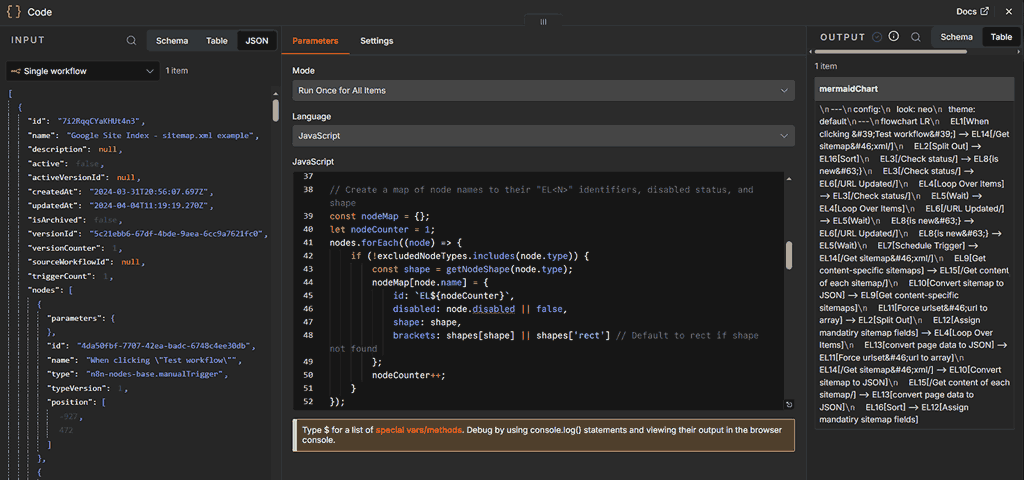 n8n Code Node comes with the code editor. Users see the usual node inputs and outputs around the editor
You don't have to choose between low-code restrictions and purely code-based integrations — custom scripts live inline alongside visual nodes.
MuleSoft development centers on Anypoint Studio, an Eclipse-based IDE used for building Mule applications, designing flows, and configuring connectors. Developers can use DataWeave, MuleSoft’s proprietary functional programming language, to query and transform complex data structures like JSON, XML, CSV, and flat files. 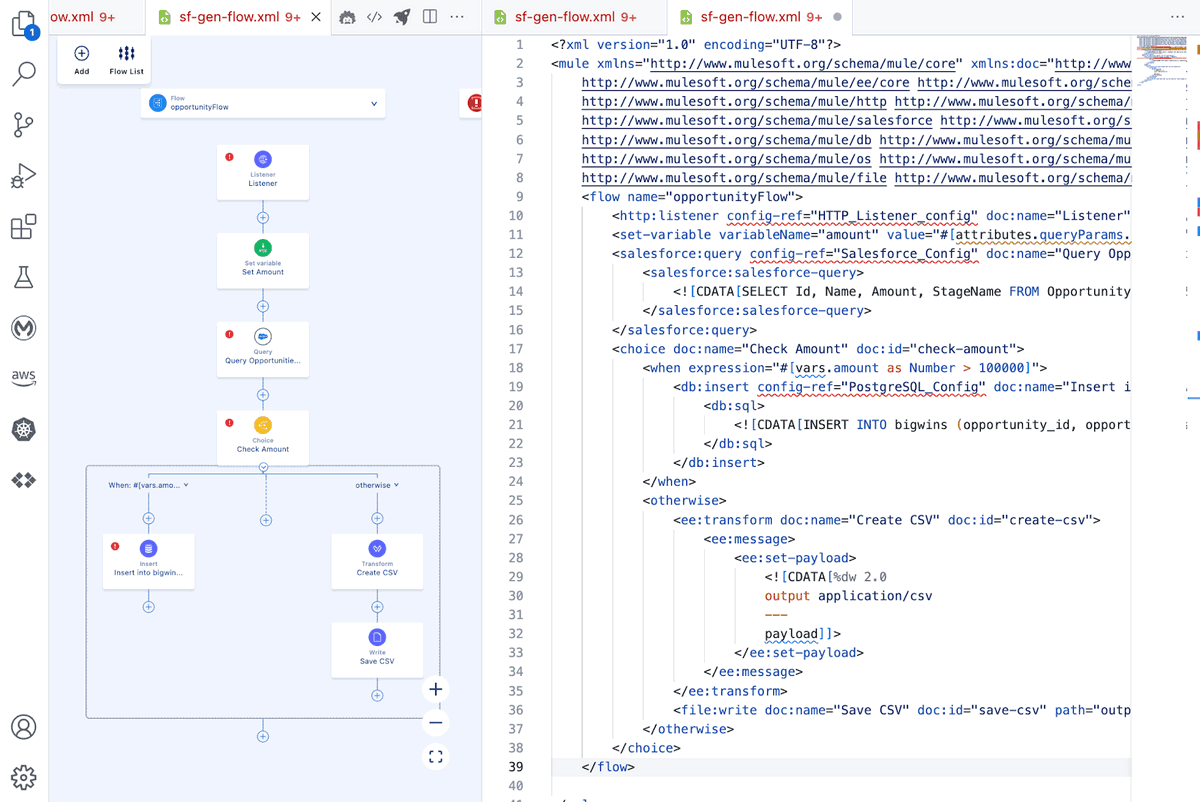 An example of the DataWeave transformations. Source: Mulesoft
While DataWeave is useful for complex data mappings, it requires specialized syntax training compared to standard languages like JavaScript or Python.
See how n8n's execution history works.

n8n keeps full execution data visible at the canvas level, displaying the precise JSON input and output for every node in the pipeline. When a production execution fails, you can open the exact execution log, view which node threw the error, and inspect the runtime state. Then you can test modifications directly on that captured payload without reproducing the upstream trigger.
MuleSoft provides unified logging through the Anypoint platform, alongside Anypoint Monitoring for telemetry, metrics, and alerting across deployed runtimes. During development, engineers use Anypoint Studio’s visual debugger to step through message processors, inspect message attributes, and set breakpoints.
While this setup offers comprehensive distributed observability, troubleshooting specific runtime payload issues often requires navigating structured application logs or configuring custom loggers.
n8n prices its paid plans by workflow executions, and every plan includes unlimited users, workflows, and integrations. One execution covers a complete workflow run, regardless of how many steps it contains or how much data it processes.
Current plans include:
For teams looking at n8n as a MuleSoft alternative, the free Community Edition also provides a route to start self-hosting without committing to a commercial plan.
MuleSoft’s pricing uses Mule Credits as a shared unit of consumption across eligible integration, API management, automation, and agent capabilities. Packages start at $2,000 per month, billed annually, with overall cost scaling significantly based on consumed throughput, deployed vCores, and selected product add-ons.
MuleSoft offers three commercial buying models:
Beyond that, the final cost depends on which capabilities you use and how much work you process. So think of the $2,000 monthly figure as a starting point, not a flat price for every deployment.
n8n and MuleSoft take different paths to enterprise integration. There isn’t one winner because they serve unique goals. The right choice depends on the infrastructure you already have, the people who will manage it, and the expected growth of your integration needs.
MuleSoft is built around API-led connectivity, with the governance and structure needed to manage APIs across a large organization. n8n gives technical teams a flexible way to build workflows that bring together APIs, business systems, custom code, and AI.
Is n8n right for your organization? Try n8n cloud today and start creating efficient workflows.

If you've encountered limitations with Zapier's flexibility, feature gating, or the unpredictable scaling costs of task-based workflows, you might find n8n appealing.
Find the best fit for your stack with this n8n vs Node-RED comparison. Review developer ergonomics, scaling, and AI nodes and integrations.

n8n vs. Claude Code for production AI: Compare execution model, agentic workflows, integration depth, and deployment trade-offs for engineering teams.
Find the right automation tool for your stack with this n8n versus Activepieces comparison, including differences in pricing, self-hosting, and AI.

I have found the holy grail of automation.

n8n’s integration with third-party services is absolutely mind-blowing. It’s like a Swiss army knife for automation.

Anything is possible with n8n. I think the cloud version is great, they are doing amazing stuff.

Thank you to the n8n community. I did the beginners course and promptly took an automation WAY beyond my skill level.
Join the teams building AI automation they can actually explain.