See llms.txt for all machine-readable content.

n8n vs. OpenClaw: Which is Right for You?

Comparing n8n versus OpenClaw? It all comes down to how much autonomy you want to give AI. n8n puts agents inside structured, observable workflows; OpenClaw gives an agent more freedom to decide what happens next.

Both can automate complex work, but they suit very different jobs. Here’s how to choose the right tool based on factors like integrations, security, scalability, debugging, and cost.

n8n's logo
LightningLightning vs symbol
OpenClaw logo

Use n8n when

You need AI automation that follows a defined process and gives your team visibility into what happens at each step. It’s a strong fit for workflows that connect business tools while giving multiple teammates a shared place to build and maintain an automation.

Use OpenClaw when

The task is open-ended and the agent needs to decide what to do next based on the situation. It’s designed for a more personal setup: The agent works closely with one person’s accounts through a conversational interface.

OpenClaw vs. n8n: Tool overview

n8n combines AI agents with structured workflows, while OpenClaw gives an autonomous agent more freedom to decide how it completes a task. Here’s what a comparison of OpenClaw versus n8n looks like at a glance.

Core model

Structured workflow and AI agents

Autonomous AI agent

Deployment

Managed cloud
Self-hosted

Self-hosted

Integrations

Prebuilt nodes
APIs
Custom nodes
MCP support

APIs
Webhooks
Browser automation
Skills

Governance

SSO, RBAC, and audit logging (select tiers)

Opt-in security

Pricing

Execution-based Cloud pricing/self-hosting

LLM usage + infrastructure

Interface

Visual workflow canvas

Conversational interface

What n8n and OpenClaw are built for

Union.svg

What's n8n?

n8n is a development and orchestration platform for building AI-powered workflows and agents. You connect nodes on a visual canvas, with each node handling a specific part of the process, like receiving a trigger, calling an API, transforming data, or passing work to an AI agent. This gives you a clear view of how data and actions move through the workflow.

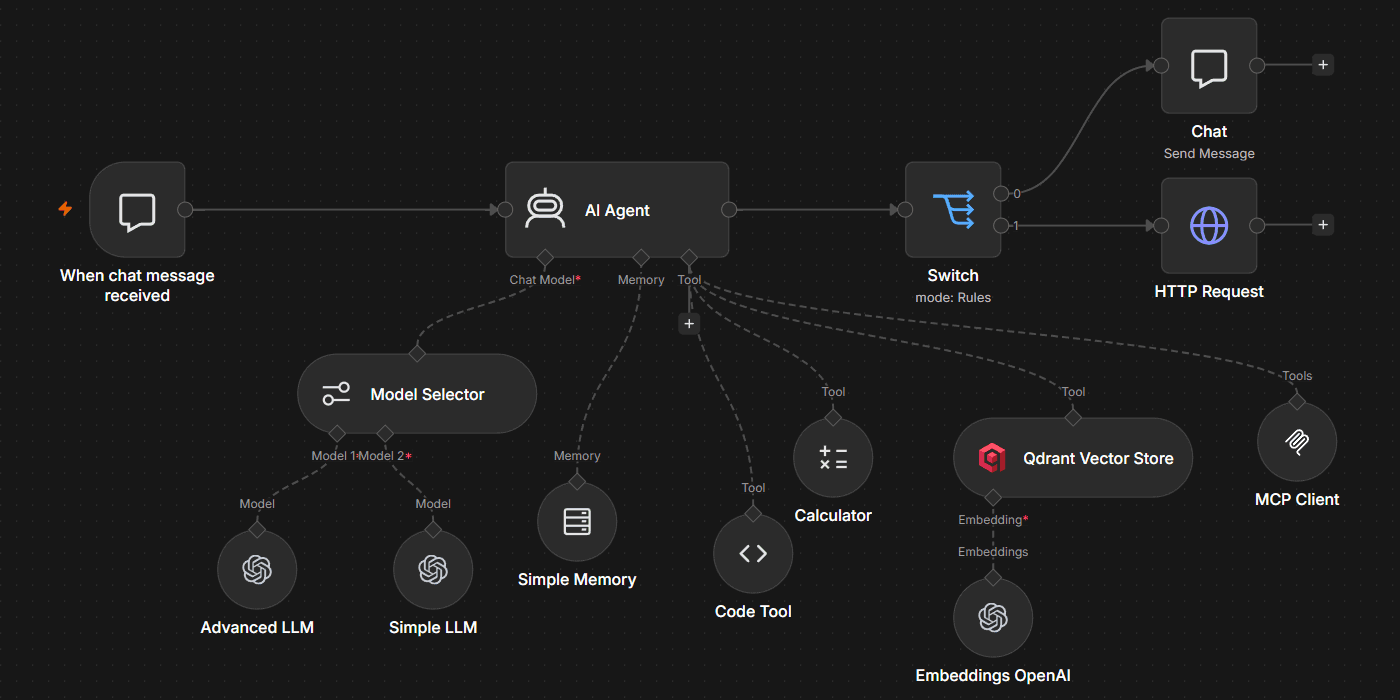
AI works within this structure instead of sitting outside it. For example, you can use the AI Agent node to handle tasks that require reasoning, then use the AI Agent Tool node to delegate work to specialized agents. The surrounding workflow still gives you control over what happens before and after those decisions, with execution history showing what happened when the workflow ran.

OpenClaw logo

What's OpenClaw?

OpenClaw is a self-hosted autonomous AI agent that figures out how to meet a goal described in natural language. Rather than mapping every step on a visual canvas, you interact with the agent conversationally through interfaces like Telegram, WhatsApp, or Slack.

The agent can then choose its execution path based on the task and the tools available to it. This makes OpenClaw suited to work where you can define the desired outcome but don't necessarily know the sequence of steps. It's MIT-licensed and community-driven, and the agent runs on infrastructure you control.

Deployment, production readiness, and scalability

n8n

n8n gives you the choice between a managed service with n8n Cloud and self-hosting on your own infrastructure. In either case, workflows keep the same visual structure, so you can move from early builds to production without rebuilding the automation in a different system.

For larger self-hosted deployments, n8n supports queue mode. A main instance handles tasks like workflow orchestration and incoming webhooks, while worker instances execute workflows using a shared Redis-backed queue. You can add workers as demand grows, increasing execution capacity without redesigning individual workflows.
n8n-config-agents.pngIn n8n users can create bounded agentic systems with predefined sequence steps before and after the Agent node.

OpenClaw

OpenClaw takes a self-hosted approach built around a gateway running on infrastructure you control. That gateway connects the agent to its messaging channels and tools, keeping the agent available to receive requests and take actions.

Running the OpenClaw gateway on your own infrastructure gives you control over where the agent runs, but scaling works differently from n8n. OpenClaw is architected around a single gateway on one machine. Expanding across a team is possible via multi-user model but heavy workload usually means operating separate instances with their own configurations and keys instead of adding workers to a shared execution pool. That makes it a better fit for personal agent workloads than high-volume batch execution.
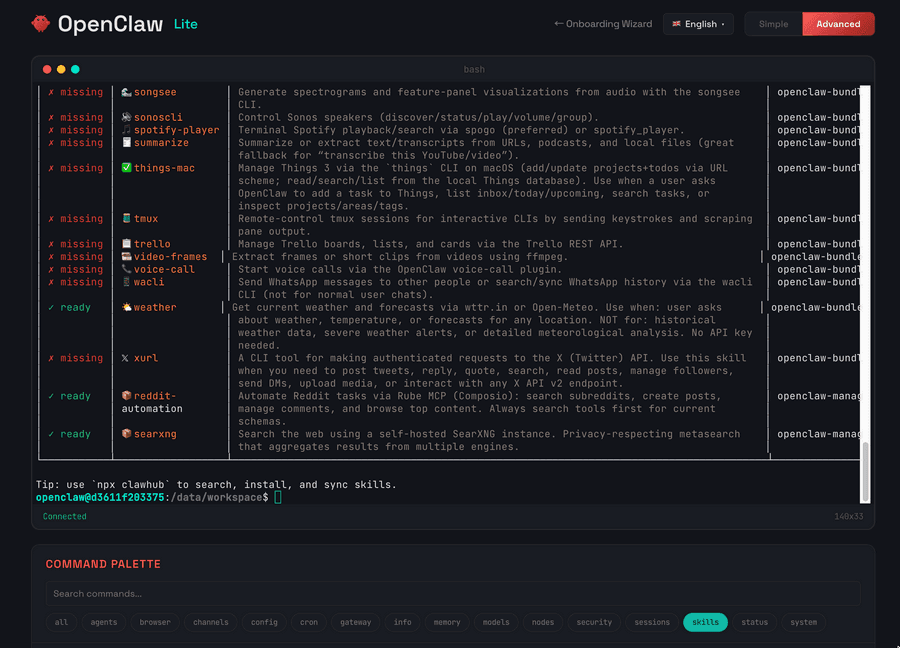
OpenClaw Lite web terminal interface showing a list of available skills with ready or missing status, and a command palette below.In addition to the classical terminal interface or IM app connector, OpenClaw offers web TUI

Security, governance, and access control

n8n

n8n includes security and governance capabilities for teams running automation in production. Role-based access control (RBAC) ships on all plans except community. Enterprise-tier features include single sign-on (SSO) and audit logging to help organizations manage access and keep a record of important activity. Credentials are encrypted, while self-hosting lets organizations keep workflow data on infrastructure they control.

Governance also extends to workflow visibility. n8n records workflow executions, allowing teams to inspect how data moved through individual nodes rather than relying only on the agent’s final output. That visibility becomes particularly useful when AI is allowed to make decisions inside a larger business process.

💡 On Enterprise tier n8n also supports automatic execution data redaction. This feature is crucial for regulated industries to prevent sensitive data leakage.

OpenClaw

OpenClaw’s security model reflects its focus on a self-hosted autonomous agent. The agent can execute shell commands, read and write files, access network services, and interact with connected accounts, depending on the permissions you give it.

Those permissions can increase the impact of a malicious skill. In Cisco’s OpenClaw security research, researchers tested a third-party skill that instructed OpenClaw to silently execute a curl command and send data to an external server. Cisco’s scanner also identified prompt injection, command injection, and tool poisoning in the skill.

Integration depth

n8n

n8n provides integrations for SaaS apps, databases, developer tools, and AI services, including tools like Stripe, HubSpot, Airtable, Google Sheets, and Salesforce. Prebuilt nodes expose supported operations directly on the canvas so you can connect systems without writing each integration from scratch.

When there’s no dedicated node for the service you need, you can connect to APIs with the HTTP Request node. That lets you make custom API calls from the same workflow, which means a missing prebuilt integration doesn’t require moving the orchestration into a separate application.

Finally, there are thousands of community-built nodes. While many of them are available on self-hosted n8n instances, there is a growing number of partner nodes (approved community nodes) that are also available to cloud n8n users.

OpenClaw

OpenClaw takes a more agent-driven approach to integrations. The agent can interact with external services through APIs, webhooks, browser automation, and skills, including community-built extensions distributed through ClawHub. Rather than placing each integration into a predefined workflow, the agent can choose which available tool to use based on the task.

The model supports open-ended tasks where the required tools may change as the agent works, but integrations can require more manual setup and vetting. Community-built skills, in particular, add another dependency that operators need to evaluate before giving an agent access to sensitive systems.

AI workflow capabilities

n8n

In n8n, AI agents operate alongside the rest of your workflow logic. The AI Agent node can choose tools and make decisions, while surrounding nodes define where data comes from and what happens after the agent finishes its task. That lets you introduce probabilistic AI without handing the entire business process over to it.

The chat model is configured separately from the agent, so you can use supported providers like OpenAI, Anthropic, Google Gemini, or local Ollama models without rebuilding the surrounding workflow. Model choice becomes one component of the automation rather than the architecture the entire process depends on.

You can also build multi-agent systems by using the AI Agent Tool node to let a primary agent delegate tasks to specialized agents. Each sub-agent can focus on a specific job while n8n handles the broader orchestration. Several other multi-agent patterns are also supported.

OpenClaw

With OpenClaw, you provide a goal, and the agent determines the steps required to achieve it. It can choose among the tools available to it as the task develops instead of following a workflow whose path has been mapped out in advance.

The running LLM therefore plays a more central role in how OpenClaw plans and executes a task. n8n separates the model from the surrounding workflow architecture, while OpenClaw's autonomous execution is more tightly coupled to the model making those decisions.

OpenClaw is well-suited to tasks where the right next action depends on what the agent discovers along the way. The trade-off is that execution is less predictable: The same goal can lead the agent through different sequences of actions, making the agent’s judgment a larger part of how the overall process runs.

See n8n's AI agent architecture in action

Use this workflow to build your own multi-agent system

Developer tools and coding capabilities

n8n

n8n lets you add custom logic without moving the rest of the automation into a separate codebase. You can use expressions for smaller data transformations and the Code node for JavaScript or Python.
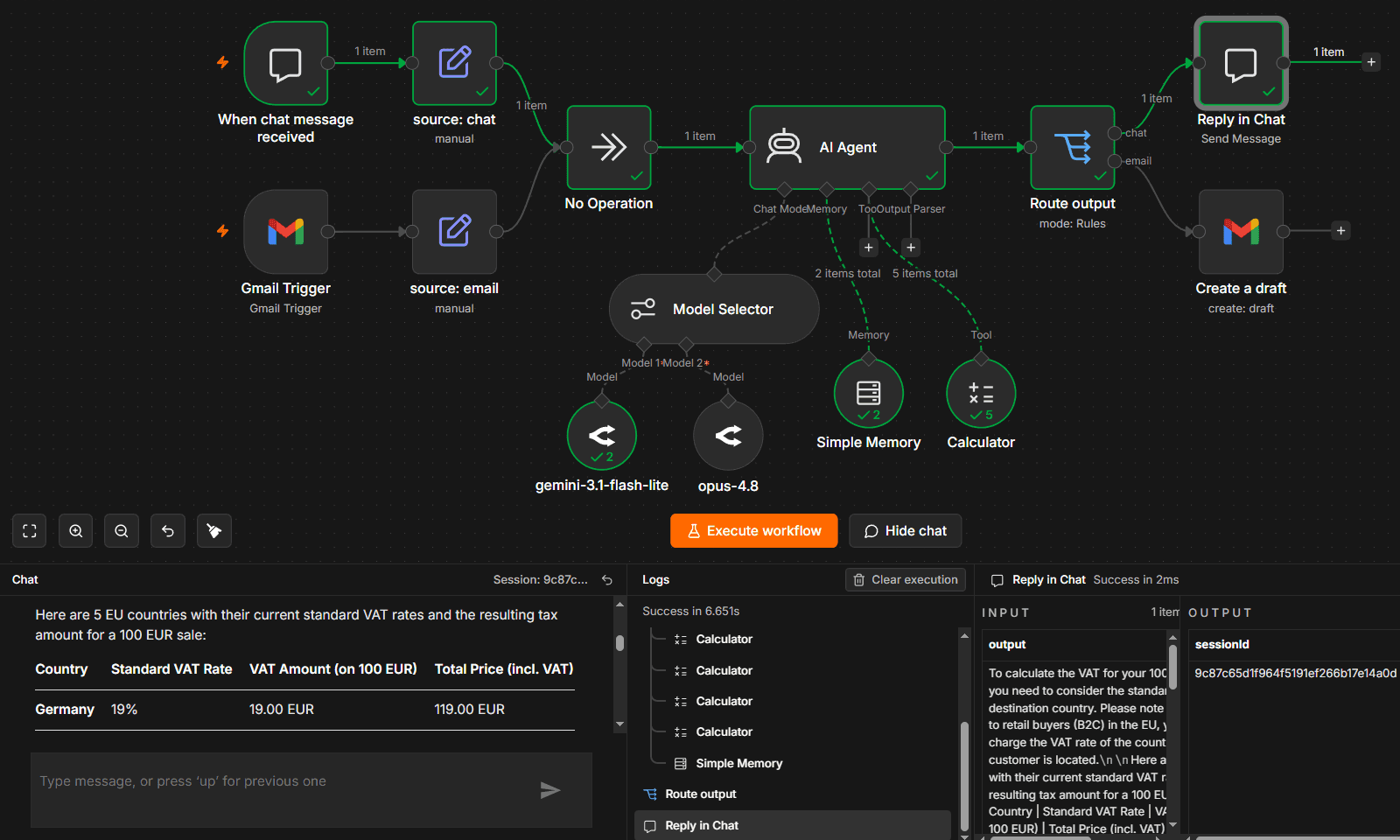
n8n canvas after a successful run, showing chat and Gmail triggers feeding an AI Agent, with the chat panel and execution logs open below the workflow. n8n users can see the whole execution sequence on the same canvas where the agent is built

Custom code still runs within n8n’s node-based execution model instead of giving an AI agent unrestricted access to the underlying system. Developers get an escape hatch when prebuilt nodes aren't enough while keeping orchestration and execution tracking inside the workflow.

OpenClaw

OpenClaw gives its agent access to tools it can select as it works toward a goal. Depending on the configuration, those capabilities can include running shell commands, working with files, calling APIs, and using installed skills. The agent can decide which tool to invoke based on what it encounters during the task.
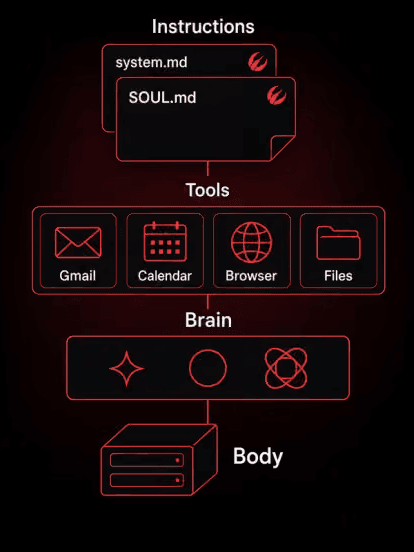
OpenClaw architecture diagram showing Instructions, Tools, Brain, and Body layers. A schematic diagram of OpenClaw’s main components. Most developer cools and capabilities are located at the Tools level, which are Skills and MCP servers that the agent can use. Source: https://openclawvps.io/blog/openclaw-guide

Unrestricted system access can make an autonomous agent highly capable, but it also increases the impact of a compromised skill or manipulated decision. A malicious OpenClaw skill is capable of silently running a curl command to exfiltrate data. The same shell access that makes an agent flexible makes careful permission management and skill vetting essential.

Debugging and error visibility

n8n

n8n records workflow executions, including the inputs and outputs for individual nodes. You can view all workflow executions and filter them by status to investigate failed runs or review previous behavior. The execution history gives you a step-by-step record of how data moved through the workflow.

When something fails, you can inspect the node where the error occurred and the data it received rather than trying to reconstruct the entire run. Debug executions let you load data from a previous execution into the editor, and failed executions can be rerun after you've identified the problem.

OpenClaw

Debugging OpenClaw is different because the agent determines its execution path as it works. Logs can show which actions the agent took, but reproducing a problem can be harder when another run may lead to a different sequence of decisions.

This distinction matters when you're troubleshooting business-critical automation. With n8n, you can inspect failures against the workflow structure you designed. With OpenClaw, debugging is more complex and it also involves understanding why the agent chose a particular path and whether it makes the same choices on another run.

Tired of building observability from scratch?

Pricing and licensing

n8n

n8n uses a source-available, fair-code licensing model. The Community Edition is free to self-host for internal business use, while n8n Cloud provides a managed option with pricing based on workflow executions. Enterprise-tier capabilities are available for organizations that need additional governance and security features.

Execution-based pricing simplifies cost estimation because a single workflow execution can contain multiple nodes and integrations: all these steps count as a single execution. Self-hosting shifts the infrastructure costs to your organization but gives you greater control over the deployment environment.

OpenClaw

OpenClaw is MIT-licensed and free to self-host. Running the software still comes with operating costs, including the infrastructure hosting the gateway and any paid LLM APIs the agent uses.

AI usage makes those costs more variable. An autonomous task may require multiple model calls as the agent reasons through a problem and uses different tools, so the final cost depends partly on how the agent approaches each task.

How to choose the right approach

The right choice depends on how much of the process you want to define in advance. n8n is a stronger fit when the automation needs a clear structure around AI decisions. OpenClaw makes more sense when deciding the next step is part of the agent’s job.

Choose n8n when

Choose n8n when you want AI reasoning inside a process your team can define and inspect.

  • Execution needs to be repeatable: The workflow defines the surrounding process even when individual AI steps are probabilistic.
  • Multiple people maintain the automation: The visual canvas gives teammates a shared representation of how the process works.
  • Business integrations are central: Prebuilt nodes and API access let workflows connect AI decisions to the systems where work happens.
  • You need an audit trail: Execution history shows how data moved through the workflow and where failures occurred.
  • You want flexibility across AI providers: The model can change without requiring you to rebuild the surrounding workflow architecture.

Choose OpenClaw when

Choose OpenClaw when the task involves deciding how to complete the task itself.

  • The work is judgment-heavy: The agent can change its approach as it discovers new information.
  • One person primarily owns the agent: The personal-agent model works well when a single user manages its accounts and permissions.
  • Conversation is the preferred interface: You can interact with the agent through familiar messaging channels rather than a workflow canvas.
  • Persistent context matters: The agent can carry context across interactions that build on previous work.

Find the right balance between autonomy and control

If you’re deciding between n8n and OpenClaw, don’t let binary thinking limit you — it’s not so much a matter of agent versus workflow, deterministic versus probabilistic AI, or even AI agent versus workflow. The two approaches can actually occupy different roles in the same automation architecture.

You could use n8n as the orchestration layer for a broader business process and call OpenClaw when a step requires more open-ended judgment. A webhook can pass work between the two, letting the autonomous agent handle the less predictable task before n8n resumes the surrounding workflow.

Ready to put AI to work without giving up control? Deploy n8n on your own infrastructure or try n8n Cloud for free.

Start building production workflows today

Self-host or try Cloud free.

Explore more n8n alternatives

n8n vs. Node-RED

Find the best fit for your stack with this n8n vs Node-RED comparison. Review developer ergonomics, scaling, and AI nodes and integrations.

Read more

n8n vs. CrewAI

Compare n8n versus CrewAI to determine the best architecture for your team. Learn how both handle multi-agent systems, integrations, and observability.

Read more

n8n vs. Zapier

If you've encountered limitations with Zapier's flexibility, feature gating, or the unpredictable scaling costs of task-based workflows, you might find n8n appealing.

Read more

n8n vs. Make

If you’ve run into limits with Make’s operation-based pricing, data caps, or cloud-only setup, n8n might be a more flexible and cost-efficient alternative.

Read more