Use n8n when

You need to build backend workflow automations to connect and run systems.
See llms.txt for all machine-readable content.
If you’re weighing n8n versus Retool, you probably have something you need to build. Maybe it’s an admin panel or a process you’re just tired of running manually. Retool can help you build the user interface, while n8n may be a good fit for automating the processes running behind it.
This guide compares how both tools handle production work so you can decide what you should use for your next project.

You need to build backend workflow automations to connect and run systems.
You need to build a user-friendly interface for an internal app.
Here’s a side-by-side comparison of Retool and n8n’s core features and capabilities.
Core purpose
Workflow automations
AI orchestration
Internal apps and dashboards
Workflows and agents for automation
Deployment
n8n Cloud
Self-hosted
Managed cloud
Self-hosted for Enterprise
Security and governance
Instance and project roles
SSO (paid plans)
Custom instance and project roles (Enterprise)
Permissions for apps and resources
Audit logs (paid tiers)
Enterprise-level identity controls (paid tiers)
Integrations
Built-in and community nodes
HTTP requests for custom API calls
Database and API resources shared across apps, workflows, and agents
AI capabilities
AI agents and AI-enabled workflows
Model integrations
MCP tools
Agents that use connected resources, workflows, and tools
Coding and debugging
JavaScript or Python Code nodes
Execution history
Node-level data inspection
App code and workflow Code blocks
Run history with block status and logs
Pricing and licensing
Source-available
Free Community Edition
Paid plans in Cloud and self-hosted
Proprietary license
Paid builder and user seats
Workflow and agent usage costs
n8n is a source-available, AI-native workflow automation platform. You can use its visual canvas to move data between systems, call APIs, run AI agents, and add custom code where you need it. It’s a strong fit for technical teams looking to build an automated workflow across systems.
n8n offers a unified canvas where users can create and debug automations. An AI Assistant helps with all aspects of creating, editing and debugging workflows.
Retool is a cloud-first development platform for building internal apps on top of your databases and APIs. Teams use it to create dashboards, admin panels, and tools where employees can look up records or take actions without working directly in the underlying systems.
Retool Workflows adds backend processes that can run on a schedule or respond to events. You can use the internal tool automation capabilities to build a user interface and the workflow running behind it.
The new Retool app builder focuses primarily on chat interactions with AI, allowing users to manually inspect data connections and the underlying code.
You can use n8n Cloud or self-host it on your own infrastructure. The self-hosted Community Edition is free, but your team is responsible for infrastructure and maintenance.
As execution volume grows, queue mode separates workflow execution from the main instance. Redis queues the jobs, and worker instances pick them up, while databases store workflow and execution data. As demand increases, you can add workers instead of relying on one instance to handle everything. Your team manages that capacity, along with backups, updates, and monitoring.
Retool primarily offers managed cloud service with various tiers and a self-hosted enterprise deployment.
Companies that use self-hosted Retool Workflows need to configure Temporal clusters and workers. The workers run queries and code in your environment, while the orchestration layer schedules and coordinates tasks. You can spread the work across those workers as demand grows, but your team is responsible for capacity planning and operational management.
n8n’s role-based access controls (RBAC) let you manage permissions across instances on the free Community Edition. You can use project-based permissions on paid plans. Projects group workflows and credentials together, which means someone can help maintain one team’s automation without getting access to a different one. Credentials are encrypted in n8n’s credential store. Paid plans add extra capabilities, such as custom roles, SSO, and an external secret-store integration.
If you choose to self-host n8n on a paid plan, you get the added security of running these controls within your own system.
Retool’s permissions let you separate the people who use a published app from those who can edit it or manage its connected resources. You can assign access through permission groups and set different permissions for production and sandbox resources. This helps separate access to an application from the ability to edit or manage its data connections.
Business and Enterprise plans include richer permission controls, plus audit logs that record user actions and queries against databases and APIs. Enterprise plans add custom SSO and log streaming, so your team can manage sign-in through its identity provider and send audit activity to an external monitoring system.
n8n connects systems through 1000+ built-in integrations and community nodes, with preconfigured operations for reading, creating, and updating data. If a node doesn’t cover the API or endpoint you need, the HTTP Request node lets you call it directly. You can combine those calls with data transformations and branching logic in the same workflow.
Trigger nodes and webhooks also let workflows respond when something happens in another system. This supports event-driven architecture: An incoming order, for example, can start a workflow that checks inventory and passes the order to fulfillment without waiting for a scheduled data sync batch.
Retool connects to databases and APIs through saved connection settings that your apps, workflows, and agents can use. You configure a resource once, then write queries to fetch or change data. Those queries connect the interface to your systems for internal apps — a table can show customer records, while a button submits an update.
Those connections also work in Retool Workflows, so they’re not limited to powering screens. And if there’s no dedicated connector for a service, a REST API resource lets you call its endpoints with authentication managed through the saved connection.
n8n’s AI Agent node lets an agent choose which connected tools to call to complete a task. You can use models from vendors like OpenAI, Anthropic, or Google Gemini; or you can connect a locally hosted model through Ollama. Native MCP support gives agents access to tools exposed by MCP servers.
Since the agent sits inside a larger workflow, you can decide where AI judgment is useful and where explicit rules should take over. An agent might classify an incoming request, for example, before regular workflow steps validate its output and route it to the right system. For more complex work, the AI Agent Tool node lets a lead agent delegate to specialized agents within the same workflow.
n8n also offers an Agent Builder, where business users configure an agent’s instructions and tools via a dedicated UI. You can reach published agents through chat or call them from a workflow, which means you don’t have to build every agent directly inside a workflow.
Retool Agents lets you configure an agent’s instructions, model, and tools, then test and deploy it within the platform. Tools can include functions that query your connected resources, workflows, other agents, or tools imported from remote MCP servers. That gives agents access to business data and actions through the connections your team manages in Retool.
You can chat with an agent directly in Retool or add an Agent Chat component to an internal app. If the task needs to run in the background, a scheduled or webhook-triggered workflow can call the agent through an Invoke Agent block. For example, a new support ticket could trigger an agent to investigate the issue before anyone opens a dashboard.
Jumpstart your next project

When a built-in node doesn’t quite do what you need, n8n’s Code node lets you write JavaScript or Python directly in the workflow. You might use it to reshape an API response or apply custom business logic. For smaller changes, expressions let you calculate values and reference earlier steps inside a node’s settings.
Your custom code stays on the same canvas as the rest of the process, with its output passed to the next step. And if you need to reuse a custom integration across workflows, you can build your own node.
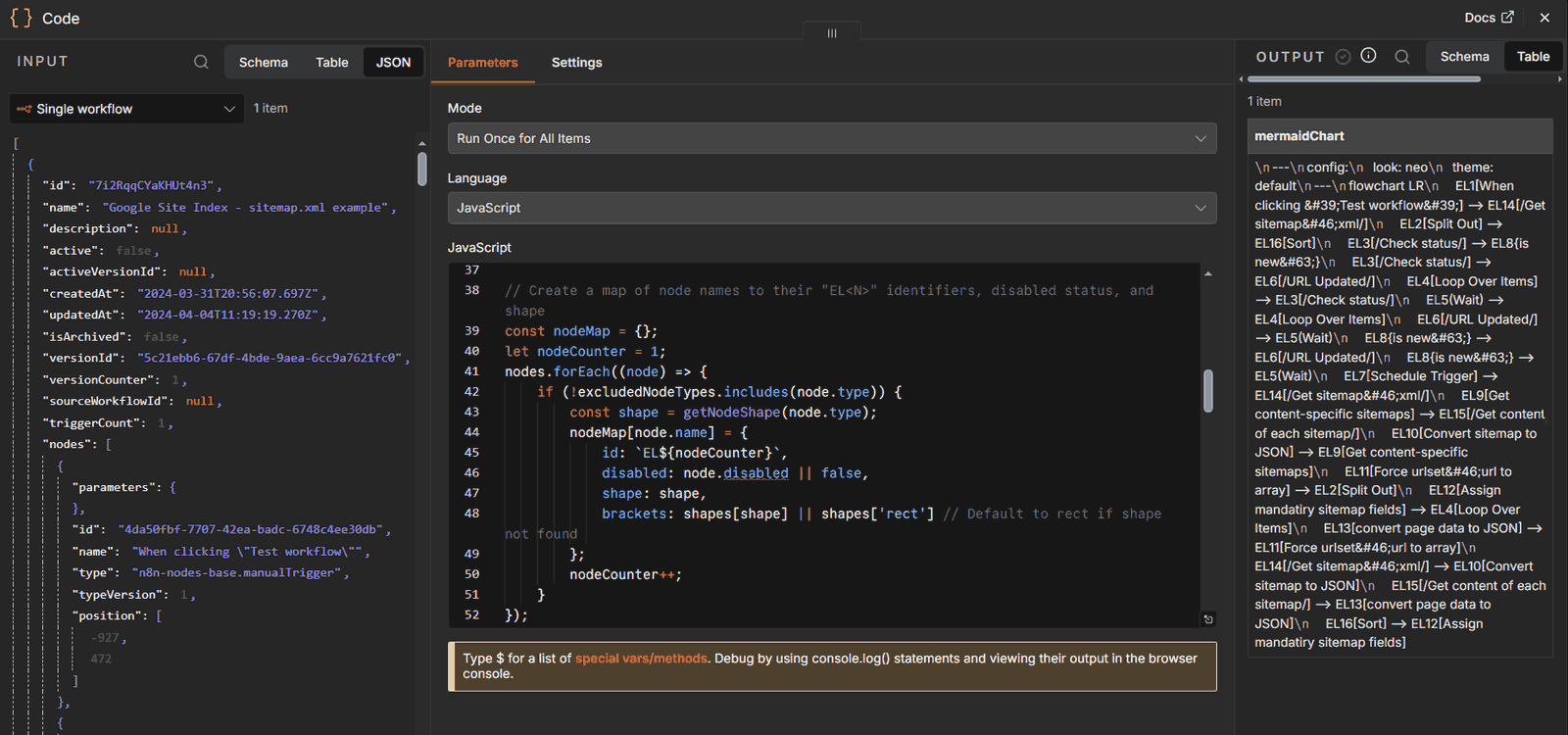
n8n’s Code node brings a JS / Python editor directly into the workflow, so that users see the input and output data items right away.
Retool’s classic app builder uses JavaScript to connect interface components to queries and control how the app behaves. A button might run a query using the selected table row, then refresh the table after an update. Expressions and scripts let you transform query results or change what users see as they interact with the app.
The newer app builder also supports direct code editing, while Retool’s CLI lets developers work on Retool-native React apps from their local environment. For backend logic, Retool Workflows includes code blocks that handle transformations and logic between resource queries.
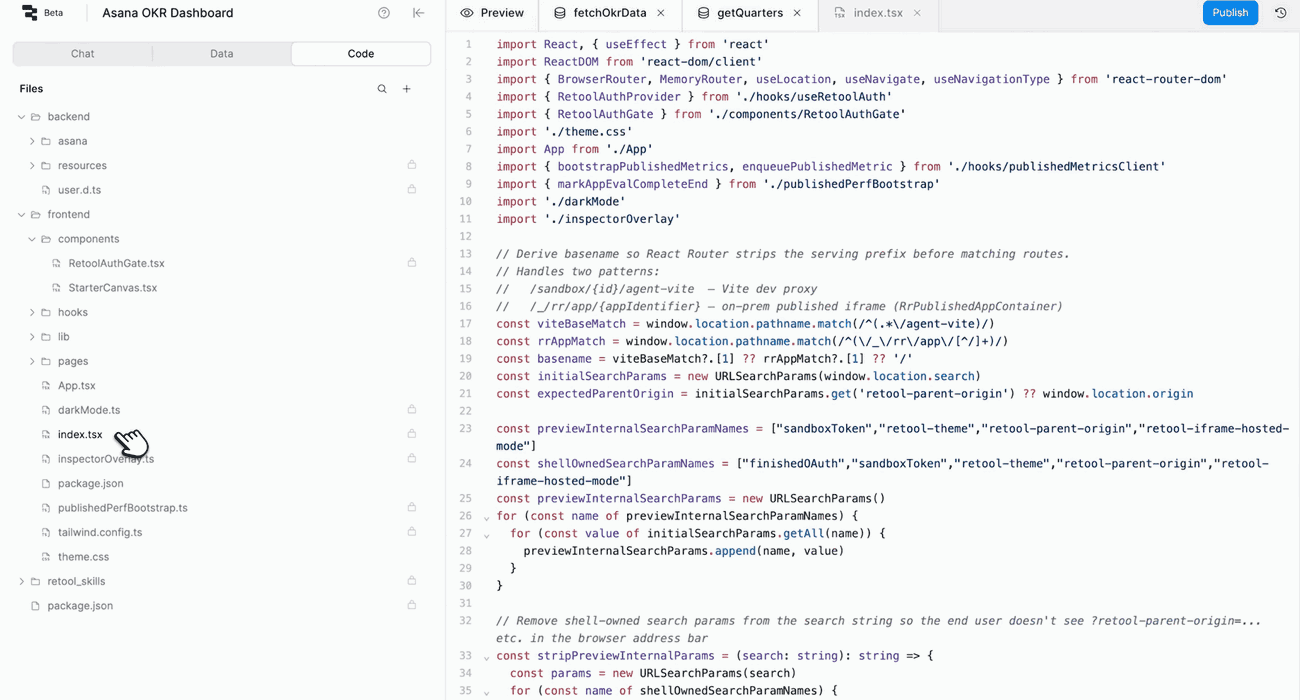
Retool allows for code editing, however the app’s code is disconnected from the UI and requires developer experience.
n8n’s executions view lets you open a saved run and inspect what happened at each node, including the data passed between steps. When a workflow fails, you can follow the execution to the failing node and check what it received instead of trying to recreate the problem from scratch.
You can also load a previous execution’s data into the editor, change the workflow, and test it against that input. What’s available to inspect depends on your execution-saving settings and retention limits, so configure those before you need to investigate a production failure.
Retool Workflows records successful and failed runs in its run history panel. Open a run to check each block’s status and narrow down where something broke. The logs help you investigate problems like invalid JavaScript or malformed SQL with filters for error, success, and informational entries.
You can configure a block to handle its own errors or use a global error handler to respond to unhandled failures, such as by notifying your team. A successful query doesn’t necessarily mean it produced the intended result — you still need checks for cases like an update that ran without changing the expected record.
See how n8n's execution history can help.

n8n’s paid plans scale with how often your workflows run, not how many people use the platform. You can also self-host the free Community Edition if you’re prepared to manage it yourself.
Retool’s paid plans set separate rates for people who build tools and those who use them. Workflow volume and AI agent runtime can add to the bill, so seat count is only part of the cost.
Most of the work you need to build happens behind the scenes: connecting APIs, moving data between systems, or coordinating AI agents with the rest of a process. You might already have an interface for that work, or you might not need one at all.
If you’re looking for a Retool alternative because your team mainly needs backend automation, n8n might be the right fit for you. Its workflow canvas keeps the process visible as it grows, with room for custom code when a built-in step isn’t enough. And if your team can handle the upkeep, the free Community Edition also gives you a self-hosted starting point without per-seat fees.
Your team needs a working interface where people can review information and take action. A support specialist might need to look up an order and issue a refund, for example, while an operations team needs a dashboard to review exceptions.
Retool makes sense as an n8n alternative when building that internal app is the main requirement. You can connect the interface to your data and add workflows or agents to handle the work around it. If your team already uses Retool, keeping those processes there can also reduce the number of platforms it needs to maintain.
Feel like you need both platforms? Retool can provide the interface where employees review orders and approve exceptions, while n8n coordinates the downstream processes across systems.
To compare Retool Workflows versus n8n for that backend work, try building a small, identical process in each platform. Include a failure case so you can see what troubleshooting involves before committing.
If the priority for your next project is backend automation, n8n can help you connect systems and build AI-powered workflows. If you’re ready to get started, try n8n Cloud or self-host with the free Community Edition.

Compare n8n versus CrewAI to determine the best architecture for your team. Learn how both handle multi-agent systems, integrations, and observability.

Comparing n8n versus LangGraph for AI agent workflows? This guide examines elements like execution models, integration depth, and observability.

Find the best fit for your stack with this n8n vs Node-RED comparison. Review developer ergonomics, scaling, and AI nodes and integrations.

Compare n8n vs. LangChain across execution, agent architecture, and deployment control. Weigh strengths and weaknesses, and discover which tool to use.

I have found the holy grail of automation.

n8n’s integration with third-party services is absolutely mind-blowing. It’s like a Swiss army knife for automation.

Anything is possible with n8n. I think the cloud version is great, they are doing amazing stuff.

Thank you to the n8n community. I did the beginners course and promptly took an automation WAY beyond my skill level.
Join the teams building AI automation they can actually explain.