See llms.txt for all machine-readable content.


💥 Scrape leads from businesses with Claude and Apify to Gmail outreach
📄 Documentation: Notion Guide
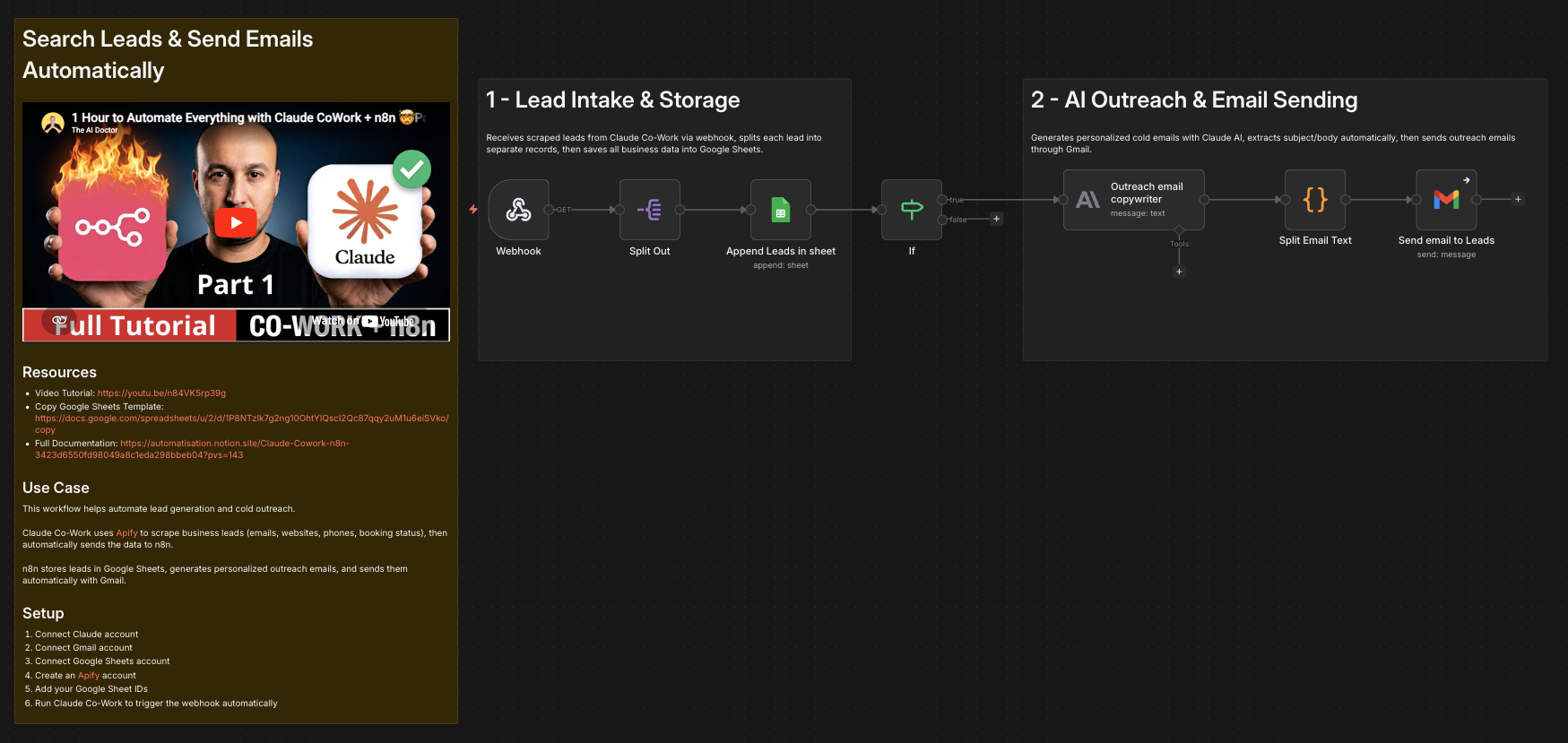
Automatically scrape business leads with Claude Co-Work and Apify, send the data to n8n through a webhook, store it in Google Sheets, generate personalized outreach emails, and send them automatically with Gmail.
This workflow combines lead scraping, lead qualification, data organization, AI copywriting, and cold outreach into one automated pipeline.
Who is this for?
This template is ideal for:
- Agencies offering SEO, automation, web design, or lead generation services
- Freelancers looking to automate prospecting
- Sales teams doing cold outreach
- Entrepreneurs searching for local business leads
- Anyone using AI to scale outbound email campaigns
What problem is this workflow solving? / Use case
Manual prospecting is slow and repetitive.
Most businesses waste hours every week:
- Searching for leads manually
- Copying business data into spreadsheets
- Writing cold emails one by one
- Sending outreach emails manually
This workflow solves that by automating the full process from lead discovery to email delivery.
Example use case:
- Use Claude Co-Work with Apify to find restaurants in Paris
- Scrape lead data such as business name, address, website, phone number, email, and booking status
- Automatically send the collected leads to n8n through a webhook
- Save lead data in Google Sheets
- Generate a personalized outreach email for each valid lead
- Send the email automatically with Gmail
What this workflow does
- Claude Co-Work uses Apify to scrape business leads and collect their data
- Claude Co-Work automatically triggers the n8n webhook with the scraped lead data
- n8n splits each business lead into separate items
- n8n appends lead data to Google Sheets
- n8n checks whether the lead has an email address
- n8n uses Claude to generate a personalized outreach email
- n8n extracts the email subject and body automatically
- n8n sends the email via Gmail
Expected outcome:
- Automated lead scraping with Claude Co-Work and Apify
- Organized lead database in Google Sheets
- Personalized AI-generated outreach emails
- Automated email sending
- Faster prospecting with less manual work
Setup
Before using this template, create and connect the following accounts:
- Google Sheets account
- Gmail account
- Anthropic / Claude account required to run Claude Co-Work
- Apify account required for scraping lead data
Then configure:
1. Claude Co-Work + Apify
Set up Claude Co-Work so it can use Apify to scrape lead data before n8n starts.
Claude Co-Work should collect fields such as:
- collection_date
- business_category
- region_state
- city_name
- street_address
- business_name
- business_description
- website_url
- phone_number
- customer_rating
- email_address
- contact_status
2. Webhook
Configure Claude Co-Work to send the scraped data to the n8n Webhook node.
The webhook receives the lead payload and starts the workflow automatically.
3. Google Sheets
Replace:
YOUR_ID_GOOLE_SHEETSYOUR_ID-sheet_GOOLE_SHEETS
With your own Google Sheet ID and Sheet tab ID.
4. Claude Prompt
Customize the outreach message inside the Outreach email copywriter node.
How to customize this workflow to your needs
Change target industry
Replace restaurants with:
- Dentists
- Lawyers
- Real estate agencies
- Coaches
- Ecommerce stores
- Local businesses
Change outreach offer
Instead of SEO or booking systems, promote:
- Web design
- AI chatbots
- Lead generation
- Marketing automation
- CRM setup
- Ads management
Notes
- Claude Co-Work and Apify handle the lead scraping step before n8n starts
- The webhook is triggered automatically after the lead data is collected
- Phone numbers are automatically cleaned before saving to Google Sheets
- Only leads with email addresses continue to outreach
- Gmail errors continue without stopping the workflow
Built for users who want to automate scraping, prospecting, and outbound sales with AI.
🎥 Watch This Tutorial
👋 Need help or want to customize this?
📩 Contact: LinkedIn
📺 YouTube: @DRFIRASS
🚀 Workshops: n8n courses (in French)
Need help customizing?
Contact me for consulting and support : Linkedin / Youtube / 🚀 n8n courses (in French)