See llms.txt for all machine-readable content.


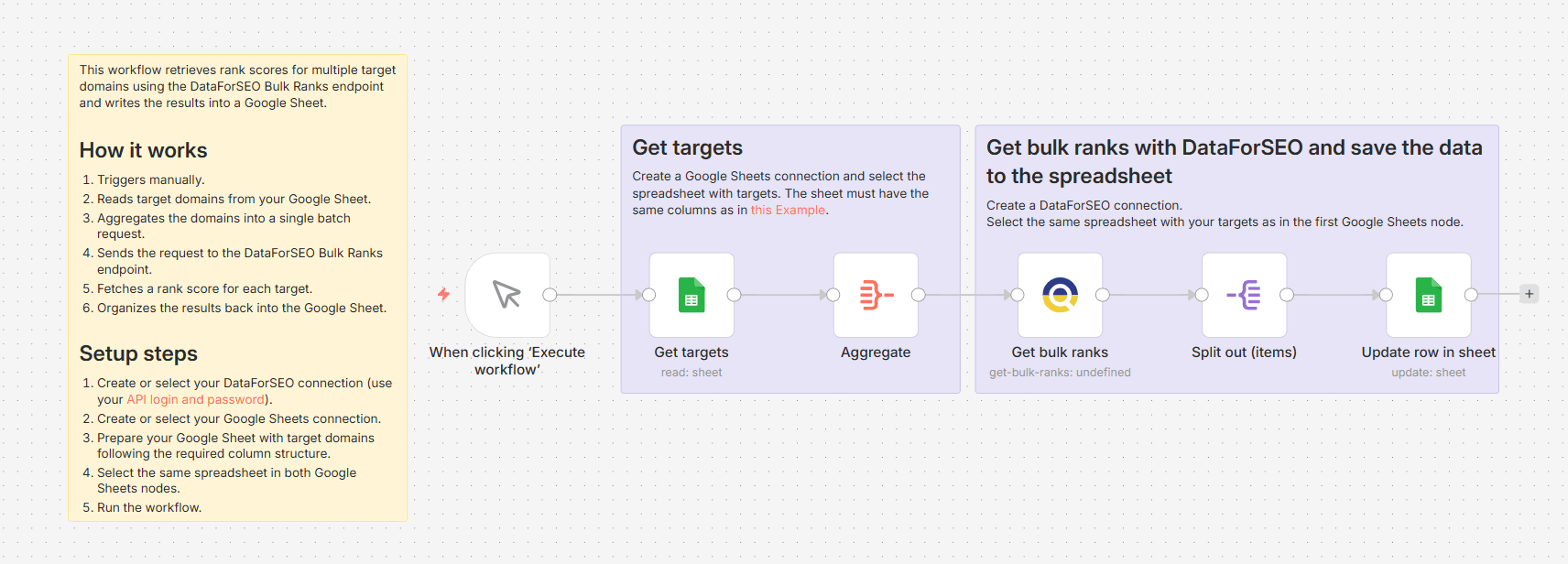
Domain rank gives you a quick read on how authoritative a domain is based on its backlink profile. This workflow lets you pull ranks for an entire list of targets at once, without any manual lookups.
On each manual run, the workflow reads your target domains from a Google Sheet and sends them as a batch request to the DataForSEO Bulk Ranks endpoint, which returns a rank score for up to 1000 domains, subdomains, or pages in a single call. The rank is based on the number of referring domains pointing to each target and is calculated using the same node-ranking principle as Google's PageRank algorithm. Values range from 0 to 1000 by default and reflect real-time data at the time of the request. After the request is complete, the rank scores are mapped back to the corresponding rows in your spreadsheet.
Who's it for
This workflow is a good fit for SEO experts and link-building teams who need to quickly screen or compare domain authority across large lists of targets for prospecting, audits, or reporting.
What it does
This workflow automatically retrieves rank scores for a list of domains specified in a Google Sheet and writes the results back to the spreadsheet, with a rank value for each target domain.
How it works
Triggers manually whenever you want to run a bulk rank check.
Reads the list of target domains from your Google Sheet.
Aggregates all domains into a single batch request.
Sends the request to the DataForSEO Bulk Ranks endpoint and retrieves a rank score for each domain.
Writes the scores back to the corresponding rows in your Google Sheet.
Requirements
- DataForSEO account and API credentials
- Google Sheets integration connected to n8n
Customization
You can customize this workflow by selecting the suitable rank scale: 0-100 or 0-1000. Additionally, you can combine rank data with other backlink metrics, such as spam score or referring domains, switch from domain-level to subdomain- or page-level analysis, or schedule the workflow to run automatically at specific intervals.