See llms.txt for all machine-readable content.

Quick overview
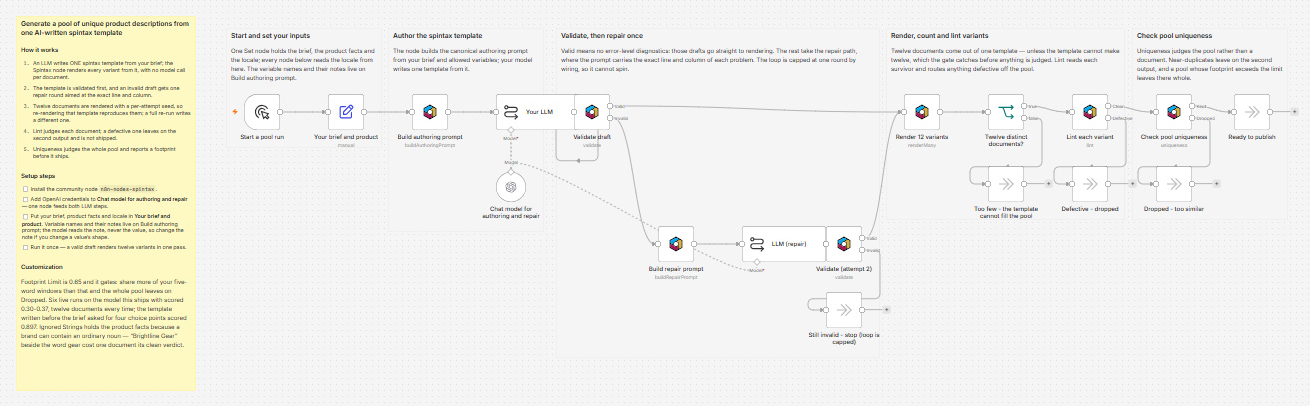
Self-hosted n8n only — this template uses a community node. OpenAI writes one spintax template from your brief; the Spintax node turns it into a pool of unique, linted product description variants, validated and repaired once before rendering.
How it works
- Starts when you manually execute the workflow.
- Defines the writing brief and fixed product variables (product, brand, audience, feature).
- Builds an authoring prompt and sends it to OpenAI to generate a spintax template.
- Validates the returned spintax and, if it is invalid, generates a repair prompt, asks OpenAI for a corrected version once, and re-validates.
- Renders 12 description variants from the cleaned spintax template using a fixed seed and the provided variables.
- Lints each rendered variant to catch issues that only appear after rendering (for example repeated words or punctuation/spacing defects).
- Drops near-duplicate variants by similarity scoring and outputs the remaining pool as ready to publish.
Setup
- Add OpenAI credentials on "Chat model for authoring and repair" (or replace it with another compatible LLM) — that single node feeds both LLM chain steps.
- Edit the brief and the product variables in the “Your brief and product” step to match your item and style constraints.
- Adjust rendering and quality thresholds as needed (variant count, seed, lint window/ignore list, and the Jaccard dedup threshold) before activating the workflow.
Requirements
- Self-hosted n8n with community nodes enabled (instance admin setting)
- The n8n-nodes-spintax community node, version 0.2.1 or newer — install via Settings → Community Nodes
- An OpenAI credential, or any other LLM node you already use — the Spintax node itself needs none: its engine is bundled and renders locally, with no network calls
Customization
- Change the Base Seed on "Render 12 variants" to re-roll the whole pool — the same seed always returns the same twelve documents
- Put the strings every document repeats — product name, brand, a merge tag — into Lint's Ignored Strings and Uniqueness's Shared Strings, so both checks judge your writing and not your data
- Lower Footprint Limit on "Check pool uniqueness" from 1 to 0.15 to turn the footprint from a report into a gate that stops a pool sharing one skeleton
Additional info
Why two checks and not one. Validate judges the template; it cannot judge the render. A flawless template still turns out the odd broken line, because that defect lives in the combination of choices rather than in the source — two neighbouring slots picking the same word, an unlucky join leaving a space before a comma. Lint reads each rendered document. Uniqueness reads the whole surviving pool and reports the share of five-word windows that repeat across it: measured on real pools of equal size, one template scores about 0.96 and six templates about 0.02, and asking for more variants of the same template cannot move that number — only new templates, or denser variation inside the one you have.