See llms.txt for all machine-readable content.


Quick overview
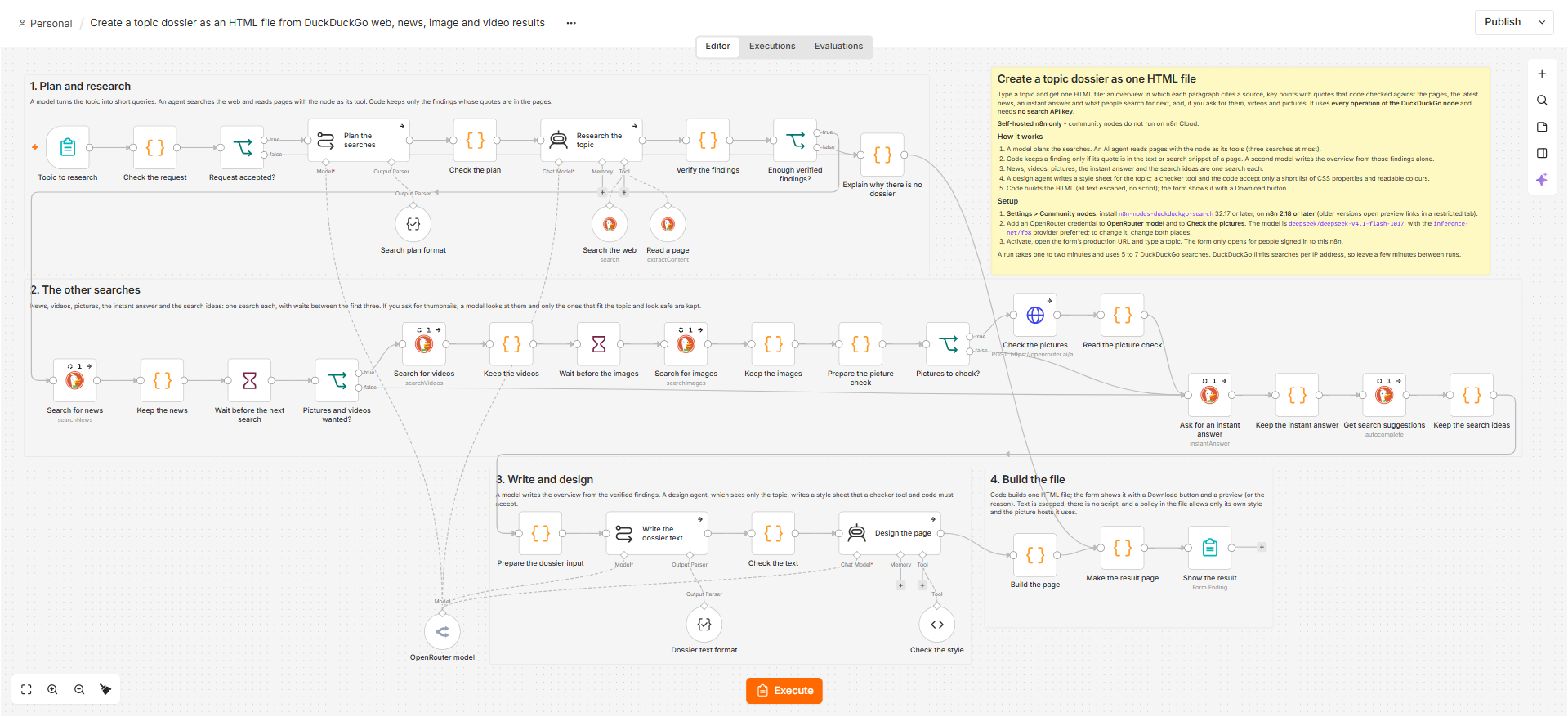
Type a topic; this workflow reads web pages found with DuckDuckGo and gives you one HTML file: an overview in which every paragraph cites a source, quotes checked against the pages, news, and optionally videos and pictures. Self-hosted n8n only.
How it works
- A form takes the topic and whether you want videos and pictures (as links, or with thumbnails).
- A model plans the searches: up to two web queries, one for news and how recent it must be, one for videos and one for pictures. Code checks the plan.
- An AI agent searches the web with the DuckDuckGo node as its tool, choosing a past day, week, month or year when the topic asks for recent pages, and returns findings with a quote from each page.
- Code keeps a finding only if its quote is in the text of a page the tools returned, and stops unless at least three points come from at least two sites.
- The DuckDuckGo node then searches news, videos and images, adds an instant answer and search ideas, with short waits between searches. A vision model only judges whether a thumbnail is safe.
- A second model writes the overview from the verified points, and a paragraph that cites no source is dropped. A design agent writes the style sheet, and code accepts it only as plain CSS with readable colours.
- Code builds one HTML file with all text escaped. The form page shows it in a preview with a Download button. If there is no dossier, the page says why.
Setup
- Self-hosted n8n 2.18 or later: install
n8n-nodes-duckduckgo-search32.19 or later under Settings → Community nodes. Searching and reading pages need no API key or account. - Add a credential to the chat-model node, OpenRouter model. Any other chat-model node can replace it; choose a model that returns JSON reliably.
- Activate the workflow, open the form's production URL and type a topic. A run takes one to two minutes and about 5 to 7 DuckDuckGo searches, so leave a few minutes between runs. Keep the form behind n8n login, as it is set here: it makes the node fetch whatever pages a search returns.
Requirements
- Self-hosted n8n only: community nodes cannot be installed on n8n Cloud
- n8n 2.18 or later, so that links in the preview open in a new tab
- The community node n8n-nodes-duckduckgo-search, version 32.19 or later
- An API key for the AI model: OpenRouter by default, or any provider with an n8n chat-model node
- No API key or account is needed for DuckDuckGo
Customization
- Change how many points and sources are kept (the limits in Verify the findings) or how many searches the agent may make (its prompt and Max Iterations)
- Choose another region on the search nodes (they are set to wt-wt, no region)
- Swap the model node for any other chat-model node
- Keep the waits between searches: DuckDuckGo limits requests per IP address
- Send the HTML file by email or save it to Google Drive instead of showing it on the form page
Additional info
Suggested title: "Create a topic dossier as an HTML file with DuckDuckGo". Please do not use "fact-checked" in the title: the workflow checks that each quote is on the page it cites, but it does not fact-check the claims in them, and the result page says so. The AI model is a swappable part (any chat-model node works), so the title names only the search node. The canvas preview does not render community nodes, so the full canvas is in the screenshot at the top of the description. The workflow JSON is submitted as it is in the repository; the AI-generated sticky notes were not used, because the file already has an overview note and section notes that include the community-node install step and the self-hosted-only line. Source and notes: https://github.com/samnodehi/n8n-nodes-duckduckgo/tree/main/docs/examples