See llms.txt for all machine-readable content.



⚡ UPDATE on May 2025 – added section with all n8n instance webhooks
Using n8n a lot?
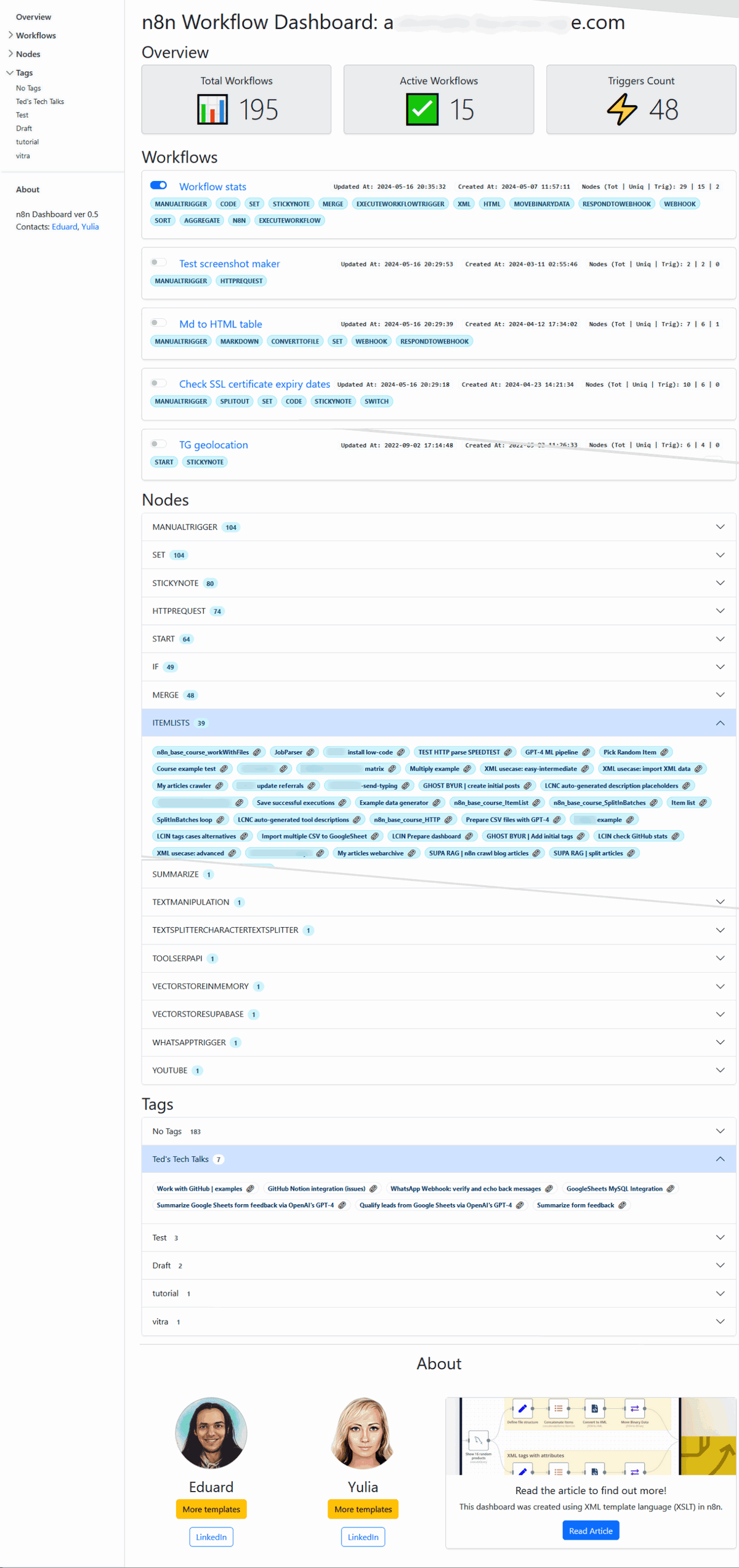
Soar above the limitations of the default n8n dashboard! This template gives you an overview of your workflows, nodes, and tags – all in one place. 💪
Built using XML stylesheets and the Bootstrap 5 library, this workflow is self-contained and does not depend on any third-party software. 🙌 It generates a comprehensive overview JSON that can be easily integrated with other BI tools for further analysis and visualization. 📊
Reach out to Eduard if you need help adapting this workflow to your specific use-case!
🚀 Benefits:
- Workflow Summary 📈: Instant overview of your workflows, active counts, and triggers.
- Left-Side Panel 📋: Quick access to all your workflows, nodes, and tags for seamless navigation.
- Workflow Details 🔬: Deep dive into each workflow's nodes, timestamps, and tags.
- Node Analysis 🧩: Identify the most frequently used nodes across your workflows.
- Tag Organization 🗂️: Workflows are grouped according to their tags.
- Webhooks ⚡: List of all webhook endpoints with the links to workflows.
- Visually Stunning 🎨: Clean, intuitive, and easy-to-navigate dashboard design.
- XML & Bootstrap 5 🛠️: Built using XML stylesheets and Bootstrap 5, ensuring a self-contained and responsive dashboard.
- No Dependencies 🔒: The workflow does not rely on any third-party software. Bootstrap 5 files are loaded via CDN but can be delivered directly from your server.
⚠️ Important note for cloud users
Since the cloud version doesn't support environmental variables, please make the following changes:
- get-nodes-via-jmespath node. Update the
instance_urlvariable: enter your n8n URL instead of{{$env["N8N_PROTOCOL"]}}://{{$env["N8N_HOST"]}} - Create HTML node. Please provide the n8n instance URL instead of
{{ $env.WEBHOOK_URL }}
🌟Example:
Follow me on LinkedIn for more tips on AI automation and n8n workflows!