See llms.txt for all machine-readable content.
Back to integrations
Integrate WaAPI with 1000+ apps and services
Unlock the full potential of WaAPI and n8n’s automation platform by connecting WaAPI’s capabilities with over 1,000 apps, data sources, services, and n8n’s built-in AI features.
Need something that’s not covered yet?
Use n8n’s pre-authenticated HTTP Request node to create new connections, giving you the flexibility to build powerful automations on any stack.


Created by
WaAPI
Last update
3 days ago
WaAPI integration
is built and maintained by our partners at WaAPI and verified by n8n. That means it’s solid, safe, and ready to help you tap into some great capabilities.
About WaAPI
Official WaAPI community node for n8n. Send and receive messages, manage chats, contacts, groups and channels straight from your workflows. Every operation is generated from our OpenAPI spec, so the node never lags behind the API. Bearer token, no OAuth setup.
Related categories

What can you do with WaAPI?
List Instances
Retrieve a list of your instances.
Create Instance
Create a new instance. Optionally set a name and webhook configuration.
Retrieve Instance
Retrieve a single instance by its ID
Update Instance
Update the instance.
Delete Instance
delete an instance by ID
Get Request Status
Retrieve the status or result of an async request by its reference UUID. Results are cached for up to 5 minutes after processing.
Client Status Of Instance
retrieve the status of your running client
Retrieve Qr Code
Retrieves a base64 encoded QR code image that can be used to authenticate and connect a account to this instance.
Retrieve Basic Client Information
Retrieve general information of the user connected to your instance.
Logout
Logs out the client, closing the current session
Reboot
Reboots your instance. This will close the current session and restart the client. The instance will need to be re-authenticated if it was previously logged in.
Send Presence Available
Sets the client's presence status to 'available'/'online'
Set Status
Sets the status text for the connected account
Set Display Name
Sets the display name for the account
Request Pairing Code
Request a pairing code for phone number registration. To prevent abuse and ensure system stability, pairing code requests are limited to 2 per minute. Multiple rapid requests may indicate automated abuse attempts.
Send Presence Unavailable
Sets the client's presence status to 'unavailable'/'offline'
Get Chat Presence
Subscribes to presence updates for the given chat and returns the current state. Subsequent changes emit presence_update webhook events (if enabled in webhook settings). **Important — subscription model:** - Presence in Web is subscription-based. You MUST call this action at least once per chat you want to track. Without a subscribe, the presence_update webhook never fires for that chat. - Calling this action again acts as a renewal. Subscriptions are lost on instance reconnect — re-subscribe after any 'ready' event if you want continuous tracking. - Privacy reciprocity: if the instance account hides its own last-seen in the settings, it cannot read others' last-seen either. Expect deny:true or hasData:false in that case. - High-frequency event — a single active chat can produce 10+ presence_update webhooks per minute. Debounce on your side. - Groups: chatstate is always null. Use typingParticipants and recordingParticipants instead. isOnline on a group = 'at least one member online'. Note: This endpoint is currently in beta and may change without notice.
Get Chat Presence Snapshot
Returns the locally cached presence for a chat without triggering a new subscription. Returns null if the chat has never been subscribed (via get-chat-presence) during the current session. Use get-chat-presence instead if you want to enable continuous tracking. Note: This endpoint is currently in beta and may change without notice.
Set Device Name
Sets the device name and/or browser name displayed for the Web session.
Create Call Link
Creates a call link for a scheduled call.
Send Event Response
Sends a response (RSVP) to a calendar event message.
Revoke Status Message
Revokes (deletes) a previously sent status message.
Get Privacy Settings
Retrieve the authenticated account's privacy settings. Note: This endpoint is currently in beta and may change without notice.
Set Privacy Setting
Update a single privacy category. Allowed values depend on the category. Note: This endpoint is currently in beta and may change without notice.
Get Business Profile
Retrieve a business profile. Defaults to the authenticated account. Only WhatsApp Business accounts expose a profile. Note: This endpoint is currently in beta and may change without notice.
Get Business Categories
List available business categories. Pass parentId to drill down; omit for top level. Note: This endpoint is currently in beta and may change without notice.
Set Business Profile
Update the authenticated business account's profile. Only provided fields are changed. Profile picture is managed separately. Note: This endpoint is currently in beta and may change without notice.
Get Quick Replies
List all quick replies configured on the business account. Note: This endpoint is currently in beta and may change without notice.
Create Quick Reply
Create a new quick reply. Returns the created quick reply with its generated id. Note: This endpoint is currently in beta and may change without notice.
Update Quick Reply
Update an existing quick reply by id. Only provided fields are changed. Note: This endpoint is currently in beta and may change without notice.
Delete Quick Reply
Delete a quick reply by id. Note: This endpoint is currently in beta and may change without notice.
Send Text Message To Chat
Send a text message to a chat. The chatId format varies depending on the chat type: - Individual chat: {phone_number}@c.us (e.g. [email protected]) - Group chat: {group_id}@g.us (e.g. [email protected]) - Channel/Newsletter: {channel_id}@newsletter (e.g. 123456789@newsletter)
Send Media Message
Send a media file to a chat. Provide either `mediaUrl` (a publicly accessible URL) or `mediaBase64` (base64-encoded file content with `mediaName`), but not both. The chatId format varies depending on the chat type: - Individual chat: {phone_number}@c.us (e.g. [email protected]) - Group chat: {group_id}@g.us (e.g. [email protected]) - Channel/Newsletter: {channel_id}@newsletter (e.g. 123456789@newsletter) Supported media types: - Images: jpg, jpeg, png, gif - Videos: mp4, 3gp, mov - Audio: mp3, wav, ogg, m4a - Documents: pdf, doc, docx, txt, xlsx, etc
Send Vcard
Send a vCard to a contact or group.
Send Location
Send a location message to a contact or group chat. The location can include additional details like name, address and URL.
Fetch Messages
Retrieve messages from a specific chat with optional filtering and media inclusion
Get Message By Id
Retrieve a specific message using its unique identifier. Optionally includes the media content if requested.
Download Media
Downloads the media content from a message and returns a temporary download URL valid for 15 minutes. Use this instead of get-message-by-id with includeMedia when you only need the media file.
Get Message Info By Id
get a message info by id
Delete Message By Id
delete a message by id
Edit Message
Edit a previously sent message.
Forward Message
Forward a message to another chat.
Search Messages
Search for messages across all chats or within a specific chat. Returns paginated results with message details.
Create Poll
Creates and sends an interactive poll message to a specified chat. The poll can have between 2-12 options and optionally allow multiple selections.
Get Poll Votes
Retrieves the vote information for a specific poll message, including who voted for which options and the original poll message details.
Get Reactions
Get reactions for a specific message
React To Message
Add or remove a reaction emoji to/from a message
Get Message Mentions
Get mentions from a message
Pin Message
Pin a message in a chat
Unpin Message
Unpin a message in a chat
Star Message
Star a message by its ID
Unstar Message
Remove star from a message
Send Event
Creates and sends a calendar event message to a specified chat.
Vote On Poll
Submits a vote on an existing poll message with the specified options.
Edit Scheduled Event
Edits an existing scheduled event message with updated details.
Get Pinned Messages
Retrieves all pinned messages from a specified chat.
Send Seen
Mark all messages in a chat as seen (read). This will show blue ticks (double check marks) to the sender only if both parties have read receipts enabled in their privacy settings. If read receipts are disabled by either party, the messages will be marked as delivered (gray ticks) instead.
Get Chats
Retrieves a list of all chats with their latest messages and metadata. Supports pagination.
Mark Chat Unread
Marks a specified chat conversation as unread. This is useful for flagging important conversations for later attention.
Mute Chat
Mute notifications for a specific chat either indefinitely or until a specified date
Unmute Chat
Removes mute settings from a specified chat, allowing notifications to be received again.
Pin Chat
Pins a chat to the top of the chat list. The operation may fail if the maximum number of pinned chats (3) has been reached.
Unpin Chat
Removes a chat from pinned status. This endpoint allows you to unpin a previously pinned chat conversation.
Get Chat By Id
Get chat by ID
Delete Chat By Id
Delete chat by ID
Archive Chat
archive chat
Unarchive Chat
unarchive chat
Get Chat Labels
Get chat labels by chat ID
Get Chats By Label Id
Get chats by label ID
Send Typing
Sends typing state indicator to a chat
Clear Chat Messages
Clears all messages from a specific chat
Sync Chat History
Synchronizes the chat history for a specific chat
Send Stop Typing
Stops the typing indicator for a chat
Add Customer Note
Adds a note to a customer chat for internal reference.
Get Customer Note
Retrieves the note associated with a customer chat.
Get Disappearing Messages
Return the current disappearing-messages timer for a chat. Note: This endpoint is currently in beta and may change without notice.
Set Disappearing Messages
Set the disappearing-messages timer on a chat. 0 disables; 86400 = 24h, 604800 = 7d, 7776000 = 90d. Groups require admin. Note: This endpoint is currently in beta and may change without notice.
Get Disappearing Durations
Return the allowed disappearing-messages durations (in seconds). Server-controlled, may vary by account/region. Note: This endpoint is currently in beta and may change without notice.
Get Contacts
Retrieves a list of all contacts from the account, including saved contacts and users who have messaged you.
Get Formatted Number
Format a phone number into standardized format
Is Registered User
Check if a given contactId is registered.
Get Profile Pic Url
Retrieves the profile picture URL for a contact, chat, group, or newsletter. Access is subject to privacy settings. Use appropriate suffixes: @c.us for contacts/chats, @g.us for groups, @newsletter for newsletters.
Get Contact By Id
Retrieves detailed contact information for a specific contact using their ID. Returns contact details including name, number, business status, and various contact flags.
Get Lid
Resolves the mapping between a contact's Linked ID (LID) and phone number. Works in both directions: pass phone-number IDs ([email protected]) to get their LID, or pass Linked IDs (number@lid) to get the phone number. Returns an array of contact objects with their LID and phone number (pn) mappings.
Upsert Contact
Creates a new contact or updates an existing one in the address book. The contact will be synchronized to the device's address book if syncToAddressbook is true. Note: This endpoint is currently in beta and may change without notice.
Delete Contact
Deletes a contact from the address book.
Block Contact
Blocks a contact, preventing them from sending messages to the authenticated user. The contact will not be able to see the user's last seen, online status, or status updates.
Unblock Contact
Removes a contact from the blocked contacts list, allowing them to send messages and see your information again according to your privacy settings.
Get Blocked Contacts
Retrieves a list of all blocked contacts
Get Common Groups
Get list of groups that are in common between you and the specified contact
Get Contact About Info
Retrieves the about/status info for a specific contact
Get Broadcast
Retrieves broadcast list details for a specified contact.
Get Number Id
Converts a phone number into the proper chat ID format. This is especially useful for countries that don't follow the standard chat ID format (like Brazil, Mexico and Argentina). The endpoint ensures you get the correct chat ID for any phone number.
Get Country Code
Get the country code for a given phone number
Create Group
Creates a new group with specified name and participants
Get Group Participants
Get group participants
Get Group Info
Get group info
Update Group Info
Update Group Information
Update Group Settings
Update Group Settings
Add Group Participant
Add a participant to a group
Remove Group Participant
Remove a participant from a group
Promote Group Participant
Promote a participant to admin
Demote Group Participant
Demote a participant from admin to normal participant
Accept Group Member Requests
Approve pending group membership requests
Deny Group Member Requests
Deny pending group membership requests
Get Group Member Requests
Get pending group membership requests
Accept Invite
Accept a group invite using an invite code
Accept Group Invite
Accept a group invitation. Pass either inviteCode (the invite code or the full invite link) — identical to accept-invite — or inviteData, the invite object carried by a group invite message.
Get Invite Info
Get information about a group invite code
Create Channel
Create a channel
Get Channels
get your channels
Get Channel By Id
get channel by id
Subscribe To Channel
subscribe to channel
Unsubscribe From Channel
unsubscribe from channel
Search Channels
Search for channels
Create Community
Create a new Community (parent group containing subgroups). When createGeneralChat is true (default), the service also provisions a default 'General' announcement subgroup. Note: This endpoint is currently in beta and may change without notice.
Get Communities
Retrieve all Communities the instance is a member of. Note: This endpoint is currently in beta and may change without notice.
Get Community By Id
Retrieve a specific Community by its ID. Note: This endpoint is currently in beta and may change without notice.
Get Community Subgroups
Retrieve all joined subgroups of a Community as full chat instances. Avoids N+1 roundtrips when walking a community. Note: This endpoint is currently in beta and may change without notice.
Send Community Announcement
Post an announcement to a Community. Supports text (message), URL-based media (mediaUrl), and broadcast targeting. target='general' (default) posts only to the default announcement subgroup which reaches every community member and returns the message result synchronously. target='all' broadcasts sequentially to every linked subgroup and is ALWAYS dispatched asynchronously — the response contains a `reference` you can poll via GET /instances/{id}/request/{reference} instead of the message payload. If both message and mediaUrl are provided without mediaCaption, message is used as the media caption. Note: This endpoint is currently in beta and may change without notice.
Link Community Subgroup
Link one or more existing standalone groups to a Community as subgroups. Note: This endpoint is currently in beta and may change without notice.
Unlink Community Subgroup
Unlink one or more subgroups from a Community. They become standalone groups again. Note: This endpoint is currently in beta and may change without notice.
Leave Community
Leave a Community as the current user. Note: This endpoint is currently in beta and may change without notice.
Get Labels
Retrieve all labels.
Get Label By Id
Get label by ID
Change Chat Labels
Add or remove labels on a chat.
Get Stories
Retrieves all available stories/status updates that are visible to the authenticated user. This includes both viewed and unviewed stories from contacts. Note: This endpoint is currently in beta and may change without notice.
Post Status
Publishes a status update visible to contacts per the user's privacy settings. Provide `content` for a text status (with optional `backgroundColor` ARGB integer and `fontStyle` 0-7) or `mediaUrl` (plus optional `mediaCaption`) for an image/video/audio status. Note: This endpoint is currently in beta and may change without notice.
Set Status Privacy
Configure who can see Status posts from this instance. Set `type` to "all" for all contacts, "allow" to restrict visibility to a specific list of contacts, or "deny" to exclude specific contacts. ⚠️ This is a persistent account-level setting and is synchronized to all linked devices. Note: This endpoint is currently in beta and may change without notice.
Get Status Privacy
Retrieve the current Status privacy setting for the instance. Returns the audience type ("contact" for all contacts, "allow-list" for an allowlist, "deny-list" for a denylist) and the configured contacts (when type is allow-list or deny-list). Note: This endpoint is currently in beta and may change without notice.
Revoke Status
Revokes (deletes) a previously posted status/story update.
Create Webhook Subscription
Subscribe a URL to receive instance events. Up to 25 active subscriptions are allowed per instance. Subscribing an already-registered URL again returns the existing subscription with a 200 status instead of creating a duplicate.
List Webhook Subscriptions
Retrieve the webhook subscriptions registered on an instance.
Delete Webhook Subscription
Remove a webhook subscription from an instance. A subscription id that does not belong to this instance is reported as not found, not forbidden.
How to install WaAPI and use it in your n8n workflows
Verified nodes need a quick setup by an instance owner first, but after that, everyone on the instance can start using them in their workflows. Learn more here.
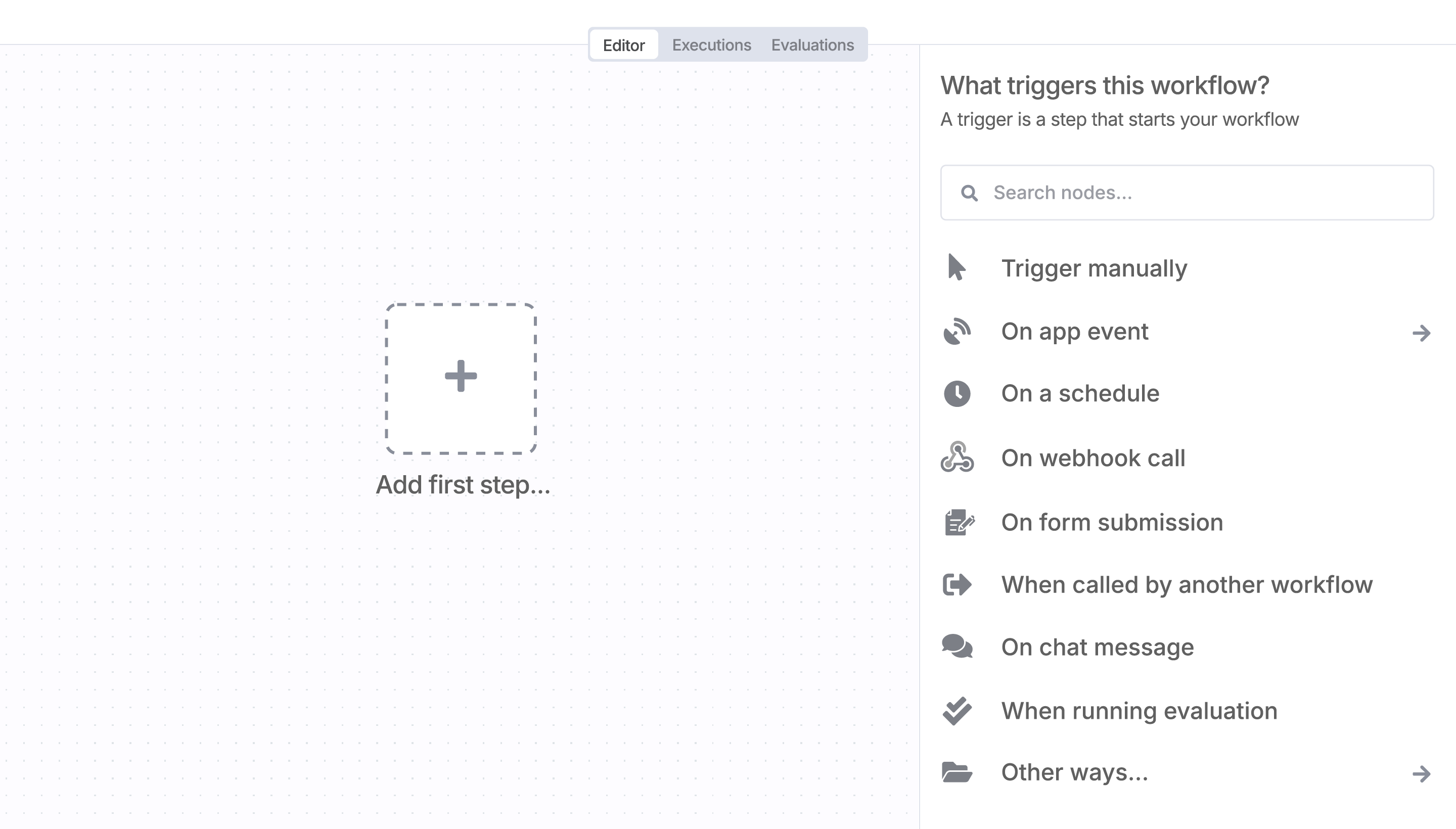
Sign in to n8n, open the editor, and click + in the top right to open the Nodes panel
Resources for WaAPI
AI agents and workflows for technical teams at


