Use n8n when

You want to build the whole automation around your agent in a visual workflow, including deterministic steps, with prebuilt integrations and the option to self-host.
See llms.txt for all machine-readable content.
Getting an agent to work doesn’t tell you how much effort it’ll take to keep it running. And if you’re comparing n8n versus Amazon Bedrock AgentCore, that responsibility will look different with each tool. n8n lets you build a workflow around your agent, while AgentCore handles the AWS infrastructure for agent code you bring.
This guide will help you determine which approach makes sense for your project and the team that has to keep it running.
You want to build the whole automation around your agent in a visual workflow, including deterministic steps, with prebuilt integrations and the option to self-host.
Your team builds agents on AWS and wants managed infrastructure for running them.
An agent might need only a runtime and access to a few tools, or it might sit halfway through a workflow that starts with a customer request and ends with an approved refund.
This table provides an at-a-glance comparison so you can see how each tool would fit into the process you’re building:
Best fit
Technical teams building business workflows that include agents
Developers building agent applications on AWS
What you build
Visual workflows connecting agents with business apps and logic
Agent code or configuration connected to managed AWS services
Primary interface
Visual canvas with JavaScript and Python for custom logic
Code, SDKs, and APIs
Tools and integrations
1,000+ prebuilt integrations, custom nodes, HTTP requests, and the Code node
Gateway exposes APIs, Lambda functions, and existing services as agent tools
Deployment
n8n Cloud or self-hosted on infrastructure you choose
Managed AWS infrastructure; feature availability varies by Region
Debugging
Step-level execution inspection and testing with saved run data
Agent traces and production telemetry in CloudWatch
Cost model
Free self-hosted Community Edition or paid execution-based plans, with unlimited steps per execution
Resource consumption and usage charges across individual services

n8n is an AI-native, source-available workflow automation platform where you connect steps on a visual canvas, adding JavaScript or Python wherever you need custom logic. An AI agent sits inside workflows alongside the steps that trigger the process, move data between apps, and handle failures.
Say an agent reviews an incoming support request. In n8n, you can build the steps that fetch the customer’s account details before the agent runs, then route its recommendation for approval afterward. The agent handles the work that calls for judgment; the workflow controls what happens around it.
In queue mode, n8n separates the main instance from the worker pool. Additionally, custom code runs inside isolated task runners. Instance logging and OpenTelemetry traces can be stored outside the n8n execution environment.
A few capabilities make that possible:
Amazon Bedrock AgentCore is a set of managed AWS services for building and running agents. You can bring an agent built with your preferred framework and model, then choose the services it needs. AWS AgentCore takes care of the underlying infrastructure, while your team defines the agent’s behavior and connects it to your application.
Its core capabilities include:
AI agent orchestration in n8n lets you divide work between specialized agents without writing the handoff logic from scratch. On the workflow canvas, the AI Agent Tool node lets a primary agent call other agents as tools. You describe what each agent handles so the primary agent knows when to delegate. For example, a research agent could gather information before handing its findings back to an agent responsible for writing the response.
You can also build and manage agents as standalone project assets via a convenient UI. Add published agents as sub-agents, describe when each should be called, and cap how many can run in parallel. You can inspect and change the delegation setup inside n8n and also re-use such agents inside workflows.
💡 n8n workflows allow for various agentic patterns, including sequential calls, parallel fan-out / fan-in and others — read the article to find which one is a best fit for your task.
AgentCore Runtime supports multi-agent workloads and the Agent-to-Agent (A2A) protocol, which lets agents discover and communicate with one another. AWS handles session isolation and the infrastructure those agents run on. Your agent application implements the protocol and determines how work moves between agents.
That gives teams room to build coordination around their preferred framework. The trade-off is where you go to understand a handoff: In n8n, you inspect the configured agents and their connections; with AgentCore, you follow the coordination logic in your application code.
n8n gives you 1,000+ prebuilt integrations to connect your agent to the apps your team already uses, with community nodes extending the catalog. If there’s no node for a service, the HTTP Request node lets you call its REST API and expose that call as an agent tool. You configure the request and credentials in the editor, so connecting an internal API doesn’t mean writing a custom tool from scratch.
n8n works with major LLMs, including OpenAI, Anthropic, and Mistral AI. You can also use local models through Ollama.
AgentCore Gateway turns APIs and Lambda functions into MCP-compatible tools and connects agents to existing MCP servers. If your team already exposes business operations through APIs, Gateway gives your agents a way to discover and call them. It also offers ready-made connections to services like Salesforce and Slack, while Code Interpreter and Browser cover tasks that need sandboxed code execution or interaction with websites.
When you self-host n8n, queue mode lets you spread workflow executions across workers. A main instance receives triggers, Redis queues the jobs, and available workers pick them up. You can add workers as demand grows. For high availability, self-hosted Enterprise also supports multi-main setup, with two distinct main processes: a follower taking over if the leader becomes unavailable. Your team operates that infrastructure.
n8n provides a change history — from the last 24 hours for all users, from the last five days for n8n Cloud Pro, and 365+ days with Enterprise. This lets you view and restore previous workflow versions.
You also decide what happens when a workflow fails. An error workflow starting with the Error Trigger can notify your team or start a recovery process.
AgentCore puts the runtime infrastructure in AWS’s hands. You can deploy code built with agent frameworks like LangGraph or CrewAI without setting up the servers yourself. Its serverless runtime scales on demand and gives each session an isolated microVM, with sessions lasting up to eight hours by default. EC2-backed AgentCore instances have sessions of up to 14 days.
Your team still maintains the agent code and its failure-handling logic, but AWS operates the environment it runs in.
You can run the Cloud n8n version or self-host it on infrastructure you control. Self-hosting lets you choose a hosting provider or keep the deployment entirely on-premises. You can also configure an isolated, air-gapped setup, provided the models and services your workflows call are available inside that environment.
That choice affects who manages your data. For self-hosted workflow data, n8n acts as neither a data controller nor a processor; your team handles retention and deletion. On n8n Cloud, n8n stores your workflows and credentials, with execution data kept according to your account’s retention settings. Self-hosting gives you more control, but connecting an external model or API still sends data to that service.
💡 When working inside air-gapped environments, consider requesting a separate Enterprise license that can be activated without the internet connection.
AgentCore runs on AWS, so your deployment choice is which AWS Region to use. Feature availability varies by Region — check that your chosen location supports every AgentCore service you need. Supporting different models and frameworks gives you flexibility in the agent code, but the managed services remain AWS dependencies.
Data control follows AWS’s shared responsibility model: AWS protects the underlying infrastructure, while you control your content and configure access to it. If data residency is a requirement, also check the processing rules for individual services — some AgentCore features use cross-region inference.
Self-hosted or air-gapped on your private network.

Running enterprise AI agents means controlling who can change the automation as well as governing agent actions. n8n’s project roles let you set permissions for workflows and credentials on all Cloud plus paid self-hosted tiers while Enterprise Self-Hosted and Cloud tiers give you fine-grained control via custom roles.
n8n also uses the Guardrails node to validate user input before the AI model processes it and to check AI output before workflows process it. For sensitive steps, teams can require human approval before agents execute certain tools.
Enterprise and Business plans support SSO,SAML, and LDAP, and Enterprise offers external secret stores and the n8n instance log streaming to your monitoring systems. That lets you keep credentials in your existing vault and review activity alongside the rest of your infrastructure.
n8n aligns its security program with SOC 2 and undergoes annual independent audits. Its Cloud infrastructure and stored platform data are hosted in the European Union. Those details can support your compliance review, alongside the controls you configure for your own workflows.
AgentCore uses AWS IAM to control access to its resources. AgentCore Identity handles authentication for agents accessing tools and services, including actions taken on a user’s behalf. It works with existing identity providers such as Okta and Microsoft Entra ID, so you can keep your current user authentication setup.
For teams already on AWS, that keeps agent permissions within a familiar security model. You still need to scope those permissions carefully: AWS recommends production IAM policies that grant access only to the resources and actions each application requires.
When a production run fails, n8n lets you bring its saved execution data back into the workflow editor. You can inspect the failed step, change the workflow, and test it against the same input instead of trying to recreate the problem. When debugging executions, n8n pins the previous run’s data to the nodes so you can start fixing right away. This feature is available on all Cloud plans and self-hosted Community, Business, and Enterprise.
An agent can also finish without an error and still make the wrong decision. To run AI agents reliably, you’ll need to evaluate the quality of those results and monitor whether fixes hold up across later runs.
Self-hosted n8n can export the workflow traces to any OpenTelemetry backend. This feature helps you monitor execution latency, track requests, and debug failures.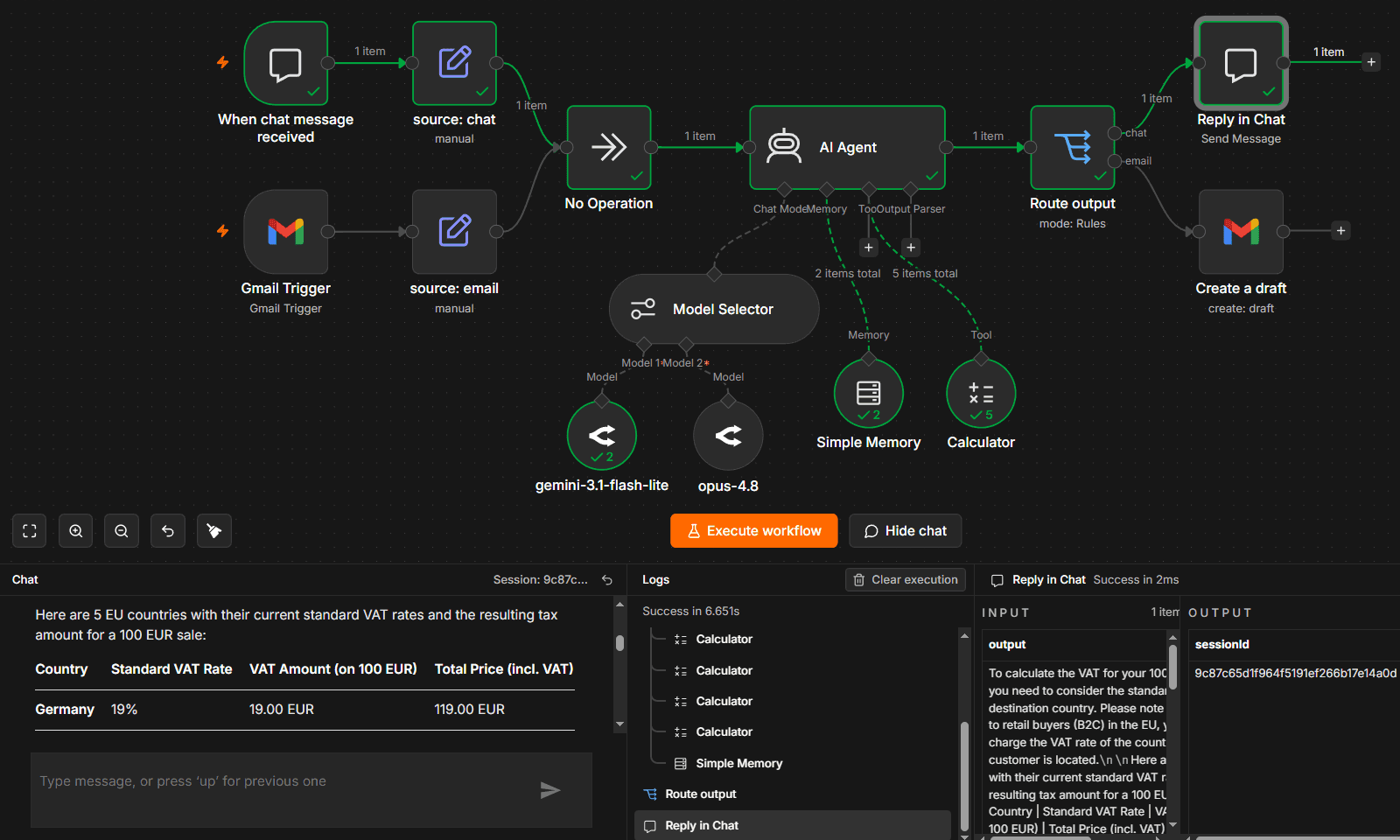 n8n offers built-in observability tools for AI Agents in the same unified canvas, as the rest of your workflow. For those using a self-hosted version, there is also the option to export traces via OpenTelemetry.
AgentCore brings production telemetry into Amazon CloudWatch, where you can investigate individual sessions and follow traces through model interactions and tool calls. It supports OpenTelemetry instrumentation, which means your team can capture what happens inside the agent code alongside the metrics AWS provides for the runtime.
This keeps agent investigations in the same place if your team already troubleshoots applications in CloudWatch. You follow the trace to locate the problem, then make and test the fix in your application code.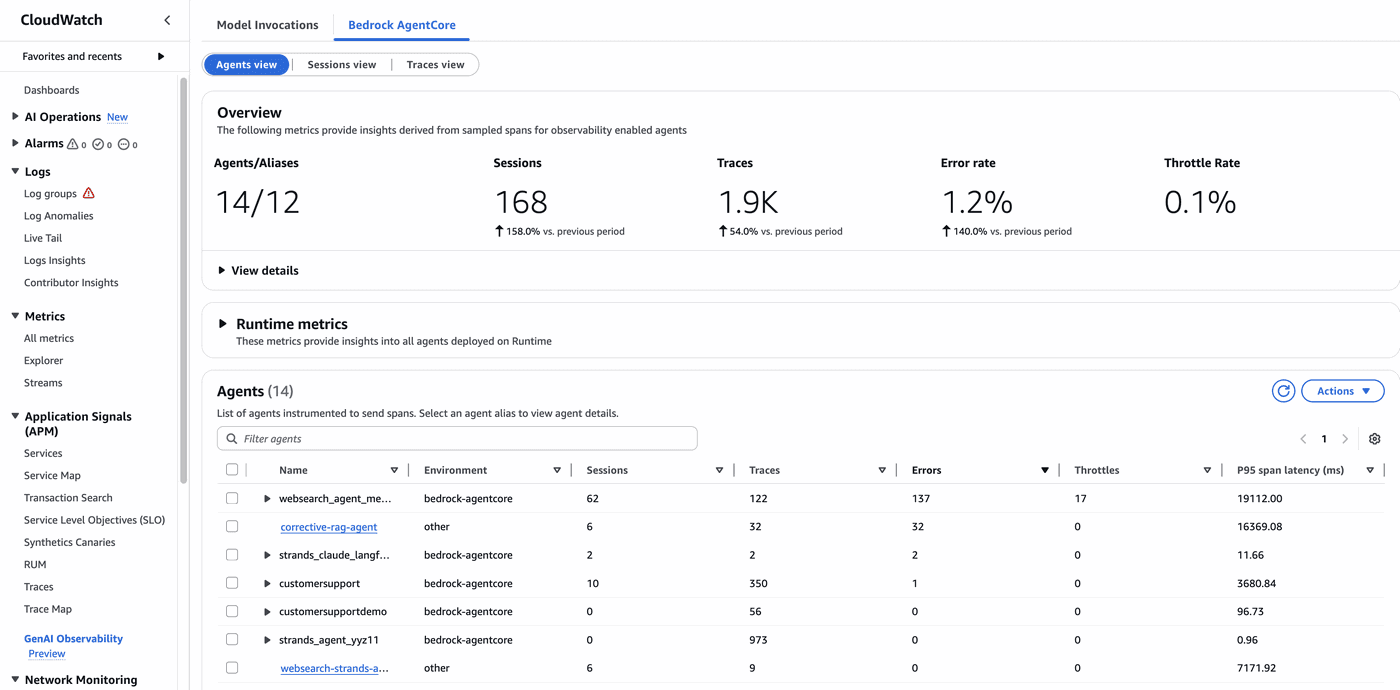 Amazon offers a separate service – CloudWatch – that aggregates and visualizes Agent traces. Source: AWS
With n8n, you can self-host the free Community Edition or pay for a plan based on how often your workflows run. n8n bills per workflow execution, which means adding steps to a workflow doesn’t increase its execution count.
Here’s an overview of n8n’s cost model:
Amazon Bedrock AgentCore’s pricing depends on which services agents use and what they consume. To estimate the bill, you’ll need to account for each component.
Here’s an overview of AgentCore’s pricing:
If you’re looking at AgentCore alternatives because you need to automate a whole business process, n8n is a strong fit. You can build the steps around your agent in the same workflow and let teammates inspect or change the process without tracing application code.
Choose n8n when:
If you’re evaluating n8n alternatives for an agent application your developers are already building on AWS, then AgentCore may be more convenient. Your team keeps working in its preferred framework while Amazon handles the runtime infrastructure and provides services you’d otherwise have to operate yourself.
Choose AgentCore when:
n8n versus Amazon Bedrock AgentCore comes down to how much of the process you need to build and who will maintain it. n8n puts the workflow around your agent in one place. AgentCore gives developers managed AWS services to support their agent applications.
Start with the work your team needs to deliver, then choose the setup you have the capacity to maintain.
You can also run them together. Run n8n on the AWS virtual server; use the built-in AWS Bedrock Chat Model which lets you keep workflows in n8n while using AWS for model inference.
For agents running on AgentCore, AWS also publishes a community node that calls the AgentCore harness from an n8n workflow. That lets n8n handle the surrounding process while AgentCore runs the agent loop.
Try n8n Cloud, or self-host the free Community Edition on your own infrastructure.


Compare n8n versus CrewAI to determine the best architecture for your team. Learn how both handle multi-agent systems, integrations, and observability.

Comparing n8n versus LangGraph for AI agent workflows? This guide examines elements like execution models, integration depth, and observability.

Find the best fit for your stack with this n8n vs Node-RED comparison. Review developer ergonomics, scaling, and AI nodes and integrations.

Compare n8n vs. LangChain across execution, agent architecture, and deployment control. Weigh strengths and weaknesses, and discover which tool to use.

I have found the holy grail of automation.

n8n’s integration with third-party services is absolutely mind-blowing. It’s like a Swiss army knife for automation.

Anything is possible with n8n. I think the cloud version is great, they are doing amazing stuff.

Thank you to the n8n community. I did the beginners course and promptly took an automation WAY beyond my skill level.
Join the teams building AI automation they can actually explain.