Use n8n when

You want a portable automation layer with self-hosting, cross-platform integrations, flexible coding, and model-agnostic AI.
See llms.txt for all machine-readable content.
Debating n8n versus Azure Logic Apps? It comes down to how much of your automation stack you want tied to one ecosystem. Azure Logic Apps offers deep Microsoft integration. n8n takes a more portable approach, with self-hosting, cross-platform integrations, and flexible AI tooling.
Here’s how they compare on the details that matter once your workflows hit production.
You want a portable automation layer with self-hosting, cross-platform integrations, flexible coding, and model-agnostic AI.
Your stack already centers on Microsoft, and you want deep Azure integration, native governance, and managed infrastructure.
Core model
Source-available workflow automation and orchestration platform
Azure-native workflow automation and integration platform
Deployment
n8n Cloud or self-hosted on your infrastructure
Consumption or Standard hosting on Azure, hybrid deployment options
Integrations
1,000+ built-in integrations, custom nodes, HTTP requests, and the Code node
1,400+ managed connectors, with deep Microsoft and Azure integration
AI
Model-agnostic AI workflows with the native Agent node and multi-agent orchestration
Agent Loop, plus Azure OpenAI and Azure AI services through the Microsoft ecosystem
Pricing model
Paid plans based on workflow executions, with unlimited steps per execution
Consumption: per trigger/action; Standard: reserved compute, plus applicable connector costs
Lock-in
Self-hostable anywhere (on-prem or any cloud), model agnostic for AI and not tied to a single vendor
Tighter coupling to Azure infrastructure, identity, and services
n8n is an AI-native, source-available development and orchestration platform for workflow automation. It lets you build workflows visually and use JavaScript or Python when you need more control. You can self-host it on your own infrastructure or use n8n Cloud, connect to APIs and apps across your stack, and build AI-powered workflows without moving orchestration into a separate codebase.
n8n has a unified visual canvas where users create both deterministic and Agentic workflows, debug errors and review past executions. That makes n8n a good fit when you want to own more of your automation layer. You’re not committing your workflows to one cloud or AI provider, and you have an escape hatch when prebuilt integrations don’t cover what you need.
Azure Logic Apps is Microsoft’s workflow automation and integration platform. You use a visual designer to connect apps, data, and services across cloud, on-premises, and hybrid environments, and there are 1,400+ prebuilt connectors and options for custom code when needed.
Azure Logic Apps share the same engine as Power Automate, but offer wider configuration options for developers. If your infrastructure already revolves around Azure and Microsoft services, Logic Apps plugs directly into that environment. You get managed scaling and tight connections to services like Azure Service Bus while still being able to reach third-party systems.
You’ll also see Logic Apps discussed as part of Azure Integration Services, Microsoft’s broader set of Azure services for connecting applications and systems. In practice, that can mean combining Logic Apps for workflow orchestration with services like API Management, Service Bus, and Event Grid instead of asking one tool to handle the entire integration architecture.
💡 Compared to MS Power Automation, Azure Logic Apps is a more developer-oriented platform. Both share the same workflow engine but are aimed at different user groups. If your team is primarily business-oriented, check out our comparison piece on n8n versus Power Automate.
You can run n8n on managed n8n Cloud or self-host it on your own infrastructure. That gives you control over where workflows and data live without forcing you to build the execution layer from scratch.
When self-hosted workloads grow, you can enable queue mode to scale horizontally. A main n8n instance adds executions to a Redis-backed queue, while workers pull jobs and run them in parallel. If you need more capacity, add more workers instead of redesigning your workflows.
Azure Logic Apps gives you two main hosting models: Consumption and Standard.
Consumption runs on Microsoft’s shared, multi-tenant infrastructure and scales automatically, leaving you with no capacity to manage. It’s the more hands-off option.
Standard runs on the single-tenant Azure Logic Apps runtime and gives you more control over the underlying environment. You get reserved compute, virtual network integration, and static outbound IP addresses, which helps if your workflows need to fit into an existing Azure networking setup.
💡 There is a third deployment option – the hybrid model. Local workflows run in the on-prem Kubernetes cluster and have direct access to the sensitive data sources without exposing them. At the same time, the control panel and standard API connectors remain in the Azure cloud.
When you self-host n8n, your workflow data and credentials stay within infrastructure you control. n8n also offers security features like basic RBAC and encrypted credential stores, and advanced governance features like SSO, audit logging, granular RBAC, and external secret store integration are available on various paid plans.
n8n also offers visibility into how workflows operate. Teams can inspect workflow logic and execution data instead of piecing together activity across separate scripts, logs, and services.
Azure Logic Apps plugs into Azure’s existing identity and governance stack. You can manage access through Microsoft Entra ID and Azure RBAC, while managed identities let workflows authenticate to supported services without storing credentials in workflow logic.
The Standard plan lets you use virtual network integration and private endpoints to keep traffic within controlled network boundaries. For organizations already governed through Azure, Logic Apps can slot into security policies and access controls already in place.
n8n gives you 1,000+ integrations for common SaaS apps, databases, developer tools, and AI services. Native nodes handle much of the repetitive work around authentication, operations, and data exchange, letting you focus on the workflow itself.
When no dedicated integration is available, an HTTP Request node lets you call REST APIs directly. You can also add JavaScript or Python when an integration needs custom logic, giving you a path beyond the prebuilt connector library. Finally, there are thousands of community nodes available (primarily on a self-hosted version, the cloud version only supports verified partner nodes).
Azure Logic Apps offers a larger managed connector catalog, with more than 1,400 connectors spanning Microsoft services, enterprise systems, SaaS apps, and other platforms. Microsoft manages the connector infrastructure, including many authentication and connectivity details.
The strongest integration depth sits inside the Microsoft ecosystem. Azure services and Microsoft 365 fit naturally into Logic Apps workflows, while custom connectors and HTTP actions cover systems outside the managed catalog.
n8n brings AI into the same canvas as the rest of your automation. You can connect LLMs, memory, vector stores, business apps, and human approval steps without building a separate orchestration layer around them.
The AI Agent node lets you build agents that use tools and take actions across connected systems. You can also build a multi-agent system where specialized agents work together. And because n8n supports multiple model providers, like OpenAI, Anthropic, and Mistral AI, you can switch models as your requirements change.
Azure Logic Apps approaches AI through Agent Loop, a built-in agent capability, and the broader Microsoft ecosystem. You can connect workflows to Azure OpenAI and AI services through connectors, then combine model calls with Azure services, Microsoft 365, and other business systems.
The trade-off is tighter coupling. AI orchestration leans on Microsoft’s Azure AI stack rather than a model-agnostic agent layer inside Logic Apps. For teams already building around Azure, the approach keeps AI workflows close to the infrastructure and governance they already use.
Build a multi-agent system with our template.

n8n gives you a visual workflow builder without boxing you into no-code. When a node can’t handle your logic, drop into the Code node and write JavaScript or Python directly on the canvas. You can also build custom nodes and add dynamic expressions when you need deeper functionality.
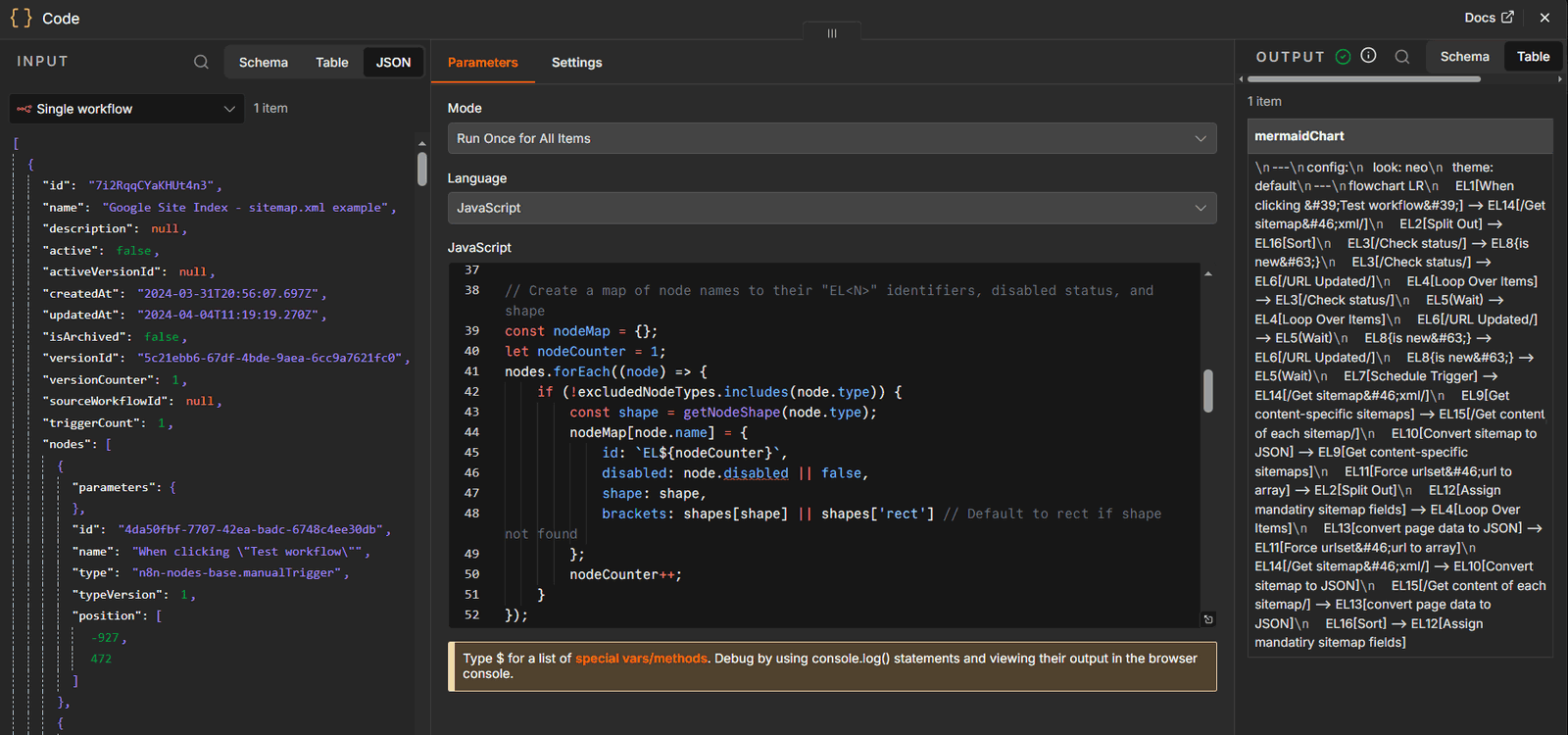 n8n’s Code Node allows users to add custom logic on the same visual canvas while observing the same input / output data payloads
On Business and Enterprise plans, n8n offers Git-based source control to support environments. This lets you link n8n instances to Git repositories, creating multiple n8n environments backed by Git branches.
Azure Logic Apps puts more of the developer experience inside Azure tooling. You can build and manage workflows with its Visual Studio Code extension, use expressions inside workflow definitions, and call Azure Functions when you need custom code.
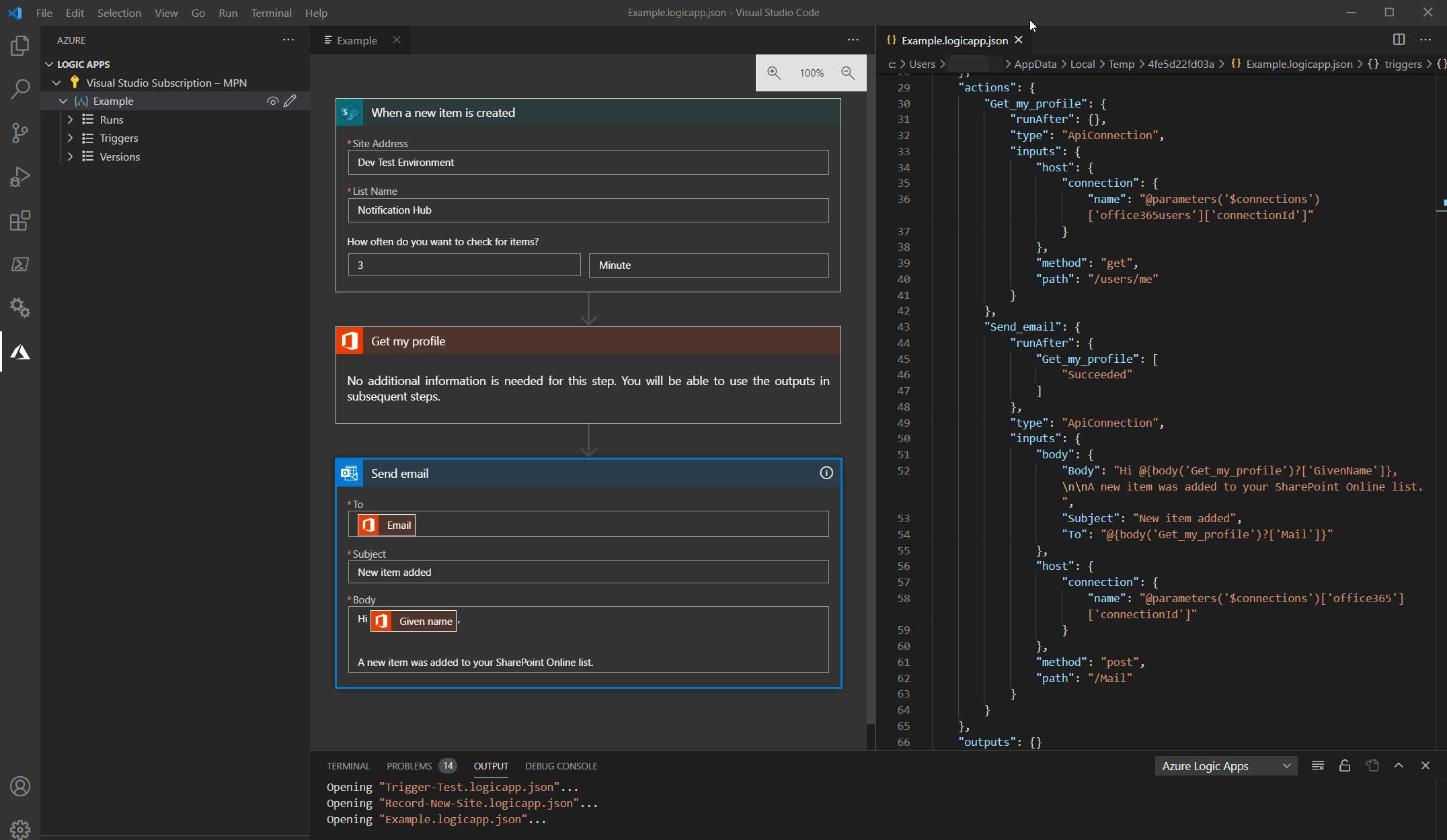 Developers can create and edit workflows as JSON files and preview the results via a VS Code extension. Source: GitHub.
n8n records every workflow run, including the path each execution took and the data moving between nodes. You can view all executions, filter runs, inspect inputs and outputs, and on Enterprise plans, stream logs to external services. n8n also helps you pinpoint where a workflow failed.
For recurring failures, error workflows let you define what happens next. You can send an alert, log the failure, or trigger another recovery process instead of handling every error manually.
n8n Insights allows you to track workflows over time, including execution and failure rate. A quick summary banner is available on all plans, while some paid plans get access to a detailed dashboard.
Azure Logic Apps gives you run history for each workflow, with status and execution details for individual actions and triggers. You can inspect inputs and outputs to trace a failed run and identify the step that caused the problem.
For broader monitoring, Logic Apps works with Azure Monitor and Application Insights. You can track workflow health, query telemetry, and configure alerts alongside the rest of your Azure environment.
See how n8n's execution history works.

n8n prices paid plans by workflow execution, not by the number of steps inside a workflow. That means a 20-step workflow counts the same as one with five steps when it runs from start to finish.
Here’s how n8n’s pricing breaks down:
Pricing for Azure Logic Apps depends on the hosting model you choose. The Consumption plan charges based on usage, while Standard charges for reserved compute capacity. Managed connector calls can add separate charges under both models.
Here’s an overview of Logic Apps’ pricing:
n8n makes more sense when you want control over where your workflows run and what they connect to. You can self-host, connect tools across clouds and vendors, bring in custom code when visual building reaches its limits, and choose the AI models and services that fit each workflow. If you’re looking for an Azure Logic Apps alternative, try n8n for flexibility without requiring the rest of the stack to follow a single vendor ecosystem.
Azure Logic Apps could be the more convenient option if Microsoft already sits at the center of your stack. If you’re looking at n8n alternatives because you want deeper Azure integration, try Logic Apps. It gives you native access to Microsoft’s identity management, networking, monitoring, and governance layers. You sacrifice some portability, though.
The decision comes down to where you want your automation layer to live. Azure Logic Apps fits naturally into a Microsoft-first architecture, with deep Azure integrations and governance built around the same ecosystem.
n8n gives you more freedom to build across ecosystems. You can self-host, connect services across your stack, add code when needed, and choose your own AI models and tools. If portability and control matter as your automation grows, pick n8n for room to evolve without locking in the rest of your stack.
Ready to build? Start with n8n Cloud or self-host n8n for full control over your deployment.
Compare n8n versus CrewAI to determine the best architecture for your team. Learn how both handle multi-agent systems, integrations, and observability.

Comparing n8n versus LangGraph for AI agent workflows? This guide examines elements like execution models, integration depth, and observability.

Find the best fit for your stack with this n8n vs Node-RED comparison. Review developer ergonomics, scaling, and AI nodes and integrations.

Compare n8n vs. LangChain across execution, agent architecture, and deployment control. Weigh strengths and weaknesses, and discover which tool to use.

I have found the holy grail of automation.

n8n’s integration with third-party services is absolutely mind-blowing. It’s like a Swiss army knife for automation.

Anything is possible with n8n. I think the cloud version is great, they are doing amazing stuff.

Thank you to the n8n community. I did the beginners course and promptly took an automation WAY beyond my skill level.
Join the teams building AI automation they can actually explain.