Use n8n when

You want to build API-based workflows and AI agents in one visual environment, with the option to run the whole platform on your own infrastructure.
See llms.txt for all machine-readable content.
If you’re weighing n8n versus SnapLogic, consider the workflow your team actually needs to ship. Is it an agent that acts on incoming requests or a pipeline moving millions of records into a warehouse?
The answer changes what you need from the platform and what you’re willing to pay for. We’ll compare both approaches while considering the ongoing work of running them.

You want to build API-based workflows and AI agents in one visual environment, with the option to run the whole platform on your own infrastructure.
You have a dedicated integration team managing high-volume data pipelines and centrally governed access to enterprise systems.
Choosing between these platforms means deciding what your team will take responsibility for after launch. Here’s how their development tools and operating models compare:
Core workload
API-based automation, event-driven workflows, and AI agents
Enterprise data pipelines and application/data orchestration
Deployment and scale
Cloud or full self-hosting; queue mode distributes workflow executions across workers
Multi-tenant cloud control plane with managed Cloudplex or self-managed Groundplex; capacity grows through Snaplex nodes
AI agents
LangChain-based Agents, with tools, and MCP connections alongside deterministic workflow steps; AI assistant for workflow building and editing
AgentCreator builds agents on pipelines; MCP connects external agents to integrations and platform tools
Integrations
1,000+ built-in integrations, direct API calls, and custom/community nodes
1,000+ integrations (called Snaps) bundled into core and premium Snap Packs, plus direct API calls
Coding
Expressions and nodes with custom JavaScript or Python for complex workflows
Expression Language, Script and PySpark Snaps, and a Java SDK for custom Snaps
Debugging
Inspect saved runs step by step and load execution data into the editor
Inspect execution metrics and Snap errors via Monitor, with SnapGPT-assisted troubleshooting
Governance
Project and role-based permissions (advanced controls depend on plan)
Central administration, project permissions, and API policies through API management
Pricing and licensing
Free source-available Community Edition; execution-based paid plans
Quote-based proprietary subscription; premium packs and add-ons affect cost
n8n is an AI-native, source-available workflow automation platform for teams that want to connect systems without writing every integration from scratch. You build workflows visually, adding JavaScript or Python when the logic needs it. The same canvas carries your workflow from testing into production, whether you run it on n8n Cloud or your own infrastructure.
AI agents fit into that environment alongside your other workflows. For people who don’t need to build an entire workflow, n8n also offers a convenient interface for creating and managing agents: Choose a model, write instructions, and add the tools and skills the agent needs.
There's also the n8n assistant, a chat-based agent that helps you design, edit, test, and troubleshoot workflows with natural language. This assistant can also build agents and execute instance tasks, like renaming and publishing workflows.
Additionally, n8n offers a unified canvas where users create and debug workflows, both manually or via a chat with an AI Assistant.
SnapLogic is an enterprise data integration platform for connecting applications and moving data across cloud and on-premises systems. As an iPaaS — a platform for building and managing integrations — it gives teams a central place to build and govern pipelines. Each pipeline connects components called Snaps that read, transform, or write data.
Pipelines execute on a runtime called a Snaplex. Teams can use a SnapLogic-managed Cloud environment or operate in their own environment. SnapLogic also offers AI capabilities, including SnapGPT for integration assistance and AgentCreator for building agents that work with enterprise systems.
With n8n Cloud, n8n manages the infrastructure. Self-hosting puts your team in charge of deployment and maintenance, including how you add capacity. For workflow scaling, self-hosting provides queue mode, which separates incoming triggers from execution: the main instance queues jobs through Redis, and workers pick up those jobs using a shared database. Adding workers lets you run more workflows concurrently.
n8n can orchestrate large data jobs, but queue mode alone doesn’t make it equivalent to a bulk ETL engine. For batch processing, you still need to design manageable batches, account for memory limits and API quotas, and test throughput against your expected workload.
SnapLogic separates its cloud control plane, where teams configure and monitor integrations, from the Snaplex data plane that runs pipelines. A Cloudplex is managed by SnapLogic; a Groundplex runs on infrastructure your team manages. You scale execution capacity by adding Snaplex nodes, with Cloudplex expansion handled through SnapLogic.
Pipelines can run on a schedule, respond to HTTP requests through Triggered Tasks, or remain running through Ultra Tasks. Low-latency Ultra Tasks queue incoming requests and route them to running pipeline instances, avoiding the startup work required for each triggered run. That gives integration teams distinct execution options for scheduled data movement and services that need to respond continuously.
In n8n, the AI Agent node sits on the same canvas as the integrations and logic around it. You can choose from AI model providers, give an agent workflows to call as tools, and delegate tasks to other agents. When deploying AI agents, your team can build the surrounding validation and error handling into that workflow.
n8n is model agnostic, so you can use common LLM providers like OpenAI, Google Gemini, and Anthropic, as well as self-hosted models through Ollama, and swap them out without rebuilding the entire workflow.
n8n also supports Model Context Protocol (MCP). The MCP Client Tool node lets agents call tools on external MCP servers, while the MCP Server Trigger exposes n8n tools to agents running elsewhere. You can connect an agent to an existing tool ecosystem or make your own workflows available through it.
n8n also has a native n8n MCP Server, which allows coding agents, like Claude and Codex, to connect securely to your n8n instance. This way, you can create, edit and troubleshoot your n8n workflows from external platforms.
SnapLogic’s agentic integration platform builds on its pipeline architecture through AgentCreator. Teams assemble agent pipelines and connect them to tool pipelines that access enterprise systems. Prompt Composer lets developers work with prompts and data together, while Agent Visualizer shows execution steps and tool-call history for troubleshooting and review.
SnapLogic MCP capabilities cover two kinds of access. Enterprise MCP exposes integration pipelines as tools that external agents can call. The SnapLogic MCP Server tools also let AI clients interact with the platform itself. Depending on the permissions configured, teams can either give agents access to business integrations or let them help operate SnapLogic.
SnapLogic also offers AI Gateway to govern agents’ access to enterprise tools and data, with policies controlling what connected agents can access.

n8n combines app nodes for specific services with core nodes for tasks like transforming data and calling APIs. Trigger nodes start workflows when an event arrives, while cluster nodes bring together components for more complex tasks, including AI agents.
If a built-in node doesn’t cover what you need, you can look for a community node or use the HTTP Request node to call the service’s API directly. Self-hosted teams can also install community packages from npm or build their own nodes, giving them several ways to connect a system without waiting for an official integration.
The core node functionality is the same in both the Community edition and the paid plans ,n8n provides access to all nodes across all plans. While Cloud users have additional Gateway credits to connect AI without having to use their own API keys, self-hosted users have move flexibility thanks to custom modes.
SnapLogic offers integration through Snaps, packaged into Snap Packs for applications and data operations. Core Snap Packs come with its base packages; premium packs are purchased separately. Teams will need to check which packs their planned pipelines need when comparing costs.
For APIs without a dedicated connector, the HTTP Client Snap lets teams make requests directly. A missing connector doesn’t automatically mean building a custom Snap: That deeper extension route is available when existing components can’t cover the requirement.
For small transformations, n8n expressions let you calculate values or pull data from earlier steps directly into a node’s fields. When the logic gets more complex, the Code node runs custom JavaScript or Python as part of the workflow, either once per item or across all incoming items.
You can move between visual configuration and code without leaving the canvas or creating a separate application. Self-hosted teams can also enable npm modules for JavaScript and configure Python dependencies through task runners. Cloud restricts those imports, so check library requirements before choosing a deployment.
SnapLogic’s Expression Language handles field mappings and transformations inside Snaps. In a Mapper Snap, for example, $email.toLowerCase() converts an incoming email address to lowercase before passing it downstream.
For more involved logic, the Script Snap runs JavaScript, Python through Jython, or Ruby through JRuby on the JVM. PySpark has a separate Snap. Teams that need a reusable custom component can build a Snap in Java with the Snap SDK and Maven, adding a development and testing toolchain beyond the pipeline editor.
n8n’s Executions list lets you open a saved run and inspect what happened at each node, including the data passed between steps and any errors. To debug a failed execution, select Debug in editor to load its data into the current workflow. You can then change the logic and test it against the input that caused the failure.
Keeping failed runs gives your team a starting point for investigating production issues without having to recreate the original request. Your workflow settings determine which executions are saved, so configure that history before you need it. 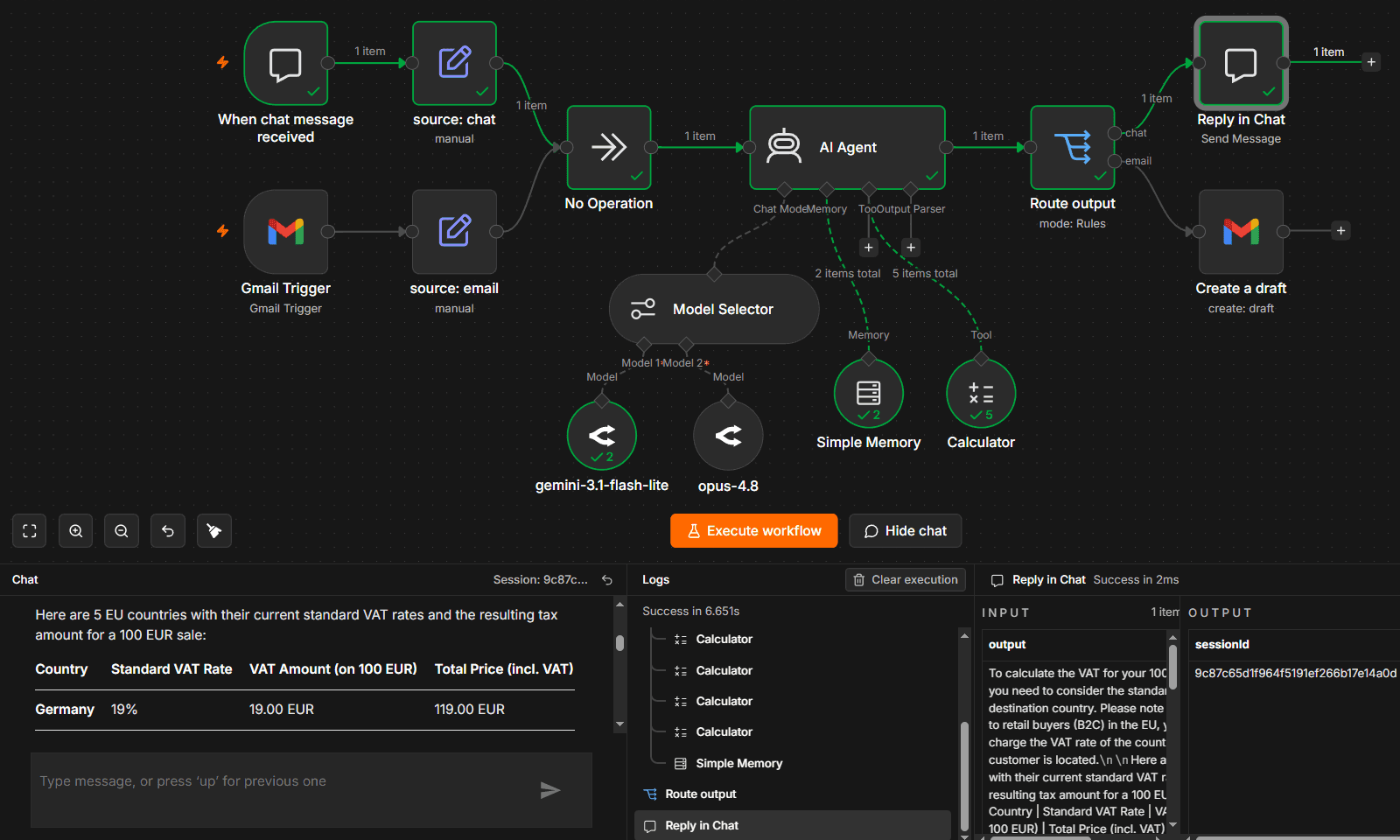 In n8n, AI Agent steps appear in the same log feed as the predefined steps.
💡 The n8n AI assistant can also help with debugging and fixing a workflow — whether it’s a misconfigured node or an unexpected change in the payload arriving from a third-party platform.
SnapLogic Monitor gives integration teams a central view of pipeline runs, with execution status, owner, duration, and document counts. You can group executions by pipeline or task, open a run’s details, and return to Designer to inspect individual Snap statistics and errors.
SnapGPT also assists with troubleshooting inside Monitor. Its failed-execution analysis reviews error messages and stack traces, then suggests likely causes and prioritized fixes. Teams can use those suggestions alongside execution details to investigate a failure.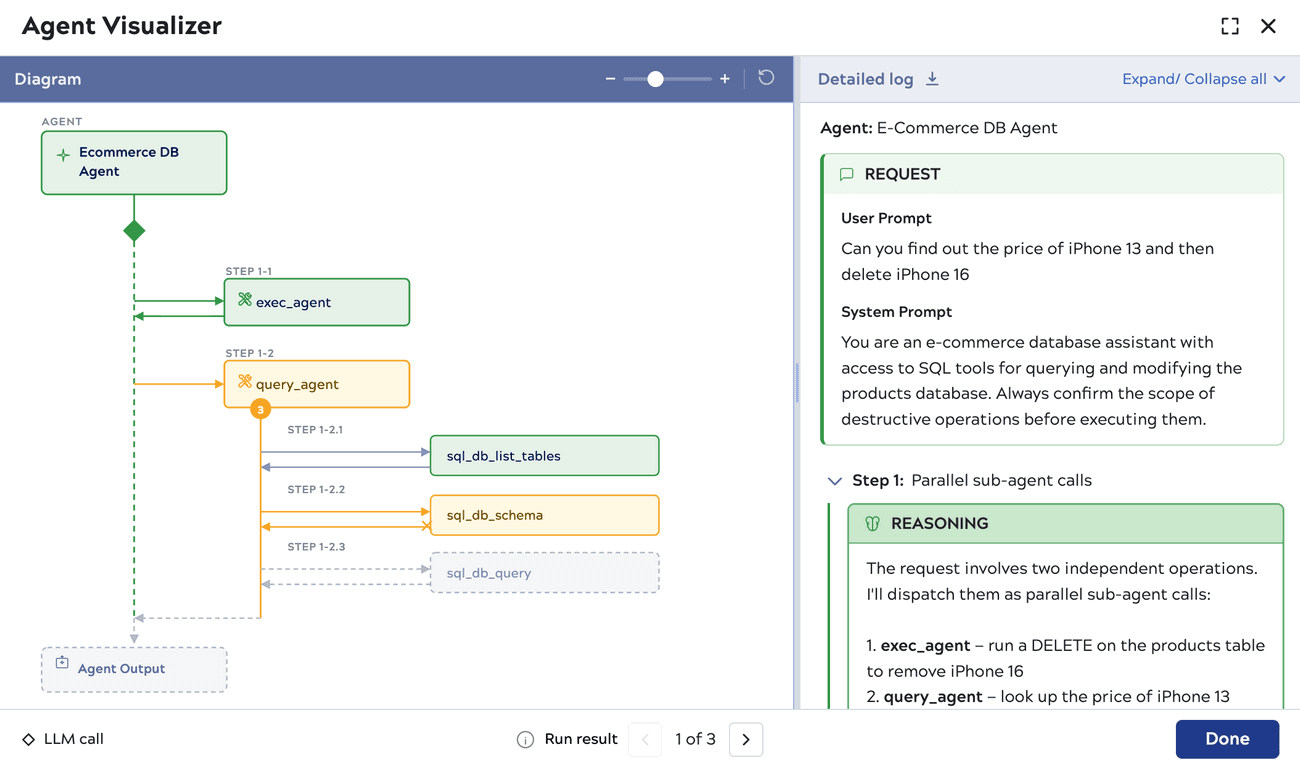 SnapLogic has a separate Agent Visualizer for debugging AI Agent steps and reasoning
n8n separates instance administration from access to individual projects. Instance roles cover owners, admins, and members, while project permissions control who can work with workflows and credentials. This is available on all n8n paid Cloud plans and self-hosted Business and Enterprise tiers.
Enterprise custom project roles let teams define even finer permissions, including separating workflow editing from publishing. SSO is unlocked for Cloud Enterprise and self-hosted Business and Enterprise.
Enterprise plans also support external secrets and log streaming, so credentials can draw from your vault and audit events can feed your logging stack. With self-hosting, your team controls the infrastructure holding workflow data and stored credentials. Data sent to connected services still follows the integrations you configure.
💡 In addition to the instance log streaming, the workflow data can be exported via OpenTelemetry traces — this feature is available on all self-hosted tiers (including the free Community edition).
SnapLogic’s Admin Manager centralizes users, groups, and roles, with project permissions controlling access to pipelines, tasks, and accounts. SAML-based SSO connects platform access to your identity provider. Its API management features add authentication and traffic policies for published services and endpoints.
Connection credentials are managed through account assets. Teams can add external secrets management, while Groundplex deployments also support Enhanced Account Encryption for greater control over credential protection. Running a Groundplex keeps pipeline processing on your infrastructure, but platform administration still uses SnapLogic’s cloud control plane.
n8n offers a free self-hosted Community Edition alongside paid Cloud and self-hosted plans. Your costs depend on the features you need and how often your workflows run:
SnapLogic pricing is quote-based, so you’ll need to scope your connector requirements and runtime capacity with its sales team:
To choose a platform, start with a workload your team expects to run in production. Consider its data volume, who’ll maintain it, and which controls your organization requires.
Consider n8n as a SnapLogic alternative when your team wants to build and operate API-based workflows or AI agents in one enterprise environment.
It’s a good choice when:
SnapLogic could be an effective n8n alternative if your organization needs an enterprise iPaaS for a centrally managed integration program.
Consider it if:
Your team’s workload and capacity to maintain it should guide the decision. Having code, integrations, and agents in one workflow environment is central to how n8n compares with other platforms. When weighing it against SnapLogic’s pipeline-centered approach, focus on how each platform fits your team’s development and operational practices.
Before committing, test a representative workload. Investigate a failed run, check what adding capacity involves, and estimate costs at the volume you expect a year from now.
Start building production workflows today, Self-host or try Cloud for free.


Compare n8n versus CrewAI to determine the best architecture for your team. Learn how both handle multi-agent systems, integrations, and observability.

Comparing n8n versus LangGraph for AI agent workflows? This guide examines elements like execution models, integration depth, and observability.

Find the best fit for your stack with this n8n vs Node-RED comparison. Review developer ergonomics, scaling, and AI nodes and integrations.

Compare n8n vs. LangChain across execution, agent architecture, and deployment control. Weigh strengths and weaknesses, and discover which tool to use.

I have found the holy grail of automation.

n8n’s integration with third-party services is absolutely mind-blowing. It’s like a Swiss army knife for automation.

Anything is possible with n8n. I think the cloud version is great, they are doing amazing stuff.

Thank you to the n8n community. I did the beginners course and promptly took an automation WAY beyond my skill level.
Join the teams building AI automation they can actually explain.