
See llms.txt for all machine-readable content.

n8n vs. Temporal: Which is Right for You?

Comparing n8n versus Temporal? They’re both production-grade orchestration platforms. But they solve different problems.

This workflow orchestration comparison digs into architecture, execution models, AI capabilities, integration depth, and operational overhead to help you determine which approach is best for you.

LightningLightning vs symbol
n8n's logo
n8n's logo

Use n8n when

You need a workflow platform that connects systems quickly and is easy to understand. n8n works well when your automations rely on APIs, SaaS tools, or AI agents that need visual observability. It also fits teams that want built-in governance and a self-hosted setup without heavy infrastructure.

Use Temporal when

You build backend workflows that run for long periods and must survive failures without losing progress. Temporal suits engineering teams that already manage complex services and need strict control over state, retries, and execution flow. It delivers strong durability but requires a deeper operational commitment.

Temporal vs. n8n: Tool overview

Here’s a quick comparison of each platform’s core capabilities:

Architecture and execution model
  • Visual workflow orchestration with event-driven execution and queue-based scaling
  • Code-first workflow orchestration with durable execution and event-sourced state recovery
AI agent capabilities
  • Native AI Agent node
  • LLM integrations
  • Memory
  • Vector stores
  • MCP support
  • Limited set of pre-built SDK integrations and examples for AI workflows
Integration depth
  • 1,000+ integrations community nodes, and generic HTTP Request node
  • Integrations implemented as custom Activities through SDKs
Observability and debugging
  • Visual execution history
  • Per-node inspection
  • Re-run from failure
  • Export traces via OpenTelemetry
  • Event history and workflow visibility through Temporal UI and external monitoring tooling
Operational overhead
  • Deploys with a relatively small infrastructure footprint and supports managed Cloud options
  • Requires operating Temporal services and supporting infrastructure in production
Licensing and cost
  • Source-available with free self-hosted Community Edition and commercial tiers
  • Open-source core with infrastructure and operational costs determined by deployment architecture

What n8n and Temporal are built for?

Here’s a breakdown of n8n and Temporal’s purpose and ideal environment.

Union.svg

What’s n8n?

The n8n platform is a source-available workflow automation and orchestration platform built for connecting applications, APIs, data sources, and AI systems. It’s designed for production environments where workflows need to integrate business systems, automate processes, and orchestrate AI-powered actions while remaining observable and maintainable. n8n combines a visual workflow canvas with code-level extensibility, allowing teams to build complex automations without assembling a custom orchestration stack.

n8n homepage hero banner

The platform relies on these core elements:

  • Workflows: Complete execution graphs initiated by triggers like webhooks, schedules, application events, or user actions
  • Nodes: Modular building blocks that handle integrations, logic, data transformations, and external API interactions
  • AI nodes: Dedicated components for agents, chat models, memory, vector stores, embeddings, and MCP-based tooling
  • Code node: Native JavaScript and Python execution for custom business logic and advanced transformations
  • Sub-workflows: Reusable workflow components that support modular, service-like workflow design

What’s Temporal?

Temporal is a durable execution platform for code-first workflow orchestration. It’s built around the idea that long-running business processes should survive failures, restarts, and deployments without losing state. Instead of defining workflows visually, developers write workflow logic directly in code using supported SDKs like Python and TypeScript.

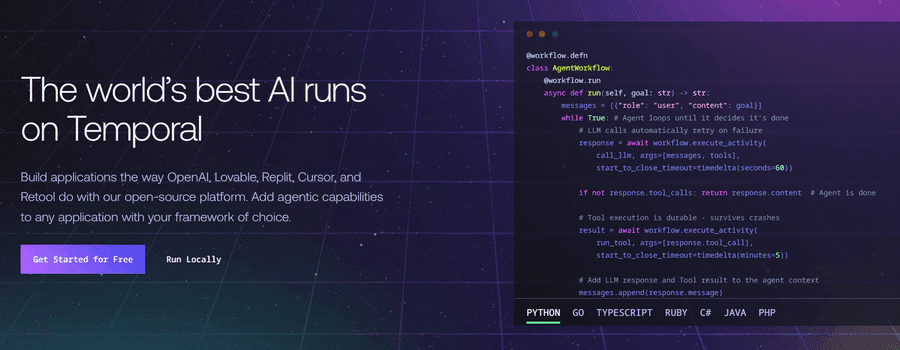
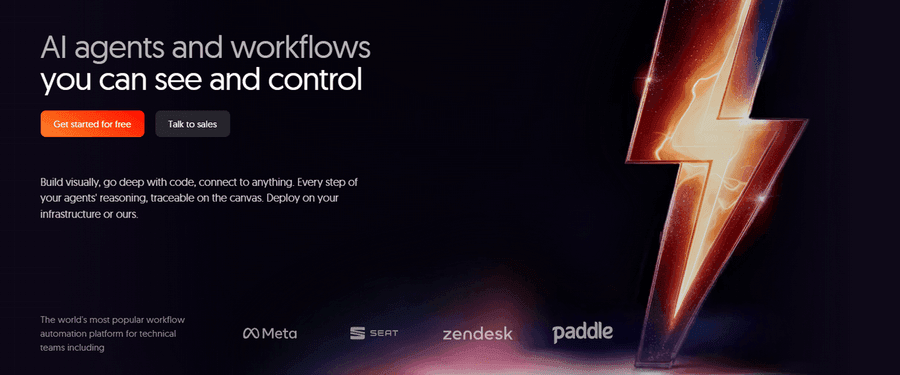
Temporal homepage hero banner

Temporal defines execution through these core components:

  • Workflows: Long-running processes written in application code and managed by the Temporal runtime
  • Activities: Individual units of work that interact with external systems, APIs, databases, or services
  • Workers: Application processes that execute workflow and activity code
  • Event history: An append-only record of workflow events used to reconstruct state after failures
  • Task queues: Distributed queues that coordinate work between the Temporal service and worker processes

Architecture and execution model

Here's how each platform approaches workflow execution and orchestration in production.

n8n

n8n organizes automation as a graph of connected nodes. A workflow typically begins with a trigger, moves through transformation and decision logic, and interacts with external systems. Because every step exists on a visual canvas, teams can inspect execution paths and understand how data moves through the workflow without tracing application code across multiple services.

n8n queue mode

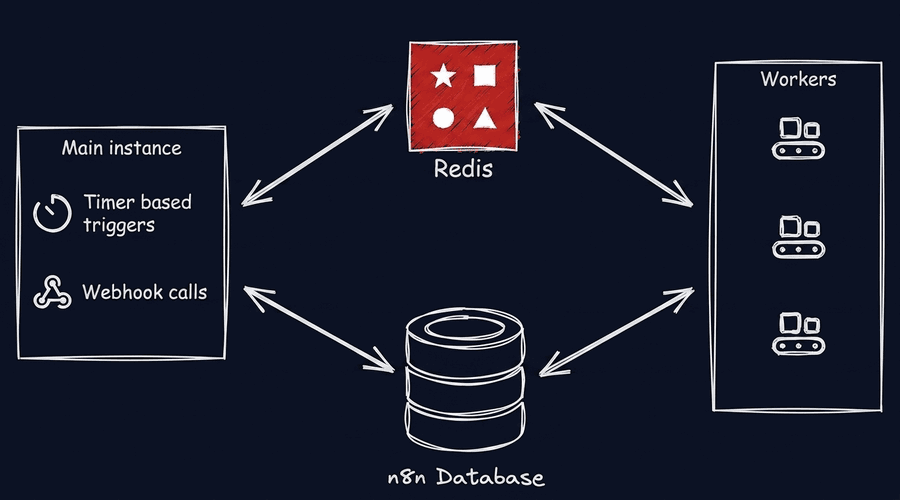
For production workloads, n8n supports vertical and horizontal scaling through queue mode. In this architecture, workflow executions are offloaded from the main application instance to dedicated worker processes using Redis-backed queues. This allows teams to increase throughput by adding workers rather than assembling a custom orchestration stack, while still maintaining a unified workflow definition and execution history.

Temporal

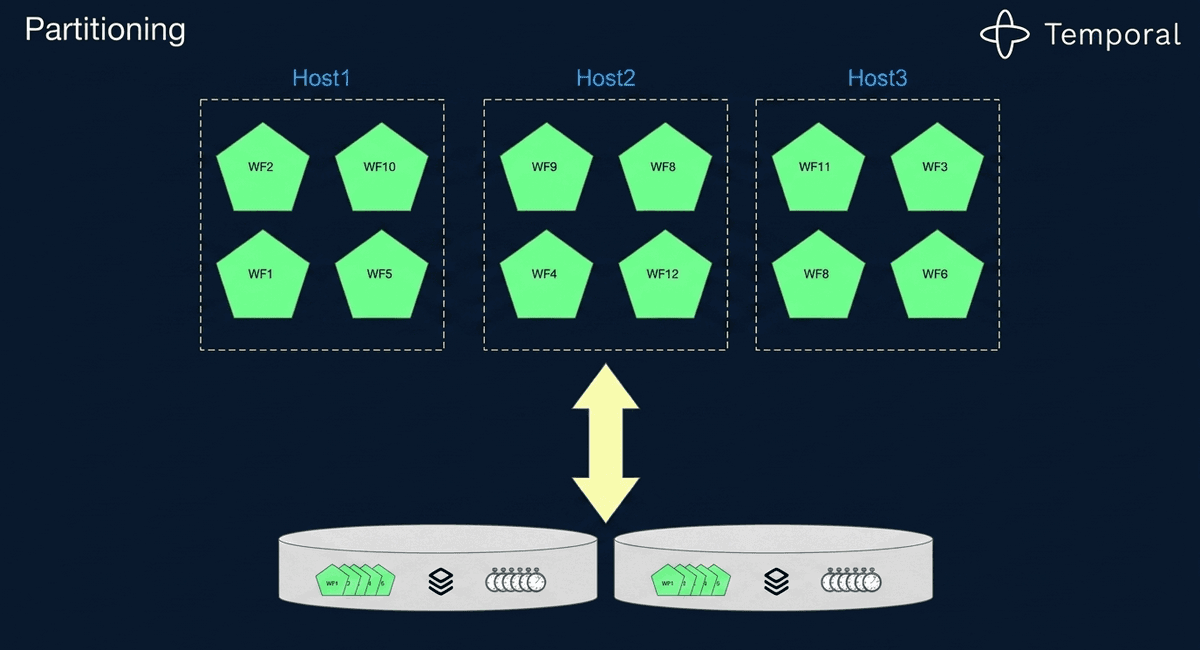
Temporal takes a code-first approach to orchestration. Developers define workflows using one of Temporal's SDKs, while the platform records workflow events in a persistent history. When a worker fails or restarts, Temporal replays that history to reconstruct workflow state and continue execution from the correct point.

Temporal diagram

Architecture is what gives the Temporal workflow engine its durability guarantees. Long-running processes continue from the point after disruptions. The tradeoff is operational complexity: Teams have to manage worker processes, task queues, and the Temporal service itself. That complexity means Temporal is best suited to organizations that already operate backend infrastructure at scale.

AI agent capabilities

Here's how each platform approaches AI orchestration and agent development.

n8n

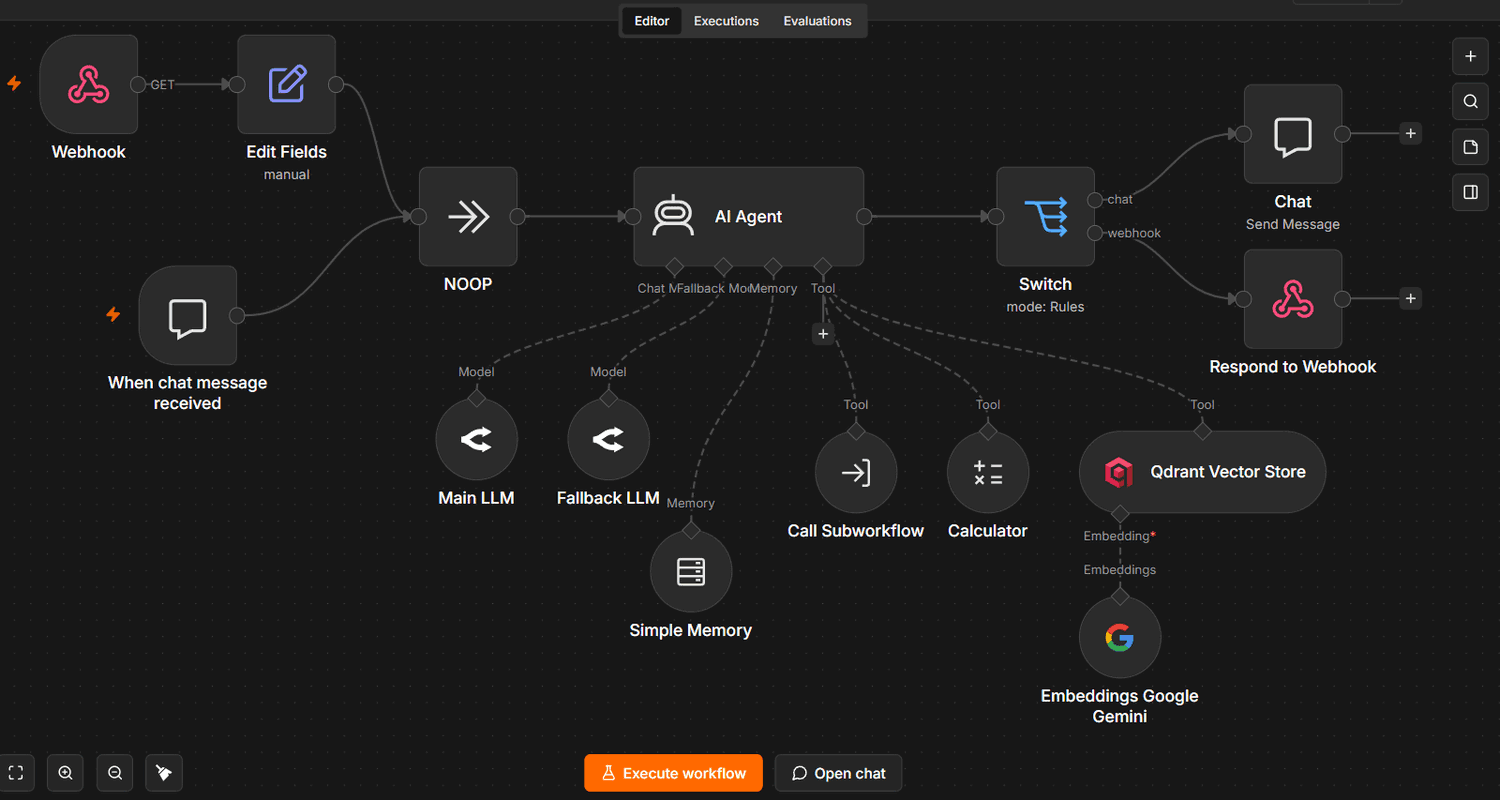
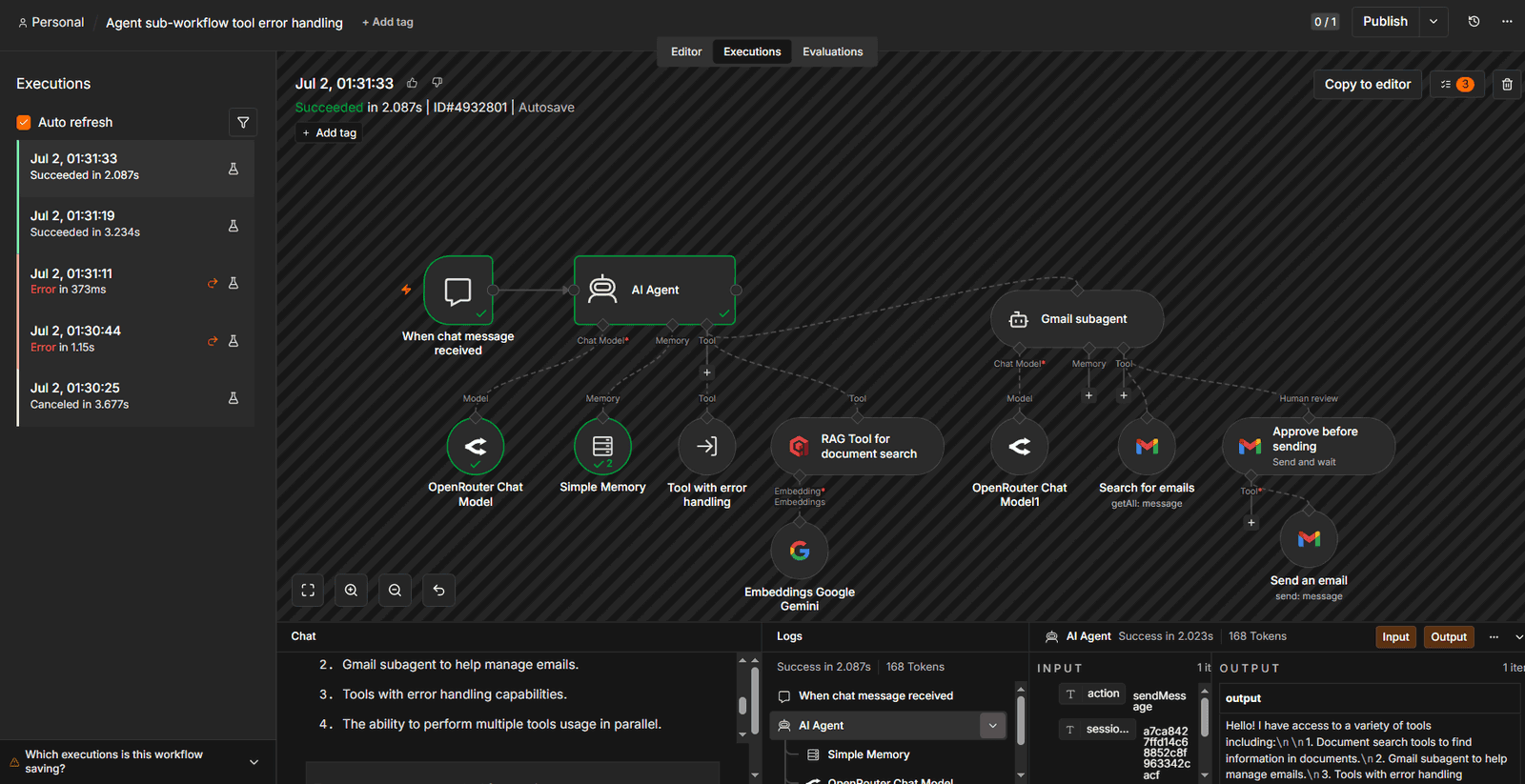
n8n treats AI as a first-class orchestration layer. AI agents, integrations, and business logic all exist on the same canvas, allowing teams to combine LLM reasoning with external systems inside a single workflow.

n8n-canvas-agent(1).png

The platform includes native AI infrastructure built on top of LangChain, including the AI Agent node, chat model integrations, memory components, vector store connectors, embeddings, and MCP support. Teams can connect models from multiple providers including OpenAI and Anthropic while managing prompts, memory, and tools visually. When custom behavior is required, the Code node provides native JavaScript and Python execution without leaving the workflow environment.

Temporal

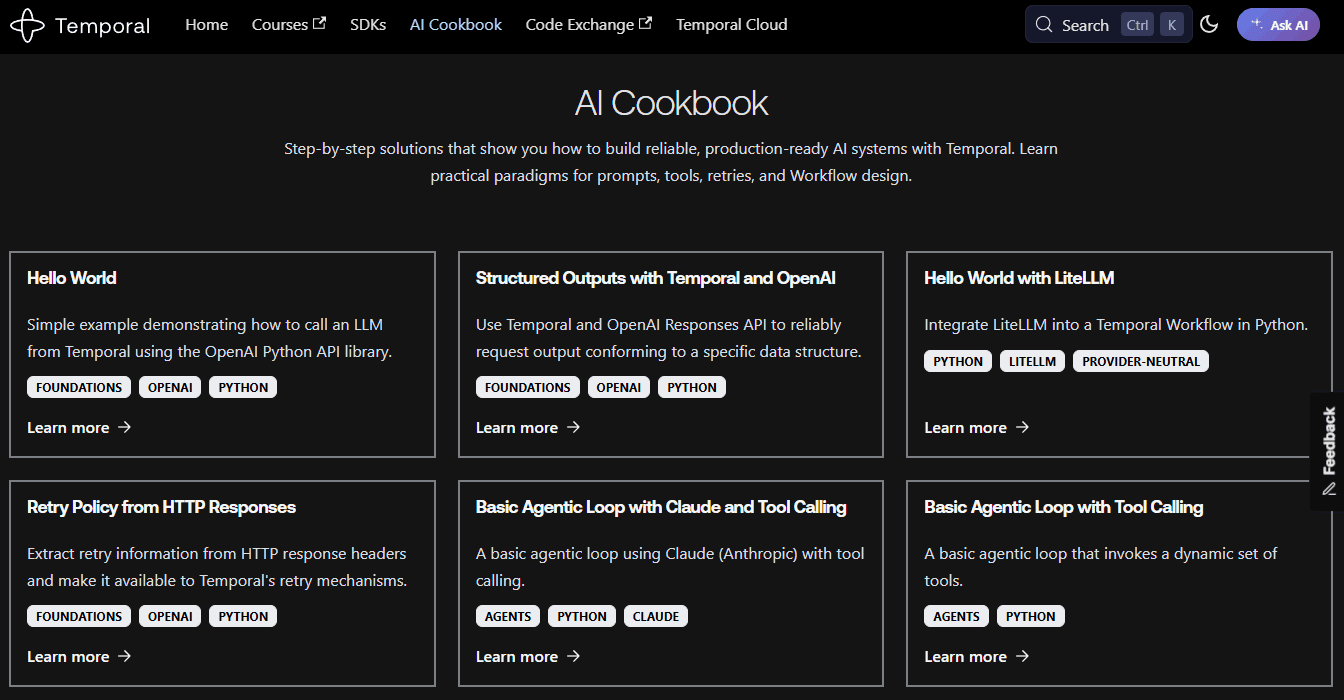
Temporal takes a different approach. The platform doesn’t include native AI agents, built-in memory system, vector store, or retrieval infrastructure — these are not part of the core service. Instead, Temporal provides durable execution primitives (Workflows, Activities, Workers) plus a limited set of pre-built SDK integrations and AI-focused examples for workflow orchestration.

temporal-ai-features.png

These recipes and integrations show how to wrap LLM calls and tool invocations as Activities so they inherit Temporal's retries, timeouts, and durability, but the AI logic itself — prompt design, tool definitions, memory, retrieval — still lives in application code written against external AI frameworks.
As AI systems grow more complex, teams typically need to add their own tooling around observability, evaluation, and prompt management. Temporal can reliably execute AI-powered workflows and offers a library of patterns for doing so, but it doesn't ship the packaged AI-specific infrastructure that n8n includes out of the box.

Integration depth

Here's how each platform connects to external applications, APIs, and services.

n8n

n8n includes more than 1,000 pre-built integrations covering SaaS apps, databases, communication tools, cloud services, and AI providers. Each integration includes built-in credential management. For unsupported services, n8n provides HTTP and GraphQL node. n8n users have created thousands of public community nodes and technical teams can extend the platform further through custom nodes and npm-based development. This approach reduces the amount of integration code teams need to write and maintain while keeping external systems accessible from the same workflow canvas.

Temporal

Temporal doesn’t provide a native integration catalog of SaaS/API connectors the way traditional automation platforms do. Instead, external systems are connected through Activities, which developers implement using Temporal's SDKs, giving teams full control over connector behavior, but also making them responsible for writing, testing, and maintaining that code.

Temporal maintains a growing list of pre-built, plugin-based SDK integrations — largely for AI and observability tooling rather than general SaaS connectivity. Some of these are built and maintained by Temporal, while others are contributed or maintained by the third-party platforms themselves.

For everything outside this integration set — CRMs, marketing tools, databases, internal APIs — teams still write custom Activities using the SDKs, and as the number of external services grows, so does the engineering effort required to manage retries, API changes, and service-specific logic.

Observability and debugging

Here's how each platform approaches workflow visibility and troubleshooting.

n8n

Observability is built directly into n8n's execution model. Every workflow run generates a visual execution history that shows how data moves through each node, including inputs, outputs, and errors. When a workflow fails, teams can inspect the exact step that caused the issue without digging through application logs or reconstructing execution paths manually.

n8n-execution history.png

n8n also supports re-running workflows from failed nodes, allowing teams to test fixes without restarting an entire execution. Because execution history, workflow logic, and debugging tools all exist within the same interface, teams get production-level visibility without building a separate observability stack.

Temporal

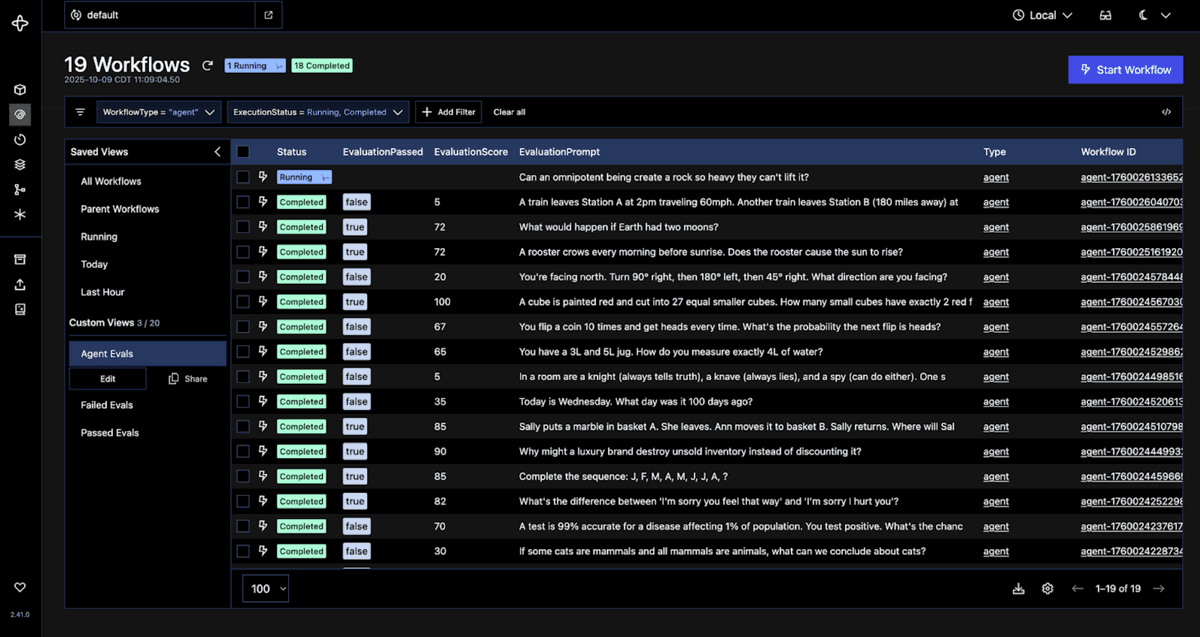
Temporal provides workflow visibility through its Web UI and event history. Teams can inspect workflow state, execution progress, and the sequence of events that occurred during a workflow's lifecycle. Because the platform records workflow history persistently, developers can trace how a workflow reached its current state and investigate failures after they occur.

temporal-web-ui (1).png

But production environments often require external monitoring and observability tooling. Metrics, distributed tracing, application performance monitoring, and infrastructure visibility generally come from tools outside the Temporal platform itself, making observability part of the broader infrastructure stack rather than a built-in workflow experience.

Failure handling and retries

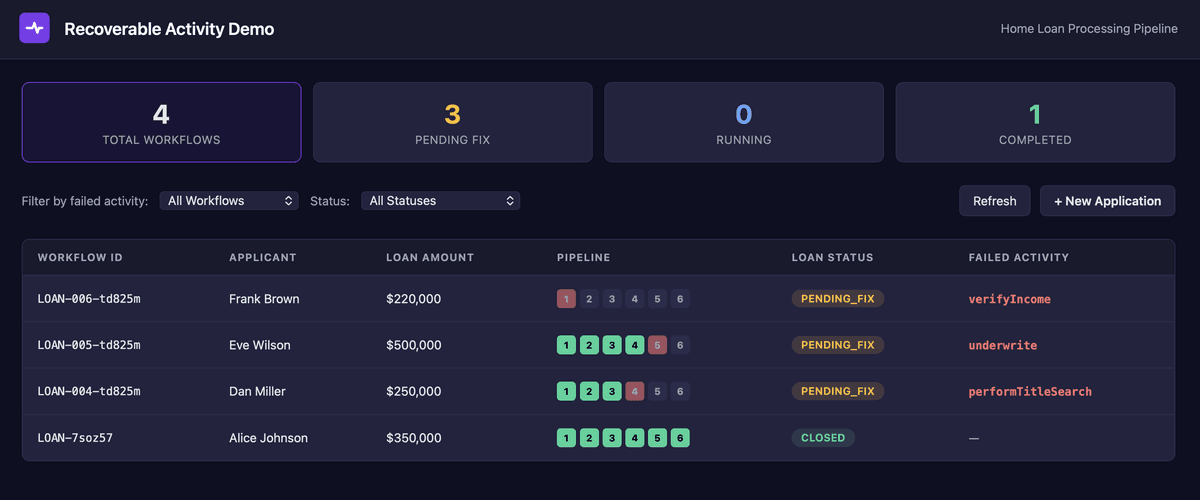
Both platforms provide mechanisms for recovering from failures and retrying operations. The difference is how much of that behavior is built into the orchestration layer versus configured inside the workflow itself.

n8n

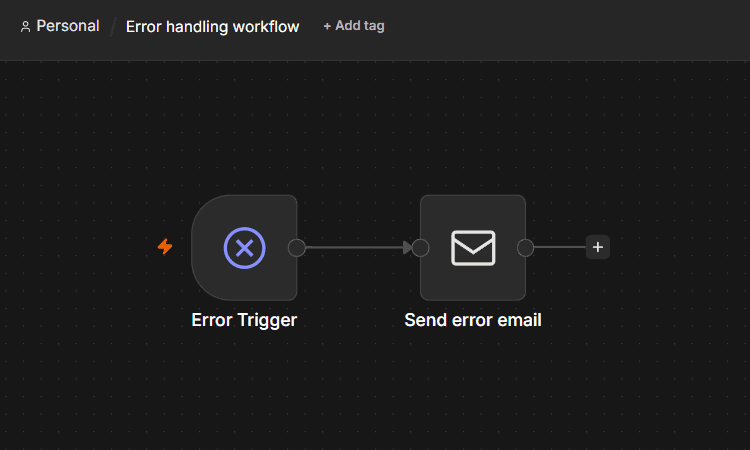
n8n offers several approaches to failure handling:

  • Error Trigger workflows: Route failures into dedicated recovery or notification workflows
  • Node-level retries: Configure retry behavior directly on individual nodes
  • Custom recovery logic: Builds fallback paths, compensating actions, and alerts directly on the canvas
  • Flexible error routing: Controls how failures propagate through a workflow

n8n-error-workflow.png

Because error handling is workflow-driven, teams can customize recovery behavior for specific use cases. But n8n doesn’t provide a global workflow retry policy or native exponential backoff across an entire workflow. Recovery strategies are typically implemented at the node or workflow level.

Temporal

Failure handling is a core part of Temporal's execution model:

  • Automatic Activity retries Retry failed operations without custom code
  • Configurable retry policies: Define retry limits, intervals, and timeout behavior
  • Native exponential backoff: Gradually increases retry intervals for transient failures
  • Scoped failure recovery: Isolates failures to individual Activities instead of restarting an entire workflow
  • State preservation: Maintains workflow progress while retries occur

temporal-error-recovery.png

This model allows long-running workflows to recover from transient service interruptions while preserving execution state. For mission-critical backend processes, these built-in durability and recovery guarantees are among Temporal's biggest advantages.

Deployment and self-hosting

Here's what teams need to operate when running each platform in production.

n8n

You can deploy n8n either as a managed cloud service or self-hosted within your own infrastructure. For production environments, n8n scales well via queue mode with workers

A typical queue-mode deployment includes:

  • Main instance: Handles the editor UI, API endpoints, and workflow orchestration
  • Worker instances: Execute workflow runs in parallel
  • Redis: Manages the execution queue
  • PostgreSQL: Stores workflow definitions, credentials, and execution metadata

This architecture allows teams to scale throughput by adding worker instances as demand grows.

Temporal

Temporal is designed as a distributed orchestration system composed of multiple services working together. Production deployments typically run on Kubernetes and require teams to manage both the Temporal platform and the supporting infrastructure around it.

A typical deployment includes:

  • Temporal services: Core platform components responsible for workflow execution and coordination
  • Worker processes: Execute workflow and Activity code
  • Persistence layer: Stores workflow state and event history
  • Task queues: Coordinate work between services and workers
  • Monitoring and operational tooling: Supports visibility, performance monitoring, and platform maintenance

This architecture provides the durability and scalability Temporal is known for, but it also increases the operational surface area teams have to own. For organizations with established platform engineering practices, that tradeoff may be worthwhile. For others, it may become too big of an infrastructure commitment.

How to choose

Choosing between these platforms comes down to a single question: How much orchestration infrastructure does your team want to own?

Choose n8n for:

  • Workflows connect multiple external APIs, databases, and SaaS applications.
  • AI agents need to share the same canvas as integrations and business logic.
  • Native AI infrastructure, including agents, memory, vector stores, and model integrations, is important.
  • Built-in observability, credential management, and execution history reduce operational overhead.
  • You need enterprise governance features like RBAC, SSO, and audit logs.
  • You need custom logic but want to run JavaScript or Python directly inside workflows through the Code node.
  • Self-hosting and scaling need to stay relatively straightforward.

Choose Temporal for:

  • Workflows run for hours, days, or longer and require strict state management.
  • Engineering teams already operate and maintain backend infrastructure.
  • Fine-grained control over retries, timeouts, and state transitions is non-negotiable.
  • Applications depend on process-level durability guarantees.
  • Workflows are primarily backend services rather than integration pipelines.
  • The organization is willing to accept additional operational complexity in exchange for stronger execution guarantees.

Build AI-powered workflows with n8n

Temporal and n8n are both built for production orchestration, but they solve different problems. n8n focuses on integrations, AI workflows, and business automation with built-in observability and governance. Temporal focuses on durable execution for long-running backend services. The right choice depends on where your team wants to spend its engineering capacity: managing orchestration infrastructure or building integrations and business logic.

If you're looking for a Temporal workflow alternative that reduces operational overhead while providing native AI and integration capabilities, n8n is often the better fit. Sign up today to try n8n Cloud for free and see how it handles real workloads.

Explore more n8n alternatives

n8n vs. LangChain

Compare n8n vs. LangChain across execution, agent architecture, and deployment control. Weigh strengths and weaknesses, and discover which tool to use.

Read more

n8n vs. Flowise

Build a better tech stack with help from this n8n versus Flowise comparison, which explores how each platform handles automation and LLM agent workflows.

Read more

n8n vs. Node-RED

Find the best fit for your stack with this n8n vs Node-RED comparison. Review developer ergonomics, scaling, and AI nodes and integrations.

Read more

n8n vs. CrewAI

Compare n8n versus CrewAI to determine the best architecture for your team. Learn how both handle multi-agent systems, integrations, and observability.

Read more