Use n8n when
AI needs to integrate with your existing tools, automate processes, and run reliably in production.
Use Dify when
your priority is building and iterating on AI applications rather than business automation.
See llms.txt for all machine-readable content.
Teams building AI products fall into two camps: those building standalone AI apps (like chatbots) and those weaving AI into existing logic.
Dify suits the first group, with a specialized environment for prompt engineering and AI app lifecycle management. n8n suits the second, acting as the orchestration layer connecting agents to your infrastructure.
Compare both in detail in our n8n vs Dify breakdown.




AI needs to integrate with your existing tools, automate processes, and run reliably in production.
your priority is building and iterating on AI applications rather than business automation.
Here’s a surface-level overview of what each tool does.
At first glance, both platforms look similar: You drag nodes onto a canvas, connect them with arrows, and watch a process come to life.
But the underlying philosophy of each tool dictates what you can actually build with them. One is designed to be the "glue" for your entire company's operations, while the other is a specialized environment for the AI experience.
Here’s how these two platforms differ.

n8n is a source-available workflow automation platform that treats AI as core infrastructure instead of just an add-on. It’s built for engineers who need AI to actually do something within their existing tech stack, enhancing every workflow with complex custom automations.
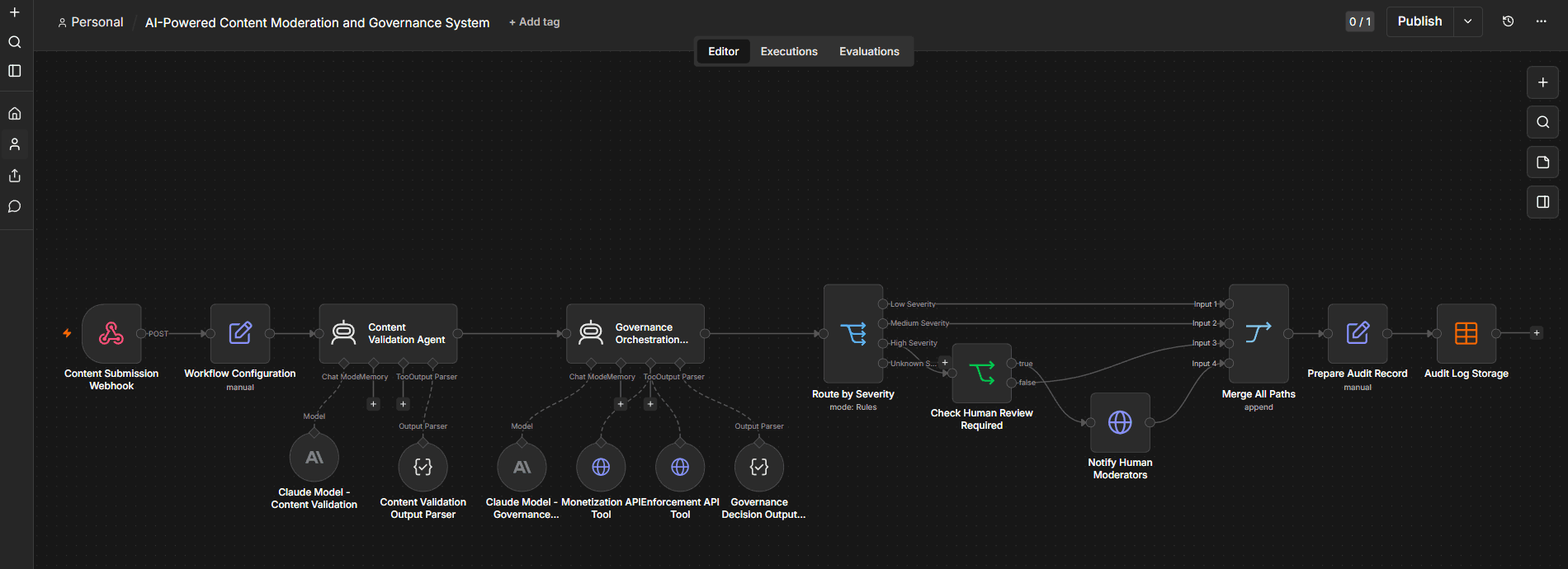
n8n allows adding AI features into the pre-defined workflow steps
n8n treats the LLM a part of the larger process. Need a system that triggers when a lead hits a database, runs a custom script to clean the data, asks an agent to categorize it, and then updates Salesforce? n8n is built for that complexity. It’s an orchestration tool first, with AI capabilities embedded directly into the canvas.
n8n also supports several client-facing features, such as forms or embeddable chat inputs, however, these features may look less mature to more specialized projects.
Dify is an open-source, AI-native application development platform focused on building, deploying, and managing LLM-powered applications. It excels in prompt engineering, built-in document chunking for RAG, and monitoring how a model performs over time.
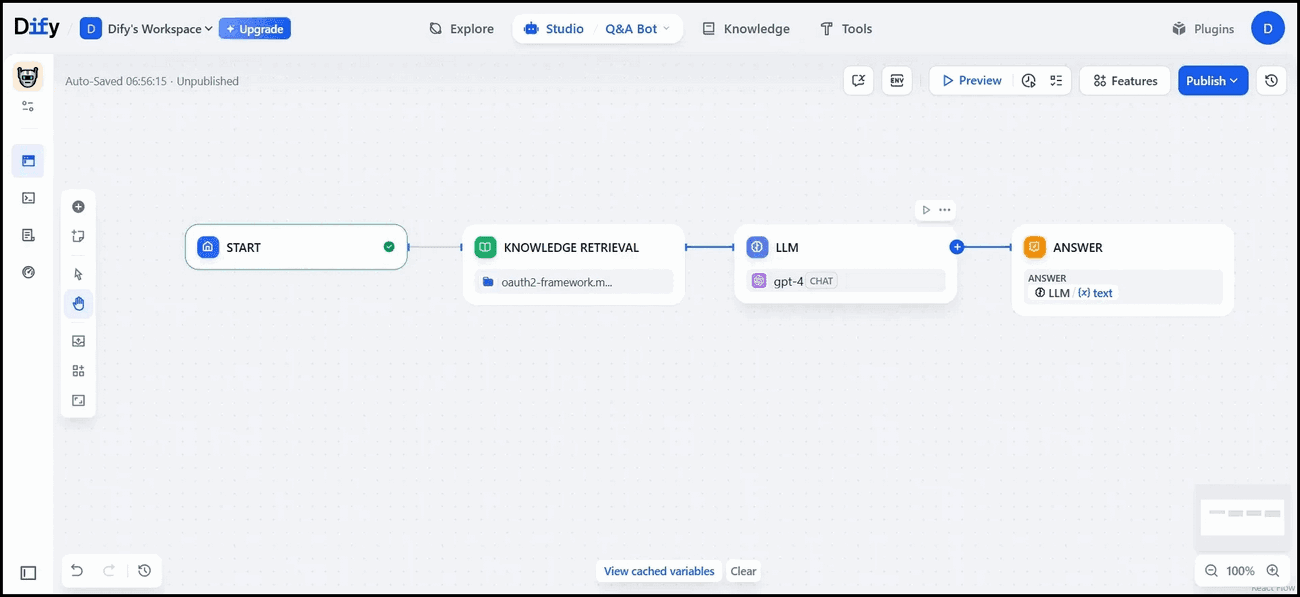
Dify is strong when it comes to building user-facing AI apps
Dify provides a polished environment to refine how an agent speaks and responds. It’s best for building a standalone chatbot or a knowledge base assistant where the chat experience is the main product.
Moving a prototype into a production environment requires a shift in focus toward infrastructure stability. Both platforms are available in cloud and via self-hosting, but they take distinct approaches to server architecture and handling high-volume traffic.
In production, n8n supports horizontal scaling through its queue mode. By distributing tasks across Redis and multiple workers , it can handle high-volume background processing without slowing down the UI. While it’s a lightweight deployment, it’s designed to scale across Docker, Kubernetes, or various cloud environments.
For teams with strict security requirements, self-hosting n8n ensures that credentials and execution logs stay entirely within your own network, supporting complex data residency needs. While self-hosting basic n8n instances is rather straightforward, deploying scalable hardened installations may require expert knowledge.
Dify’s deployment model is built on modular architecture, typically requiring around a dozen containers (including Postgres, Redis, and vector DBs) via Docker Compose. This modularity is a strength for scaling specific parts of an AI application (like the retrieval engine) independently, but it requires more maintenance from your infrastructure team.
Dify Cloud is also available if you want to focus purely on development. You skip the setup, but it’s less flexible and personalized.
Security is paramount for any tool entering a corporate environment. Because data protection is often standardized and regulated, AI features should come secondary to the results of a security audit. Governance is often the deciding factor for enterprise teams who need to ensure data residency and maintain strict administrative oversight.
n8n is better for teams that need to pass a rigorous security review. Its paid plans provide the native governance tools required by larger organizations, including role-based access control (RBAC) for managing workflow and credential permissions, as well as SAML/OIDC SSO and detailed audit trails. These features give you a clear, tamper-evident record of every change made to your production automations.
For enterprise compliance, self-hosting n8n helps you meet all data residency requirements by keeping execution logs and credentials within your own infrastructure. Put privacy first and gain control over every workflow.
Dify’s security model is built around its modified Apache 2.0 license, which allows teams to self-host the entire stack for full data control. This is a critical factor for organizations that can’t allow sensitive data to leave their network.
From a governance perspective, Dify’s enterprise features (RBAC, SSO, and audit trails) are on par with n8n’s paid offerings. However, each platform has slightly different approaches to what’s being logged, which team roles are available and how monitoring dashboards are organized.
See RBAC, SSO, and audit trails in action
An AI agent is only as effective as the tools it can access and control. Connectivity determines whether an automation remains a closed loop or functions as an integrated member of a team that interacts with the broader software stack.
n8n can act as the single orchestration layer for an entire company, offering a library of over 1,000 native integrations. Beyond these, its limitless extensibility comes from thousands community nodes and a generic HTTP Request node.
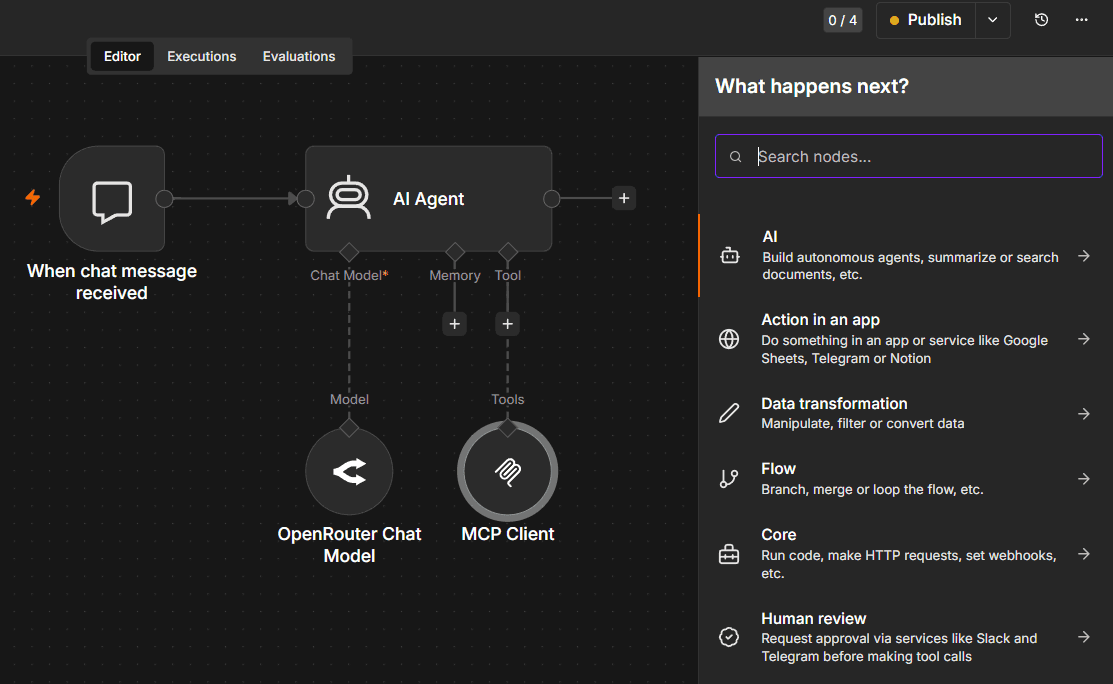
n8n has several types of actions available to all users (Community edition and paid tiers)
n8n also excels at event-driven triggers, allowing an AI workflow to kick off the moment it receives a webhook or updates a database row. This makes it possible to implement complex LLM routing, where a workflow evaluates an incoming request and sends it to different models or agents based on the complexity or department involved.
Dify takes a more curated approach to integrations, focusing heavily on the AI stack. It offers native integrations with popular LLMs (OpenAI, Anthropic, HuggingFace) and around 30+ sources, specifically vector databases like Pinecone, Qdrant Milvus, and others.
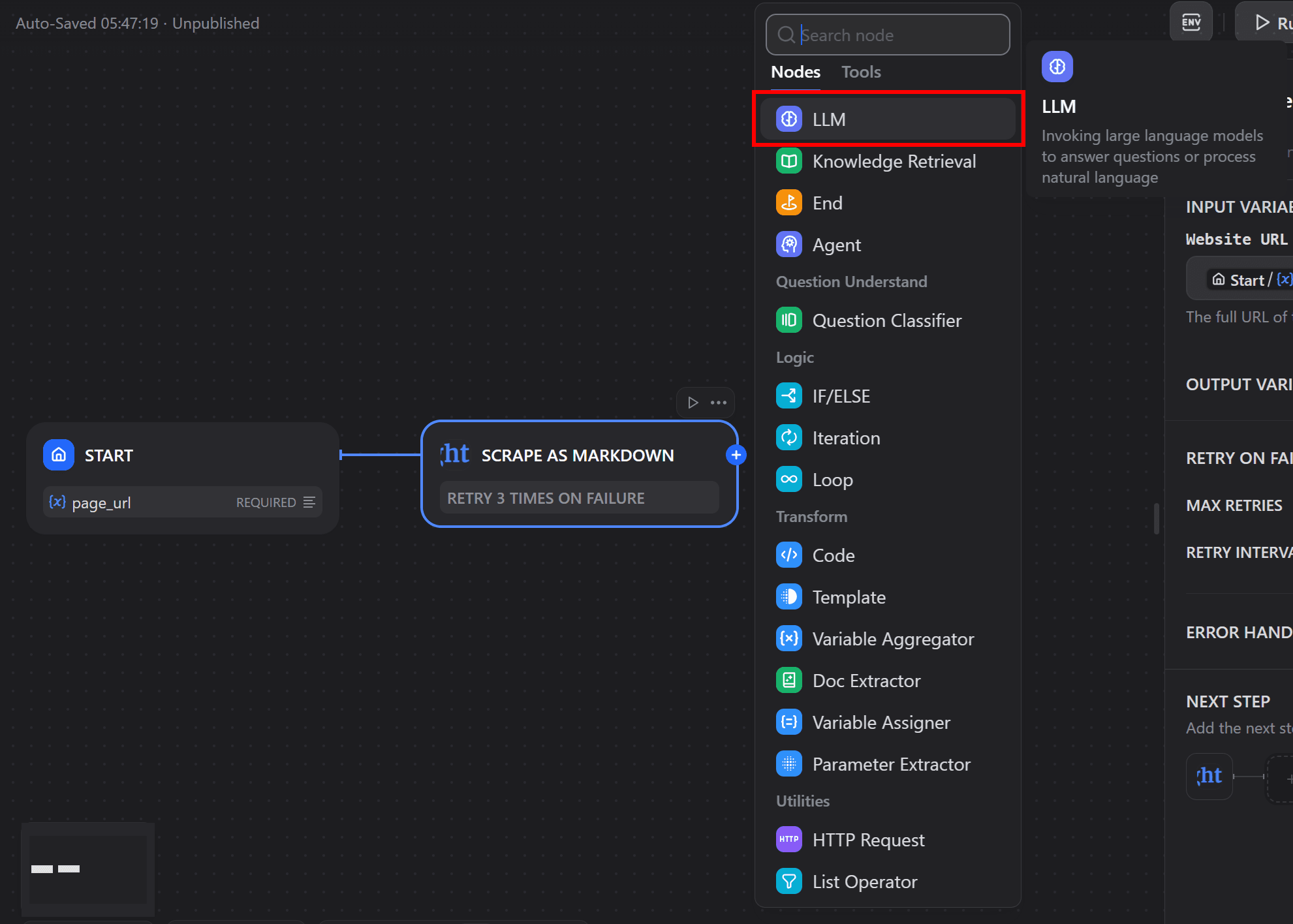
Dify centers on the AI stack built for LLM apps and RAG, not general automation.
While Dify can connect to external data sources via HTTP requests, it isn’t a general-purpose, low-code platform for automation.
Both Dify and n8n include built-in logic designed for LLMs. But the way they manage the "brain" of the operation — from conversational memory to document retrieval — follows two different approaches.
AI is a core component of the orchestration canvas. As an AI agent builder, n8n allows you to construct entire RAG pipelines, using native nodes to handle everything from document loading to vector storage. The platform includes dedicated memory management nodes that allow agents to remember past interactions across different sessions.
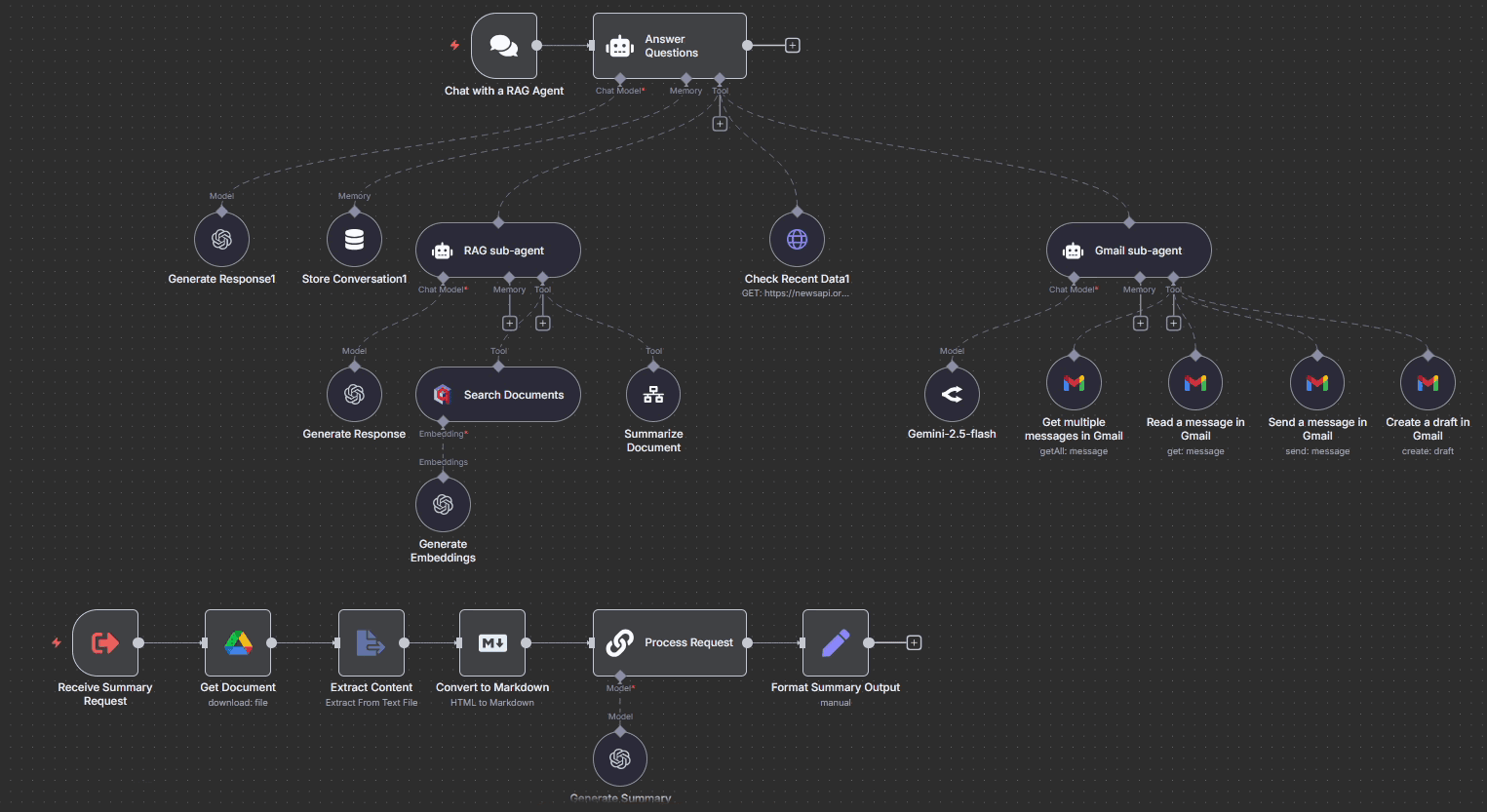
n8n allows building hierarchical multi-agent systems with agents as tools node
With native nodes and tool-calling, n8n agents can use integrations and also call sub-workflows as tools. In addition to this, n8n supports the Model Context Protocol (MCP), both as a client and as a server via MCP Trigger node. With the AI agent tool node, you can build multi-agent workflows where specialized agents handle research, logic, and final output in a coordinated flow.
Dify focuses on the specialized depth of the AI application itself. It offers multiple builder types, including Workflow, Chatflow, Chatbot, and Agent. The platform also features an interface for centralized knowledge base management, making it easier to ingest, clean, and test retrieval accuracy for RAG-heavy apps.
To create more reliable chatbots, Dify offers annotation features where you can create a curated list of high-quality answers to common questions. These pre-written replies reduce model hallucinations; however, it requires more effort to create such a pool of examples.
Once an application is ready, Dify allows you to publish AI apps as standalone URLs, enabling rapid testing and deployment without the need for a custom front end.
Visual builders eventually reach logic limits that standard nodes can’t address. At that ceiling, a platform’s value depends on how much freedom it gives developers to write custom code and build modular, reusable components.
n8n gives developers total control with native JavaScript and Python Code nodes. You can write arbitrary logic to handle data transformations and extend the platform's functionality with custom npm or pip libraries. This “code-when-you-need-it” approach, combined with sub-workflow support for modular design, allows you to build sophisticated automation architectures that are easy to maintain and reuse across your entire stack.
Dify is primarily a visual-first builder designed for speed. While it does include code nodes within its workflows for basic data preparation, the environment is more constrained than n8n. It’s an excellent setup for prompt engineers who want to focus on the model’s behavior, but developers requiring deep, low-level control over the execution logic may find Dify’s sandboxed approach restrictive for non-AI tasks.
In a production environment, reliability is all about how a system handles failure. A platform’s utility lies in the granularity of its logs and the tools available to resolve errors without disrupting the entire process.
Debugging is a core strength for n8n. Execution history shows the exact JSON at every step, and allows to re-run either a single failed node or the whole workflow. n8n also supports error handling on several levels. Error workflows are dedicated processes that trigger automatically to handle failures, send alerts, or execute fallbacks. On the workflow canvas, users can configure error branches to route the parts of the workflow or adjust the node-level setting with retries and error behavior.
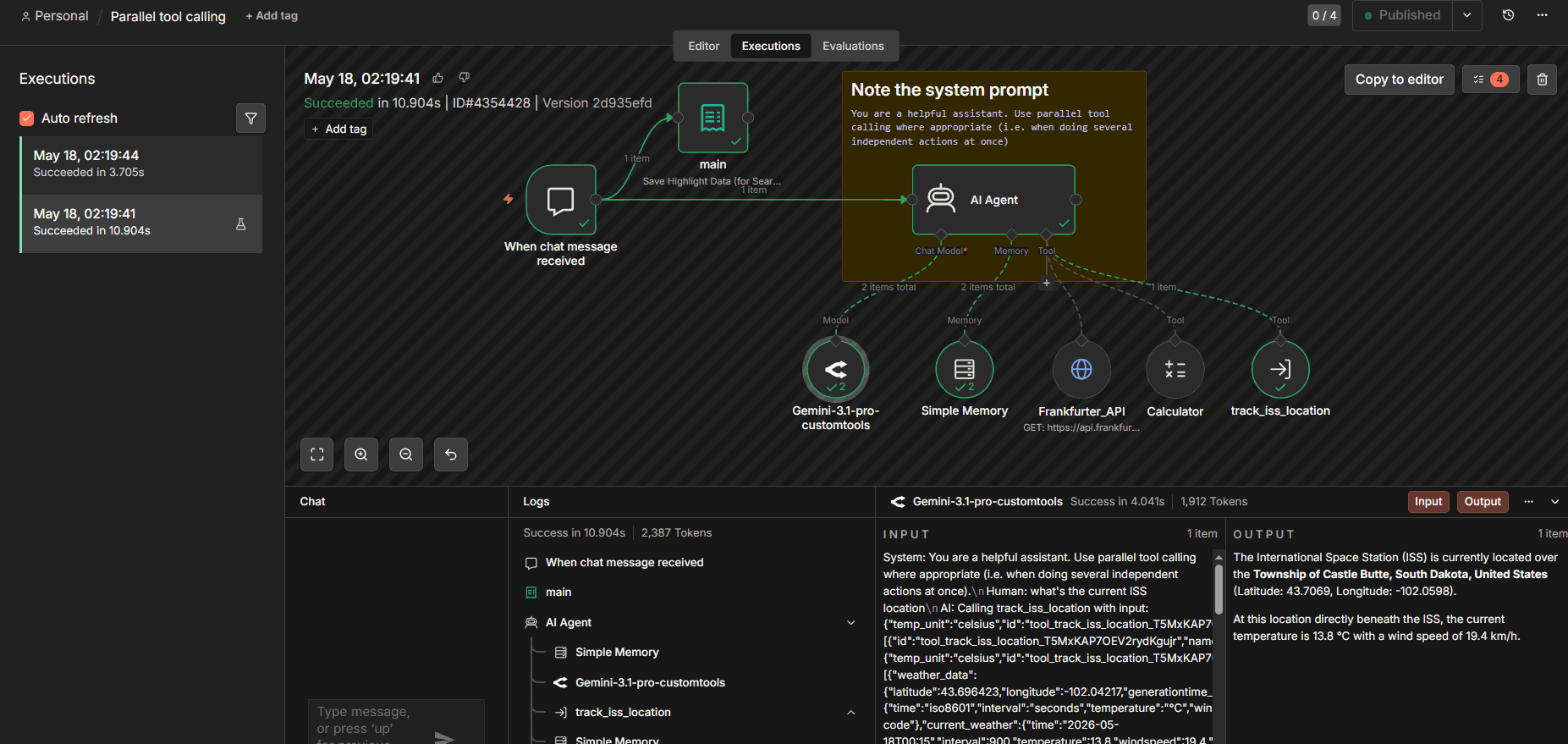
n8n offers past execution review and per-node data visibility on a single canvas
Dify’s debugging focus is squarely on AI observability. It features a more advanced dashboard for conversation monitoring and logging with annotation capabilities, allowing humans to “grade” or correct the AI’s responses over time. It also tracks token usage and latency for every run, making it easier to refine the model’s performance instead of just fixing a broken system connection.
Beyond technical features, the choice between n8n and Dify depends on the underlying licensing model and cost predictability. Understanding how expenses scale alongside execution volume is essential for maintaining a sustainable AI strategy.
n8n uses a fair-code licensing model, meaning the source code is available for inspection and self-hosting. It’s free for personal use, while enterprise features like RBAC and SSO are available on paid tiers.
n8n’s cloud pricing is execution-based, which provides a highly predictable cost structure for teams running background automations that don’t involve high-volume chat messages.
Dify operates under a modified Apache 2.0 license. While it’s free to self-host, the license includes a multi-tenant restriction, which prevents you from using the open-source version to build and sell a competing SaaS platform.
Dify’s cloud pricing follows a tier-based model focused on query volume and message count, making it a natural fit for teams scaling user-facing AI apps.
The decision usually comes down to what you’re trying to solve:
Use n8n if your AI needs to be an active part of your operations. If you’re connecting to a CRM, managing an ERP, or building complex backend logic where the AI needs to take actions across different systems, n8n is a better fit.
Use Dify if you’re building a specialized AI application where the user interaction is the priority. If your goal is to manage a complex RAG knowledge base or build a hosted chatbot that people interact with directly, Dify’s specialized tools save you time.
Many teams find that these tools actually work best together. Depending on your use-case, you can build a user-facing app in Dify and call n8n triggers for custom actions, which would take more time to implement in Dify alone. Alternatively, when you build primarily with n8n, you can call Dify chatbots via API endpoints. This way you can separate business automation logic from chatbots, allowing different users to create their solutions (automations or AI apps) in the dedicated platforms.
Deciding between Dify and n8n all comes down to where you want your center of gravity. If your goal is to ship a standalone AI product like a customer-facing chatbot or search assistant, Dify’s specialized IDE can help you polish that experience. It’s built for the prompt engineer who needs to manage RAG pipelines and evaluate model outputs in a contained, AI-first environment.
But as systems evolve and AI moves beyond chatting into taking real-world actions, the orchestration layer becomes the most critical part of the stack. n8n is best for when AI needs to live inside a production automation stack. By providing the hands an agent needs to interact with your CRM, databases, and internal APIs, n8n makes sure your AI strategy is a functional part of your business operations.
Ready to build smarter agents? Try n8n Cloud for free or deploy the self-hosted Community Edition to get started.
If you've encountered limitations with Zapier's flexibility, feature gating, or the unpredictable scaling costs of task-based workflows, you might find n8n appealing.
If you’ve run into limits with Make’s operation-based pricing, data caps, or cloud-only setup, n8n might be a more flexible and cost-efficient alternative.
Find the best fit for your stack with this n8n vs Node-RED comparison. Review developer ergonomics, scaling, and AI nodes and integrations.
Compare n8n versus CrewAI to determine the best architecture for your team. Learn how both handle multi-agent systems, integrations, and observability.