Choose n8n when

You need flexible automation across apps, APIs, data, and AI with deeper coding options and more control over how and where workflows run.
See llms.txt for all machine-readable content.
Platforms like n8n and Tines both handle workflow automation. Tines is a Security Orchestration, Automation, and Response (SOAR) tool purpose-built for IT and security workflows. n8n is a general-purpose platform that helps you connect all the apps, APIs, data, and AI systems across your business. In security contexts, n8n often sits alongside a SOAR platform like Tines.
This guide shows all the features of n8n versus Tines head-to-head.

You need flexible automation across apps, APIs, data, and AI with deeper coding options and more control over how and where workflows run.
You need to prioritize security operations, and you also want purpose-built workflows, integrations, and governance for SOC teams.
These two platforms have plenty in common, but this Tines versus n8n comparison table makes it easier to see what’s different at a glance.
Core model
General-purpose workflow and AI agent orchestration
Security and IT-focused workflow automation
Interface and logic
Visual workflows with built-in and community integrations, JavaScript, and Python
Visual Stories with low-code actions and templating for payloads and text
Target audience
Developers and technical automation teams
Security operations and IT teams
Integrations
Broad SaaS , developer, data, and AI integrations plus generic API connectivity
Security-focused integrations plus generic API connectivity
Governance and compliance
RBAC, SSO, audit logs, and external secrets management available on select plans
Security-centric access controls, audit logs, and credential management
Hosting
Managed cloud
Self-hosting for enterprise
Pricing
Free self-hosted Community Edition
Paid plans based on workflow executions
Free edition
Custom pricing for paid editions
n8n is a source-available, AI-native platform built for technical teams that need to automate across apps, APIs, data, and AI systems. Its visual canvas handles the workflow structure, while the Code node lets you drop into JavaScript and Python when the logic gets more complex. Since you can run n8n Cloud or self-host it on your own infrastructure, it’s a good fit for cross-team automation where flexibility, extensibility, and control over your data matter.
Tines is a workflow automation platform built with security teams in mind. Its workflows, called Stories, let teams automate work like alert triage, threat-intelligence enrichment, incident response, and IT operations with security-focused integrations and governance built around those workflows. That narrower focus is a strength when the automation you’re building lives primarily inside security operations.
💡 Starting in mid-2026, Tines offers 3B—a new product for general AI-assisted workflow building. The original product has been renamed to Tines Stories and continues to focus on security and IT Ops.
n8n has a user-friendly visual canvas that gives you easy access to AI-native features. The AI Agent node can reason through multi-step tasks and use external tools, while multi-agent orchestration lets a root agent delegate work to specialized agents.
n8n also supports MCP as both a client and server, RAG with vector stores, and model-agnostic LLM integrations, including OpenAI, Anthropic, Google Gemini, and self-hosted models through Ollama. The result is a broad set of AI capabilities that you can wire into the rest of your business stack while keeping the workflow visible and auditable.
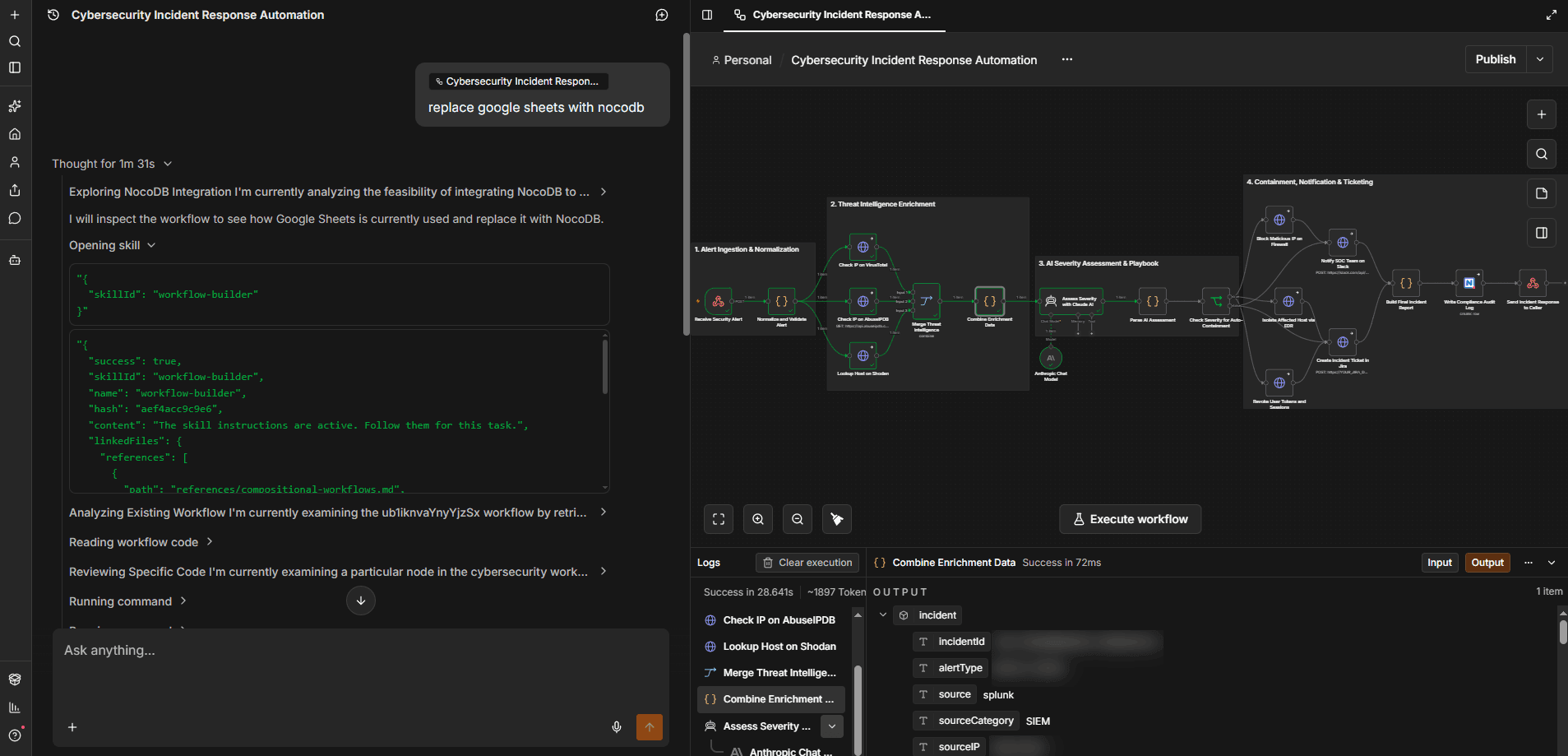 The n8n AI assistant can create and edit workflows as well as inspect workflow issues
The AI assistant from n8n helps you create, edit, and debug workflows. For business users, the new AI agent builder allows you to create agents using a simplified UI. These agents can then be later reused in workflows.
Tines brings AI into security workflows through Workbench for Storyboard, a canvas-integrated AI collaborator designed to help teams build and work with Stories. It can generate workflow steps from natural language prompts, work from runbooks, and help with tasks like transforming data or configuring actions.
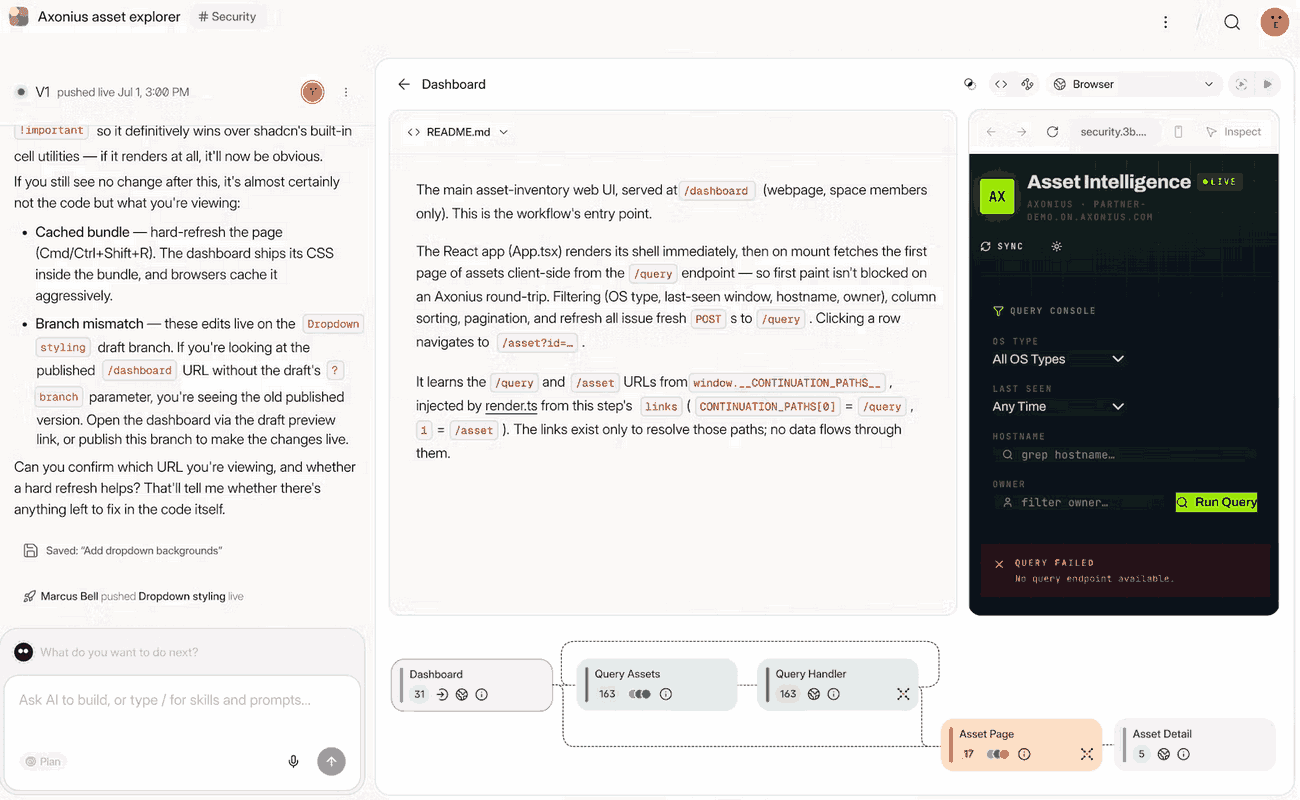 Tines 3B is a new product that features a new AI agent to build workflows.
Tines also supports AI-powered actions within Stories, including automatic mode for handling tasks without predefined prompts. The platform emphasizes applying AI within security and IT workflows instead of treating AI orchestration as a separate development environment.
Sign up for free and start exploring today.

n8n gives you a choice between managed Cloud deployment and self-hosting on your own infrastructure. Self-hosted deployments can run on a VPS, Docker, or Kubernetes, giving teams control over where their workflows and data live.
As workloads grow, queue mode distributes executions across multiple workers using Redis. You can add workers to increase processing capacity without rebuilding the workflows themselves, making horizontal scaling part of the platform instead of another orchestration layer your team has to build.
Tines takes a more managed approach to deployment. Its cloud offering provides hosted infrastructure with SLA-backed uptime so security teams don’t have to operate the platform themselves. Self-hosting is available to enterprise customers with special concerns, such as keeping sensitive data within their own environments.
Tines also handles scaling as part of its managed service, reducing the infrastructure its customers need to configure and maintain. For teams that want to keep deployment operations off their plate, Tines puts more of the infrastructure management in the hands of the platform.
n8n gives teams several layers of control over who can access workflows and what they can do with them. SSO, audit logging, external secrets management, and RBAC for assigning permissions are available at the project and workflow levels on select paid plans.
Self-hosting adds infrastructure-level control for organizations that need to keep sensitive workflow data within their own environment.
Security governance is central to Tines because the platform is designed for SOC workflows. Tines provides role-based permissions, audit logs, SSO, and controls for managing access to Stories and sensitive resources.
Tines also maintains SOC 2 Type II certification and provides security and compliance documentation through its Trust Center. Those controls support teams automating security operations where access management and traceability are requirements from the outset.
n8n connects workflows across business apps, databases, developer tools, and AI services, with 1,000+ built-in integrations and community nodes spanning areas like CRM, marketing, IT, data, and engineering. When a service doesn’t have the integration or operation you need, the HTTP Request node lets you call virtually any REST API directly.
You can also combine native nodes and API calls in the same workflow, which makes it easier to automate across systems without being limited to a platform’s prebuilt integrations.
Tines’ integration library is geared toward the security stack, with prebuilt connections for tools across areas like endpoint security, SIEM, identity, threat intelligence, and case management.
For services outside its prebuilt integrations, Tines can connect to APIs and import cURL commands to configure requests. The approach gives security teams a way to bring more tools into their Stories without requiring a dedicated integration for every service.
Developers looking for a Tines alternative specifically because they need more direct access to code might want to take a look at n8n. The Code node lets you run JavaScript or Python against incoming workflow data without leaving the canvas. That doesn’t mean replacing Tines altogether — n8n can handle code-heavy or cross-functional automation alongside security workflows that remain in Tines.
Self-hosted teams can also use external npm modules and pip packages in the Code node, while community nodes let developers extend n8n with reusable integrations and functionality. And since code and visual automation can live in the same workflow, you can use nodes for routine steps and switch to code when the logic calls for it.
As an alternative to n8n, Tines takes a purpose-built, low-code approach to security automation. Teams can transform data and add logic within Stories, while cURL imports make it easier to turn existing API requests into actions. Choosing Tines for those workflows doesn’t mean every automation needs to move there: Security-focused Stories can live in Tines alongside broader or more code-heavy workflows in n8n.
Tines’ developer tooling stays closely tied to configuring and extending the actions inside a Story rather than making general-purpose scripting a core part of the building experience.
n8n records workflow runs in execution history, where you can inspect the input, output, and execution path of individual nodes. You can filter executions by status and rerun. Dedicated error workflows let you route failures into separate handling and notification flows.
That per-node visibility makes it easier to identify exactly where and why a workflow failed without reconstructing events from separate logs. It also gives teams the transparency and control they need to trust automations running in production.
Tines handles errors within its Stories and logs actions as they move through a workflow. Teams can trace what happened at each step and use inline error handling to determine how a Story should respond when an action fails. It’s an approach that fits Tines’ security-first model, where traceability matters for both troubleshooting and maintaining an auditable record of automated actions.
n8n offers a free, cloud-based Community Edition. It prices its paid plans by workflow executions, not individual steps or users. One execution covers an entire workflow run, regardless of how many steps it contains. All paid plans include unlimited users, workflows, steps, and integrations, which means complexity doesn’t increase your bill.
Tines offers a free edition and custom-priced paid editions for its business tier. The free edition includes unlimited users, spaces, and connectors, with three live workflows and a one-time $50 AI allowance. Paid editions offer unlimited workflows, along with flexible deployment options and the ability to bring your own AI model.
So, which is better, Tines or n8n? It all depends on the architectural fit your team needs.
Choose n8n when your automation needs extend beyond security operations and across the rest of your stack. It’s well-suited to technical teams connecting business apps, APIs, databases, developer tools, and AI systems, especially when workflows call for JavaScript or Python alongside visual building.
n8n also makes sense when AI orchestration is a priority thanks to the platform’s support for multiple models, multi-agent workflows, MCP, and self-hosted models. And if infrastructure control matters, you can self-host n8n and decide where your workflows and data run.
Choose Tines when security operations are at the center of what you’re automating. Its security-focused integrations, governance features, and audit trails fit workflows like alert triage, threat-intelligence enrichment, and incident response, while its low-code approach lets security teams build without making general-purpose coding or infrastructure management central to the process.
If most of the systems you’re orchestrating live in the security stack, Tines’ purpose-built approach can keep those workflows close to the tools and controls your SOC already uses.
Ready to see where n8n fits into your stack? Try n8n Cloud for free, or self-host n8n for complete control over your deployment.

Compare n8n versus CrewAI to determine the best architecture for your team. Learn how both handle multi-agent systems, integrations, and observability.

Comparing n8n versus LangGraph for AI agent workflows? This guide examines elements like execution models, integration depth, and observability.
Find the best fit for your stack with this n8n vs Node-RED comparison. Review developer ergonomics, scaling, and AI nodes and integrations.

Compare n8n vs. LangChain across execution, agent architecture, and deployment control. Weigh strengths and weaknesses, and discover which tool to use.

I have found the holy grail of automation.

n8n’s integration with third-party services is absolutely mind-blowing. It’s like a Swiss army knife for automation.

Anything is possible with n8n. I think the cloud version is great, they are doing amazing stuff.

Thank you to the n8n community. I did the beginners course and promptly took an automation WAY beyond my skill level.
Join the teams building AI automation they can actually explain.