See llms.txt for all machine-readable content.


💥 TikTok Viral Trend Detector → Seedance 2.0 → Auto-Publish with Blotato
📄 Documentation: Notion Guide
Who is this for?
This workflow is built for content creators, social media managers, and automation enthusiasts who want to automate the entire TikTok content pipeline — from trend research to video generation to publishing — without filming anything.
It's especially powerful for anyone running faceless content channels on TikTok and Instagram, or agencies managing multiple accounts who need to produce trend-driven content at scale with zero manual effort.
⚠️ Disclaimer: This workflow uses Community Nodes (Blotato). These are only available on self-hosted n8n instances.
What problem is this workflow solving?
Creating viral TikTok content requires three separate skills: trend research, video production, and publishing strategy. Most creators spend hours doing each manually — scrolling TikTok for inspiration, editing videos in CapCut, then posting with the right hashtags at the right time.
This workflow automates the entire pipeline in one shot:
- It finds what's trending right now on TikTok in your niche
- Analyzes the viral pattern (hook structure, emotions, visual style)
- Generates an original concept inspired by that pattern (no copying)
- Creates a cinematic AI video with Seedance 2.0
- Publishes automatically to TikTok and Instagram via Blotato
What this workflow does
This automation runs in two parts:
Part 1 — Claude Cowork (Trend Intelligence)
You prompt Claude Cowork with your niche (e.g., "weird productivity hacks"). It uses Apify to scrape the top viral TikTok videos on that topic, then performs a cross-video analysis to extract the viral recipe:
- Hook pattern (the first 3 seconds)
- Narrative structure (list format, before/after, tutorial…)
- Dominant emotion (curiosity, recognition, surprise)
- Recurring visual elements
Claude then generates 3 original video concepts that apply this viral recipe — not copies, but fresh ideas built on proven patterns. The best concept is sent to the n8n webhook as a structured JSON payload.
Part 2 — n8n Automation Pipeline
Once the webhook receives the payload, n8n takes over:
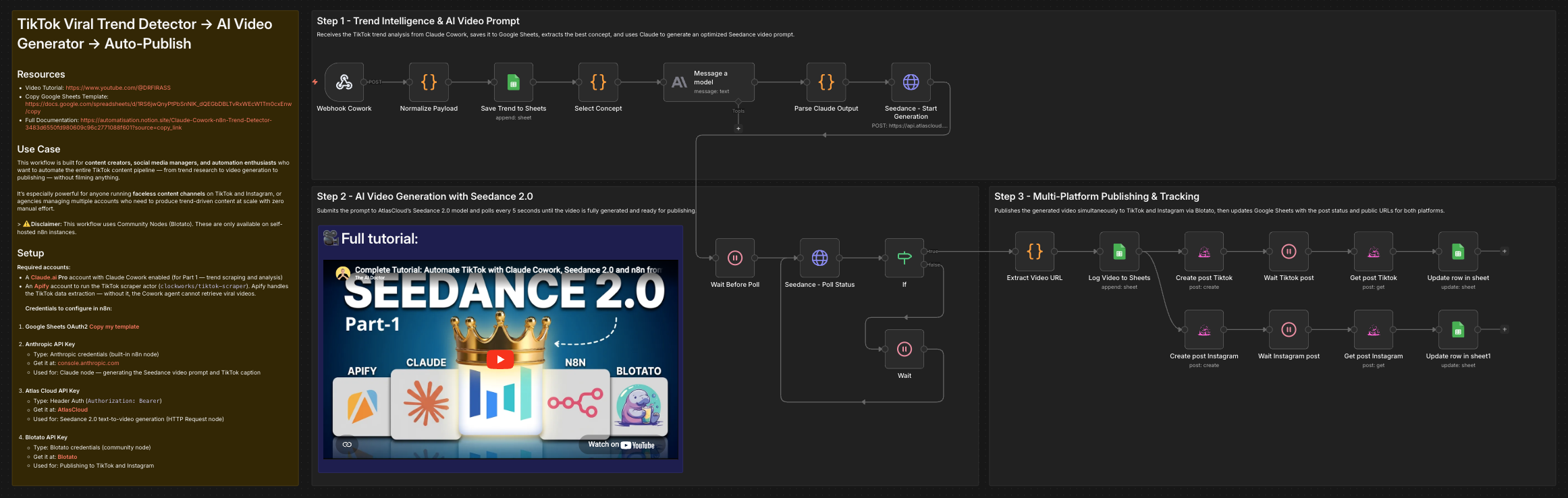
- Webhook receives the trend analysis + selected concept from Claude Cowork
- Normalize Payload handles both Postman (array format) and direct Cowork formats
- Google Sheets archives the full trend report (analyzed videos, viral pattern, all 3 concepts)
- Claude (Anthropic node) generates a Seedance-optimized video prompt: one continuous cinematic scene, no human faces, 9:16 vertical, plus a TikTok caption with hashtags
- AtlasCloud / Seedance 2.0 generates the AI video from the text prompt (720p, native audio)
- Polling loop checks every 5 seconds until the video is ready
- Google Sheets logs the production (video URL, prompt, caption, prediction ID)
- Respond Success immediately confirms to the webhook caller (before publishing, to avoid timeouts)
- Blotato publishes in parallel to TikTok and Instagram simultaneously
- Google Sheets updates the row with publication status and post URLs for both platforms
Setup
Required accounts:
- A Claude.ai Pro account with Claude Cowork enabled (for Part 1 — trend scraping and analysis)
- An Apify account to run the TikTok scraper actor (
clockworks/tiktok-scraper). Apify handles the TikTok data extraction — without it, the Cowork agent cannot retrieve viral videos.
Credentials to configure in n8n:
-
Google Sheets OAuth2
- Type: OAuth2
- Used for: Saving trend reports and production logs
- Connect via n8n's built-in Google Sheets credentials
-
Anthropic API Key
- Type: Anthropic credentials (built-in n8n node)
- Get it at: console.anthropic.com
- Used for: Claude node — generating the Seedance video prompt and TikTok caption
-
Atlas Cloud API Key
- Type: Header Auth (
Authorization: Bearer) - Get it at: AtlasCloud
- Used for: Seedance 2.0 text-to-video generation (HTTP Request node)
- Type: Header Auth (
-
Blotato API Key
- Type: Blotato credentials (community node)
- Get it at: Blotato
- Used for: Publishing to TikTok and Instagram
- Install the community node:
npm install @blotato/n8n-nodes-blotato
How to customize this workflow to your needs
Change the niche:
Edit the Claude Cowork prompt to target a different niche: cooking hacks, finance tips, fitness routines, language learning — any niche with active TikTok communities works.
Change the video model:
The workflow uses bytedance/seedance-2.0/text-to-video via AtlasCloud. You can swap it for seedance-2.0-fast (cheaper, 4s max) or any other AtlasCloud-supported model by editing the Seedance - Start Generation HTTP Request node body.
Add more platforms:
Since Blotato supports 9 platforms (YouTube Shorts, LinkedIn, Pinterest, Threads, etc.), duplicate the Create post node and change the platform parameter to publish everywhere at once.
Change publishing schedule:
Replace the Webhook trigger with a Schedule Trigger to run the full pipeline automatically every day at a set time.
Select a different concept:
Claude Cowork generates 3 video concepts per run. Change selected_concept_id in the JSON payload (1, 2, or 3) to test different concepts on the same trend data.
Adjust video duration:
The workflow currently uses duration: -1 (auto) for the Seedance node. Set it to 4 for faster/cheaper generation, or test higher values depending on your AtlasCloud plan limits.
🎥 Full tutorial: Watch on YouTube
👋 Need help or want to customize this?
📩 Contact: LinkedIn
📺 YouTube: @DRFIRASS
🚀 Workshops: n8n courses (in French)
Need help customizing?
Contact me for consulting and support : Linkedin / Youtube / 🚀 n8n courses (in French)