See llms.txt for all machine-readable content.


What this workflow does
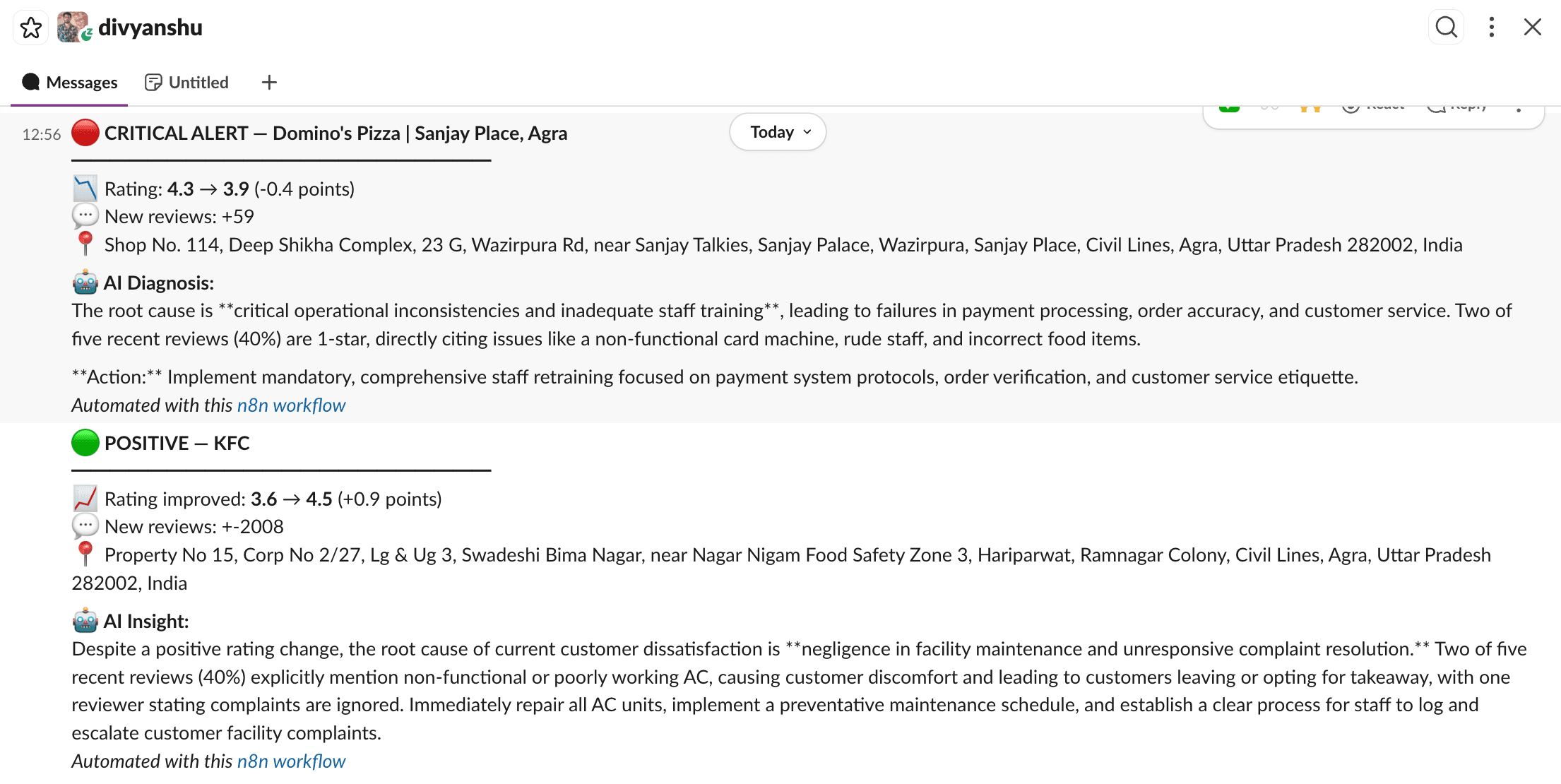
Automatically monitors restaurant ratings on Google Places daily, detects meaningful changes, uses Google Gemini AI to diagnose the root cause from real customer reviews, and delivers smart alerts to Slack — categorised as 🔴 Critical, 🟡 Watch, or 🟢 Positive.
Why it's unique
Most monitoring tools just tell you that a rating changed. RestaurantPulse tells you why — by reading actual customer reviews through AI and suggesting one concrete action to fix it.
How it works
- Reads restaurant list from Google Sheets (add any restaurant via place_id)
- Fetches live rating + reviews from Google Places API
- Compares against last known state stored in Google Sheets
- AI diagnoses root cause if change detected
- Routes alert to Slack by severity level
- Logs all alerts to Google Sheets for history
Prerequisites
- Google Places API key (console.cloud.google.com)
- Google Sheets OAuth2 credentials
- Google Gemini API key
- Slack OAuth2 credentials
Google Sheets Setup
Create a spreadsheet with two sheets:
Sheet 1 — restaurant_list
Columns: place_id | name | last_rating | last_review_count | last_checked
Sheet 2 — alert_history
Columns: timestamp | restaurant_name | old_rating | new_rating | rating_diff | alert_level | ai_diagnosis | place_id
How to find place_id
Call this URL in your browser:
https://maps.googleapis.com/maps/api/place/findplacefromtext/json?input=RESTAURANT+NAME+CITY&inputtype=textquery&fields=place_id,name&key=YOUR_KEY
Alert Levels
🔴 Critical — rating dropped 0.3+ points
🟡 Watch — rating dropped 0.1+ points OR 50+ new reviews
🟢 Positive — rating improved 0.2+ points
Sample Output