Back to Templates
See llms.txt for all machine-readable content.


Quick overview
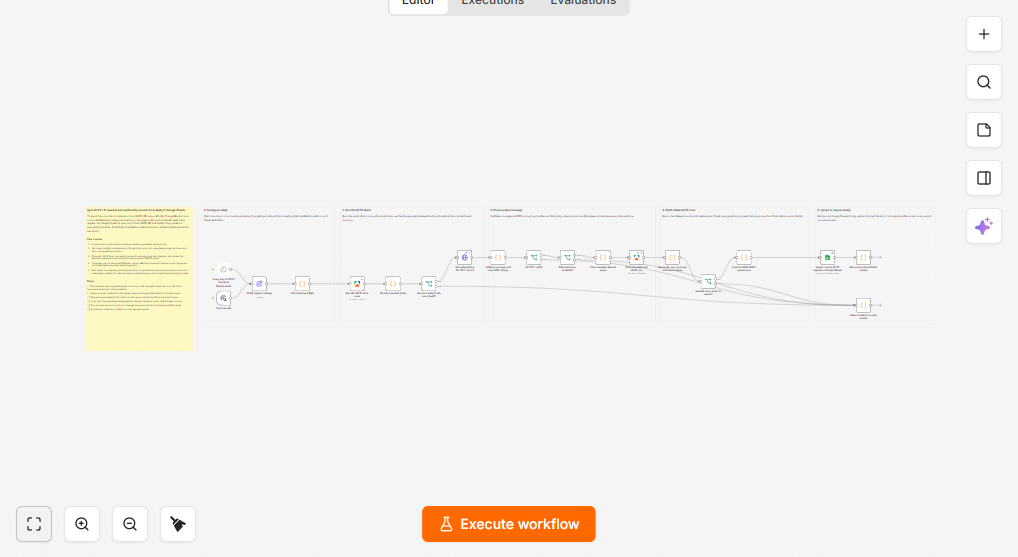
Keep a current, filterable Google Sheets register of LEI renewal and published consolidation relationships. This workflow validates limits and charges, runs the Luminar GLEIF Actor once, verifies complete output, and upserts stable, duplicate-free rows into Google Sheets.
How it works
- Runs manually or on an (inactive) daily schedule and loads the LEI watchlist and Google Sheets target settings.
- Validates the LEIs, row limits, runtime/request limits, spreadsheet details, and maximum allowed Apify charge before starting any paid work.
- Runs the Apify actor once (with retries disabled) and verifies the run succeeded and matches the expected actor build.
- Fetches the actor’s authoritative OUTPUT summary and validates coverage status, delivered row counts, and the exact pay-per-event buyer charge.
- Retrieves all delivered dataset rows from Apify using bounded pagination and reconciles them against the validated summary.
- Builds scalar Google Sheets rows with a stable upsertKey derived from the watchlist scope and the actor’s stableId.
- Upserts the rows into Google Sheets by matching on upsertKey, or returns an explicit no-write receipt when evidence is empty, inconsistent, or unsafe to write.
Setup
- Ensure your n8n instance supports the Apify community node (@apify/n8n-nodes-apify) and add an Apify OAuth2 connection.
- Add a Google Sheets OAuth2 credential with access to the target spreadsheet.
- Update the settings to include your LEIs (1–5), a watchlistName, and the target spreadsheetId and sheetName.
- Create the destination sheet and add the required header columns (including upsertKey) so the append-or-update mapping works correctly.
- Review and adjust the safety limits (maxEntities, maxRelationships, maxRequests, maxRuntimeSecs, and maxCostPerRunUsd) before enabling the schedule.
Requirements
- An Apify account, Google Sheets, and self-hosted n8n or an n8n Cloud workspace where the verified Apify community node is available.
Customization
- Change the LEIs, watchlist name, entity and relationship limits, Sheet destination, schedule, and maximum Actor charge.
Additional info
GLEIF parent relationships are published consolidation data, not beneficial-ownership proof. The workflow image shows the exact validated artifact.