See llms.txt for all machine-readable content.


Quick overview
Help hosts and property managers review recent guest feedback in Google Sheets. Highlight low ratings without an observed public host response, and preserve context. No AI account or automatic reply posting is involved.
How it works
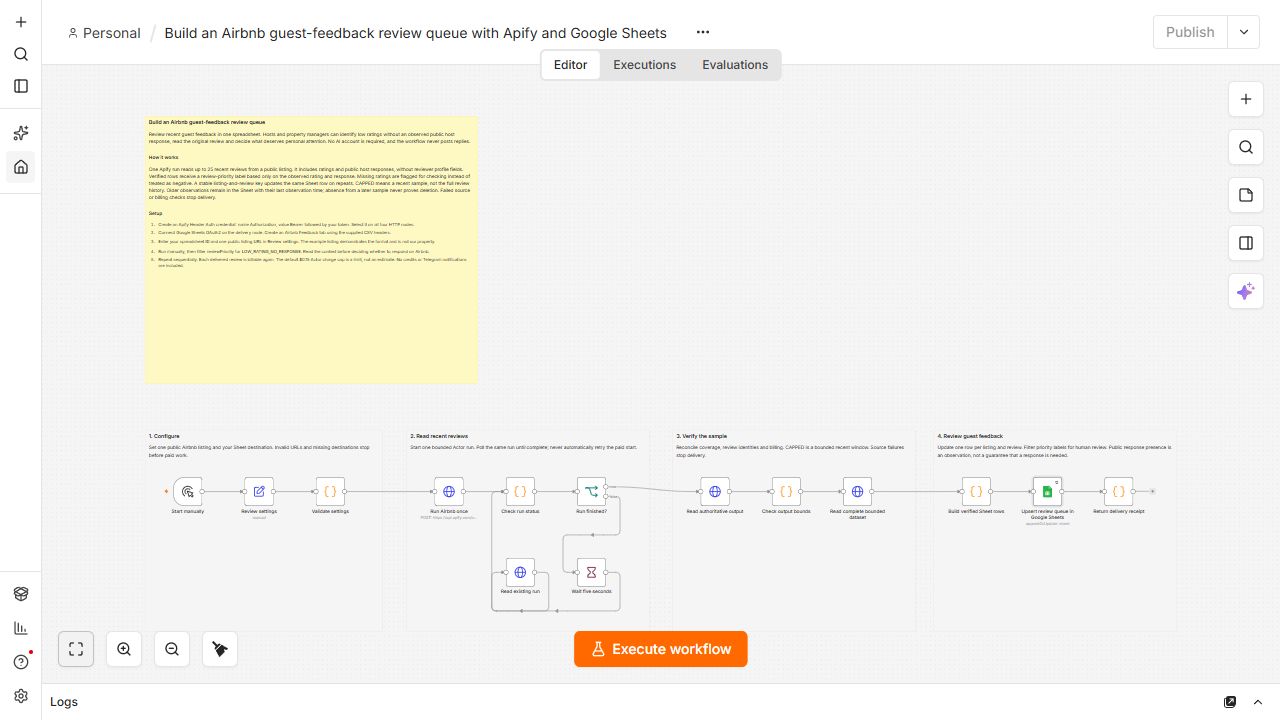
- Validate one public Airbnb listing URL, the Sheet destination and an Actor charge cap before paid work.
- Start one Apify run and poll that same run until completion, without automatic paid retries.
- Verify coverage, reconcile billing and read up to 25 recent reviews, including ratings and public host responses.
- Label low ratings without responses, missing ratings and observed responses using explicit rules. Missing ratings are never treated as negative.
- Upsert one row per listing and stable review ID. Repeated observations update existing rows without duplicate keys.
- Preserve observation timestamps and CAPPED labels. The recent window is not full review history, and absent reviews are never assumed deleted.
Setup
- Create an Apify Header Auth credential with header Authorization and value Bearer followed by your token. Select it on all four HTTP nodes.
- Connect Google Sheets OAuth2. Create an Airbnb Feedback tab and import the companion header CSV into its first row, preserving all 15 column names.
- Enter your spreadsheet ID and listing URL in Review settings, run manually, and filter reviewPriority for LOW_RATING_NO_RESPONSE. Repeat sequentially.
Requirements
- Apify usage credits and Google Sheets access are required. Delivered reviews are billable on each run. The default $0.15 charge cap is a limit, not a quoted price.
Customization
- Change the listing URL or filter priority labels in Sheets. Read each review before deciding whether to respond on Airbnb.
Additional info