See llms.txt for all machine-readable content.


How it works
- Receive a chat input as an image prompt.
- Call OpenAI's
gpt-image-1API to generate an image. - Split the returned images and process them one by one.
- Upload each generated image to Google Drive.
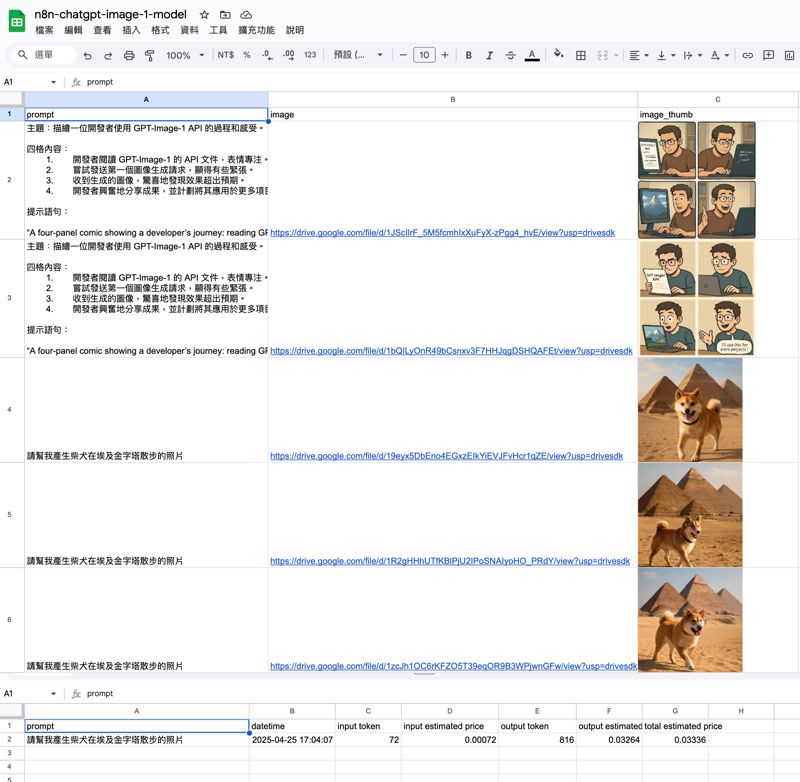
- Save image links and thumbnails to a Google Sheets document.
- Record token usage and estimated cost into a separate sheet.
Set up steps
- Connect your OpenAI API credentials for image generation.
- Connect your Google Drive and Google Sheets accounts.
- Set the destination folder in Google Drive.
- Set the target Google Sheet and specify the correct sheet tabs.
- The setup usually takes around 5-10 minutes.
- Detailed field mappings are already pre-configured inside the workflow.
- Additional tips and instructions are included as sticky notes inside the workflow.