See llms.txt for all machine-readable content.

GitHub and VivifyScrum integration

Save yourself the work of writing custom integrations for GitHub and VivifyScrum and use n8n instead. Build adaptable and scalable Development, workflows that work with your technology stack. All within a building experience you will love.

How to connect GitHub and VivifyScrum

Create a new workflow and add the first step

In n8n, click the "Add workflow" button in the Workflows tab to create a new workflow. Add the starting point – a trigger on when your workflow should run: an app event, a schedule, a webhook call, another workflow, an AI chat, or a manual trigger. Sometimes, the HTTP Request node might already serve as your starting point.

GitHub and VivifyScrum integration: Create a new workflow and add the first step

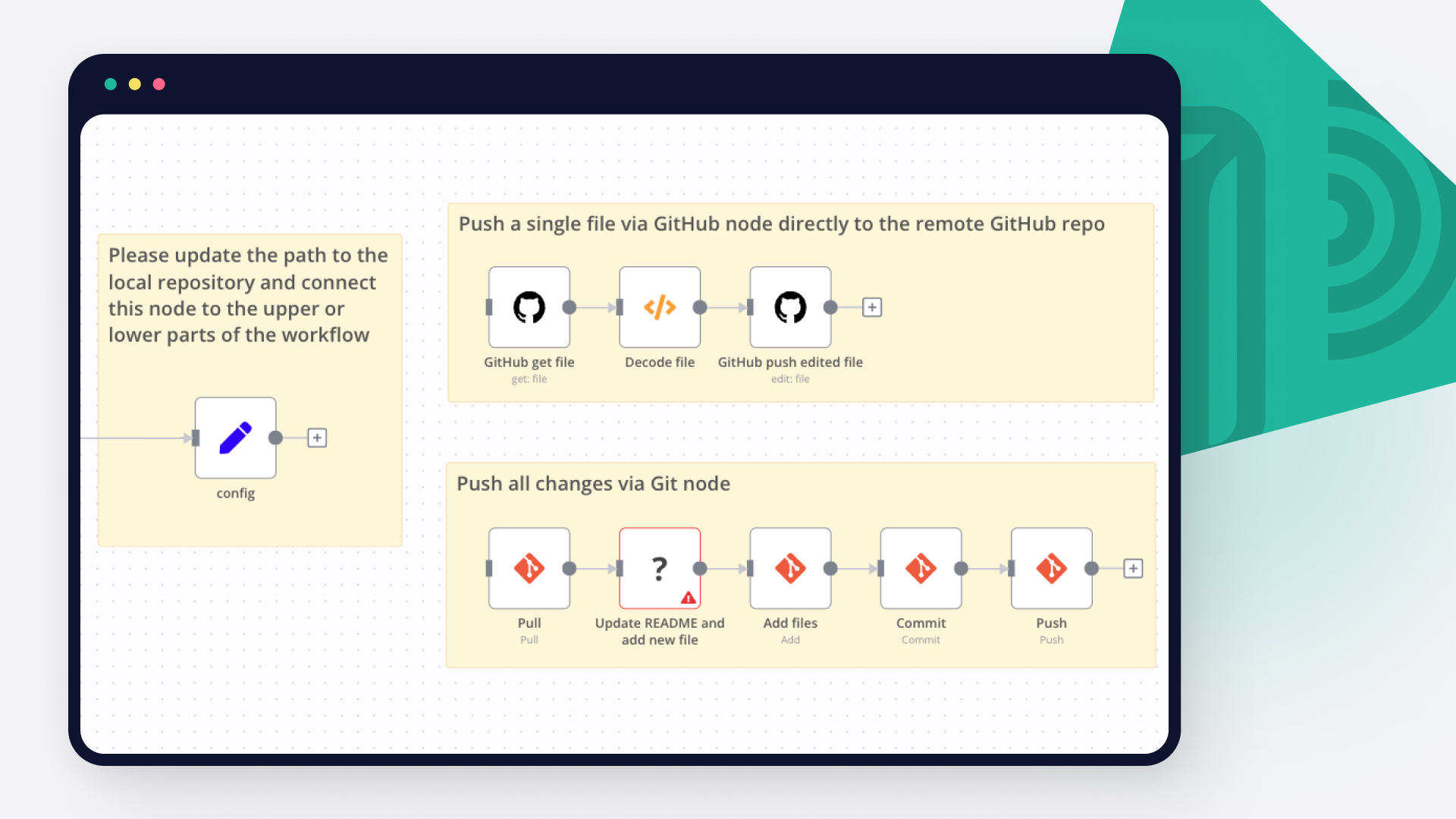
Automated workflow backup to GitHub on schedule

Easily ensure your n8n workflows are never lost! This template automates the process of backing up all your n8n workflows to a GitHub repository every 6 hours. Set it up once and enjoy worry-free workflow versioning and disaster recovery! 🔄✨ 📝 What This Workflow Does Schedules backups: Triggers the workflow automatically every 6 hours—no manual steps needed. ⏰ Exports all current workflows: Collects a JSON snapshot of every workflow in your n8n instance. 📦 Pushes backups to GitHub: Commits each backup file to your specified GitHub repository with a time-stamped commit message for easy tracking. 🗂️🚀 Smart file handling: Checks if a backup file already exists and creates or updates as needed, keeping your repository clean and organized. 🤖 ⚡️ Why Use This Template? Automate your workflow backups – never miss a backup again! Seamless integration with GitHub for team collaboration, change management, and rollback. Simple, reliable, and fully customizable to match your backup intervals and repository setup. Peace of mind that your critical automation assets are always protected. 📦 How the Template Works: Step-by-step Overview Scheduled Trigger: Fires every 6 hours to launch the backup sequence. Get All Workflows: Uses the HTTP Request node to fetch all n8n workflows from your instance as JSON data. Move Binary Data: Converts the JSON into a binary format, ready for GitHub storage. Edit/Create Backup File: Attempts to edit (update) an existing backup file in your GitHub repo. If the file does not exist, the workflow will create a new one. Conditional Logic: Checks after each run whether the backup file exists and ensures previous versions can be recovered or merged as needed. Repeat: The process auto-loops every 6 hours—no further intervention required! 🔧 How To Set Up On Your Server Import the template into your n8n instance. Configure your GitHub credentials in the workflow nodes. Update the GitHub repository details (owner, repository, and filePath) to use your own repo and desired file path. Set your n8n API key and update the API endpoint URL to match your deployment. Save and activate the workflow—now your backups are on autopilot! 👨‍💻 Example Use Cases Version control for rapidly changing automation environments. Safeguarding business-critical automation assets. Easy rollback in case of workflow corruption or accidental deletion. Team collaboration through GitHub's pull request and review process. 🌟 Pro Tips Adjust the backup interval in the Schedule Trigger node if you require more/less frequent backups. Use GitHub branch protection rules for enhanced workflow security. Pair this backup workflow with notifications (e.g., Slack or Email) for backup alerts. Protect your n8n workflows with automated, reliable, and versioned GitHub backups—set it and forget it! 🚦🔒

Popular ways to use the GitHub and VivifyScrum integration

Build your own GitHub and VivifyScrum integration

Create custom GitHub and VivifyScrum workflows by choosing triggers and actions. Nodes come with global operations and settings, as well as app-specific parameters that can be configured. You can also use the HTTP Request node to query data from any app or service with a REST API.

GitHub supported actions

Supported methods for VivifyScrum

Delete
Get
Head
Options
Patch
Post
Put

To set up VivifyScrum integration, add the HTTP Request node to your workflow canvas and authenticate it using a generic authentication method. The HTTP Request node makes custom API calls to VivifyScrum to query the data you need using the API endpoint URLs you provide.

See the example here

Requires additional credentials set up

Use n8n's HTTP Request node with a predefined or generic credential type to make custom API calls.

GitHub and VivifyScrum integration details

GitHub

GitHub

GitHub is the number one platform for developers. It boosts their software development and enhances their collaboration options. The tools offered by Github help you automate your tasks and facilitate your work, that is why it is preferred by millions of developers around the world.

VivifyScrum

VivifyScrum

VivifyScrum is an agile project management tool that helps teams collaborate and manage their tasks effectively. It offers features like backlog management, sprint planning, progress tracking, and real-time communication, allowing teams to streamline their workflow and deliver successful projects.

Other integrations with GitHub and VivifyScrum

Save engineering resources

Reduce time spent on customer integrations, engineer faster POCs, keep your customer-specific functionality separate from product all without having to code.

Learn more

FAQ about GitHub integrations

Need help setting up your GitHub and VivifyScrum integration?

Discover our latest community's recommendations and join the discussions about GitHub and VivifyScrum integration.

  • DupervalAI

    How do I download a binary file using the GitHub node?

    DupervalAI

    Hi, How am I supposed to download a binary file that I fetch with the “Get a file” feature of the GitHub node? I see the file in my execution but it has a downlad button in it that I need to click manually, it seems. I…

    Open topic
  • Семен Буров

    Github Node Error: Could not get the SHA of the file, when try edit file with # or Emoji in name

    Семен Буров

    Describe the problem/error/question I try to use many templates for N8N Backup to github. For example: Github N8N Backups: How to backup workflows with folder structure instead of tags? And in my case i have an error w…

    Open topic
  • Piotr Sikora

    Github List Files Node - How to change branch?

    Piotr Sikora

    Describe the problem/error/question I’m using Github List node. I want to list files and directories from specific branch. As you can see above - there is no option to change the branch. Do you have any option to do…

    Open topic
  • Ammar Aamir

    Environements Control

    Ammar Aamir

    Is environmental control only available for the Enterprise subscription? Is N8N planning to make it available for the community version? This is literally an essential feature.

    Open topic

Looking to integrate Slack and VirusTotal in your company?

Trusted by teams building smarter workflows.

Why

Why use n8n to integrate GitHub with VivifyScrum

Handle branching, merging and iteration easily. Pause your workflow to wait for external events.

Re-run single steps to test changes in no time. And pin your data to avoid generating trigger events every time you execute.

Your data is displayed alongside your settings, making edge cases easy to track down.

Use 1000+ workflow templates available from our core team and our community.

Copy and paste, easily import and export workflows.

Simple enough to 
understand + sophisticated 
enough to ship