See llms.txt for all machine-readable content.

Quick overview
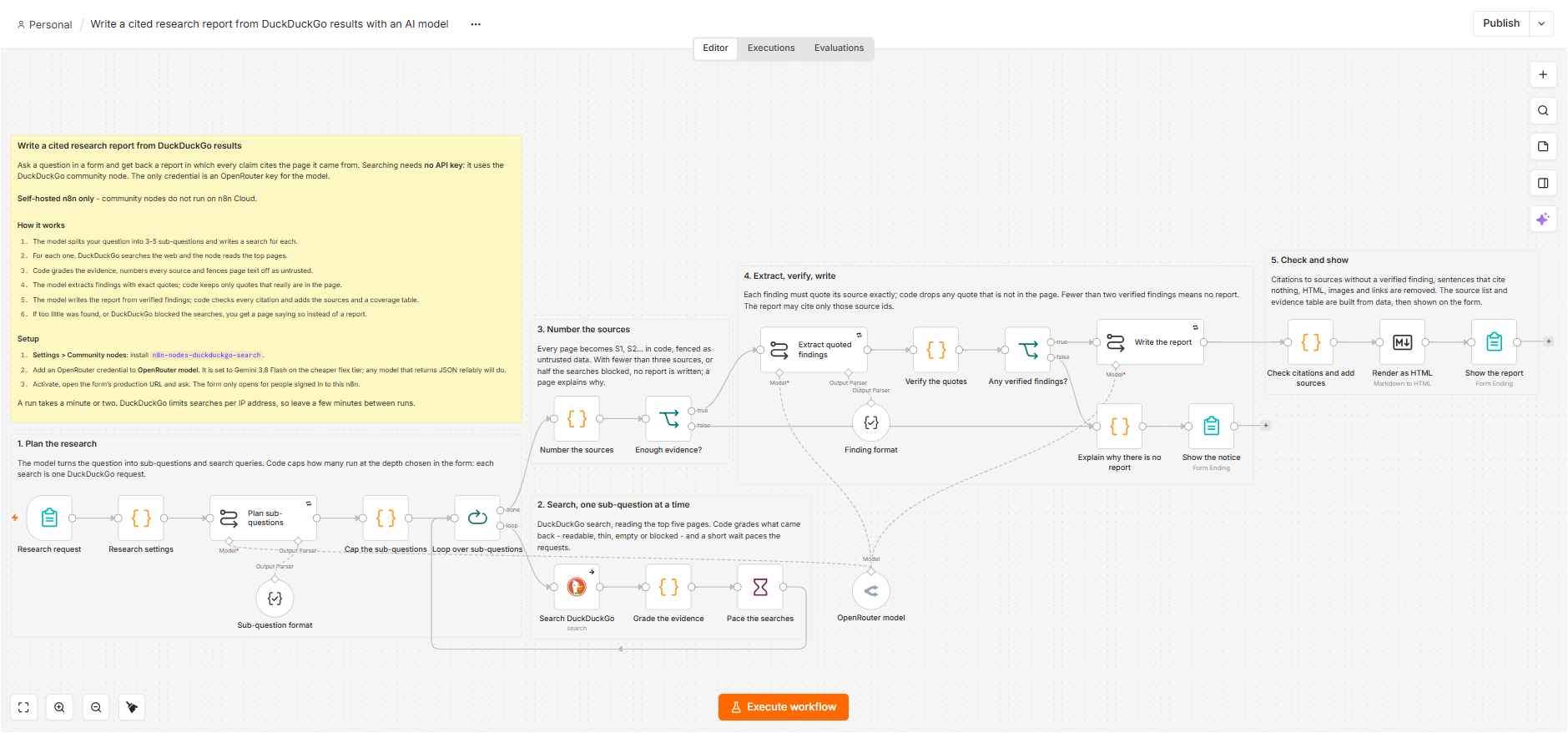
Ask a question in a form; this workflow searches the web with DuckDuckGo and has an OpenRouter model write a report in which every claim cites a page it read, with every quote checked against its source. Self-hosted n8n only.
How it works
- Receives a question and depth selection from an authenticated n8n Form.
- Uses an OpenRouter LLM to split the question into 3–5 sub-questions and DuckDuckGo search queries based on the selected depth.
- Runs each query through the DuckDuckGo Search community node, fetches top results with page text, grades whether evidence is usable or blocked, and paces requests to reduce rate limiting.
- Deduplicates and numbers all collected sources (S1, S2, …) and stops early with a notice if there are too few usable sources or too many searches are blocked.
- Uses the LLM to extract per-sub-question findings with exact quotes, then programmatically verifies each quote exists in the corresponding source text and discards unverified findings.
- If enough verified findings exist, the LLM writes a Markdown report citing only source IDs, and the workflow removes uncited sentences, invalid citations, links/HTML, and adds an evidence-coverage table and a clickable source list.
- Renders the final Markdown to HTML and displays the report (or a “no report” explanation) back in the form response.
Setup
- Use a self-hosted n8n instance and install the community node
n8n-nodes-duckduckgo-searchvia Settings → Community nodes. - Create and select an OpenRouter credential (API key) for the OpenRouter chat model used for planning, extraction, and writing.
- Publish the n8n Form trigger and use its production URL to submit questions (the form requires users to be signed in to n8n).
Requirements
- Self-hosted n8n only: community nodes cannot be installed on n8n Cloud
- The community node n8n-nodes-duckduckgo-search
- An OpenRouter account and API key
- No API key or account is needed for DuckDuckGo
Customization
- Change the depth options in the form; each sub-question is one DuckDuckGo search
- Change how many pages are read per search in Search DuckDuckGo
- Swap the OpenRouter model; any model that returns JSON reliably works
- Keep the wait between searches: DuckDuckGo limits requests per IP address
- Send the report by email or Slack instead of showing it on the form page
Additional info
The canvas preview does not render community nodes, so the full canvas is in the screenshot at the top of the description. The AI-suggested JSON replaced all six sticky notes with one saying the workflow "does not contain any nodes", so I kept the original file; its sticky notes follow the sticky-note guidelines. Source and notes: https://github.com/samnodehi/n8n-nodes-duckduckgo/tree/main/docs/examples