See llms.txt for all machine-readable content.



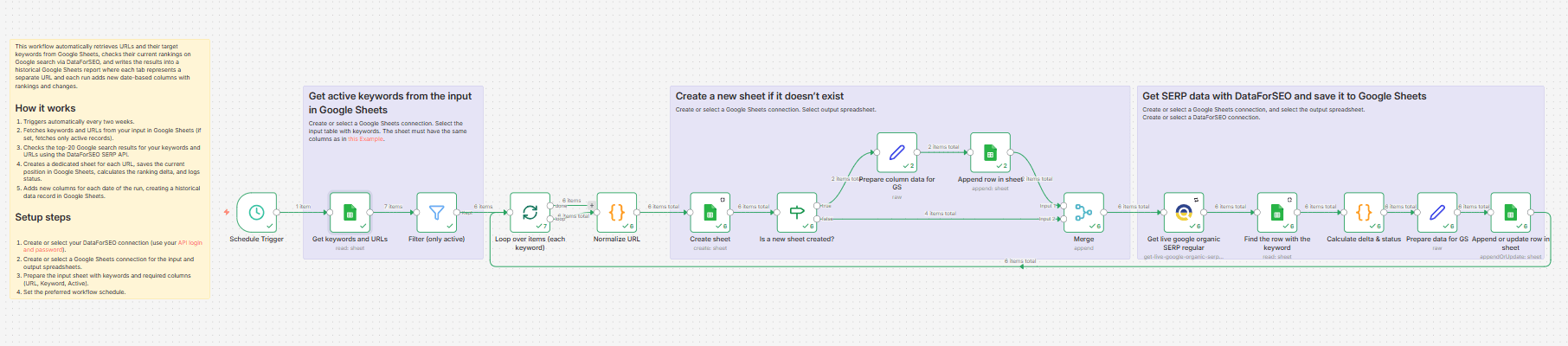
This workflow automatically monitors how specific URLs rank for their target keywords in Google search results and stores your full ranking history in Google Sheets.
On each scheduled run, the workflow reads a list of URLs and related keywords from your input in Google Sheets, filters only active rows (if set), and checks search positions on Google using the DataForSEO SERP API.
The workflow then saves the results in a separate Spreadsheet tab corresponding to each tracked URL. Table rows contain your keywords, columns store ranking positions by run date, and automatically calculated ranking delta (comparison with the previous measurement), so you can quickly see whether a keyword improved, dropped, or stayed unchanged.
As a result, you get a clean historical ranking table by URL that lets you easily monitor SEO performance over time, quickly detect changes, and review page-level keyword trends without manual SERP checks.
Who’s it for
This workflow is ideal for SEO specialists, content marketers, agencies, and website owners who want to automate rank tracking for specific landing pages and keep a clean historical view of keyword performance by URL.
What it does
This workflow automatically retrieves URLs and their target keywords from Google Sheets, checks their current rankings on Google search via the DataForSEO SERP API, and writes the results to a historical Google Sheets report, where each tab represents a separate URL, and each run adds new date-based columns with rankings and changes.
How it works
Triggers automatically every two weeks.
Fetches keywords and URLs from your input in Google Sheets (if set, fetches only active records).
Checks the top-20 Google search results for your keywords and URLs using the DataForSEO SERP API.
Creates a dedicated sheet for each URL, saves the current position in Google Sheets, calculates the ranking delta, and logs status.
Adds new columns for each date of the run, creating a historical data record in Google Sheets.
Requirements
- n8n cloud account with the DataForSEO node installed or a self-hosted n8n instance
- DataForSEO account and API credentials
- Google Sheets account and connection to n8n
Customization
You can easily customize this workflow by changing the run frequency, switching the target search location or language, tracking mobile results instead of desktop, or extending the output with status labels, alerts, or visual trend reporting.