See llms.txt for all machine-readable content.


Quick overview
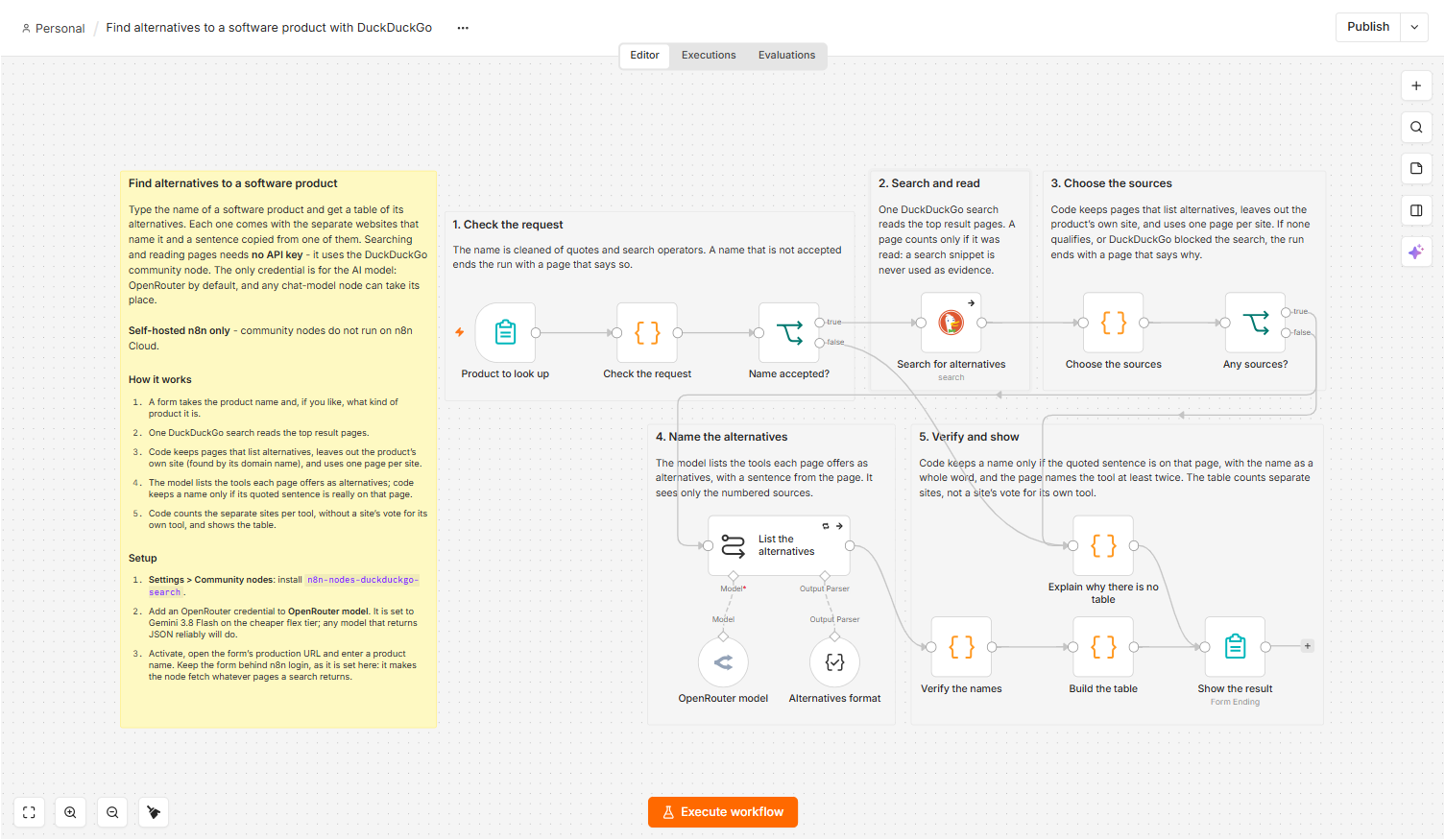
Type a software product's name; this workflow reads the pages DuckDuckGo finds for its alternatives and shows a table: each tool, how many separate sites list it, and a sentence copied from one of them. Self-hosted n8n only.
How it works
- A form takes the product name and, if you like, what kind of product it is.
- One DuckDuckGo search reads the top twelve result pages.
- Code keeps pages that list alternatives, leaves out the product's own site (found by its domain name), and uses one page per site.
- The model lists the tools each page offers as alternatives, with a sentence from that page.
- Code keeps a name only if the sentence the model quoted is on the page, then counts the separate sites per tool. A site's vote for its own tool is not counted. The table shows that passage from the page, finished to the end of its sentence.
- The form shows the table, the sites that were read, and the pages that were left out and why.
Setup
- Self-hosted n8n: install
n8n-nodes-duckduckgo-searchunder Settings → Community nodes. Searching and reading pages need no API key or account. - Add a credential to the chat-model node, OpenRouter model (Gemini 3.8 Flash by default). Any other chat-model node can replace it; choose a model that returns JSON reliably.
- Activate the workflow, open the form's production URL and enter a product name. Keep the form behind n8n login, as it is set here: it makes the node fetch whatever pages a search returns.
Requirements
- Self-hosted n8n only: community nodes cannot be installed on n8n Cloud
- The community node n8n-nodes-duckduckgo-search
- An API key for the AI model: OpenRouter by default, or any provider with an n8n chat-model node
- No API key or account is needed for DuckDuckGo
Customization
- Change how many pages are read: Max Results and Max Results for Page Content on the search node (the Code nodes use at most eight sources and show at most fifteen tools)
- Swap the model node for any other chat-model node
- Change the region on the search node (it is set to us-en) to favour another country's sites
- Send the table by email or Slack instead of showing it on the form page
- Run the search twice with different wording, for example
<name> competitors, and join the results before Choose the sources
Additional info
Suggested title: "Find alternatives to a software product with DuckDuckGo". The AI model is a swappable part (any chat-model node works), so the title names only the search node. The canvas preview does not render community nodes, so the full canvas is in the screenshot at the top of the description. The table says how many separate sites list a tool; it is not a quality ranking, and the page says so. Source and notes: https://github.com/samnodehi/n8n-nodes-duckduckgo/tree/main/docs/examples