See llms.txt for all machine-readable content.


Quick overview
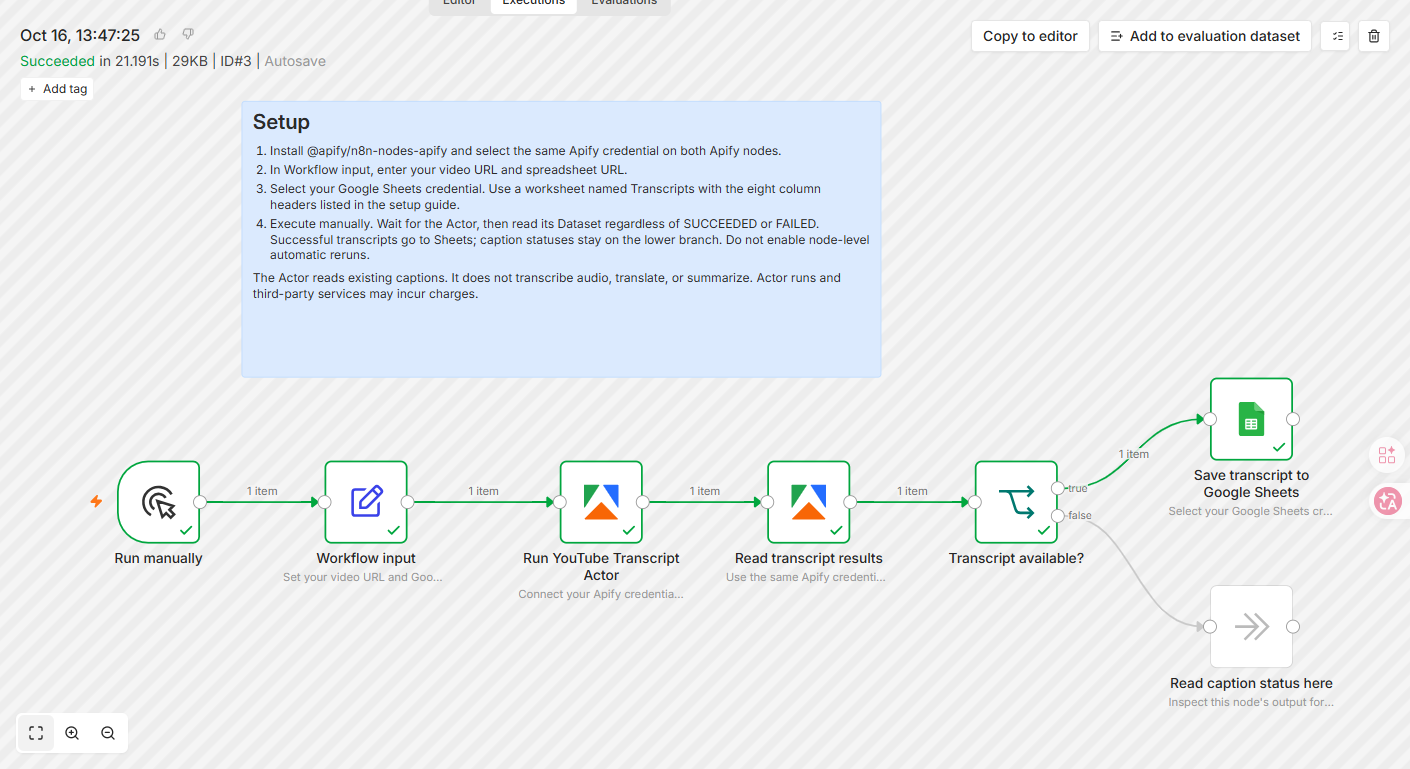
Save an existing YouTube video or Shorts caption track to Google Sheets with Apify. Each successful video becomes one row with full fetched text and metadata; caption failures follow a separate branch.
How it works
- Starts when you manually execute the workflow.
- Reads the target YouTube video URL plus the Google Sheets spreadsheet URL and worksheet name.
- Runs YouTube Transcript Scraper on Apify and waits for the run to finish. The Actor retrieves existing captions rather than transcribing audio.
- Reads the same run's Dataset, including saved status records from a failed Actor run, and checks whether a transcript was retrieved successfully.
- Appends one row to Google Sheets with the video ID, title, URL, channel, caption language, automatic-caption flag, full fetched text, and extraction time.
- Routes missing captions, unavailable languages, and blocked requests to a separate status node without appending blank transcript rows.
Setup
- Install the verified Apify node (@apify/n8n-nodes-apify) if needed. Select the same Apify API credential on both Apify nodes; do not put API tokens in the shared JSON.
- Connect a Google Sheets credential with permission to edit the destination spreadsheet.
- Create a worksheet named Transcripts with these eight headers: Video ID, Video title, Video URL, Channel, Caption language, Auto-generated, Transcript, Scraped at.
- In Workflow input, set videoUrl, spreadsheetUrl, and sheetName, then execute manually. See the illustrated setup guide: https://github.com/arjun-go-go/apify-workflow-examples/tree/main/youtube-transcripts-to-google-sheets
Requirements
- Requires n8n Cloud or a self-hosted instance with the verified Apify node, an Apify account, Google Sheets access, and a public video with available captions.
Customization
- Change caption-language preferences in the Actor input if needed. Extend the downstream workflow for your own analysis; this template itself does not translate or summarize.
Additional info
The template has no separate fee. Actor runs are paid: check current pricing at https://apify.com/arjun_code/youtube-transcript-scraper. n8n and Google services may have their own charges. This is a manual, single-video, append-only example: rerunning a successful URL adds another row. It requests text only, not SRT/VTT. It does not transcribe audio, and source captions can contain errors or omit speech.