Back to Templates


📧 Automated Initial Outreach Emails with Safety Controls
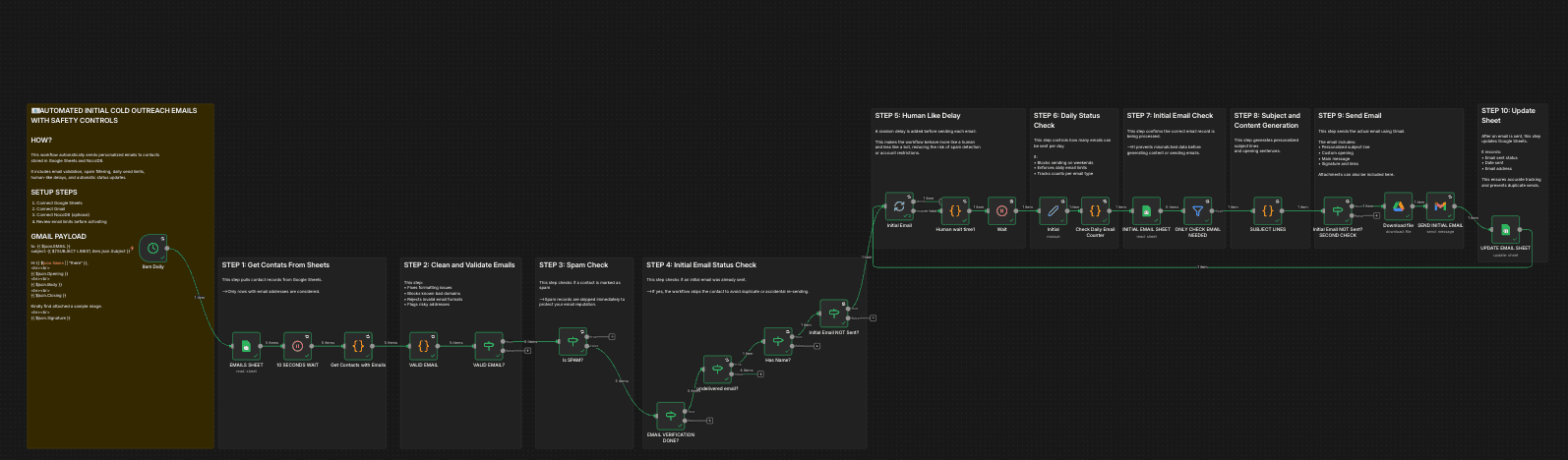
This n8n workflow sends personalized outreach emails automatically while enforcing strict safety rules such as email validation, spam checks, daily limits, and human-like delays.
It is designed to help beginners send emails safely, consistently, and at scale without damaging sender reputation.
What This Workflow Does
On a daily schedule, this workflow:
- Pulls contacts from Google Sheets
- Cleans and validates email addresses
- Blocks spam, invalid, or risky emails
- Checks if an email was already sent
- Enforces daily sending limits (weekdays only)
- Adds random human-like delays
- Generates personalized subject lines and openings
- Sends emails via Gmail
- Updates Google Sheets with send status
Who This Is For
This workflow is useful if you:
- Send cold or semi-cold outreach emails
- Apply to jobs at scale with personalization
- Run sales, hiring, or networking campaigns
- Want safety controls to avoid spam flags
- Are learning n8n with a real-world workflow
No advanced n8n knowledge is required.
Required Services
You will need:
- Google Sheets (contact source + status tracking)
- Gmail (sending emails)
- Google Drive (for attachments like CVs)
- n8n (self-hosted or cloud)
Sheet Structure (Recommended)
Contacts Sheet
Required columns:
- Name
- EMAIL VERIFIED
- EMAIL SMTP VERIFIED
- EMAIL SUGGESTION
- EMAIL TYPE
- SENT
- SENT DATE
Email Status Columns
Updated automatically by the workflow:
- SENT
- DATE SENT
- EMAIL TYPE
Setup Instructions
1. Connect Google Sheets
- Update the Google Sheets nodes to point to your own spreadsheet
- Ensure column names match the workflow
Sample Data for Sheets
| Name | EMAIL VERIFIED | EMAIL SMTP VERIFIED | EMAIL SUGGESTION | EMAIL TYPE | SENT | DATE SENT | |
|---|---|---|---|---|---|---|---|
| [email protected] | Alex Morgan | REACHABLE | VALID | SAFE TO SEND | INITIAL | YES | 2025-01-12 |
| [email protected] | — | CATCH-ALL | UNKNOWN | SEND WITH CAUTION | INITIAL | NO | — |
| [email protected] | Sarah Lane | REACHABLE | VALID | SAFE TO SEND | INITIAL | YES | 2025-01-13 |
| [email protected] | — | UNKNOWN | NOT VERIFIED | VERIFY BEFORE SENDING | INITIAL | NO | — |
| [email protected] | Michael T. | REACHABLE | VALID | SAFE TO SEND | FOLLOW-UP | YES | 2025-01-14 |
EMAILis required for sending.SENTandDATE SENTare updated after a successful email send.EMAIL VERIFIEDreflects high-level verification results.EMAIL SMTP VERIFIEDindicates server-level validation when available.EMAIL SUGGESTIONis generated by the workflow’s safety logic.SENTandDATE SENTare updated only after a successful send.- Rows without a name are invalid for outreach.
- Additional rows can be added freely.
2. Connect Gmail
- Add your Gmail credentials
- Confirm daily sending limits match your account limits
3. (Optional) Connect Google Drive
- Used to attach files (e.g., Decks, CVs, Presentations,etc)
4. Review Safety Settings
- Daily email limit is enforced in code
- Weekends are automatically blocked
- Spam and invalid emails are skipped
5. Activate the Workflow
- Enable the workflow
- Emails will start sending automatically at the scheduled time
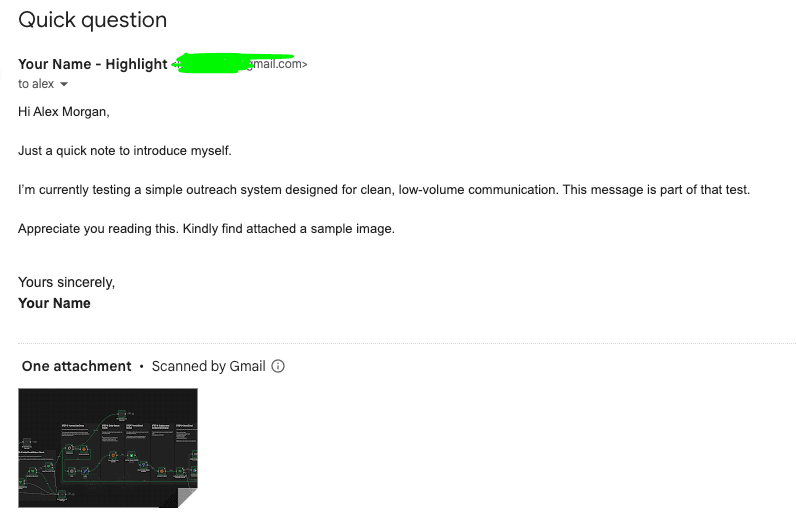
Email Sample
Safety Features Explained
This workflow includes built-in protections:
- ✅ Email format validation
- ✅ Blocked domains and keywords
- ✅ Spam flag checks
- ✅ Duplicate send prevention
- ✅ Daily quota enforcement
- ✅ Weekend blocking
- ✅ Random delays between sends
These safeguards help maintain a healthy sender reputation.
Customization Ideas
You can extend this workflow to:
- Add follow-up (retarget) emails
- Integrate email verification APIs
- Log sends into a database (NocoDB, Postgres, etc)
- Add Slack notifications
- Support multiple Gmail accounts
- Personalize content further with AI
Important Notes
- Review Gmail sending limits before scaling
- Test with a small contact list first
- Do not remove safety checks unless you understand the risks
License
This workflow is shared for educational and practical use.
You are free to modify and adapt it for your own projects.
Author
Built and shared by Itunu Ola
n8n automation builder focused on safe, production-ready workflows.