Back to Templates


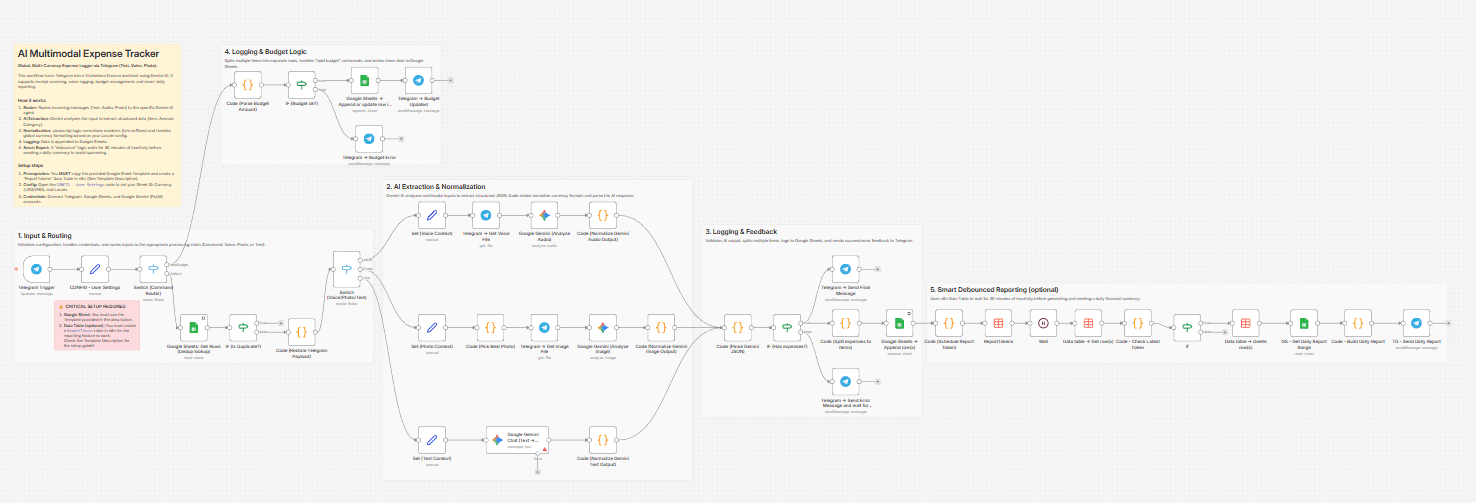
Why I built this? (The Problem)
Most expense tracker apps (like Money Lover, Spendee, or Wallet) have a common friction point: Data Entry. You have to unlock your phone, find the app, wait for it to load, navigate menus, and manually select categories. It’s tedious, so we often forget to log small expenses.
I wanted a solution that lives where I already spend my time: Telegram. This workflow allows you to log expenses in seconds—just by sending a text, a voice note while driving, or a photo of a receipt. No UI navigation required.
Comparison: This Workflow vs. Traditional Apps
| Feature | Traditional Expense Apps | This n8n Workflow |
|---|---|---|
| Data Ownership | Data is locked in their proprietary database. | 100% Yours. It lives in your Google Sheet. You can export, pivot, or connect it to Looker Studio. |
| Input Speed | Slow. Requires multiple taps/clicks. | Instant. Send a text/voice/photo to a Telegram bot. |
| Flexibility | Rigid categories & logic. | Infinite. You can customize the AI prompt, categories, and currency logic. |
| Cost | Often requires monthly subscriptions for premium features. | Low Cost. Runs on your n8n instance + Gemini Flash API (which is currently free/very cheap). |
| UI/UX | Beautiful, pre-built mobile dashboards. | Raw Data. You view data in Google Sheets (though you can build a dashboard there) |
Key Features
-
Multi-Modal Input: Just send what you have.
-- Text: "Lunch 50k, Taxi 30k" (Splits into 2 rows).
-- Voice: Speak naturally, AI transcribes and extracts data.
-- Photo: OCRs receipts and parses details. -
Global Currency Support: Uses Gemini AI to intelligently detect currency. You can set a default currency (e.g., USD, VND) in the Config node.
-
Smart Extraction & Categorization:
-- Automatically splits multiple items in one message (e.g., "Lunch 20k and Grab 50k" → 2 separate rows).
-- AI automatically assigns categories (Food, Transport, Bills, etc.) based on the item name. -
Budget Management: Use the command
/add budget 500to instantly top up your monthly budget. -
"Quiet" Reporting: Instead of spamming you after every message, the system waits for 30 minutes of inactivity before sending a daily summary report (Debounce logic).
Setup Instructions
1. Prerequisites
-
Google Sheet: You MUST make a copy of this template: [Google Sheet Template here]
-
n8n Data Table: This workflow requires a Data Table named
ReportTokensfor the reporting feature. Please read the setup guide below. Setup Guide: AI Expense Tracker
2. Configure the Workflow
-
Credentials: Connect Telegram, Google Sheets, and Google Gemini (PaLM).
-
Config Node: Open the
CONFIG - User Settingsnode and update these fields.--
spreadsheet_id: The ID of your copied Google Sheet
--sheet_gid_dashboard: The ID of your sheet Dashboard
--sheet_gid_budget: he ID of your sheet Budget_Topups
--currency_code: Your currency code (e.g., USD, EUR, VND).
--currency_symbol: Your currency symbol (e.g., $, €, ₫).
--locale: Your locale for number formatting (e.g., en-US, vi-VN). -
Data Table: Create a table in n8n with columns:
chat_id,report_token,updated_at(All type: String). Link this table to the relevant nodes in the workflow.
3. Usage
- Log Expense: Send "Coffee $5" or a photo.
- Add Budget: Send command
/add budget 1000
Need Help or Want to Customize This?
Contact me for consulting and support:
Email: [email protected]