Back to Templates


Try It Out!
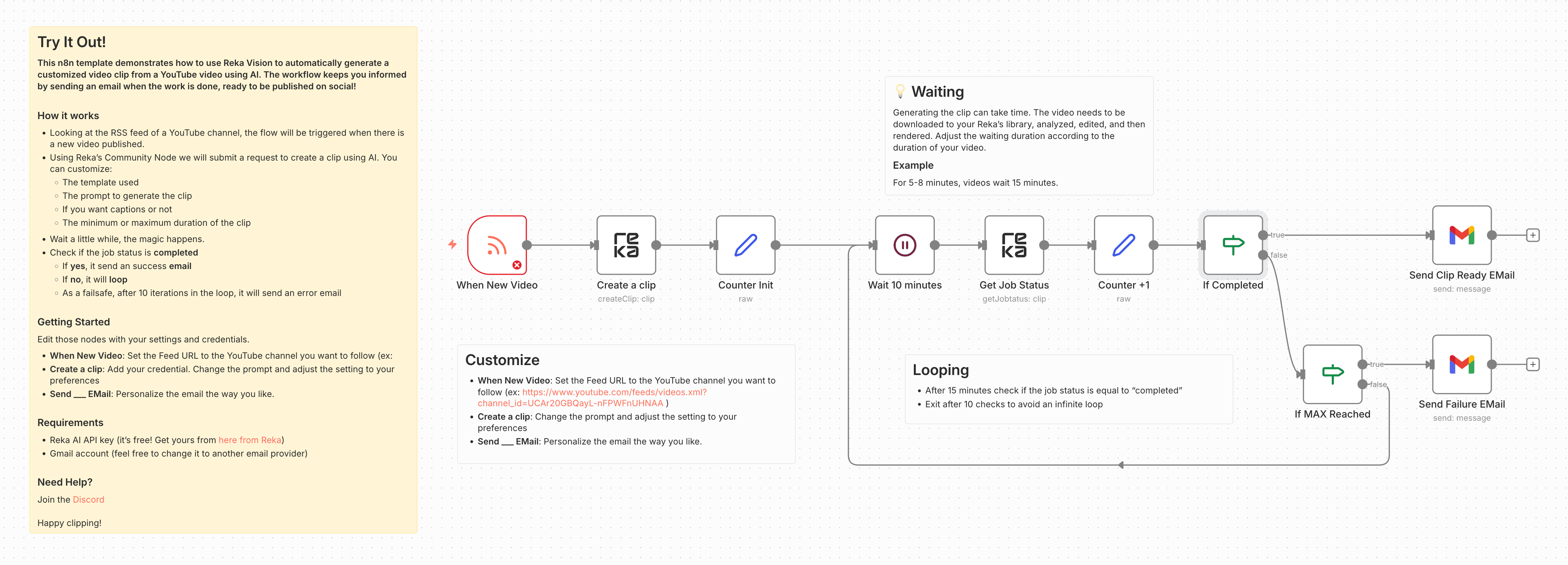
This n8n template demonstrates how to use Reka Vision to automatically generate a customized video clip from a YouTube video using AI. The workflow keeps you informed by sending an email when the work is done, ready to be published on social!
How it works
- Looking at the RSS feed of a YouTube channel, the flow will be triggered when there is a new video published.
- Using Reka's API, we will submit a request for creating a clip using AI. You can customize:
- the template used
- the prompt to generate the clip
- if you want captions or not
- the minimum or maximum duration of the clip
- Wait a little while, the magic happens
- Check if the job status is completed
- If yes, it send an success email
- if no, it will loop
- Implement best practices with a failsafe after 10 iterations in the loop; it will send an error email
Gettting Started
Edit those nodes with your settings and credentials.
- When New Video: Set the Feed URL to the YouTube channel you want to follow (ex:
- Create a clip: Add your credential. Change the prompt and adjust the setting to your preferences
- Send ___ EMail: Personalize the email the way you like.
Requirements
- Reka AI API key (it's free! Get yours from here from Reka)
- Gmail account (feel free to change it to another mail provider)
Need Help?
Join the Discord
Happy clipping!