Back to Templates



Who is this for
Finance teams and accounts payable departments who need automated invoice validation before processing. Perfect for catching calculation errors, missing fields, and discrepancies before they reach your accounting system.
What it does
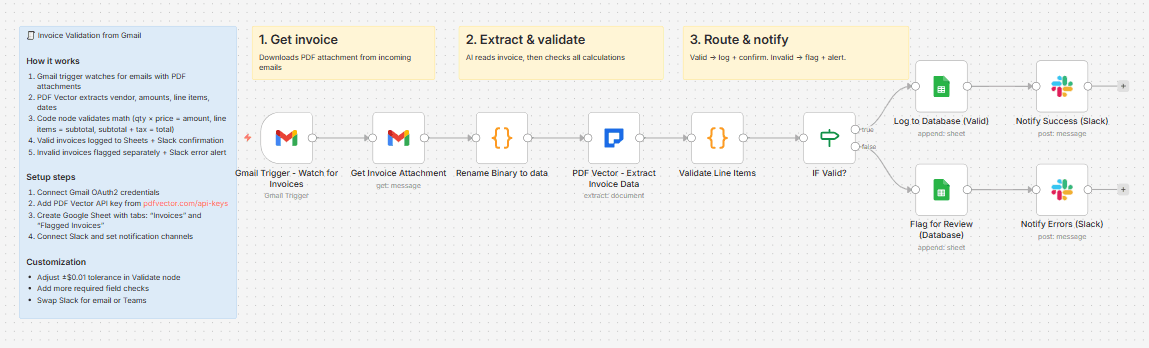
Monitors Gmail for invoice attachments, extracts all data using AI, validates mathematical accuracy of line items and totals, then routes valid invoices to your database while flagging errors for manual review.
How it works
- Gmail trigger watches for new emails with PDF attachments
- PDF Vector extracts structured invoice data (vendor, amounts, line items, dates)
- Validation checks: line item math (qty × price = amount), subtotal accuracy, and total calculation
- Valid invoices logged to Google Sheets + Slack success message
- Invalid invoices flagged separately + Slack error alert
Setup steps
- Connect Gmail OAuth2 credentials
- Get PDF Vector API key from pdfvector.com/api-keys
- Create Google Sheet with tabs: "Invoices" and "Flagged Invoices"
- Connect Slack and set notification channels
- Update Sheet ID in both Sheets nodes
Requirements
- Gmail account (OAuth2)
- PDF Vector API key (community node - self-hosted n8n only)
- Google Sheets account (OAuth2)
- Slack workspace with API access
Validation checks included
- Line item math: quantity × unit price = line amount
- Subtotal accuracy: sum of line items = stated subtotal
- Total calculation: subtotal + tax = total
- Required fields: invoice number, vendor name, total amount
- Tolerance: ±$0.01 for rounding differences
Customization ideas
- Adjust ±$0.01 tolerance in Validate invoice node
- Add more required field checks
- Connect to your ERP system
- Swap Slack for Microsoft Teams