Back to Templates




Who is this for
Individuals managing personal finances, freelancers tracking business expenses, or small business owners who want automated insights from their bank statements without manual spreadsheet work.
What it does
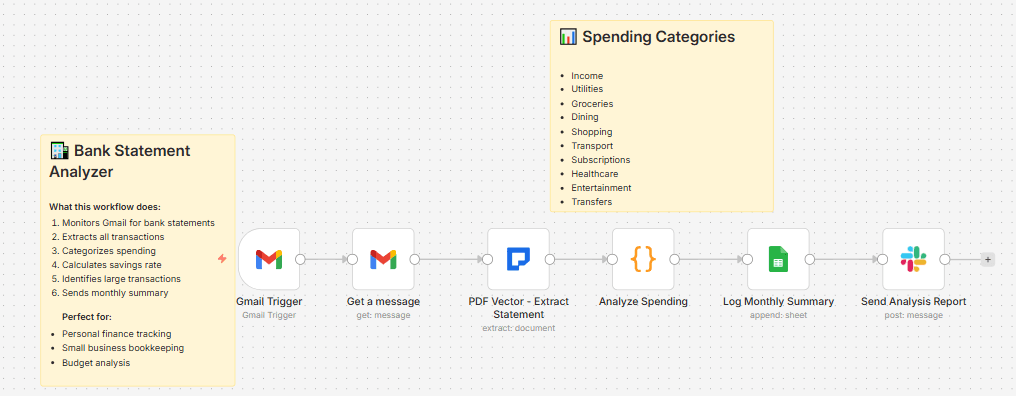
This workflow automatically processes bank statements received via email, extracts every transaction, categorizes spending using AI, calculates your savings rate, identifies large transactions, and sends you a detailed monthly summary via Slack.
How it works
- Gmail trigger monitors your inbox for bank statement emails
- PDF Vector extracts all transactions with dates, amounts, descriptions, and running balances
- AI categorizes each transaction into: Income, Utilities, Groceries, Dining, Shopping, Transport, Travel, Subscriptions, Healthcare, Entertainment, or Transfer
- Smart categorization rules recognize common merchants (Uber → Transport, Netflix → Subscriptions, Whole Foods → Groceries)
- Code node calculates totals, savings rate, and spending percentages by category
- Flags large transactions over $500 for visibility
- Logs monthly summary to Google Sheets
- Sends detailed analysis report to Slack
Setup steps
- Connect Gmail OAuth2 credentials
- Get PDF Vector API key from pdfvector.com/api-keys
- Create a Google Sheet with columns: Period Start, Period End, Opening Balance, Closing Balance, Total Income, Total Spending, Savings Rate %, Transaction Count, Processed Date
- Connect Slack and select your notification channel
- Update the Google Sheet ID in the Sheets node
Requirements
- Gmail account (OAuth2)
- PDF Vector API key (community node - self-hosted n8n only)
- Google Sheets account (OAuth2)
- Slack workspace with API access
Analysis included
- Total income vs spending comparison
- Savings rate percentage calculation
- Spending breakdown by category with percentages
- Large transaction alerts (over $500)
- Transaction count per statement
Spending categories
Income, Utilities, Groceries, Dining, Shopping, Transport, Travel, Subscriptions, Healthcare, Entertainment, Transfer, Other
Customization ideas
- Adjust the large transaction threshold from $500
- Add budget alerts when category spending exceeds limits
- Connect to Notion for a personal finance dashboard
- Add weekly summaries instead of monthly
- Export individual transactions to a separate sheet for detailed tracking