Back to Templates


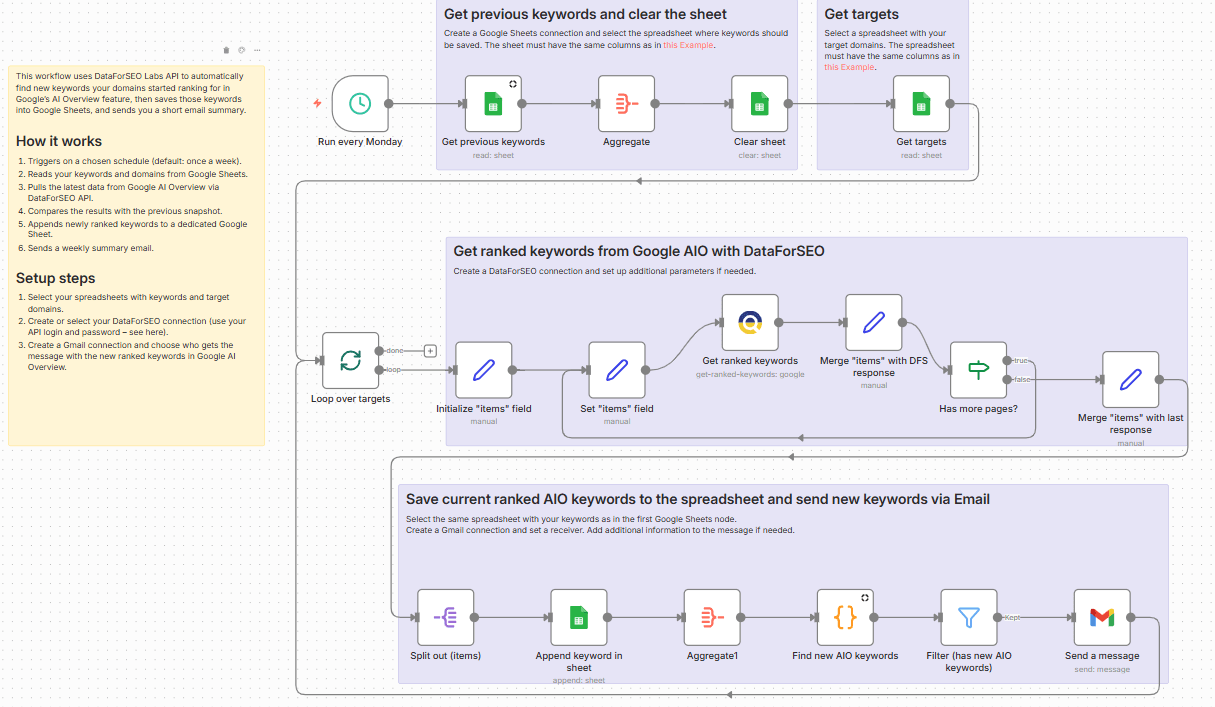
Once a week, this workflow automatically detects newly ranked keywords in Google AI Overview across your domains using DataForSEO API. It pulls the latest data for every target, stores a new snapshot in Google Sheets, and compares it with the previous run. Any new keywords and related info is automatically appended to a dedicated log sheet, and a short email recap is sent to your chosen recipients, so your team can easily review updates without manual monitoring.
Who’s it for
SEO specialists and marketers who want a hands-off way to track newly ranked keywords in Google’s AIO for specific domains and get weekly updates without manual checks.
What it does
This workflow automatically discovers new keywords your domains started ranking for in Google AI Overview (AIO), logs them in Google Sheets, and emails you a weekly summary of what’s changed.
How it works
Triggers on a chosen schedule (default: once a week).
Reads your keywords and domains from Google Sheets.
Pulls the latest data from Google AI Overview via DataForSEO API.
Compares the results with the previous snapshot.
Appends newly ranked keywords to a dedicated Google Sheet.
Sends a weekly summary email.
Requirements
- DataForSEO account
- A spreadsheet in Google Sheets with your keywords that matches the required column structure (as in the example).
- A spreadsheet in Google Sheets with your target domains that matches the required column structure (as in the example).
- Gmail account
Customization
You can customize this workflow by changing the schedule, exporting results to other tools (such as Looker Studio and BigQuery) instead of Google Sheets, and modifying the email text.