Back to Templates


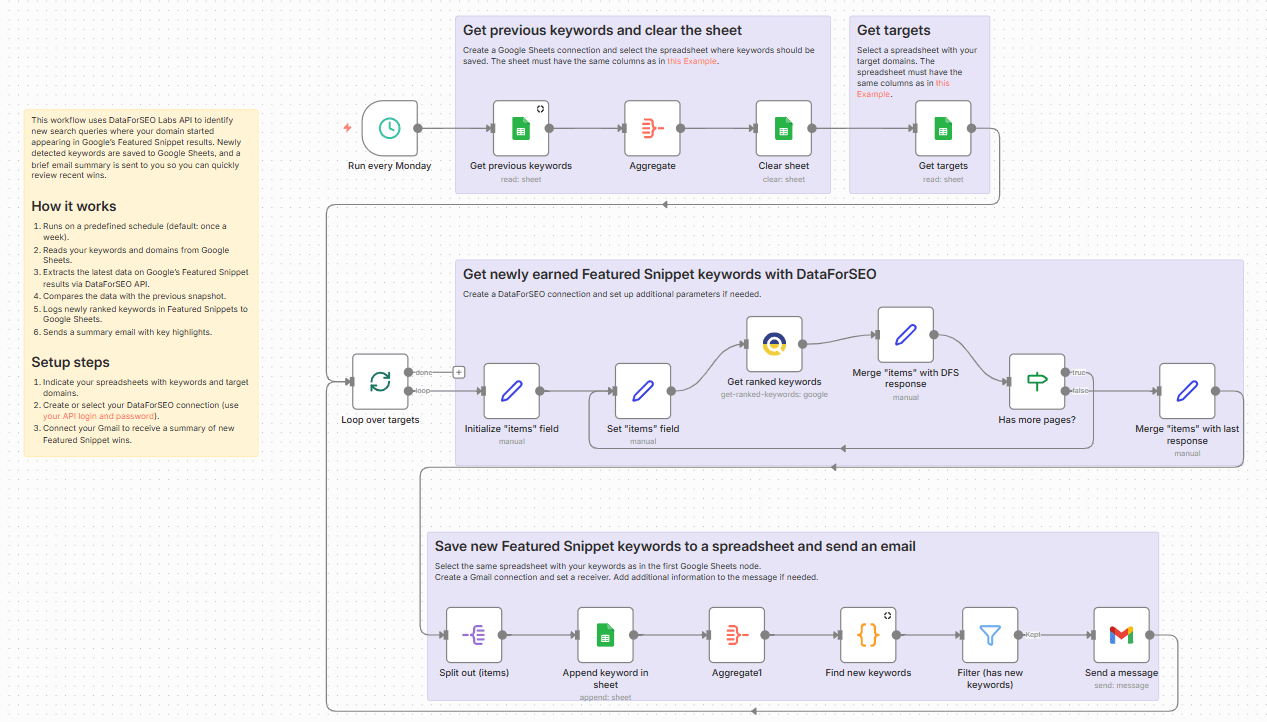
This weekly workflow helps you keep track of new Featured Snippet visibility for your domain without manual SERP checks. Each week, it fetches the most recent data from DataForSEO, saves a snapshot to Google Sheets, and compares it against the previous run.
Any new keywords for which your domain appears in a Featured Snippet are automatically added to a dedicated sheet along with ranking and search volume data, creating a historical log of growth over time. Lastly, the workflow sends you or your team an email overview highlighting how many new keywords were found, so you never miss an important update.
Who’s it for
SEO professionals, marketers and content teams who want an automated way to monitor new keyword appearances in Google’s Featured Snippets and receive regular updates without checking SERPs by hand.
What it does
This workflow automatically detects when your domains start ranking for new keywords in Featured Snippets, records those keywords in Google Sheets, and sends a brief weekly summary of changes via email.
How it works
Runs on a predefined schedule (default: once a week).
Reads your keywords and domains from Google Sheets.
Extracts the latest data on Google’s Featured Snippet results via DataForSEO API.
Compares the data with the previous snapshot.
Logs newly ranked keywords to a dedicated Google Sheet.
Sends a summary email with key highlights.
Requirements
- DataForSEO account and API credentials
- A spreadsheet in Google Sheets with your keywords, following the required column structure (as in the example).
- A spreadsheet in Google Sheets with your target domains, following the required column structure (as in the example).
- Gmail account
Customization
You can easily adapt this workflow to your specific needs and preferences by adjusting the schedule, exporting results to other tools (like Looker Studio and BigQuery) instead of Google Sheets, and cusomtizing the email content.