Back to Templates


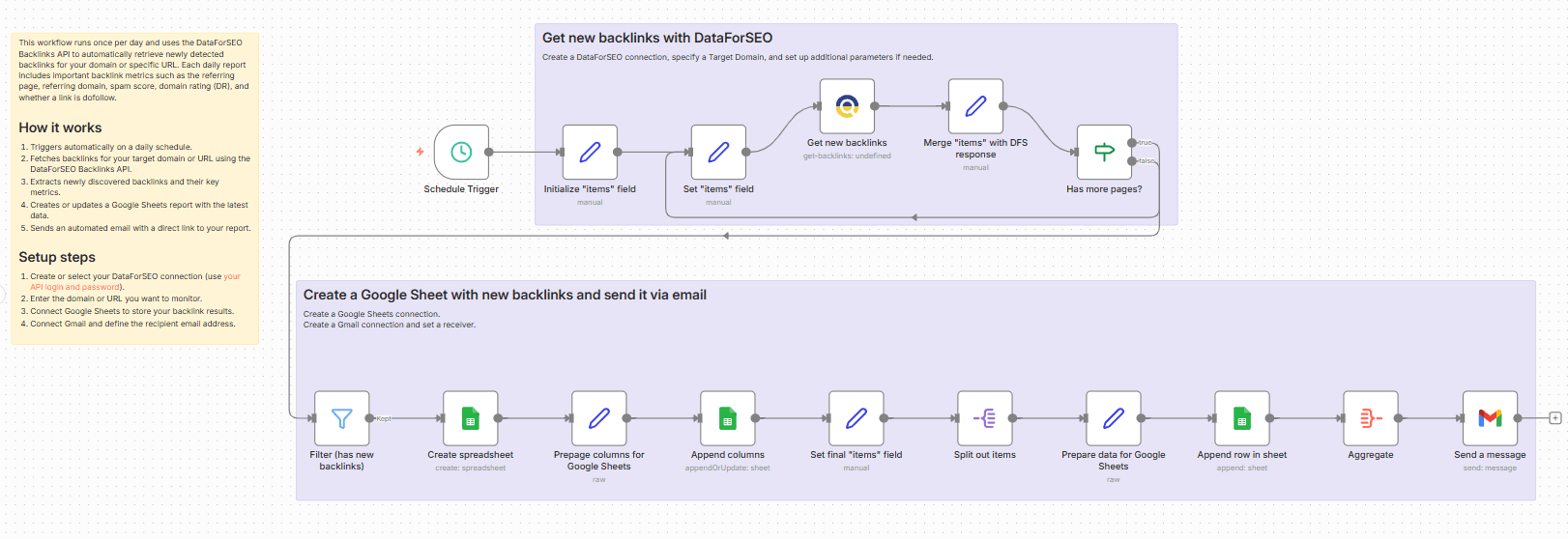
This workflow helps you keep track of new backlinks by automatically generating a daily report in Google Sheets with the DataForSEO API, and delivering it via Gmail.
On each run, the workflow connects to the DataForSEO Backlinks API to retrieve the latest backlink data for your target domain or URL. It then organizes the results into a structured Google Sheets report, complete with key backlink metrics such as referring source URL, referring domain, spam score, domain rating (DR), and dofollow link attributes where present.
Once the report is updated, the workflow automatically sends you an email notification via Gmail with a direct link to the Google Sheet, making it easy to review new links and measure link-building progress day-to-day.
Who’s it for
This workflow is especially useful for SEO teams, link-building specialists, and website owners who want automated daily overview of new backlinks.
What it does
This workflow automatically monitors newly detected backlinks and sends you a daily report via email.
How it works
Triggers automatically on a daily basis.
Fetches backlinks for your target domain or URL using the DataForSEO Backlinks API.
Extracts newly discovered backlinks and their key metrics.
Creates or updates a Google Sheets report with the latest data.
Sends an automated email with a direct link to your report.
Requirements
- DataForSEO account and API credentials
- Google Sheets connection in n8n
- Gmail connection in n8n
Customization
You can easily customize this workflow by changing the number of backlinks analyzed, selecting additional backlink details for your report, saving daily reports in other tools (like Notion or Airtable), or changing how often the workflow runs.