


AI Email Assistant: Get Actionable Gmail Alerts on Telegram
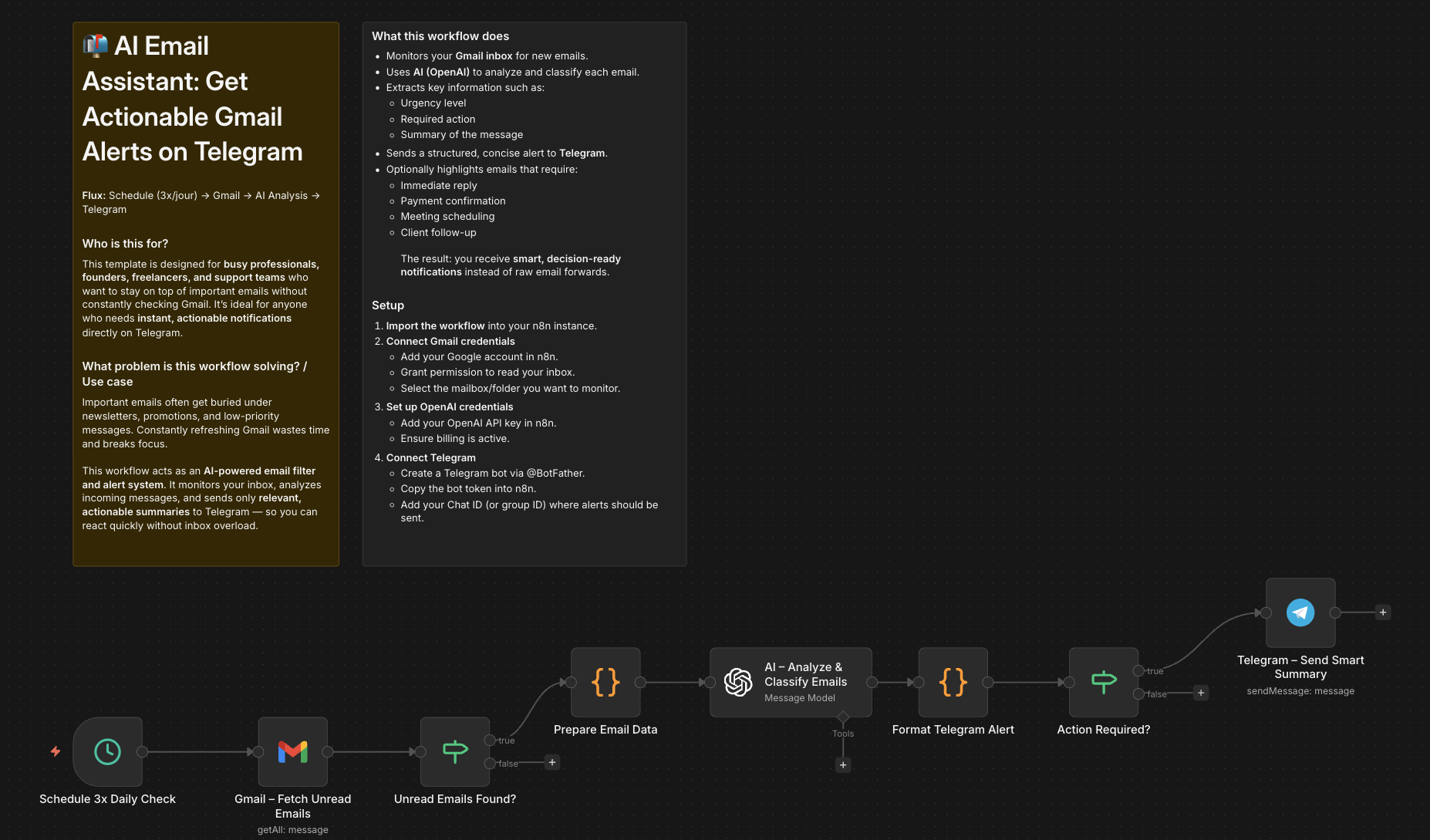
Who is this for?
This template is designed for busy professionals, founders, freelancers, and support teams who want to stay on top of important emails without constantly checking Gmail. It’s ideal for anyone who needs instant, actionable notifications directly on Telegram.
What problem is this workflow solving? / Use case
Important emails often get buried under newsletters, promotions, and low-priority messages. Constantly refreshing Gmail wastes time and breaks focus.
This workflow acts as an AI-powered email filter and alert system. It monitors your inbox, analyzes incoming messages, and sends only relevant, actionable summaries to Telegram — so you can react quickly without inbox overload.
What this workflow does
- Monitors your Gmail inbox for new emails.
- Uses AI (OpenAI) to analyze and classify each email.
- Extracts key information such as:
- Urgency level
- Required action
- Summary of the message
- Sends a structured, concise alert to Telegram.
- Optionally highlights emails that require:
- Immediate reply
- Payment confirmation
- Meeting scheduling
- Client follow-up
The result: you receive smart, decision-ready notifications instead of raw email forwards.
Setup
-
Import the workflow into your n8n instance.
-
Connect Gmail credentials
- Add your Google account in n8n.
- Grant permission to read your inbox.
- Select the mailbox/folder you want to monitor.
-
Set up OpenAI credentials
- Add your OpenAI API key in n8n.
- Ensure billing is active.
-
Connect Telegram
- Create a Telegram bot via @BotFather.
- Copy the bot token into n8n.
- Add your Chat ID (or group ID) where alerts should be sent.
-
Test the workflow
- Send a test email to your Gmail.
- Confirm that a summarized, actionable message appears in Telegram.
How to customize this workflow to your needs
-
Filter specific senders
Modify the Gmail trigger to monitor only emails from clients, payment platforms, or specific domains. -
Adjust AI instructions
Edit the system prompt to:- Classify emails by priority (High / Medium / Low)
- Detect invoices, contracts, or support requests
- Automatically draft suggested replies
-
Change alert format
Customize the Telegram message structure (add emojis, urgency labels, or action buttons). -
Add automation branches
Extend the workflow to:- Create tasks in Notion or Trello
- Add calendar events automatically
- Label emails in Gmail based on AI classification
With this template, your inbox becomes an AI-powered assistant that filters noise and delivers only what truly matters — directly to Telegram in real time.
👋 Need help or want to customize this?
📩 Contact: LinkedIn
📺 YouTube: @DRFIRASS
🚀 Workshops: Mes Ateliers n8n
Need help customizing?
Contact me for consulting and support : Linkedin / Youtube / 🚀 Mes Ateliers n8n