See llms.txt for all machine-readable content.

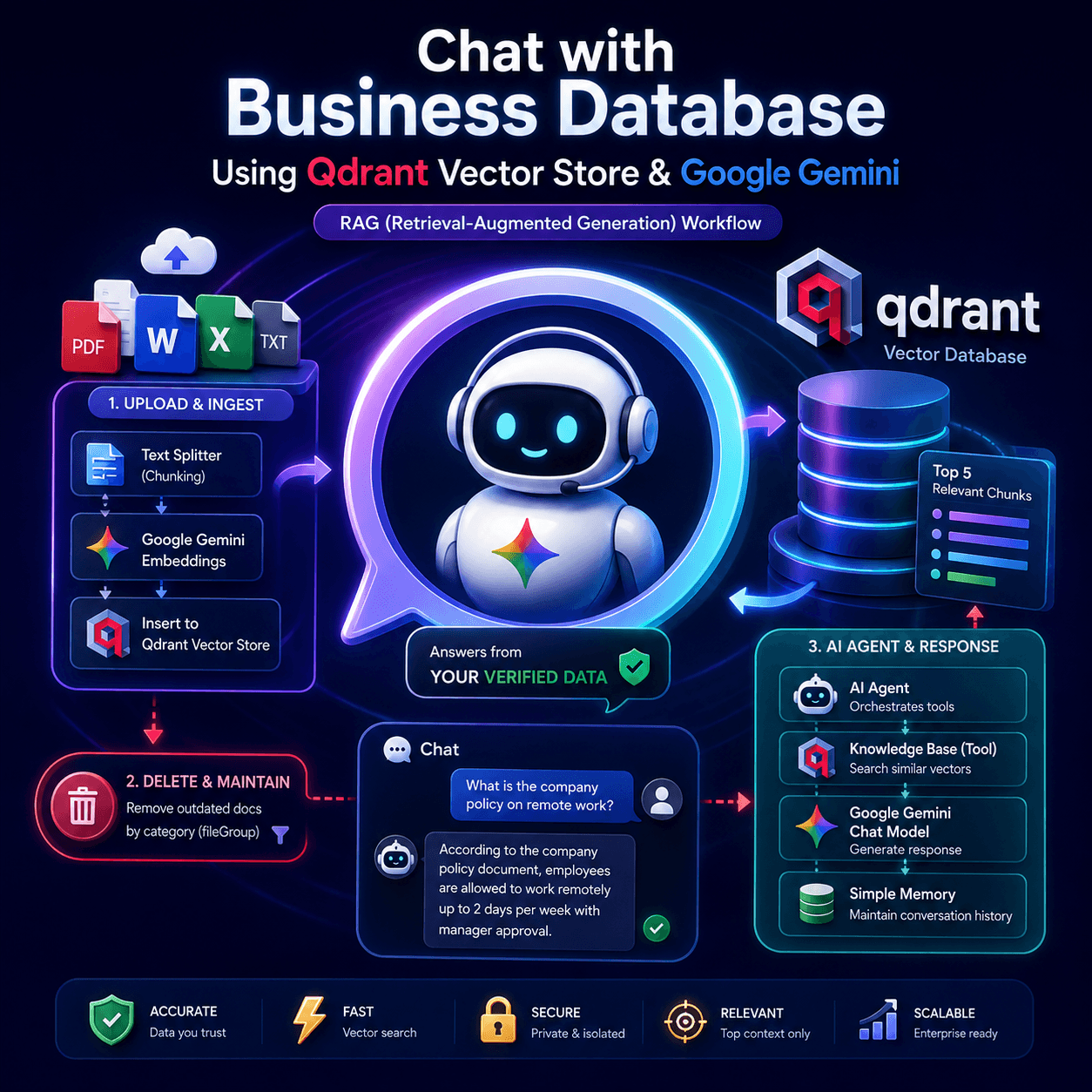
This comprehensive Retrieval-Augmented Generation (RAG) system enables businesses to effectively manage and query their knowledge base. Users can seamlessly upload documents via a web form, automatically segment and chunk the content, generate high-quality embeddings with Google Gemini, and store them securely within a Qdrant vector database. Outdated documentation can be instantly pruned by category to ensure absolute data reliability, while an advanced AI Agent powers an interactive chatbot that responds to user inquiries utilizing only your verified data infrastructure.
If your enterprise requires an agile, data-isolated customer support or internal operations assistant without the risk of AI hallucinations, this workflow is the definitive blueprint.
How it works
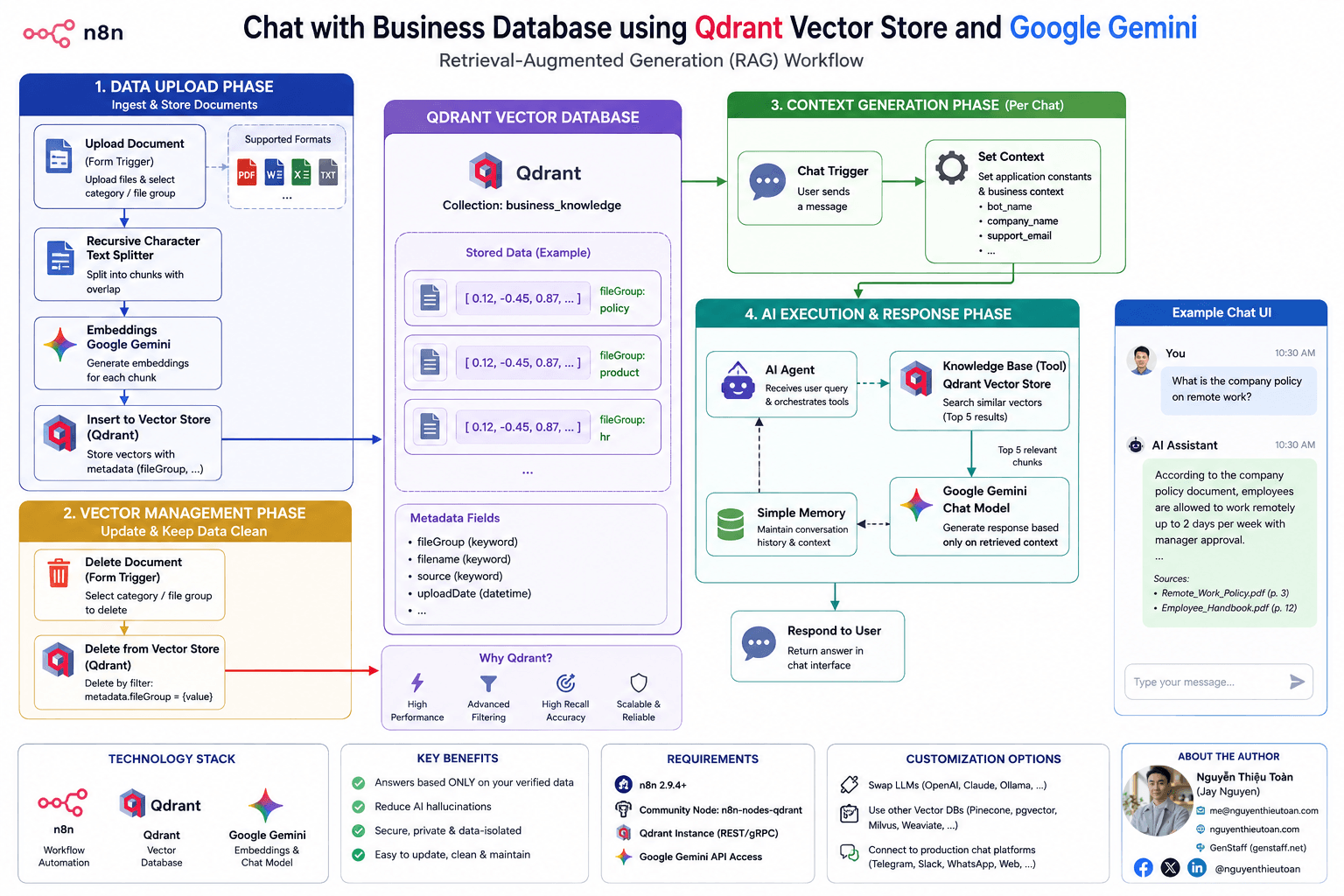
- Data Upload Phase: The Upload Document form trigger accepts multi-format files and assigns a descriptive metadata category. The Recursive Character Text Splitter breaks down raw content into logical chunks with configured token overlaps, passes them to Embeddings Google Gemini for vector calculations, and commits them to the Qdrant database via the Insert to Vector Store pipeline.
- Vector Management Phase: The Delete Document form trigger captures requests to update specific corporate data groups. The Delete from Vector Store node uses specialized filter parameters (
metadata.fileGroup) to purge target documentation segments synchronously, avoiding database pollution or overlapping information before executing an updated re-upload. - Context Generation Phase: When a user initiates a chat message through the Chat Trigger, the Set Context node immediately instantiates application constants including brand definitions, bot naming variables, and fallback support channels.
- AI Execution & Response Phase: The AI Agent receives the consolidated session payload and cross-references the user request directly against the Knowledge Base tool. Qdrant evaluates vector similarities, retrieves the top 5 highly relevant text chunks, and passes them to the Google Gemini Chat Model to render a hyper-focused response based solely on the injected data, while managing context history through Simple Memory.
How to use
- Install Prerequisites: Open your n8n workspace settings, navigate to Community Nodes, and add
n8n-nodes-qdrantto support raw REST API point manipulations. - Assign Credentials: Connect your Google Gemini (
googlePalmApi) credentials to all embedding and language model sub-nodes, and authenticate your Qdrant API / Qdrant REST API profiles within the vector storage instances. - Configure Environment Context: Open the Set Context configuration node and update key variables (
bot_name,company_name,support_email) to inherit your business properties. - Define Database Collections: Input your exact target Qdrant collection name within all 3 operational Qdrant infrastructure nodes, ensuring it is indexed properly by matching fields (e.g.,
metadata.fileGroupunder akeywordschema). - Set Categories & Activate: Customize the drop-down menu parameters inside the form trigger nodes to map exactly to your organizational document categories, toggle the workflow to active, and begin executing secure enterprise text analytics.
Requirements
- n8n Version: Built and validated on production-grade environments running n8n 2.9.4+. (Upgrading your instances regularly ensures complete engine and tool schema compliance).
- Community Plugin:
n8n-nodes-qdrantinstalled and validated on your n8n core deployment instance. - Vector DB Instance: A cloud-hosted or self-hosted active Qdrant cluster instance with open REST/gRPC endpoints.
- AI Access: Valid enterprise api access keys for the Google Gemini developer platform ecosystem.
Customizing this workflow
- Interchange AI Models: Easily swap out the Google Gemini Chat Model and embedding sub-nodes to route traffic to alternative large language models such as OpenAI (GPT-4o), Anthropic Claude, or self-hosted Ollama backends.
- Scale Vector Databases: Replace the Qdrant connection infrastructure nodes with native n8n vectors such as Pinecone, Supabase pgvector, Milvus, or Weaviate to suit existing technical stacks.
- Production Handoff UI: Detach the default testing Chat Trigger layout interface and link the input node matrix directly to production chat webhooks including Telegram, Slack, WhatsApp, or standard commercial web embed interfaces.
About the Author
Created by: Nguyễn Thiệu Toàn (Jay Nguyen)
Email: [email protected]
Website: nguyenthieutoan.com
Company: GenStaff (genstaff.net)
Socials (Facebook / X / LinkedIn): @nguyenthieutoan
Official Template Page: n8n.io/creators/nguyenthieutoan