Back to Templates


Community Node Disclaimer
This workflow uses KlickTipp community nodes, available for self-hosted n8n instances only.
Introduction
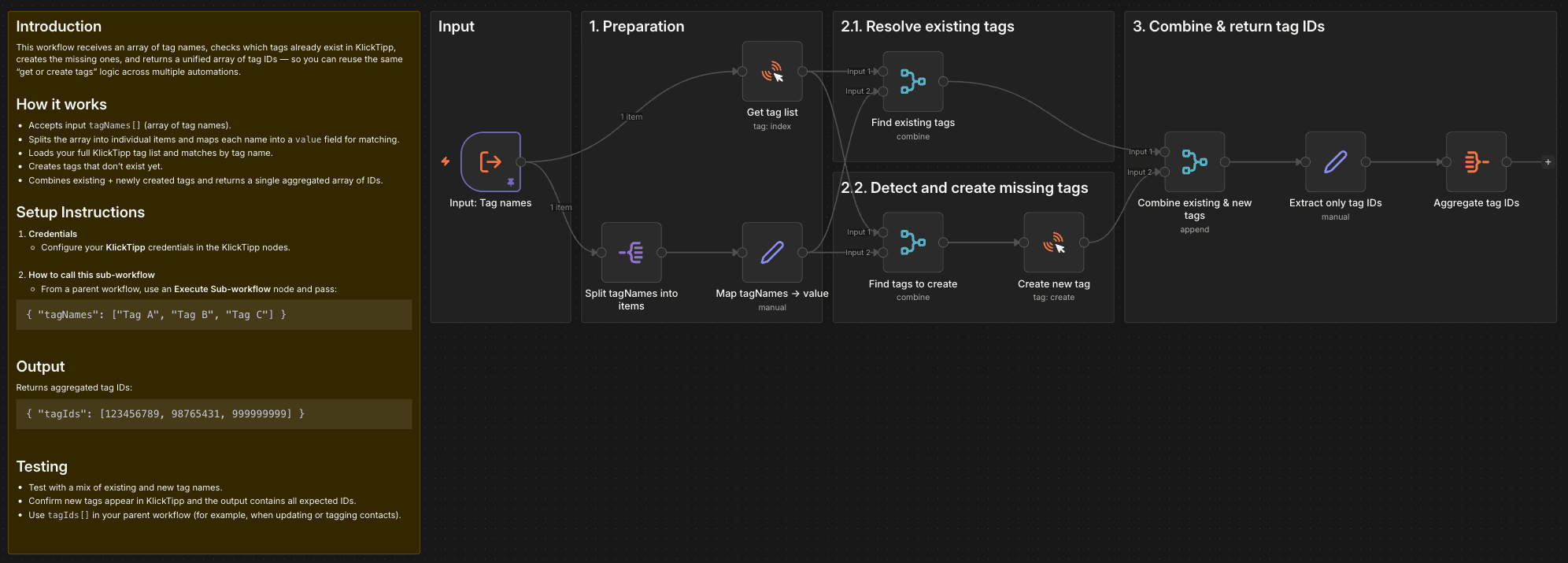
This workflow receives an array of tag names, checks which tags already exist in KlickTipp, creates the missing ones, and returns a unified array of tag IDs — so you can reuse the same "get or create tags" logic across multiple automations.
How it works
- Accepts input
tagNames[](array of tag names). - Splits the array into individual items and maps each name into a
valuefield for matching. - Loads your full KlickTipp tag list and matches by tag name.
- Creates tags that don’t exist yet.
- Combines existing + newly created tags and returns a single aggregated array of IDs.
Setup Instructions
-
Credentials
- Configure your KlickTipp credentials in the KlickTipp nodes.
-
How to call this sub-workflow
- From a parent workflow, use an Execute Sub-workflow node and pass:
{ "tagNames": ["Tag A", "Tag B", "Tag C"] }
Output
Returns aggregated tag IDs:
{ "tagIds": [123456789, 98765431, 999999999] }
Testing
- Test with a mix of existing and new tag names.
- Confirm new tags appear in KlickTipp and the output contains all expected IDs.
- Use
tagIds[]in your parent workflow (for example, when updating or tagging contacts).