Back to Templates



Description
Automatically triage Product UAT feedback using AI, route it to the right tools and teams, and close the feedback loop with testers, all in one workflow.
This workflow analyzes raw UAT feedback, classifies it (critical bug, feature request, UX improvement, or noise), validates AI confidence, escalates when human review is needed, and synchronizes everything across Jira, Slack, Notion, Google Sheets, and email.
Context
Product teams often receive unstructured UAT feedback from multiple sources (forms, Slack, internal tools), making triage slow, inconsistent, and error-prone.
This workflow ensures:
-
Faster bug detection
-
Consistent categorization
-
Zero feedback lost
-
Clear accountability between Product, Engineering, and Design
-
It combines AI automation with human-in-the-loop control, making it safe for real production environments.
Who is this for?
-
Product Managers running UAT or beta programs
-
Project Managers coordinating QA and release validation
-
Product Ops / PMO teams
-
Engineering teams who want faster, cleaner bug escalation
-
Any team managing high-volume UAT feedback
-
Perfect for teams that want speed without sacrificing control.
Requirements
-
Webhook trigger (form, internal tool, Slack integration, etc.)
-
OpenAI account (for AI triage)
-
Jira (bug tracking)
-
Slack (team notifications)
-
Notion (product roadmap / UX backlog)
-
Google Sheets (UAT feedback log)
-
Gmail (tester & manual review notifications)
How it works
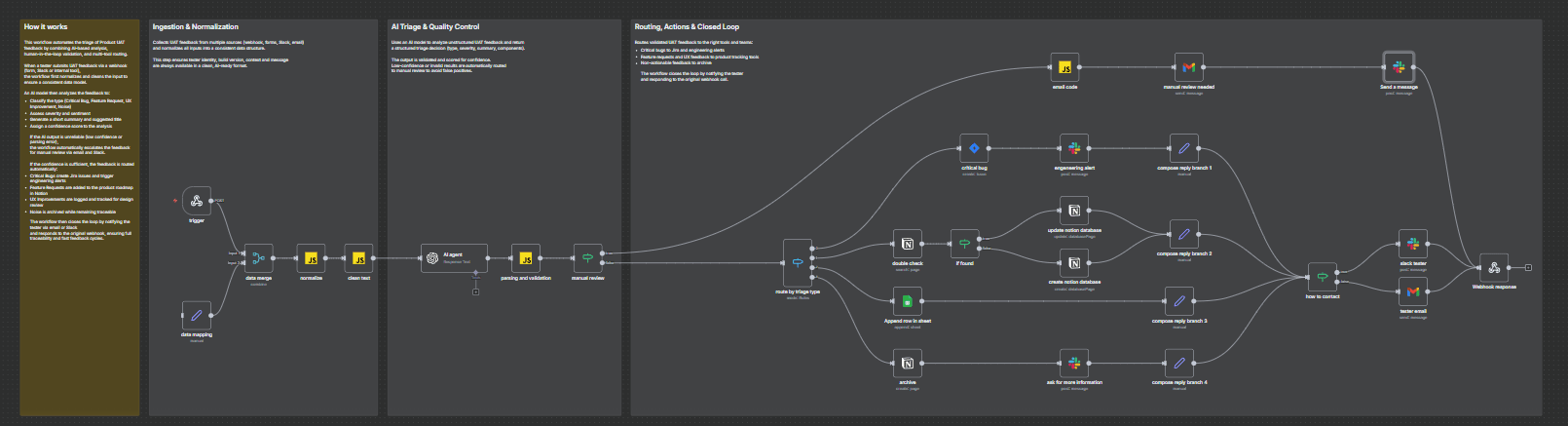
- Trigger
The workflow starts when UAT feedback is submitted via a webhook (form, Slack, or internal tool).
- Normalize & Clean
Incoming data is normalized into a consistent structure (tester, build, page, message) and cleaned to be AI-ready.
- AI Triage
An AI model analyzes the feedback and returns:
- Type (Critical Bug, Feature Request, UX Improvement, Noise)

- Severity & sentiment

- Summary and suggested title

- Confidence score
- Quality Control
If the AI output is unreliable (low confidence or parsing error), the feedback is automatically routed to manual review via email and Slack.
-
Routing & Actions
-
If confidence is sufficient:
-
Critical Bugs → Jira issue + Engineering Slack alert
-
Feature Requests → Notion roadmap
-
UX Improvements → Design / UX tracking
-
Noise → Archived but traceable
-
-
Closed Loop
The tester is notified via Slack or email, and the workflow responds to the original webhook with a structured status payload.
What you get
-
One unified UAT triage system
-
Faster bug escalation
-
Clean product and UX backlogs
-
Full traceability of every feedback
-
Automatic tester communication
-
Safe AI usage with human fallback
About me :
I’m Yassin a Product Manager Scaling tech products with a data-driven mindset.
📬 Feel free to connect with me on Linkedin