Back to Templates


Automated Trade Report from Interactive Brokers
This workflow is aimed at traders who use Interactive Brokers. It automatically retrieves the trades made in IBKR on a daily basis and writes them to a Google Sheet, so that anyone can easily perform further analyses and statistics using the on-board tools.
This creates an automatic, continuous trade journal.
Typical Usecaes
- Monitoring your trades in one journal
- Analyze your Profit & Losses
- Basis for any kind of statistics
• Log trades (entry, exit, setup, reason)
• Analyze performance (win rate, R/R, expectancy)
• Evaluate strategies & setups
• Detect mistakes & patterns
• Track emotions & discipline
• Support coaching, reviews & improvement
How it works
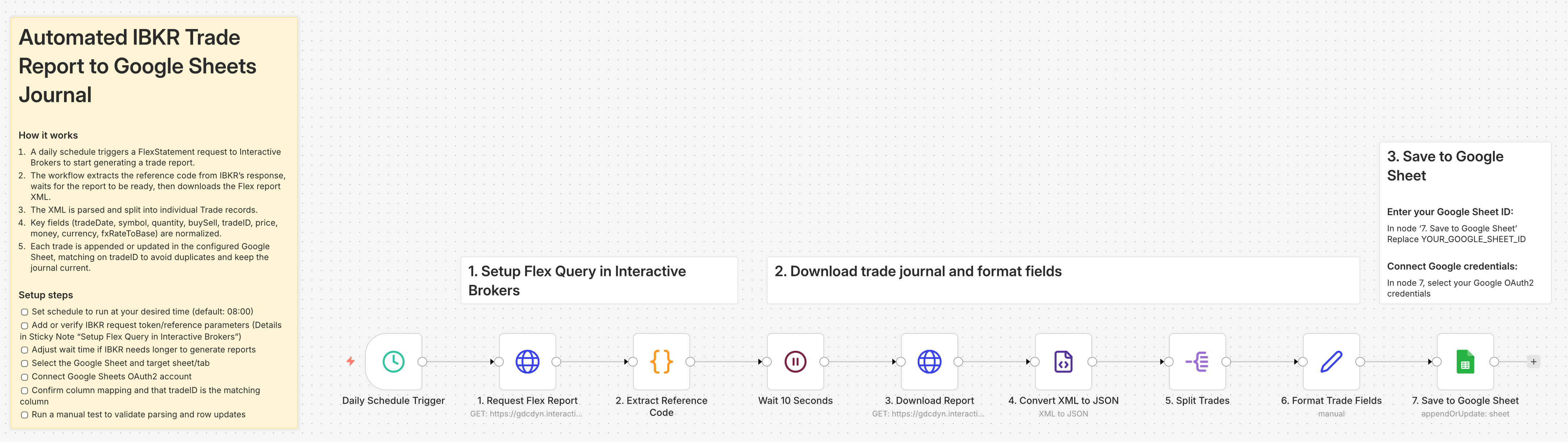
- A daily schedule triggers a FlexStatement request to Interactive Brokers to start generating a trade report.
- The workflow extracts the reference code from IBKR's response, waits for the report to be ready, then downloads the Flex report XML.
- The XML is parsed and split into individual Trade records.
- Key fields (tradeDate, symbol, quantity, buySell, tradeID, price, money, currency, fxRateToBase) are normalized.\n5. Each trade is appended or updated in the configured Google Sheet, matching on tradeID to avoid duplicates and keep the journal current.
Prerequisites
- Trading Account on IBKR
- Google Sheets OAuth2
- A Google Sheet containing your trading journal
Setup
- [ ] Set schedule to run at your desired time (default: 08:00)
- [ ] Add or verify IBKR request token/reference parameters.
1. Create Flex Query Token:
Go to IBKR Account Management
Reports → Flex Queries → Flex Web Service
→ Generate Current Token
→ Make a note of the token (e.g.: 123456789012345678901234)
2. Enter Flex Token:
In node '1. Request Flex Report' and in node '2. Extract Reference Code'
Replace YOUR_FLEX_TOKEN with your token ID
3. Create Flex Query in IBKR (if not already done):
Go to IBKR Account Management
Reports → Flex Queries → Activity Flex Query → Create
Select: Trade Confirmation ✓
Period: Last 365 Days
Format: XML
Save and note down the query ID
4. Enter Flex Query ID:
In node '1. Request Flex Report'
Replace YOUR_QUERY_ID with your query ID
- [ ] Adjust wait time if IBKR needs longer to generate reports
- [ ] Select the Google Sheet and target sheet/tab
- [ ] Connect Google Sheets OAuth2 account
- [ ] Confirm column mapping and that tradeID is the matching column
- [ ] Run a manual test to validate parsing and row updates