Back to Templates

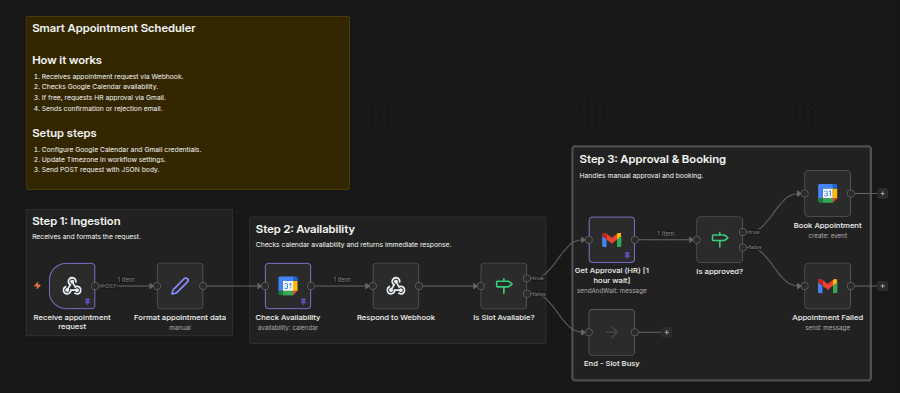
Tired of automated booking tools cluttering your calendar with spam or overlapping meetings? SyncPoint is a “Smart Gatekeeper” that checks your availability and asks for your manual approval via email before a single event is booked. Once approved, it schedules the meeting automatically and notifies all stakeholders.
Why use this?
While most schedulers are fully automatic, they lack human intuition. SyncPoint bridges the gap. It automates the tedious parts (checking availability, generating meeting links, sending confirmations) but keeps you in control. If you're not feeling a specific meeting request, you can reject it with one click from your inbox.
How it works?
++Webhook Trigger:++ Receives the appointment request (Name, Email, Organization, and Requested Time).
++Instant Response:++ Immediately responds to the requester via webhook (without waiting for approval), confirming the request is under review.
++Availability Check:++ The workflow automatically queries your Google Calendar for a 1-hour window starting at the requested time.
++Smart Branching:++
If Busy: It immediately ends the process (or can be configured to send a "Slot Taken" email).
If Free: It sends an Approval Email to your inbox using the Gmail sendAndWait node.
Human-in-the-Loop: You receive an email with "Approve" and "Reject" buttons. The workflow pauses safely (up to 1 hour) using an async wait mechanism and resumes automatically once a decision is made.
++Final Execution:++
Approved: It creates the Google Calendar event, generates a Google Meet link, and sends a confirmation email to the client.
Rejected: It sends a polite "Not available" email to the client and clears the workflow.
Requirements
To get this workflow running, you will need:
Google Calendar OAuth2 API: To verify availability and create the final event.
Gmail OAuth2 API: To send the approval request to yourself and the final status to the client.
Publicly accessible n8n instance: Since this uses a Webhook and the Wait for Link functionality, your n8n instance must be reachable from the internet. It could be self hosted or n8n cloud itself.
Setup Instructions
-
Credentials: Connect your Google Calendar and Gmail accounts in the n8n credentials manager.
-
Configure the Admin Email:
- Open the "Get Approval (HR)" node.
- Change the To Email field to your own email address where you want to receive the approval requests.
-
Webhook Body:
[
  {
    "params": {

    },
    "query": {

    },
    "body": {
      "name": "Jon Doe",
      "organization": "Test Org",
      "email": "[email protected]",
      "phone": "9999999999",
      "appointmentDateTime": "2026-01-20T20:00:00+05:30",
      "optionalMessage": "I'm interested in the AI-Powered Systems plan."
    },
    "webhookUrl": "https://america-gavialoid-claudio.ngrok-free.dev/webhook-test/appointment-request",
    "executionMode": "test"
  }
]
-
Timezone Configuration: The workflow is currently set to Asia/Kolkata (+05:30).
- To change this, open the "Mapping" and "Check Availability" nodes and update the timezone string to your local timezone (e.g., America/New_York).
-
Calendar Selection: In the "Check Availability" and "Book Appointment" nodes, ensure the Calendar field is pointed to your primary email calendar.
Customization Ideas
- Dynamic Duration: Add a field to the Webhook for "Meeting Length" and use it to calculate the end time dynamically.
- Slack/Discord Notifications: Instead of Gmail, use a Slack "Wait for Interaction" node to approve or reject meetings directly from a chat channel.
- Buffer Times: Adjust the availability check to look for a 1.5-hour window instead of 1 hour to ensure you have a "breathing room" between meetings.