Back to Templates


💥 Generate product images with NanoBanana Pro to Veo videos and Blotato
Who is this for?
This workflow is designed for:
- Content creators and marketers
- E-commerce and product-based businesses
- Agencies producing social media visuals and videos
- Automation builders looking for AI-powered creative pipelines
It is ideal for anyone who wants to automate product image and video creation using AI and publish content without manual work.
What problem is this workflow solving? / Use case
Creating product visuals and marketing videos usually requires multiple tools, manual prompt writing, and repetitive steps.
This workflow solves:
- Manual image and video creation
- Inconsistent visual quality across assets
- Time-consuming prompt iteration
- Manual video publishing to social platforms
The workflow automates the entire process from image generation to video publishing using AI.
What this workflow does
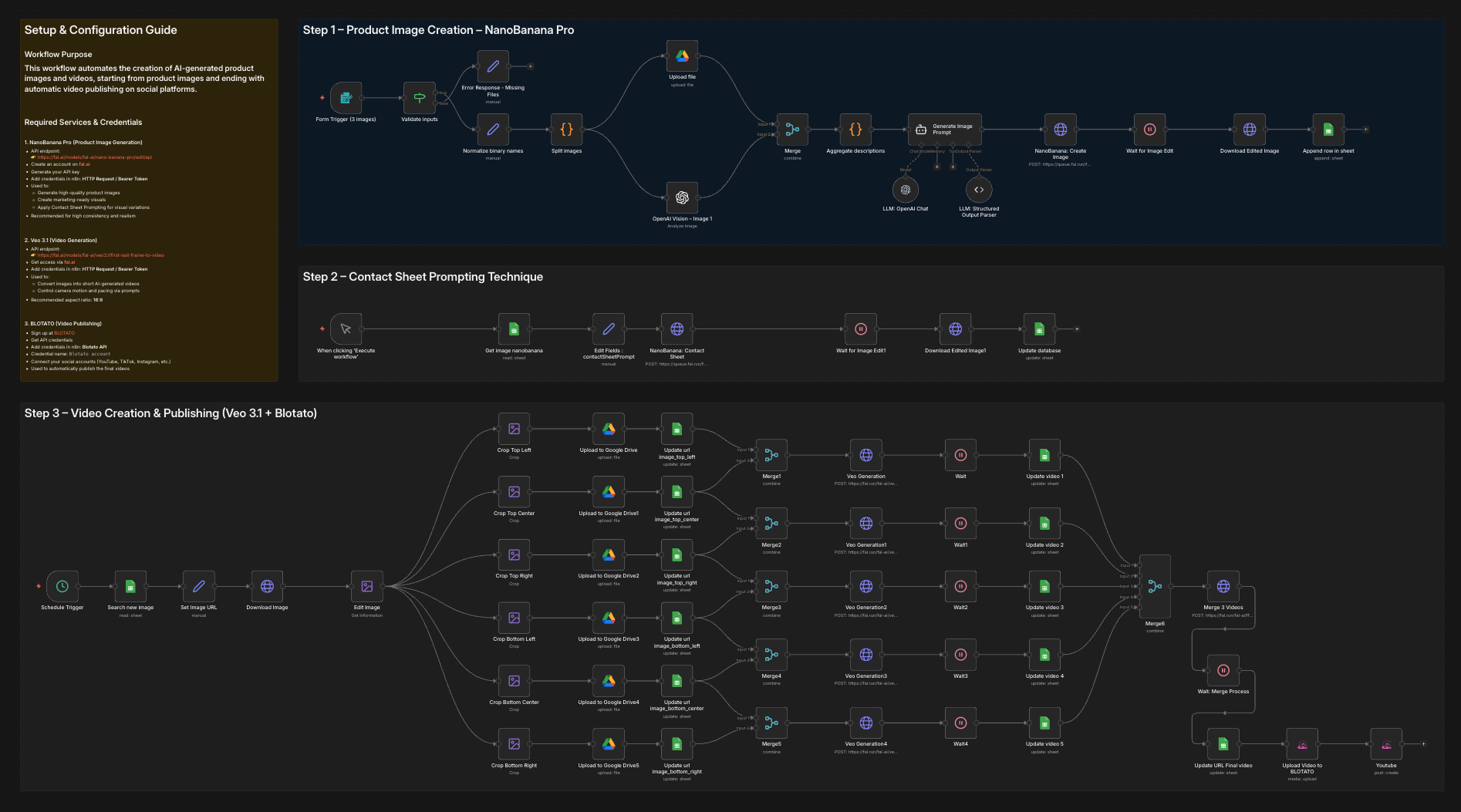
This workflow provides an end-to-end automation pipeline:
- Generates high-quality product images using NanoBanana Pro
- Applies Contact Sheet Prompting to explore multiple visual variations
- Converts selected images into short marketing videos using Veo 3.1
- Automatically publishes the final videos via BLOTATO
The result is a fully automated creative workflow that turns AI prompts into ready-to-publish video content.
Setup
To use this workflow, you need the following services and credentials:
- OpenAI API
- Used for image analysis and prompt generation
- NanoBanana Pro (fal.ai)
- Product image generation
- API: https://fal.ai/models/fal-ai/nano-banana-pro/edit/api
- Veo 3.1 (fal.ai)
- Video generation
- API: https://fal.ai/models/fal-ai/veo3.1/first-last-frame-to-video
- Blotato
- Video publishing to social platforms
- Sign up at BLOTATO
All credentials must be added in n8n before running the workflow.
How to customize this workflow to your needs
You can easily adapt this workflow by:
- Modifying AI prompts to match your brand style
- Adjusting image composition and realism parameters in NanoBanana Pro
- Changing video motion, pacing, and aspect ratio in Veo 3.1
- Selecting different social platforms or publishing rules in Blotato
- Replacing or extending individual steps while keeping the same architecture
The workflow is modular and can be reused for multiple products or campaigns.
🎥 Watch This Tutorial
👋 Need help or want to customize this?
📩 Contact: LinkedIn
📺 YouTube: @DRFIRASS
🚀 Workshops: Mes Ateliers n8n
📄 Documentation: Notion Guide
Need help customizing?
Contact me for consulting and support : Linkedin / Youtube / 🚀 Mes Ateliers n8n