Back to Templates


🚀 AI Image Generation Workflow – Scalable E-commerce Product Images
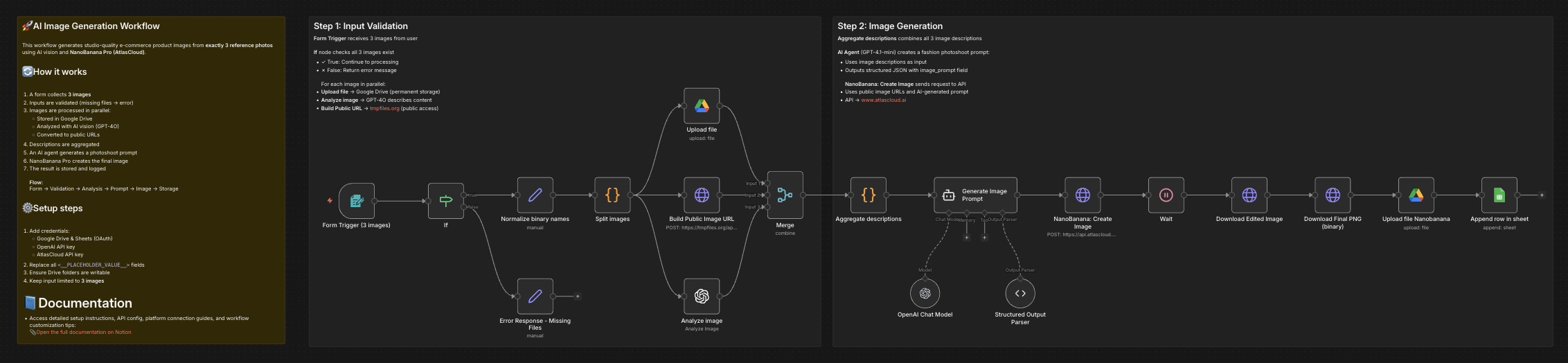
This workflow automates the creation of high-quality, AI-generated product images using NanoBanana Pro.
It analyzes multiple reference images, generates a professional photoshoot-style prompt, creates a new image, and stores the final result with a public URL for reuse.
📄 Documentation: Notion Guide
👤 Who is this for?
This workflow is designed for:
- E-commerce store owners
- Digital marketers and growth teams
- Creative agencies
- Automation builders using n8n
- Anyone who wants to generate scalable, consistent product images from existing photos
No advanced coding skills are required.
❓ What problem does this workflow solve? / Use case
Creating professional product images at scale is expensive, slow, and inconsistent.
This workflow solves:
- Manual photoshoot costs
- Inconsistent visual branding
- Time wasted on prompt writing
- Difficulty generating AI-ready public image URLs
- Repetitive image upload and storage steps
Typical use case:
Transform 3 reference photos (model + product) into a studio-quality fashion image automatically.
⚙️ What this workflow does
- Collects exactly 3 images via a form upload
- Validates inputs to ensure all required images are present
- Splits images into individual processing paths
- Uploads original images to Google Drive (permanent storage)
- Generates public, crawlable image URLs
- Analyzes each image using AI vision (GPT-4O)
- Aggregates image descriptions into a structured context
- Generates a professional photoshoot prompt using an AI agent
- Creates a new image via NanoBanana Pro
- Polls the API until the image generation is completed
- Downloads the final image as a binary file
- Uploads the final image to Google Drive
- Logs results (images + descriptions) into Google Sheets
🛠️ Setup
Required credentials
- Google Drive (OAuth)
- Google Sheets (OAuth)
- OpenAI API key
- AtlasCloud API key
Required configuration
- Replace all
<__PLACEHOLDER_VALUE__>fields:- Google Drive folder IDs
- Google Sheets document ID and sheet name
- AtlasCloud API key
- Ensure Google Drive folders have write permissions
- Confirm tmpfiles.org is reachable from your environment
Important notes
- The workflow expects exactly 3 images
- The final image is downloaded as binary before upload
- Public URLs are normalized to
https://tmpfiles.org/dl/...for maximum AI compatibility
🎥 Watch This Tutorial
👋 Need help or want to customize this?
📩 Contact: LinkedIn
📺 YouTube: @DRFIRASS
🚀 Workshops: Mes Ateliers n8n
Need help customizing?
Contact me for consulting and support : Linkedin / Youtube / 🚀 Mes Ateliers n8n