Back to Templates


💥 AI Image → Professional Video Workflow (NanoBanana Ultra + Kling AI + Blotato)
📄 Documentation: Notion Guide
👤 Who is this for?
This workflow is designed for content creators, marketers, fashion brands, AI creators, and automation builders who want to turn a single image into a cinematic, multi-shot professional video, then automatically publish it on platforms like YouTube—without manual editing.
It’s especially useful if you already work with Google Sheets, n8n, and AI image/video generation APIs.
🎯 What problem does this workflow solve? (Use case)
Creating high-quality video content from images usually requires:
- Manual image editing
- Multiple AI tools
- Video stitching
- Uploading and publishing steps
This workflow fully automates that pipeline:
- From a single image URL
- To a cinematic multi-shot video
- To automatic publishing
All driven from a spreadsheet.
⚙️ What this workflow does
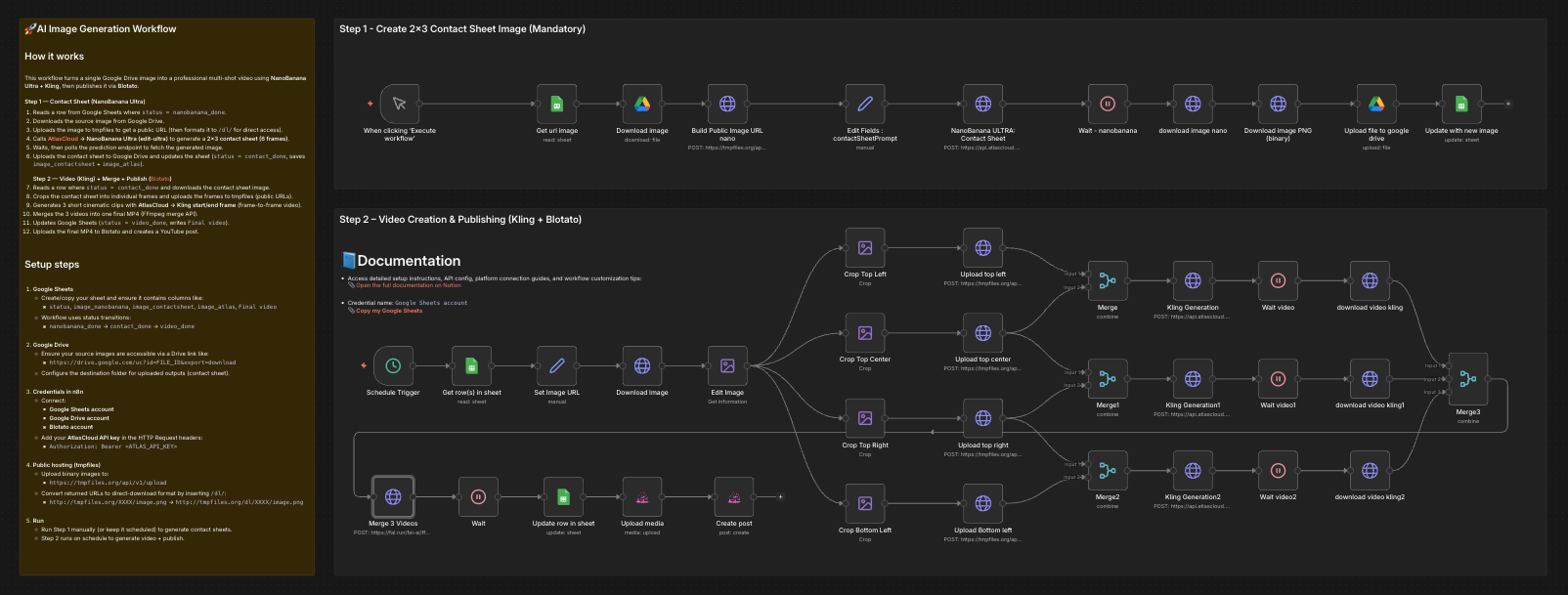
This workflow runs in two main phases:
Step 1 – Contact Sheet Generation (NanoBanana Ultra)
- Reads an image URL from Google Sheets
- Downloads the image from Google Drive
- Uploads it to a public host (tmpfiles)
- Uses NanoBanana Ultra (edit-ultra) to generate a 2×3 cinematic contact sheet
- Ensures:
- Identity preservation
- Fashion & texture fidelity
- Consistent lighting and style
- Saves the generated contact sheet back to Google Drive
- Updates the spreadsheet status
Step 2 – Video Creation & Publishing (Blotato)
- Splits the contact sheet into 6 keyframes
- Uploads each frame publicly
- Uses Kling AI (start–end frame i2v) to generate multiple cinematic video segments
- Merges the generated clips into a single final video (FFmpeg API)
- Uploads the final video to Google Drive
- Publishes automatically to YouTube via Blotato
- Updates the spreadsheet with the final video URL and status
🛠️ Setup
To use this workflow, you need:
- n8n (Cloud or Self-Hosted)
- Google Sheets
- Copy the provided template
- Each row controls one image → one video
- API Keys
- AtlasCloud (NanoBanana + Kling)
- tmpfiles.org (public hosting)
- Blotato (publishing)
- Connected Accounts
- Google Drive
- Google Sheets
- Blotato
🎛️ How to customize this workflow
You can easily adapt it to your needs:
- Change video style
- Edit the Kling prompt (camera movement, mood, pacing)
- Adjust video duration
- Modify the
durationparameter in Kling nodes
- Modify the
- Use fewer or more shots
- Add/remove crop + Kling generation branches
- Publish to other platforms
- Blotato supports multiple social networks
- Trigger automatically
- Use the Schedule Trigger instead of manual execution
- Different aspect ratios
- Adjust NanoBanana
aspect_ratioand crop math
- Adjust NanoBanana
🚀 Expected outcome
From one image, you get:
- A high-end editorial contact sheet
- Multiple cinematic AI-generated video clips
- One merged professional video
- Automatically uploaded and published
No manual editing. No timeline work. Fully automated.
👋 Need help or want to customize this?
📩 Contact: LinkedIn
📺 YouTube: @DRFIRASS
🚀 Workshops: Mes Ateliers n8n
Need help customizing?
Contact me for consulting and support : Linkedin / Youtube / 🚀 Mes Ateliers n8n