Back to Templates


Try It Out!
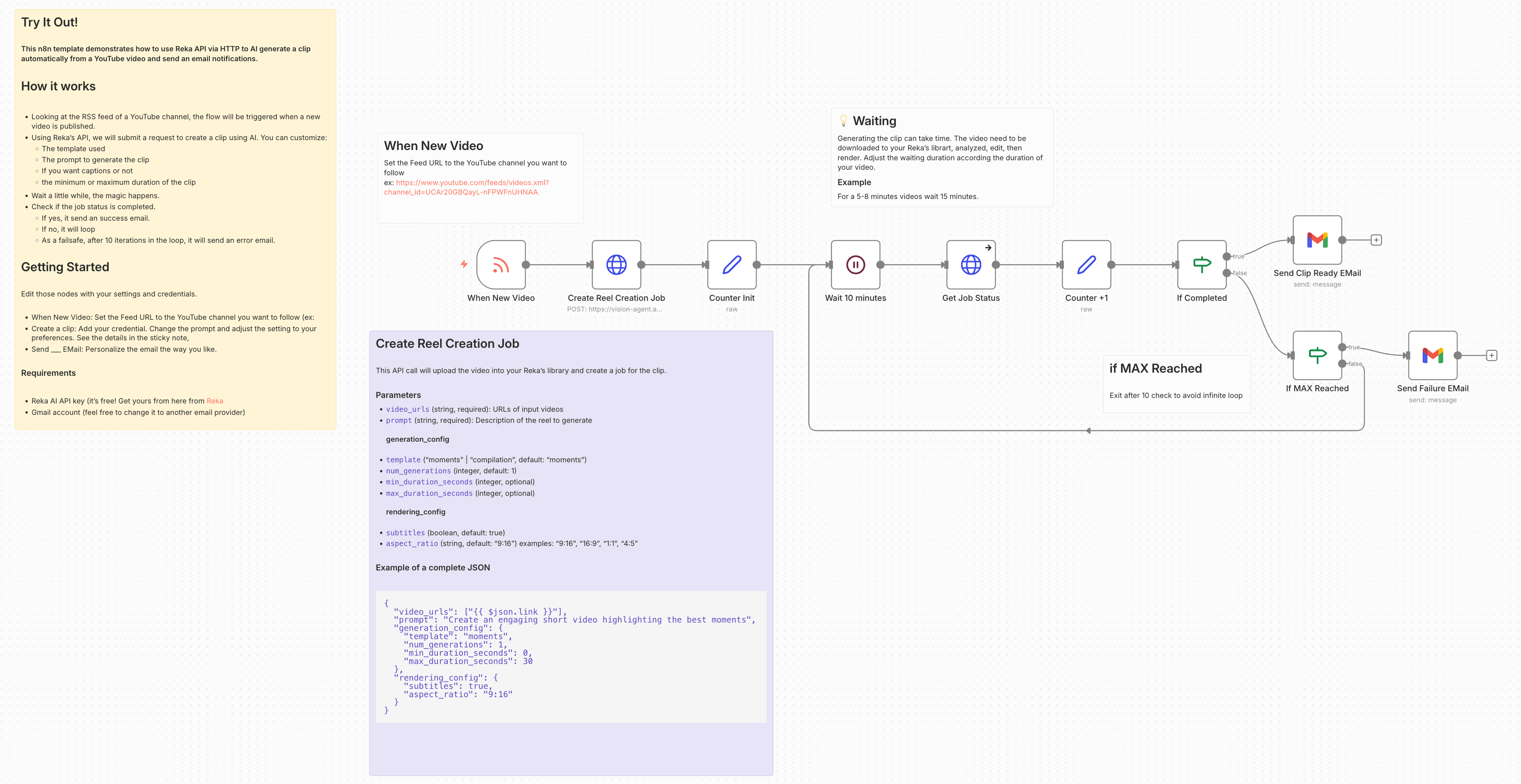
This n8n template demonstrates how to use Reka API via HTTP to AI generate a clip automatically from a YouTube video and send email notifications.
How it works
-
Looking at the RSS feed of a YouTube channel, the flow will be triggered when there is a new video published.
-
Using Reka's API, we will submit a request for creating a clip using AI. You can customize:
- the prompt to generate the clip
- decide if you want captions or not
- decide the minimum or maximum duration of the clip
-
Wait a little while, the magic happens
-
Check if the job status is completed
- If yes, it send an success email
- If no, it will loop
- As a failsafe, after 10 iterations in the loop, it will send an error email
🔧 Configurations
After importing the template, here is some information to customize your clips the way you like them.
🔘 When New Video
Set the Feed URL to the YouTube channel you want to follow
ex: https://www.youtube.com/feeds/videos.xml?channel_id=UCAr20GBQayL-nFPWFnUHNAA
🔘 Create Reel Creation Job
This API call will upload the video into your Reka's library and create a job for the clip.
Parameters
video_urls(string, required): URLs of input videosprompt(string, required): Description of the reel to generate
generation_config
template(“moments” | “compilation”, default: “moments”)num_generations(integer, default: 1)min_duration_seconds(integer, optional)max_duration_seconds(integer, optional)
rendering_config
subtitles(boolean, default: true)aspect_ratio(string, default: “9:16”) examples: “9:16”, “16:9”, “1:1”, “4:5”
Example of a complete JSON
{
  "video_urls": ["{{ $json.link }}"],
  "prompt": "Create an engaging short video highlighting the best moments",
  "generation_config": {
    "template": "moments",
    "num_generations": 1,
    "min_duration_seconds": 0,
    "max_duration_seconds": 30
  },
  "rendering_config": {
    "subtitles": true,
    "aspect_ratio": "9:16"
  }
}
🔘 Send Clip Ready EMail
Using the information of all previous nodes, customize an email that contains all the information the way you like.
Here is an example:
Hello! Your clip is ready to be downloaded.

Title: {{ $('Check clip job status').item.json.output[0].title }}

Download it here: {{ $('Check clip job status').item.json.output[0].video_url }}

Description: {{ $('Check clip job status').item.json.output[0].caption }}
Requirements
- Reka AI API key (it's free! Get yours from here from Reka)
- Gmail account (feel free to change it to another mail provider)
Need Help?
Join the Discord
Happy clipping!